Releases: Piebald-AI/piebald-issues
v0.2.7

- Piebald is now built on Linux ARM64 in addition to x64.
- Added support for Claude Opus 4.7.
- Fixed Qwen.ai OAuth tokens automatic refreshing.
- Fixed a bug where Claude via Antigravity couldn't call MCP tools without arguments.
- Fixed latest Antigravity version detection.
- Updated Antigravity
claude-sonnet-4-6-thinkingmodel ID toclaude-sonnet-4-6. - Compacted Code tab UI in the project sidebar.
- Handled some incompatibilities with OpenAI-"compatible" providers.
- Fixed error finish reason handling for OpenRouter response with upstream errors.
- Fixed a bug that could sometimes break file-@mentioning.
v0.2.6
- Fixed more chat crashing errors.
- Fixed "missing thinking" and "missing signature" errors with custom Anthropic providers.
- Fully updated Antigravity version.
- Fixed Antigravity error display.
- Added a confirmation dialog before disabling telemetry or error reporting.
- Added
/bugslash command alias for opening the feedback submission dialog. - Changed dialog overlay effect.
- Fixed provider selection bugs that occur after deleting a provider used by existing chats.
v0.2.5
In this release, we've added a feature for setting a default permission mode that new chats will use. We've also fixed several bugs.
- Added the ability to customize default permission mode used for new chats and renamed "Default" to "Read-only".
- Added Ctrl+-, Ctrl+=, and Ctrl+0 to control font size zoom.
- Added buttons to copy tool input and output.
- Added execution time to tool calls.
- Made the Chats, Terminals, and Code tab headers sticky so that they stay in view while scrolling the sidebar.
- Fixed a bug where branch tabs would overflow off the screen.
- Fixed a bug where skill slash commands weren't recognized after being pasted.
- Fixed a bug where creating a chat after deleting the last used provider would throw errors.
- Fixed a bug where non-image files (files not ending with .png, .jpg, .jpeg, .webp, or .gif) could be attached with the "Attach image" button.
- Fixed a bug where deleting a chat would switch you to another project.
- Improved error messages when MCP servers fail to start.
- Fixed the "Use" and "Start using" buttons when no project was active.
- Fixed a bug where the app would crash due to minor issues in our OpenAI Responses API support.
- Fixed title generation with ChatGPT providers.
- Fixed chat crashing errors.
- Implemented fixes for "Invalid request data" error when using Claude Max subscription.
- Implemented fixes for Gemini Code Assist support to reduce access suspension risk.
v0.2.4
- Fixed context notifications not showing on new messages.
- Added the number of chats in the worktree to the delete worktree dialog.
- Updated auto-approval rules to include all read-only tool calls, including those operating outside the current project's directory.
- Fixed Qwen.ai OAuth support by adding an empty system prompt when no system prompt is defined
- Added prompt caching support to Qwen.ai OAuth providers.
- Fixed Qwen.ai OAuth re-authentication and access token refreshing.
- Fixed automatic title generation being blocking until multi-step generation are finished.
- Fixed a bug where the sidebar would incorrectly mark chats as having draft prompts
- Added pre-validation to tool calls, so that obvious errors (e.g. an Edit tool call with
oldStringidentical tonewString) are auto-approved and fail instead of requiring manual approval. - Fixed a bug where deleting the current chat's provider shows noisy errors.
- Fixed animation bug with the minimized feedback dialog.
- Added a setting (on by default) to expand tool calls, resulting in reduced flickering
- Added buttons alongside the jump-to-top and jump-to-bottom buttons for jumping up and down through messages.
- Fixed a bug with automatic empty chat cleanup.
- Fixed a bug when listing built-in slash commands.
- Made Glob/Grep tools properly respect
.gitignore. - Fixed a bug wher subagent chats weren't being trashed along with the parent chat.
v0.2.3
We've added remote MCP headers and manual OAuth configuration (client ID, client secret, and callback port, like Claude Code), background color customization, and a few other small features and bug fixes.
Manual MCP header and OAuth configuration
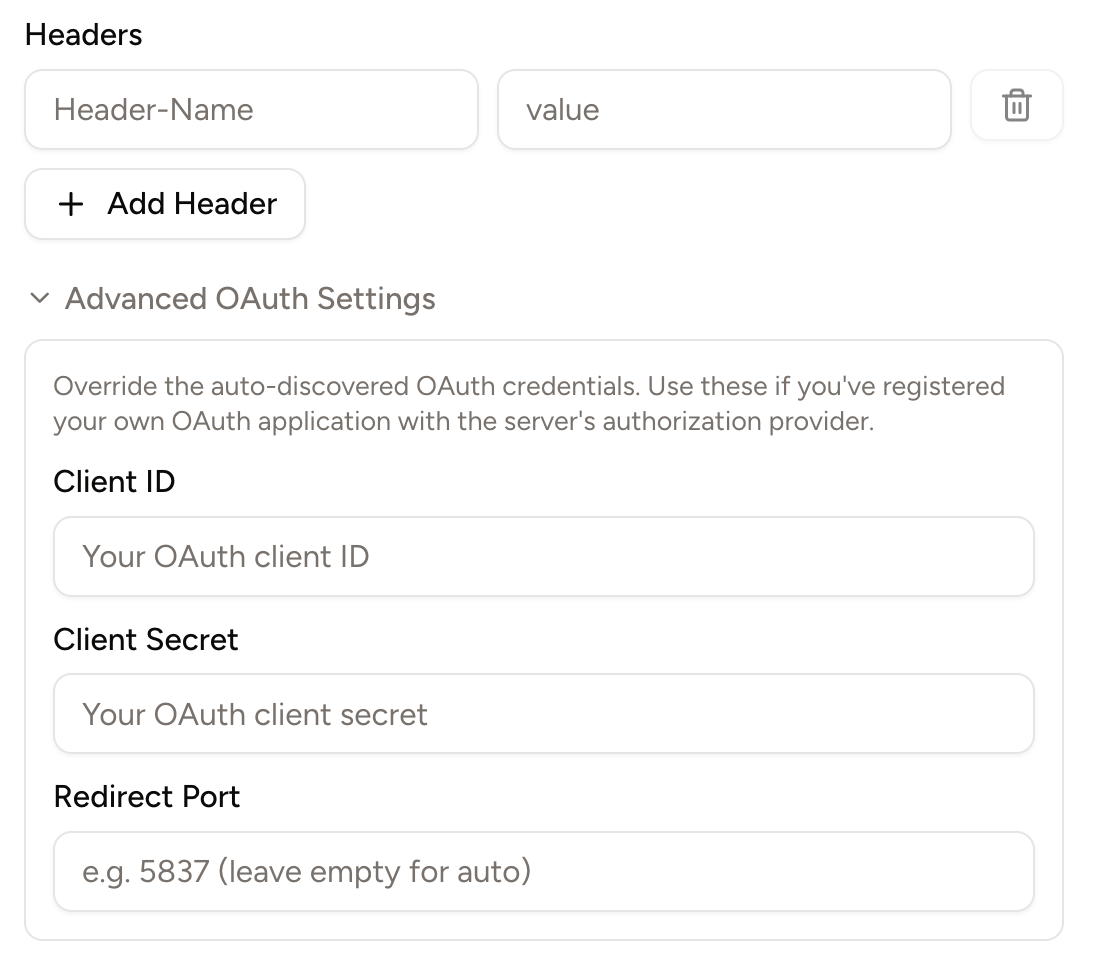
Some remote MCP servers, like GitHub's, recommend using headers like the Authentication: Bearer ... to authenticate the server. Others, like Slack's, require users to manually input a client ID, client secret, and callback port (authentication parameters that are required for a complete OAuth login process).
Piebald now supports both remote MCP headers and manually inputting client ID, client secret, and callback port:
Background color customization
You can now customize the background color of the entire interface for light mode and dark mode. Go to Settings → Appearance and change the Background Color settings:

Other
- Automatically minimize the feedback dialog when you click Submit.
- Added a new button to delete all trashed chats in a project.
- Changed the color for the AGENTS.md or CLAUDE.md context notification from red to blue to avoid it looking like an error.
- Added a copy button to file paths displayed in file read, write and edit tool calls.
- Added a button on toast notifications to close them.
- Fixed Qwen OAuth provider token refreshing.
- Fixed "bad request" error when using Qwen.ai OAuth.
- Fixed a bug when deleting worktrees.
- Cleaned terminal output of ANSI escape sequences before giving it to the model.
- Fixed a bug when a project that was a Git repo is no longer a Git repo.
- Made chats with stale "Pending your approval" status be automatically corrected.
v0.2.2
We're continuing work on big features like hooks and a tab bar, but we've fixed lots of bugs and added a few minor UI enhancements:
- Added Help → Check for Updates menu
- Added setting Chat Interface → Auto-scroll During Streaming
- Fixed trashed subagent chats remaining in sidebar
- Fixed Ctrl+S and Cmd+S save shortcut in file editor
- Fixed handling of missing
choicesfield in streaming error responses - Added fold and unfold for unchanged diff regions
- Added support for loading skills from Claude Code plugins
- Fixed file clicking when terminal is fullscreen
- Fixed OpenAI handling of responses with blank token values
- Added a button to provider cards to make it easy to start using that provider
- Limited Git status items to 10k to keep the app from freezing
- Added a button to queued messages for sending immediately
- Correctly set chat status to idle when a tool call is interrupted
- Fixed AI file mentions in markdown lists
- Added automatic exponential backoff and retry. Useful for providers with aggressive short-lived usage limits like Qwen and intermittent errors
- Clicking on projects that have multiple worktrees, all of which except the root worktree are inactive, will now take you directly into the root worktree, instead of taking you to the worktree listing view. If you want to go to the worktree listing view, you can use the new "View Worktrees" project menu item
- Removed the warning that mentions Piebald v0.1.19 from provider cards
- Fixed a bug that occurs when reloading with empty chats
- Fixed a bug with the builtin
WebFetchtool where fetching large web pages would crash the app - Fixed synchronization of the select boxes under the message input with the select boxes in the Chat Settings sidebar
v0.2.1
We're still working on features for subsequent releases, but this is a bug-fixes-only release.
- Made our Copilot support dynamically use completions/responses/messages API
- Made our Copilot support correctly list all available models
- Implemented several internal performance improvements
- Increased default MCP tool call timeout from 30s to 60s and made it configurabled
- Fixed a language glitch when reloading the app the app language customized
- Fixed bash
find -execcomands incorrectly being auto-approved - Added a
PIEBALD_DISABLE_ERROR_REPORTINGenvironment variable - Added
~/.claude/commands(old-style pre-skills Claude Code custom slash commands) and derivative./.agents/commandsdirectories to skill search path - Fixed backticks being included when copying portions of code blocks
- Made Glob/Grep tool calls cancelable
- Fixed regenerated and subsequent messages not displaying
- Fixed Zapier link
- Fixed Glama scrape count
- Added Ctrl+C, Ctrl+V, Ctrl+Shift+C, and Ctrl+Shift+V keyboard shortcuts for copying from and pasting into the terminal
- Disable compaction actions when the current chat is empty
- Show the jump-to-top/-bottom buttons during scrolling
- Corrected AGENTS.md context notification name in some cases
- Fix a sign-in error
- Fix a regex error in some browsers
- Fix a bug when deleting worktrees
- Show the Qwen model name instead of "coder-model"
- Fix a crash when using Qwen providers
- Sanitize unusual enums from MCP tool schemas for Gemini
- Fix compaction provider/model being hidden when auto-compact is disabled
v0.2.0

In Piebald v0.2.0 we've added an integrated file browser, code editor, and integrated terminal, and added support for worktrees, skills as slash commands, message queuing, Qwen OAuth support, localization, and remote/HTTP MCP servers!
Integrated file browser, Git viewer, and code editor (Pro)
The sidebar in Piebald is now project-oriented instead of just chat-oriented, with each project getting its own randomly-generated colored avatar for easier identification, and a search box to filter projects and worktrees by name. This allows us to include an integrated file browser, Git viewer, and code editor, as well as an integrated terminal!

Integrated terminal (Pro)
In addition to the file browser, Git viewer, and code editor, we've added an integrated terminal feature that you can use to run commands in the project directory.

Git worktrees (Pro)
We now support creating and using Git worktrees within a project! You can create chats in specific worktrees, view/edit files, and run terminal commands in them.

Skills as slash commands
Skills can now be invoked as slash commands in the chat input. All local skills in .agents/skills and global skills in $HOME/.agents/skills that are automatically loaded into new chats will also be available via /<skill-name>.

Message queuing (Pro)
When you want to send a message while a previous one is still generating a response, you can now choose to interrupt it or queue it in two different modes: send right away, and follow-up.
- "Send right away" will not interrupt the current generation but rather send the message as soon as the current message is done being generated, before the model has the opportunity to respond to tool call output.
- "Follow-up" will queue the message to be sent after the current task is complete, including all tool calls.

Qwen OAuth support
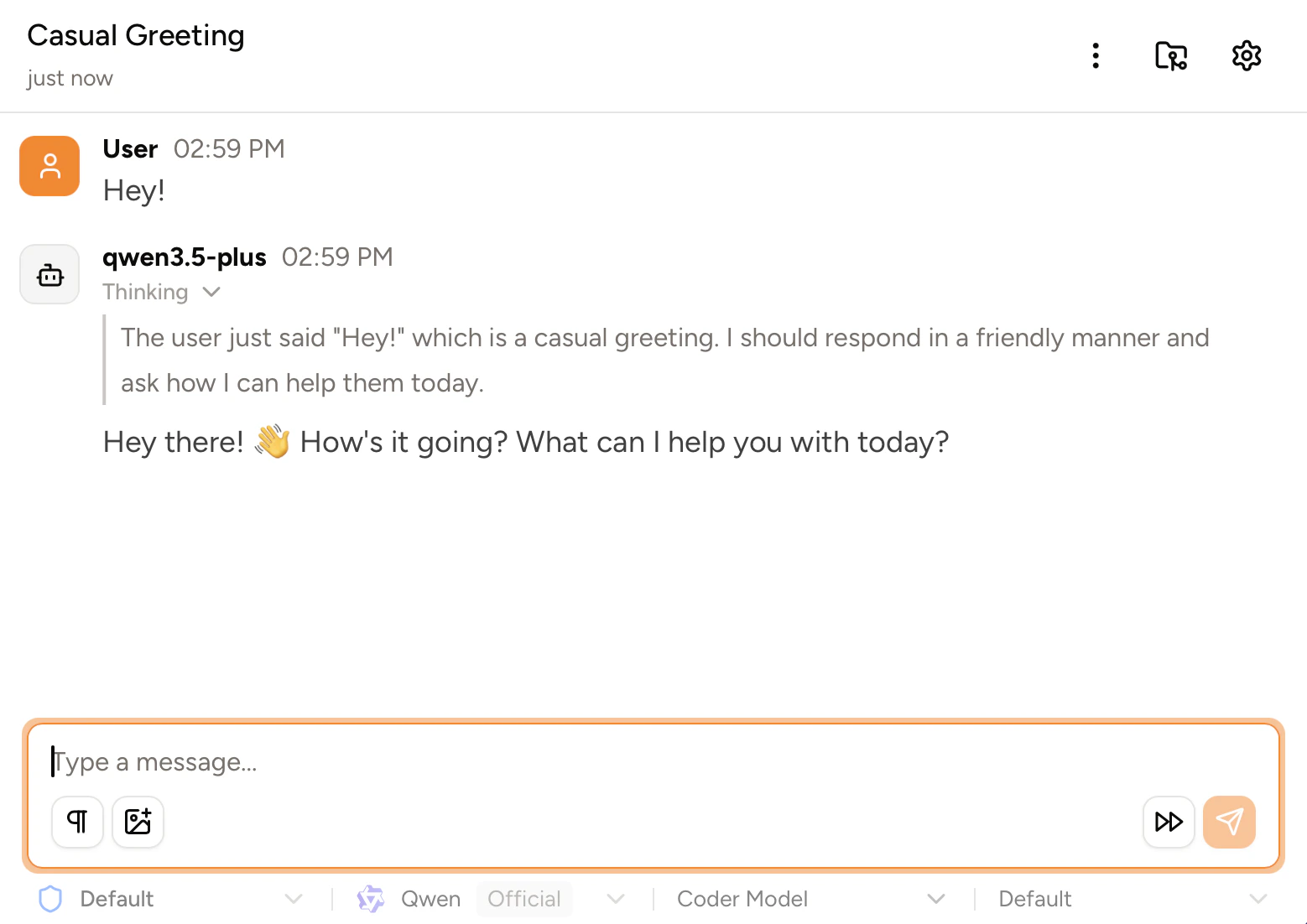
You can now log in with your Qwen.ai account via OAuth, similar to Qwen Code. The free tier includes 1,000 requests per day.
Localization
We've translated the UI into 4 languages: Chinese (Simplified), German, Russian, and Spanish. You can change the language in Settings → Language.

Remote/HTTP MCP servers
We now support remote HTTP MCP servers! To add an HTTP MCP server, go to Settings → MCP Servers → Add → Add Server, select "HTTP" as the transport type, and enter the URL of the server.

Tool calls are now interruptible
You can now interrupt tool calls at any time, via esc or by clicking the interrupt button in the chat input box or on an individual tool call.

Other
- We added a quick start section that you can use to quickly sign in to a supported OAuth provider or paste an API key
- Many more read-only bash commands are now auto-approved
- When a chat is automatically-compacted, generation is automatically resumed in the new chat
- We've added new buttons to jump to the top and bottom of the chat
- We've added a new setting to automatically append the duration of a terminal command/sub agent to the tool's output
- We've fixed support for customizing the system prompt when using OpenAI Responses API providers
- Subagents are now automatically approved
- You can now toggle word wrap for diff views
- We've updated the title generation prompt to make titles shorter and more helpful
- Title generation can now be postponed by the model if the conversation is not yet ready for a title
- Subagents will no longer send notifications when they're complete
- The
WebFetchtool is now much faster and more accurate
We also fixed a number of bugs around authentication, editing profiles, message interruption, plan approval, provider icons, tool call status, regeneration, responsiveness, and much more.
Next
We're working on hooks, first-class support for many more providers, accurate token usage metrics, context editing, syncing & storage with Piebald Cloud, and subscription provider rate limit monitoring. We're also planning to soon work on worktree creation scripts, integrated LSP support, importing chats from Claude Code, OpenCode, etc., a stats page, and more.