Talk to Claude Code from your Gemini Enterprise App chat — phone, browser, or terminal — and pick up the same conversation anywhere.




A complete proof-of-concept that registers Anthropic's Claude Code (and Google's Gemini CLI) as an A2A custom agent inside Gemini Enterprise App, so any employee can drive a real coding agent from the GE chat — and continue the same session and work on a Cloud Workstation terminal or on their phone.
- 🔁 Multi-surface session resume — Start a task on mobile, finish it in your terminal. Same Claude, same conversation, same files.
- 👤 One Cloud Workstation per user — Auto-provisioned on first use. Persistent disk keeps
~/.claude, transcripts, and code across restarts. - 🏢 Org-managed coding environment — Ship
CLAUDE.md, Skills, and MCP servers to every user in a single Workstation image. - 🔐 Vertex AI ADC end-to-end — No Anthropic / Gemini API keys anywhere. Everything bills through your existing Google Cloud invoice.
- 🎨 Native rich UI via A2UI — Claude can return cards, forms, and dashboards that GE renders as Material components.
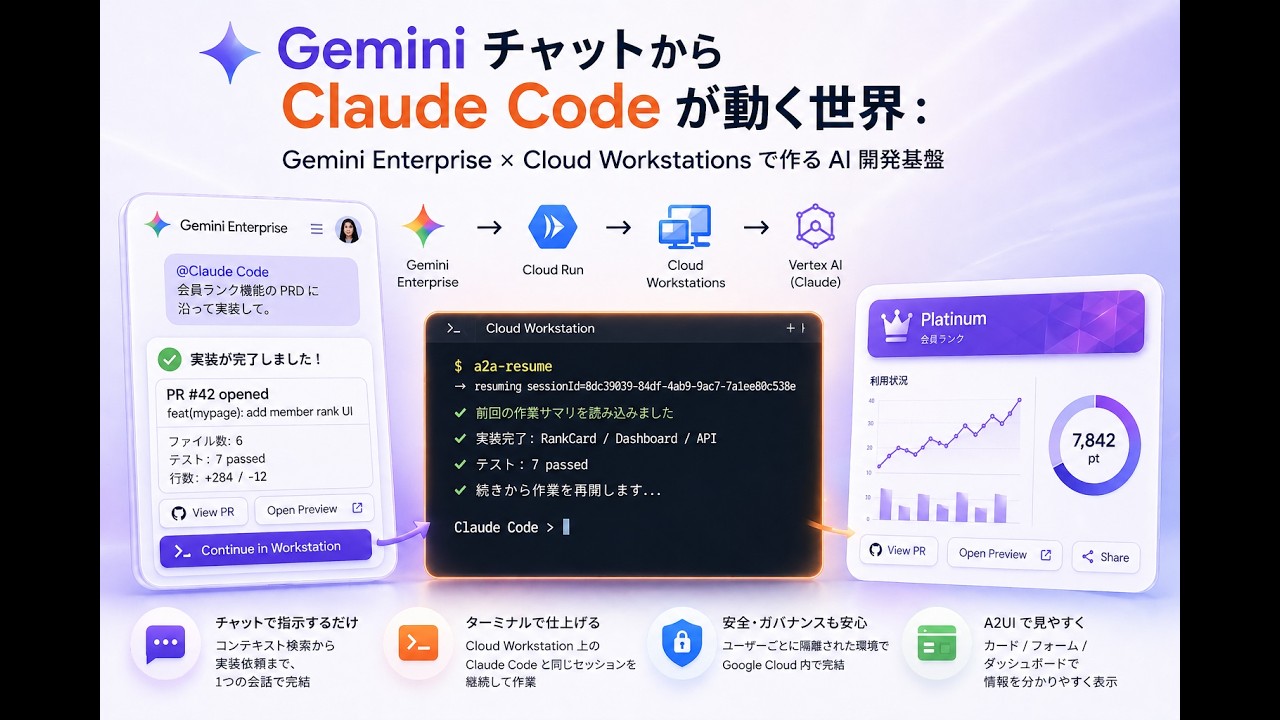
Click to watch on YouTube
Pick "Claude Code" from the agent list and just chat. The reply ends with a one-liner you can paste into the workstation to continue.

Open the workstation in your browser, run a2a-resume, and the conversation you were having in GE drops into your terminal — full transcript, working dir, and all.

The Gemini Enterprise mobile app talks to the same agent. Kick off a task on the train; review the PR by the time you reach your desk.

When Claude spins up a dev server in the workstation, the forwarded URL comes right back into the GE chat — one click and you're looking at the running app.


Gemini Enterprise (web / mobile / agent gallery)
        │  A2A protocol (JSON-RPC + SSE), Bearer <user OAuth token>
        ▼
Cloud Run "a2a-router"           — stateless front door
  • Serves /.well-known/agent-card.json
  • Exchanges OAuth bearer → user email
  • Routes to the user's Cloud Workstation
        │  https://8080-<ws>.<cluster>.cloudworkstations.dev
        │  Bearer <generateAccessToken()>
        ▼
Cloud Workstation "a2a-<email>"  — per-user, persistent
  • Same router image, AGENT_FORWARD_MODE=local
  • Spawns Claude Agent SDK / Gemini CLI subprocesses
  • Persistent disk: ~/.claude, ~/.a2a-sessions, /workspace
        │  Vertex AI ADC (no API keys)
        ▼
Vertex AI Anthropic   /   Vertex AI Gemini
The Cloud Run side is a thin stateless proxy (resolve user → forward). All conversation state, transcripts, and code live on the per-user persistent disk.
Four design choices spelled out in the Zenn article:
- One Workstation per user — IAM, persistent disk, and audit log are all per-person, so blast radius is structural, not by convention.
- The Workstation is the AI's "home" —
CLAUDE.md, Skills, MCP servers, and CLIs are baked into the image, so every user starts with the same org-approved tooling. - YOLO mode is OK because of the box around it — Claude / Gemini run with auto-approval, but they can only damage one user's persistent disk, the SA scope is
aiplatform.user, and idle shutdown caps any runaway loop within ~15 minutes. - A2UI for rich UI — Claude returns build summaries, forms, and progress dashboards as JSON; GE renders them as Material cards. Safer than executing model-generated UI code.

export PROJECT_ID=your-gcp-project-id

# 1. Provision infra (Service Account, Workstations cluster, Cloud Run, IAM)
cd terraform
terraform init -backend-config="bucket=${PROJECT_ID}-terraform-state"
terraform apply -var="project_id=${PROJECT_ID}"

# 2. Build the workstation image (Cloud Build)
cd ../workstation-image
PROJECT_ID=$PROJECT_ID ./build.sh

# 3. Build & deploy the Cloud Run router
cd ../a2a-router
PROJECT_ID=$PROJECT_ID ./deploy.sh

# 4. Register the agent card URL in Gemini Enterprise
#    https://<ROUTER_URL>/.well-known/agent-card.json
Full step-by-step (state bucket, custom VPC, GE registration, OAuth scopes): docs/SETUP.md
Live demo script for customer / team walkthroughs: docs/DEMO.md
| Path | What lives here |
|---|---|
a2a-router/ |
TypeScript A2A server. Runs on Cloud Run as the entry proxy and inside each workstation in local mode (same image, same code). |
workstation-image/ |
Custom Cloud Workstations image: Code OSS base + Node.js 20 + Claude Code + Gemini CLI + gh + the A2A server + bundled Skills. |
terraform/ |
Infrastructure as Code: SA, Artifact Registry, Workstations cluster/config, Cloud Run service, IAM, NAT-friendly subnet. |
docs/ |
SETUP.md (deployment) and DEMO.md (live demo script). |
.github/workflows/ |
CI: TypeScript build, terraform fmt/validate, shellcheck. |
- 📝 Gemini Enterprise × Claude Code on Cloud Workstations — full walkthrough with design rationale and gotchas (Japanese)
- 📘 Claude Opus 4.6 × Vertex AI complete guide — prerequisite for using Claude on Vertex AI
- 📗 Gemini Enterprise × ADK to automate "plan → merge" — the previous article in this series
Apache License 2.0 — use it, fork it, ship it.