Webconfig
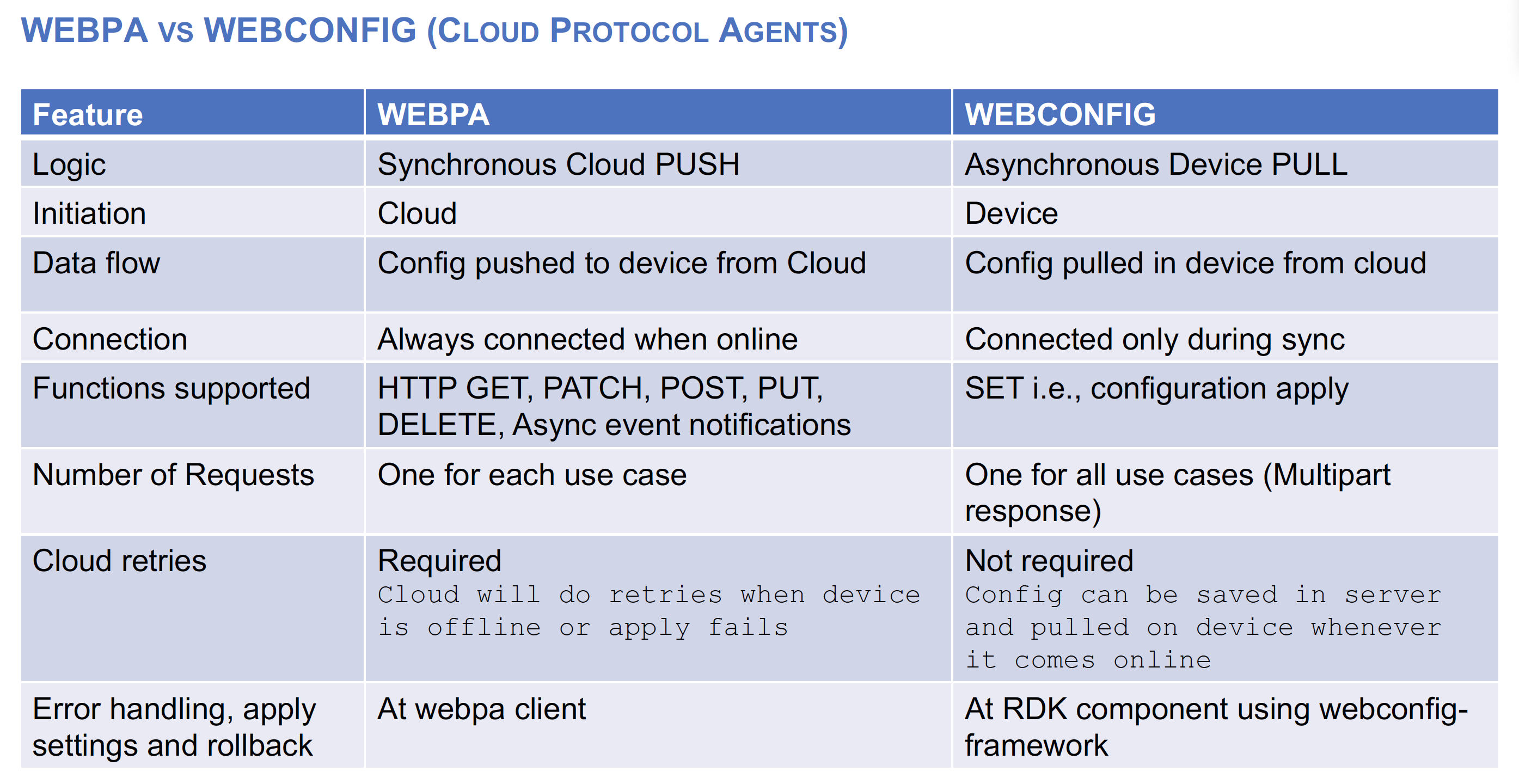
- Async Device Pull mechanism to get config instead of runtime device online apply as in webpa
- Configurations stored in cloud; device pulls this whenever it comes online.
- Multipart Doc HTTPS GET request & response with root version
- webconfig HTTP request header will contain the comma separated list of the root and sub doc versions previously applied and saved on device. Cloud Server will compare the version shared by device with what it has and returns only the multipart sub doc for the version mismatch cases
- Multipart response will have ROOT doc version in HTTP header Etag
- Multipart is HTTP response containing multiple content types or sections separated by boundary
- Webconfig GET response data format is msgpack for faster processing and compressed data
- BLOB (Binary large object) is a structure containing related multiple key value pairs put together based on a use case. This helps to push huge configurations and multi-component config
- Webconfig is transparent and will send SET command to apply each config value AS IS to owning components over BUS
- Webconfig is deployed as a separate process on RDKB devices
- Webconfig uses generic bus RBUS
- In RDKB, all config is implemented as BLOBs as that helps in better error handling and self heal.
- Webconfig code is in github opensource and is designed in a generic way to be deployed easily on RDKB, RDKV or PODs
- Generic code is here https://github.com/xmidt-org/webcfg
- Platform specific code for various platforms is grouped in a single repo https://github.com/xmidt-org/cpeabs
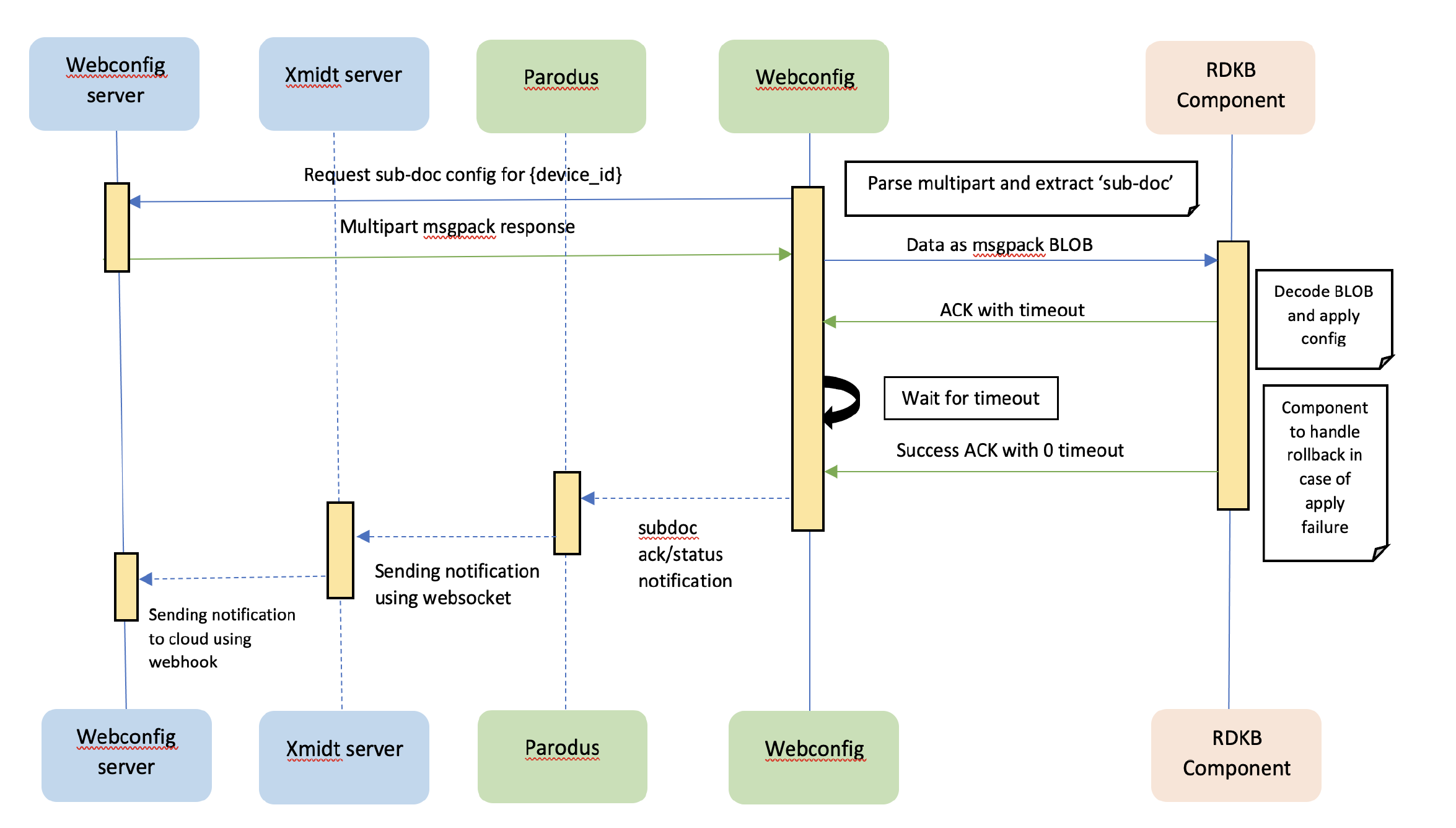
- Every time when the device boots up, the webconfig will send a Multipart HTTP GET request to the cloud with root and sub doc versions.
- The cloud will compare these version with the version, which is currently present in the cloud, and will send only the mismatched subdocs as a multipart response (msgpack encoded BLOB structure) to CPE.
- The webconfig will parse the multipart response and send it to the RDKB component.
- The RDKB component will apply and send the status back to the cloud.
- For cases when cloud gets device configuration at a later point in time then webconfig server will do POKE
- Using WEBPA, poke or force sync SET request will be sent to the device
- Webconfig client in return will request cloud with root and sub doc versions same as during boot
- Device.X_RDK_WebConfig.ForceSync = “root”
- Get the new sub doc in GET response from cloud and apply it
- The RDKB component will apply and send the status back to the cloud
- This sync was developed to support subdocs that require the CPE to sync with the cloud periodically like once in a day.
- During maintenance window, CPE will do a sync request at random time generated within CPE.
- This Maintenance sync is done to update some device configuration like telemetry, RFC etc from cloud for that day.
- These subdoc versions are not saved in the CPE database.
- For handling use case where cloud may have added support to groups/blobs which CPE doesn’t support, a metadata header with a bitmask indicating supported features in CPE will be sent to cloud
- During forced sync/bootup sync, CPE will add a header X-System-Supported-Docs: to the request. This header will contain a bitmask string which indicates what feature is supported in CPE FW.
- Within RDK, each feature will be supported by different components. Hence the subdocs are arranged into groups to form a series of bit masked values separated by commas. Placeholder of each group in the header could be predefined and can be identified by the two MS nibbles. So, cloud may parse the bitstreams as per the group ID shared by RDK. Within each group’s bitmap, cloud can check the bits turned ON to identify supported feature.
- To identify schema version supported by each group, a new metadata header will be added as X-System-Schema-Version with comma separated version numbers along with a bit mask subdoc id. That will ensure cloud knows the schema version of subdoc supported by CPE in each FW release.
- Both version and supported docs information is populated during build time. So, it won’t change during runtime in CPE.
HTTP header sent to cloud
X-System-Supported-Docs =16777247,33554435,50331649,67108865,83886081,100663297,117440513,134217729 X-System-Schema-Version =16777217-2.0,16777220-1.3,16777224-2.1,33554433-1.1,67108865-2.0,117440513-3.0
Webconfig.properties
WEBCONFIG_SUBDOC_MAP_1=portforwarding:1:true,wan:2:true,lan:3:true,macbinding:4:true,hotspot:5:true,bridge:6:false WEBCONFIG_SUBDOC_MAP_2=privatessid:1:true,homessid:2:true,radio:3:false