Procedures
- Overview
- Why procedures?
- Declaration
- Parameter cardinality
- Keys
- Parameter order
- Invocation
- Debugging
- Examples
- Pagination example
- Collection example
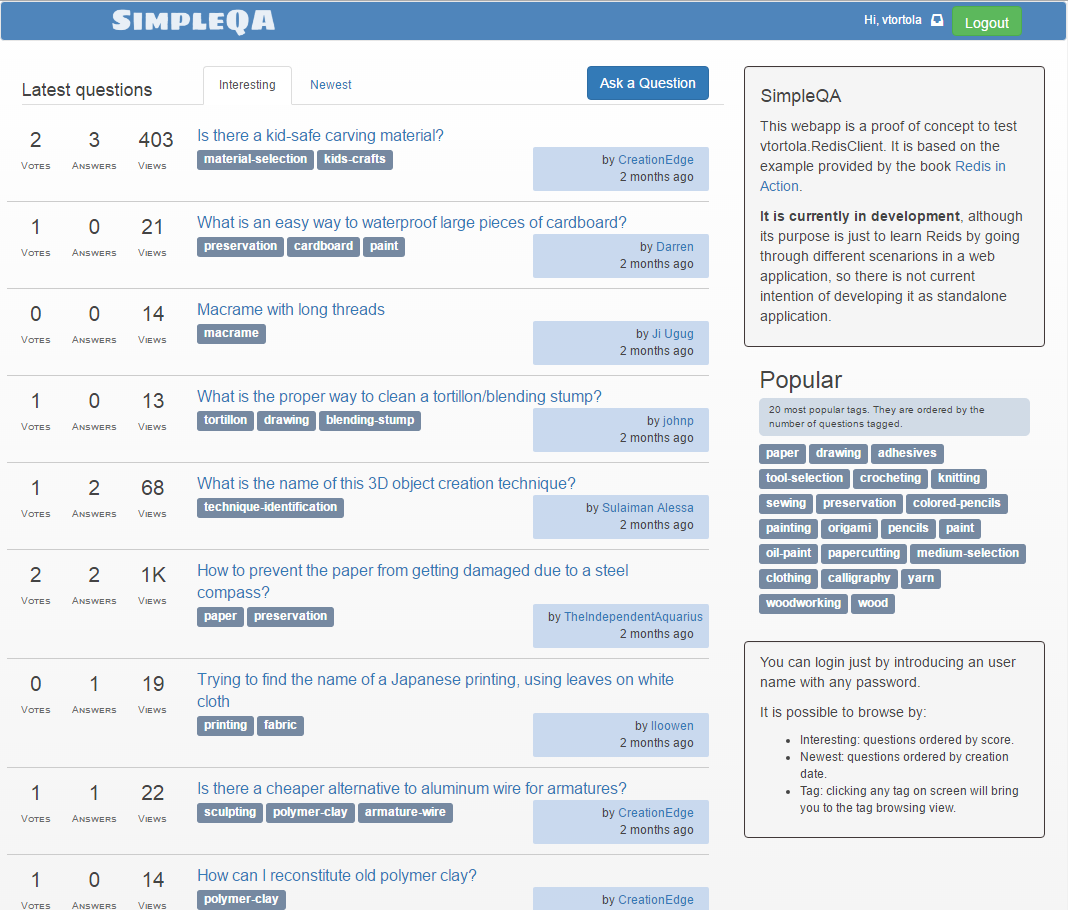
- SimpleQA : A proof of concept of a StackOverflow-ish Q&A web application.
In Redis is possible to have server-side scripting with LUA scripts. They come very handy for avoiding multiple round trips, and have the feature of being atomic, so scripts do not need to use WATCH.
In vtortola.RedisClient server-side scripting is provided through "procedures", that is just a way of wrapping your LUA scripts with an alias and parameter binding for easing their use and invocation. RedisClient create local variables with the names you used in the signature and sets the data from KEYS and ARGV in them for you.
Procedures are declared once in the configuration, and the client makes sure they are always deployed to the Redis instance. Read more about procedures management.
When working with LUA in Redis, you get the parameters through the KEYS and ARGV parameters. In RedisClient's procedures, parameters are declared in the procedure signature and a small portion of code is injected into the LUA script to bind KEYS and ARGV to your defined parameters.
- They have all the benefits of regular LUA scripting in Redis, like atomicity and avoiding multiple round trips to the server, since a procedure is just a way to wrap regular LUA scripts.
- Multiple procedures can be defined in a same text file since they are limited by
procandendprocboundaries. - RedisClient handles the procedure deployment.
- Procedures are invoked by name rather than using
EVALorEVALSHA. - Instead passing parameter values in
KEYSandARGVarrays, and having to hardcore the index location of the data in those arrays, named parameters are used. - Array parameters of arbitrary length are supported, being the length of those arrays defined at parameter value binding time.
- Procedures in RedisClient use the same parameter binding capabilities than for regular Redis commands.
- Procedure results can be inspected as any other Redis command.
Rather than just providing the LUA code, they need to be wrapped in what is called a procedure:
proc Sum(a, b)
    return a + b
endproc
Afterwards, the procedure can be executed by just invoking its alias (in this case Sum) and the two parameters (without parenthesis).
Procedures accepts single and collection parameters:
-
myparameterwill expect a single value'. -
myparameters[]will expect one or more values as an array. They are LUA arrays.
proc Sum(a, b[])
    for i=1, table.getn(b), 1
    do
      a = a+ b[i]
    end
    return a
endproc
Array parameters have variable length. The length is decided at the moment of binding (during invocation), so the parameter will have as many elements as the parameter value being bound to it.
Parameters can be passed as keys to the script (important for clustering) using the $ prefix, either in single or collection parameters. Remember to use the key parameter without the $ symbol in the body of your procedure.
The parameter (or parameters) marked with $ will be passed in KEYS rather than in ARGV.
proc SumAndStore($key, a, b)
    local result = a + b
    return redis.call('SET', key, result)
endproc
Parameters can be declared in any order. It does not matter if they are keys or not, single or collections.
-- sum both vectors and store the result in <key>
proc ZipAndStore(a[], $key, b[])
    local result = a
    local oper = b
    if table.getn(b) > table.getn(a) then
        result = b
        oper = a
    end
    for i=1, table.getn(oper), 1
    do
       result[i] = result[i] + oper[i]
    end
    return redis.call('SADD', key, unpack(result))
endproc
Calling "ZipAndStore @avalues @somekey @bvalues", new { avalues = new []{1,2,3}, bvalues= new []{5,6,7,9}, somekey = "xx" } will store 6 8 10 9 in set named "xx".
For invoking a procedure, just indicate the procedure alias and the parameters (without parenthesis) like with any other Redis command:
var result = await channel.ExecuteAsync(@"
                           SumAndStore @key @valueA @valueB",
                           new { key = "mysum", valueA = 3, valueB = 4 })
                           .ConfigureAwait(false);
result[0].AssertOK();
Then you can inspect the result like usual.
There is available a procedure debugger launcher that allows you to debug your procedures.
Imagine a catalog application, with products/services defined as different hashes in the Redis database, where each hash contains the properties of each product, like name, url, stock, description, picture url, etc... Also you have different zsets containing the keys of all products sorted by a specific properties or just grouped by categories. Since there may be a big amount of products, pagination is needed to avoid blowing up the server response with too much data.
How is this pagination achieved without server side scripting? First querying the zset with the desired range to obtain the list of hash keys that need to be retrieved, and then retrieving each key (usually) one by one.
This can be expedited and simplified with server-side scripting. For example, you can use a procedure to get the list of products directly, without extra round trips:
proc ZPaginate(zset, page, itemsPerPage)

	local start  = page * itemsPerPage
	local stop = start + itemsPerPage - 1
	local items = redis.call('ZREVRANGE', zset, start, stop)

	local result = {}

	for index, key in ipairs(items) do
	    result[index] = redis.call('HGETALL', key)
	end

	return result
endproc
Using the templated string syntax you can invoke this procedure easily:
// Execute procedure
var result = channel.Execute("ZPaginate @key @page @items",
                              new { key = "products:bydate",  page=3, items=10 });

// Expand result of the first line as a collection of results
var hashes = result[0].AsResults();

// Bind each hash to an object
// Where <Product> is a class with properties that match the hash keys.
var products = hashes.Select(h => h.AsObjectCollation<Product>()).ToArray();-- sums the content of <a[]> and stores the content
-- into the key specified in <asum>
proc AggregateSumAndStore($asum, a[])
local function sum(t)
local sum = 0
for i=1, table.getn(t), 1
do
sum = sum + t[i]
end
return sum
end
local result = sum(a)
return redis.call('set', asum, result)
endproc
using (var channel = _client.CreateChannel())
{
    var result = await channel.ExecuteAsync(@"
                               AggregateSumAndStore @key @values",
                               new { key = "mysum", values = new [] { 1, 2, 3} }
                               ).ConfigureAwait(false);
    result[0].AssertOK();
}
This will store the value 6 as string in the key mysum and will return OK. The value mysum is passed in KEYS rather than in ARGV.
SimpleQA is a proof of concept of a Q&A site using procecures. It based on the example provided in the book Redis in Action, and also a poor imitation of inspired by StackExchange sites.