Open-source finance terminal. Fast, keyboard-driven and extensible.
Available as a desktop app or TUI.
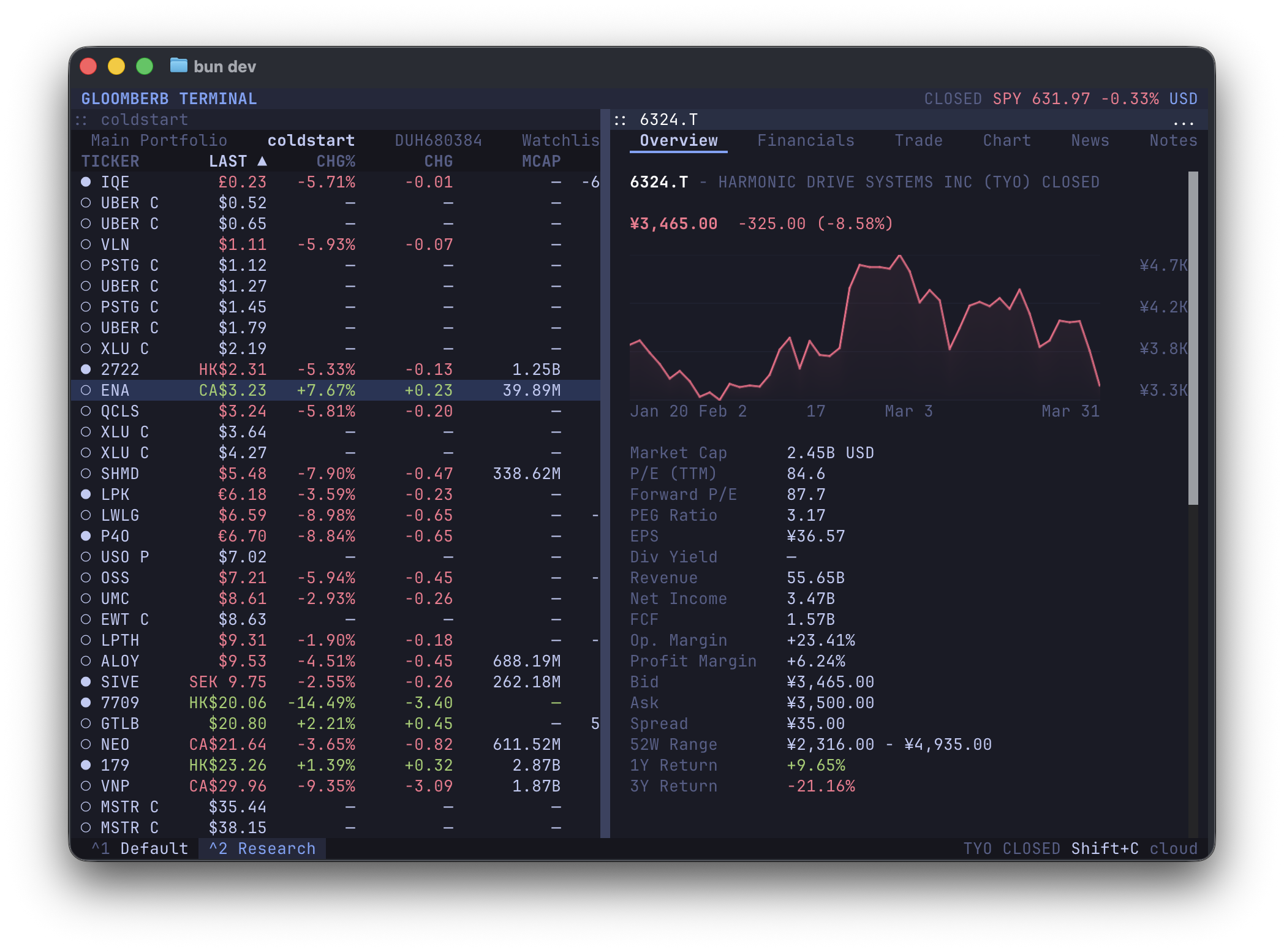
macOS desktop app + terminal command:
brew install --cask vincelwt/tap/gloomberb
# or
curl -fsSL gloomberb.com/install | bash
Both install Gloomberb.app and a gloomberb terminal command that runs the TUI through the app bundle, so the Bun runtime is stored once.
Desktop-only download:
Terminal-only install:
bun install -g gloomberbThen run:
gloomberbOn macOS, app updates replace the app bundle in place and keep the terminal command pointing at the updated bundle. Homebrew users can also update through brew upgrade --cask gloomberb.
For the best terminal experience, use a Kitty-compatible terminal such as Ghostty, Kitty, or WezTerm.
Open the command bar with Ctrl+P or `, then type a command.
| Try | Opens |
|---|---|
DES AAPL |
Security details |
GP NVDA |
Price chart |
TOP |
Ranked market stories |
MOST |
Market movers |
PF |
Portfolios and watchlists |
HELP |
Full in-app shortcut list |
- Research companies with quotes, charts, financials, filings, holders, insiders, options, analyst ratings, events, and relative valuation.
- Follow markets with top stories, breaking news, sector feeds, global indices, FX, macro events, yield curves, market movers, and fear/greed.
- Track portfolios and watchlists, connect brokers, set alerts, keep notes, run AI screens, browse prediction markets, and use Gloom Cloud chat.
Running gloomberb with no arguments launches the terminal UI. Use gloomberb help to see the full command list.
| Command | Use |
|---|---|
gloomberb |
Launch the terminal UI |
gloomberb help |
Show all CLI commands |
gloomberb search <query> |
Search tickers and company names |
gloomberb ticker <symbol> |
Show quote, ownership, and financials |
gloomberb portfolio [action] |
Manage manual portfolios |
gloomberb watchlist [action] |
Manage watchlists |
gloomberb predictions [...] |
Launch Prediction Markets |
gloomberb plugins |
List installed plugins |
gloomberb install <user/repo> |
Install a plugin from GitHub |
gloomberb remove <name> |
Remove an installed plugin |
gloomberb update [name] |
Update plugins |
Everything from the portfolio list to broker integrations is a plugin. Plugins can add panes, tabs, columns, command bar commands, CLI commands, status bar widgets, and data providers.
Core plugin areas include:
- Portfolios, watchlists, manual entry, and broker connections
- Ticker details, quotes, charts, options, filings, holders, insiders, and research
- News, market movers, global indices, sectors, FX, earnings, macro data, and yield curves
- Prediction markets, alerts, notes, chat, AI screeners, and external plugins
See PLUGINS.md for the plugin API and the shared UI surface available through gloomberb/components.
| Key | Action |
|---|---|
Ctrl+P or ` |
Open command bar |
Ctrl+, |
Open focused pane settings |
Ctrl+W |
Close focused pane |
Ctrl+Shift+M |
Move focused window (WIN resize starts resize mode) |
Ctrl+Shift+D |
Dock or float focused pane |
Ctrl+Shift+L |
Layout actions |
Ctrl+Shift+G |
Gridlock all windows |
Tab |
Switch panes |
j / k |
Navigate lists |
h / l |
Switch tabs |
m |
Cycle chart mode |
q |
Quit |
Desktop builds also accept Cmd/Ctrl+K for the command bar, the matching Cmd shortcuts on macOS, Cmd/Ctrl+Shift+O to pop out a pane, and Cmd/Ctrl+Shift+C to copy a focused pane screenshot.
Use HELP inside Gloomberb for the live shortcut list. The common command-bar prefixes are listed here for quick scanning.
| Shortcut | Function |
|---|---|
DES <ticker> / T <ticker> |
Security details for a ticker |
FA <ticker> |
Financial statement view |
GP <ticker> |
Price chart |
GIP <ticker> |
Intraday price chart |
HP <ticker> |
Historical OHLCV prices |
GF <tickers> |
Fundamental statement graph |
GE <tickers> |
Valuation multiple graph |
GR <tickers> |
Security relationship graph |
EE <ticker> |
Events view with earnings and revenue estimates |
EM [tickers] |
Earnings monitor |
SRCH <query> |
Provider symbol search |
QQ <tickers> |
Ticker quote monitor |
CMP <tickers> |
Ticker charts |
CORR <tickers> |
Ticker return correlations |
ANR <ticker> |
Analyst targets and ratings |
SEC <ticker> |
SEC filings and company disclosures |
OMON <ticker> |
Options monitor |
HDS <ticker> |
Institutional holders |
13F [fund/ticker/CIK] |
13F fund filings and holdings |
INS <ticker> |
Insider activity |
EVT <ticker> |
Corporate actions, earnings, and estimates |
RV <tickers> |
Relative valuation |
| Shortcut | Function |
|---|---|
TOP |
Ranked market stories |
MOST |
Top gainers, losers, most active, and trending tickers |
N |
News feed |
CN <ticker> |
Ticker news |
NI |
Sector news |
FIRST |
Breaking news |
TWIT <query> |
Ticker-related market posts |
WEI |
Global equity indices |
ECON |
Economic events and releases |
GC |
Yield curve |
ERN |
Earnings calendar |
BI / SP |
S&P 500 sector performance |
FXC |
Major FX cross rates |
FNG |
Fear and greed market gauge |
| Shortcut | Function |
|---|---|
PF |
Portfolio and watchlist workspace |
PORT |
Portfolio risk and sector exposure |
ALRT |
Price alerts |
SA <symbol condition price> |
Create a price alert |
PM <query> |
Polymarket and Kalshi prediction data |
AI <prompt> |
AI screener |
CHAT [channel] |
Gloom Cloud chat |
DM @user [@user...] |
Open or start a direct or group chat |
ACM |
Gloom Cloud account settings |
TBO |
TheBuildout infrastructure intelligence |
CG |
Congress trading disclosures |
NOTE |
Notes |
IBKR |
IBKR trading pane |
BR |
Broker connections |
CHG |
Changelog |
HELP |
Open shortcut and layout help |
AW / AP <ticker> |
Add a ticker to the active watchlist or portfolio |
RW / RP <ticker> |
Remove a ticker from the active watchlist or portfolio |
PS |
Open focused pane settings |
LAY <action> |
Open layout actions |
WIN move|resize |
Move or resize the focused window |
GL |
Gridlock all visible panes |
SB |
Toggle the status bar |
VF |
Toggle quote value flashing |
TH <theme> |
Change color theme |
CR |
Cycle chart renderer |
PL <plugin> |
Manage plugins |
MIT
- OpenTUI for the layout engine