This Discord bot is designed to facilitate the pairing process of students with volunteer tutors. Its purpose is to encourage and enhance the engagement of this process by gamifying it. It achieves this by using a help board that acts as a mission board where tutors can accept quests to help students in need
- Create help tickets with
/help, with customizable inputs - Automatically delete help ticket after 72 hours
- Guardians can respond to and claim tickets in a private help board
- Once a ticket is resolved, an archive post is created with the details surrounding the encountered problem and solution
- User action log
- Node.js
- Discord.js
- Javascript
• Register the bot with discord with the right permission
• Create the necessary Discord channels and obtain the channel IDs
• Set the correct value for environment variables
• Run "node deploy-commands.js" to register the slash commands to Discord
• Run "node app.js" to start the bot
- bot
- applications.commands
- Read Messages/View Channels
- Send Messages
- Create Public Threads
- Create Private Threads
- Send Messages in Threads
- Read Message History
- Use Slash Command
To run this project, you will need to add the following environment variables to your .env file
| Variable Name | Description |
|---|---|
| CLIENT_TOKEN | The discord bot's CLIENT_TOKEN used to login |
| clientId | The client_id of the registered bot |
| guildId | The discord community id |
| helpBoardChannelId | The channel ID where you want the help requests to go |
| resolvedTicketsChannelId | The ID of the forum-channel where you want the resolved tickets to go. *Must be a discord Forum channel. |
| Folder/File | Purpose |
|---|---|
| commands/ | This folder contains all of the logics for the slash commands |
| interactions/ | This folder contains all of the button's function |
| resources/commands-form/ | This folder contains all the forms for slash command |
| deploy-commands.js | Register the slash commands to Discord |
| app.js | Main file where the bot login, load all the commands, and event listeners |
| Channel Name | Purpose |
|---|---|
| help-board | a private text-channel that acts as a mission board where all the help tickets get send to |
| resolved-tickets | a public forum-channel that serves as an archive for all of resolved tickets |
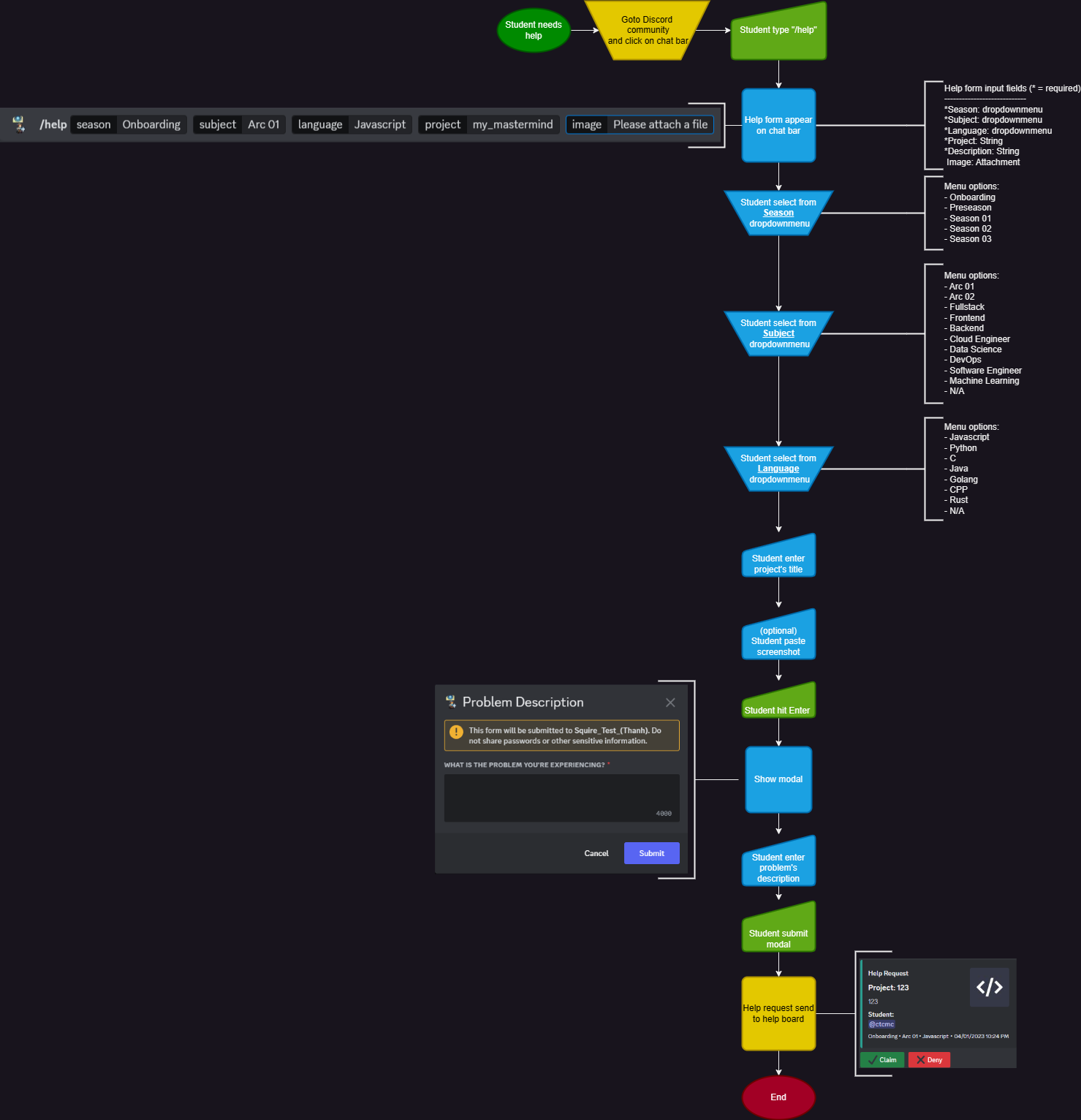
Help tickets can be submitted by using the slash command /help in Discord, fill in all the required input fields and hit enter
The bot can be run with as-is to see how student input works and how it corresponds to forum tags.
-
Requesting help from volunteers in a Discord community is inefficient
- Students are expected to post in busy chat channels where their problem may or may not be discovered by a guardian. If a student is new to programming, they may not have the skills yet to research solutions and rely on these guardians to help. To find these students, guardians must regularly scan a number of channels, creating uneccesary work for these volunteers. Some guardians may want to help, but necessarily not have the time to scan these channels.
-
Chat channels as archives for previously asked questions is inefficient
- To find previously answered questions, students need to search through the channel with non-standardized keywords to find where their question was answered. If they manage to find a thread where their question was answered, they need to sift through the dialogue contained in the thread to find relevant information. Chat channels acting as archives to previously asked questions implies a lot of uneccesary clutter to deal with. If the discussion around the problem happened in a DM or call, there is no way of referencing it in the future
-
Asking for help is daunting
- A student may be embarrassed to ask for help within a public channel. They may only be comfortable talking in a private call or DM.
-
Squire sends help requests directly to guardians
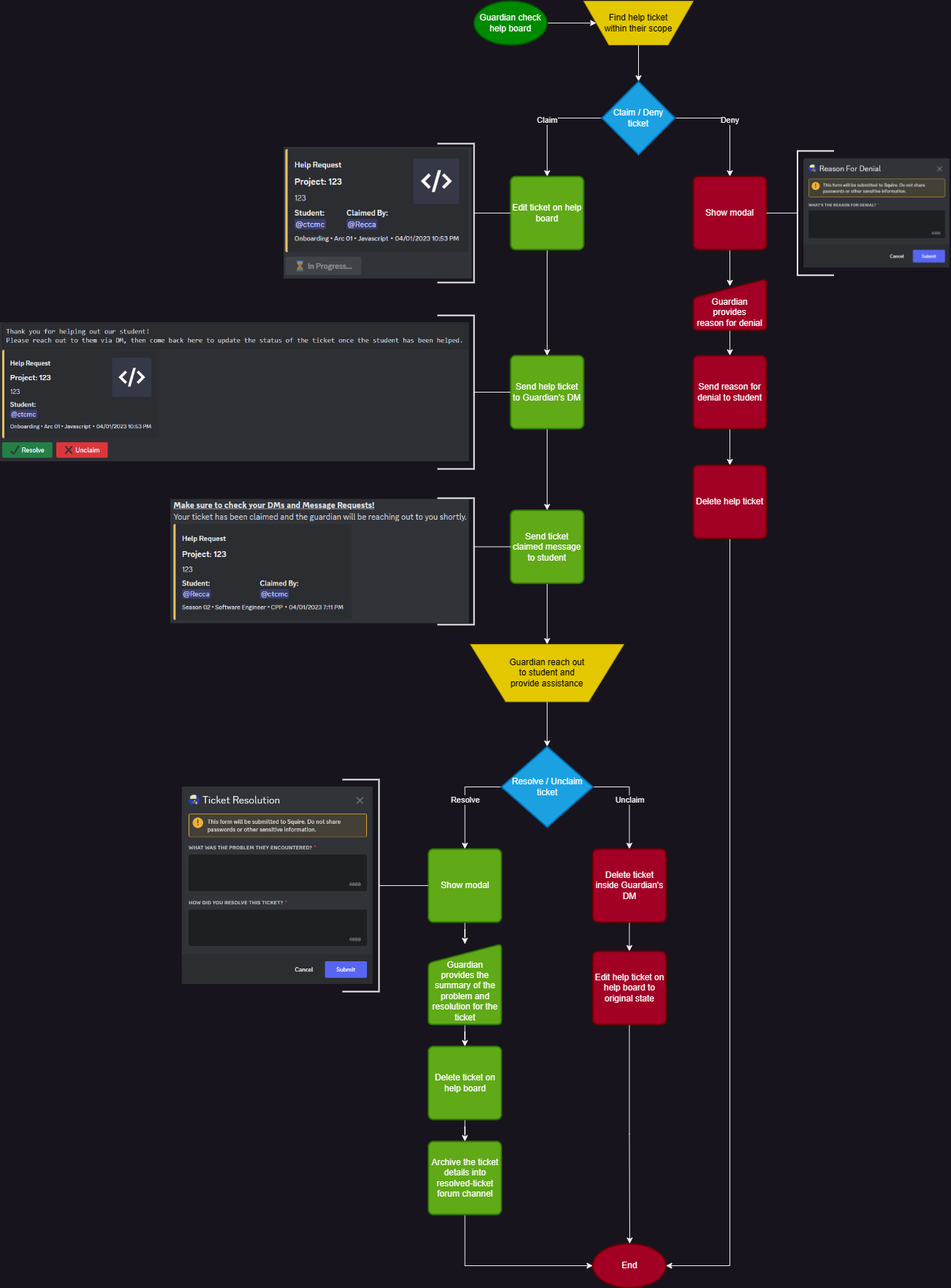
- When a student requests help, a ticket is created with details of the encountered problem and is posted to a dedicated, read-only help board where guardians can claim the ticket. Once a ticket is claimed, both parties are sent a DM by Squire with the relevant ticket, the guardian's name, and a message requesting them to reach out to each other. Job posts in the help board are easy to read, and their status (claimable or in-progress) is reflected in the ticket.
-
Squire automatically archives resolved tickets
- When a ticket is resolved, the guardian must enter details regarding the resolved problem, as well as the solution they came up with. Then, Squire creates a post in a dedicated resolved tickets forum with the ticket, problem, and solution available to read. Posts are tagged using details from the ticket. Guardians can then filter forum posts by available tags to find past resolved tickets relevant to them. This forum can optionally be able to be read by students.
-
Squire makes asking for help more private
- Submitting a help request is not visible to other users. Tickets are only viewable by guardians, and further discussion can occur in a private DM or call.
Connor:
Discord.js is a powerful library that was intuitive to use. The main challenge in this project was working around the requirements set by the Discord API. Every interaction in the discord app needs a corresponding reply, and there was a roadblock surrounding replying to interactions that have already been replied to. We had a lot of discussion about how we could address real problems that students face, and I think we created something useful as we tried to empathize with these students. If I were to do this again, I would do it in Java to get more practice with the language and OOP. Overall I had a lot of fun building and collaborating with Thanh and I hope someone gets some use from Squire.
Thanh:
I learned much more than just coding from working on this project. One day, my friend Connor and I sat down to analyze the Discord community of our bootcamp. We brainstormed and identified the problems that students were facing, and then we worked together to develop a solution that we believed would benefit all students in the long run. We defined the solution step-by-step and used Figjam, an online collaboration tool, to visually represent the implementation process. After that, we divided the tasks and discussed with each other to ensure that we implemented the solution using the best coding practices.