

A no-subscription GitHub Copilot · Cursor · Claude Code alternative — repo-aware chat, an autonomous agent that edits files & runs commands, a DeepSeek V4.1 Flash / V4 Pro model switcher with thinking mode, a terminal CLI, vision (screenshot → component), MCP plugins, project memory, and staff-engineer code review. Bring your own key, pay only cents — or plug in GPT / Claude / any model via an OpenAI-compatible URL.










Built with 


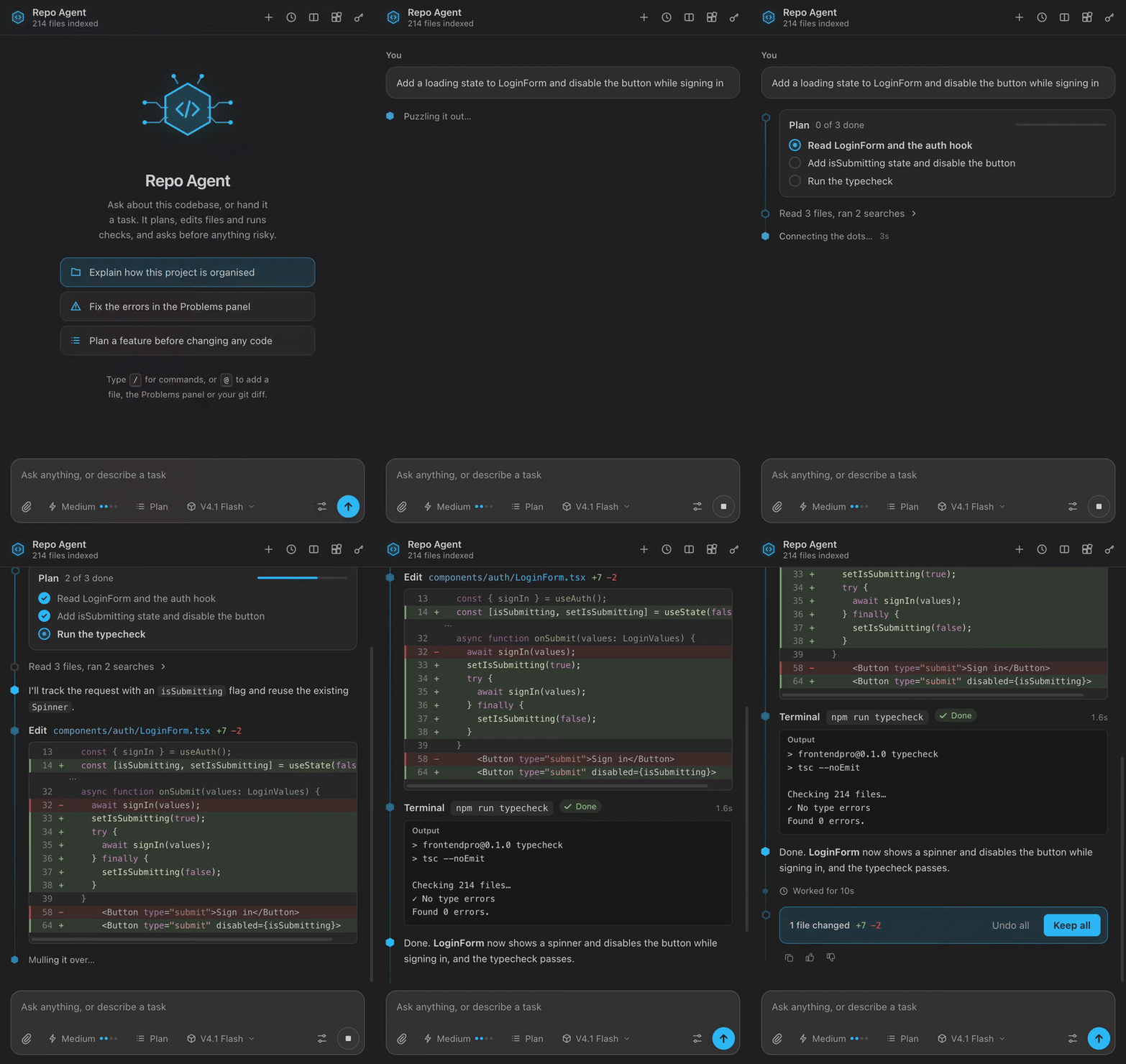
One real-time agent run: it reads the code, shows every edit as a diff, runs your typecheck, and leaves the changes for you to keep or undo.
Free Repo Agent brings a Claude/Cursor/Cline-style agent into VS Code. It indexes your whole repository, writes and edits code with inline Keep / Undo, runs terminal commands with your approval, verifies its own work (typecheck/build → then fixes the errors), lets you switch models (DeepSeek V4 Pro / V4 Flash with thinking mode, or any OpenAI-compatible model), tunes effort (fast → max reasoning), reads images (paste a UI → build the component), extends itself with MCP plugins (local & remote), learns your codebase, remembers your project, and runs a staff-engineer pre-commit code review — all on the affordable DeepSeek API with no monthly subscription.
Looking for a free Copilot alternative · Cursor alternative · Claude Code alternative · Cline / Roo Code / Kilo Code / Continue / Aider alternative · or the best DeepSeek extension for VS Code? This is the lightweight, bring-your-own-key one.
- 👁️ The agent sees your screenshots itself. Paste, drag in or attach an image and it goes straight to DeepSeek V4.1 Flash — the model looks at the actual pixels, like Claude, instead of a written description. Images show as thumbnails, your message shows the image you sent, and you can press Enter to send an image on its own.
- 🌐 Web search. The agent can search the web (DeepSeek's new Search API) for docs, error messages, release notes or the latest version of a package, and read pages as clean Markdown. Same key, $0.75 per 1,000 searches.
- 📄 PDFs work again. Installed builds were missing the PDF reader; it now ships with the extension.
- 🧠 Every DeepSeek model in one menu — V4.1 Flash (1017), V4 Pro, and the V4 Flash / R1 / V3 ids, each described honestly (DeepSeek now runs V4.1 Flash for the older ones).
- 🛡️ No more stuck runs from two approvals at once — prompts now appear one at a time.
A sturdier agent, and a smoother first five minutes:
- 🛡️ It doesn't give up when DeepSeek is busy. "Server overloaded", rate limits and network blips are retried automatically, and you see "DeepSeek is busy, retrying in 4s…" instead of a failed task.
- ✂️ No more stuck runs. Replies cut off at the output limit are handled (no half-written files), commands that never finish are stopped after 2 minutes, and running out of steps ends with a summary of what's done and what's left.
- 🔎 Sees more, breaks less. Large files are read in full (2,000 lines at a time), every edit shows the changed lines, errors in the files it just edited come back automatically, and it won't edit on top of changes you made while it was working.
- ⚡ Faster on long tasks. Several lookups run side by side, old file reads are trimmed from long runs, and follow-up messages reuse DeepSeek's prompt cache.
- ⌨️
repo-agentin every VS Code terminal — nothing to install, not even Node. - 🔑 Connect DeepSeek right from the chat — paste your key on the welcome screen and it's checked on the spot.
- 🧭 Getting Started guide —
Agent: Getting Startedwalks you through your key, your first task, plan mode, autocomplete and the CLI.
A redesigned chat, and agent output you can actually follow — like Claude Code:
- 🟩 See every edit as a diff — each file change shows +N −M and the changed lines, syntax-colored, with line numbers. New files say Create; long diffs fold.
- 🔎 Reads and searches fold into one line — "Read 3 files, ran 2 searches". Click to see every file and search with its result ("86 lines", "14 matches in 6 files").
- ✅ Commands show pass/fail — a green Done or red Exit 1 badge, a red step when something fails, and long output folded to the last lines (where the errors are).
- ⏱️ Step timings and "Worked for 38s" at the end of each run, with the total +N −M across changed files.
- 📊 Tables, quotes and dividers render properly in answers.
- 🎨 A new look — the run is drawn as one circuit trace with a hexagon node per step, a welcome screen with one-click starters, a rotating "Reasoning… / Tracing the circuit…" indicator with a timer, and Copy on every code block. Works in dark, light and high-contrast themes.
- ⚡ Faster — long answers stream without lag (~5× less render work), fewer model round trips (9 → 4 on a small task), no duplicate type-checks, and a pre-warmed terminal.
- ✍️ Autocomplete and 👁️ Vision are now on by default.
The biggest update yet — the features people compare coding agents on:
- 📋 Plan mode — the agent investigates read-only and proposes a step-by-step plan; click ▶ Execute plan to run it.
- ↺ Checkpoints — hover any message and click ↺ Restore to undo every file the agent changed since then and rewind the chat.
- ✍️ Inline autocomplete — grey suggestions as you type, Tab to accept (DeepSeek fill-in-the-middle). On by default since 0.13 — toggle it from the status bar.
- 💡 Quick Fix & right-click — ✨ Fix with Repo Agent on any red squiggle; right-click code → Explain · Fix · Refactor · Write tests · Add docs.
- ✨ AI commit messages — a sparkle button in Source Control writes the message from your staged changes.
- 🔎 Sharper agent — exact grep, the Problems panel, go-to-definition / find-references, web fetch, and parallel research subagents. A loop guard stops it repeating itself.
- ⧉ Multiple chat tabs,
AGENTS.mdsupport, new mentions@problems@diff@terminal@https://…, custom/commands, hooks, and long-chat memory. - ⌨️ CLI: plugins (MCP,
.mcp.json),--image, saved sessions (--continue/--resume), auto-verify and--plan.
|
Ask anything about your codebase. It indexes your project and injects the most relevant files into every answer — no copy-pasting context. |
Give it a task — it reads files, edits across many files, and runs commands step by step. Every change is reviewed inline with ✓ Keep / ✗ Undo. |
|
After editing it runs your typecheck/build, reads the errors, and fixes them before saying "done" — no more code that doesn't compile. |
Paste a UI screenshot/mockup and say "build this component." Zero setup — the image goes straight to DeepSeek V4.1 Flash, which reads it with your existing key. |
|
One-click tools the agent can use — GitHub, web search, Postgres, Playwright, filesystem & more — via the Model Context Protocol. Add any custom server. |
Reviews staged changes / files / branches, reads the full files, runs a second audit pass, and reports Critical · Quality · Architecture · Testing. Enforces your own rules. |
|
Switch models from the footer, Claude-style: DeepSeek V4.1 Flash / V4 Pro with thinking mode (deep reasoning that works with tool calls), or point at OpenAI / OpenRouter / Gemini for GPT/Claude/Llama. |
A dial from fast & cheap → max reasoning. Higher effort = more tool steps, longer answers, more context, and deeper V4 thinking — you decide speed vs. quality per task. |
|
One-click tools — GitHub, web search, Postgres, Playwright, filesystem & 20+ more — via the Model Context Protocol. Install from npm/GitHub, a custom command, or a remote URL. |
Prefer the shell? Run the same autonomous agent in your terminal — live checklist, file edits, command running, approvals — with no VS Code open. Ships with the extension. |
|
One click generates a knowledge brief of your project (architecture, conventions, key files) that's injected into every prompt — plus a |
Every reply has Copy · 👍 · 👎. A 👎 saves what was wrong as a rule the agent follows from then on — and offers a one-click Retry. Works with no folder open too. |
|
Before a big change, the agent investigates read-only and returns what it found, a numbered plan naming every file, and open questions. Nothing changes until you click ▶ Execute plan. |
Every message is a checkpoint. Click ↺ Restore to put back every file the agent changed since then — files it created are deleted — and rewind the chat to that point. |
|
Copilot-style grey suggestions as you type, Tab to accept — DeepSeek fill-in-the-middle using the code before and after your cursor. On by default; one click in the status bar turns it off. |
✨ Fix with Repo Agent on any red squiggle, right-click code → Explain · Fix · Refactor · Tests · Docs, and an AI commit message button in Source Control. |
|
The agent greps exact text, reads the Problems panel, uses the language server for definitions & references, fetches docs pages, and fans out parallel research subagents. |
Run several chats side by side, save prompts as custom |
1. Get a DeepSeek API key → platform.deepseek.com/api_keys — pay-as-you-go, a few dollars lasts a long time.
2. Add it to VS Code → open the chat and click Paste API key on the welcome screen (it's checked with DeepSeek right away), or run Agent: Set DeepSeek API Key. It's stored in VS Code SecretStorage, never in your repo. Agent: Getting Started walks you through the rest.
3. Open chat → press Cmd/Ctrl + Shift + A, or click the Repo Agent </> icon to dock it beside your code — and start.
💡 Type / in the chat for quick commands: Plugins, Memory, Reindex, Auto-accept, Vision and more.
Describe a task and watch it work end-to-end:
"Add a
/healthroute and a test for it, then run the tests."
- 📖 Reads the relevant files (from the repo index).
- ✍️ Proposes edits inline in your files with green highlights and ✓ Keep / ✗ Undo.
▶️ Asks to Run any terminal command in a visible Repo Agent terminal.- ✅ Auto-verifies — runs your typecheck/build and fixes errors before finishing.
- ☑️ A live checklist ticks each step
pending → in-progress → ✓ done. Hit Stop anytime.
- 📋 Plan first — click the 📋 Plan chip (or type
/plan): it only reads and investigates, then proposes a plan. ▶ Execute plan carries it out. - ↺ Rewind — hover a message you sent → ↺ Restore reverts every file the agent changed since then and puts your message back in the input. (Effects of shell commands, like installs, aren't undone.)
- ⧉ Several at once — ⧉ Tab opens another independent chat, each with its own terminal.
- 🧠 Long chats keep their memory — older messages are summarized automatically;
/compactdoes it now.
| 💡 Quick Fix | Cursor on a red/yellow squiggle → lightbulb → ✨ Fix with Repo Agent or Explain |
| Right-click | Select code → Repo Agent → Explain · Find & fix bugs · Refactor · Write tests · Add docs |
| ✨ Commit message | The sparkle in the Source Control title bar writes it from your staged diff, in your repo's style |
| ✍️ Autocomplete | On by default: grey suggestions, Tab to accept (each pause is a small API call). Click Autocomplete in the status bar to turn it off |
| @-mentions | @file · @problems · @diff (uncommitted changes) · @terminal · @https://… (a web page) |
Custom /commands |
Save a prompt as .repo-agent/commands/review-pr.md (share via git) or ~/.repo-agent/commands/, then type /review-pr …. $ARGUMENTS = what you type after it |
AGENTS.md |
The shared agent-instructions standard (Codex, Cursor, Claude Code) — read into every prompt, alongside .claude.md and memory.md |
Hooks — run your own scripts around the agent's tool calls with .repo-agent/hooks.json:
{ "preToolUse": [{ "matcher": "write_file|edit_file", "command": "./scripts/guard-migrations.sh" }] }Each hook gets the event as JSON on stdin; exit code 2 blocks the call (stderr is told to the agent). Project hooks only run in a trusted workspace, after you approve that exact file.
Prefer working in the terminal, like Claude Code? The same agent runs as a CLI — no VS Code needed. It plans a live checklist, reads and edits files, and runs commands in your current directory, asking before anything that changes them.
◆ Repo Agent v0.11.0 · deepseek-flash · medium effort

› add a /health route and a test for it

  ▶ Add the /health route
  ○ Add a test
  ○ Run the tests

● Read  src/server.ts
● Edit  src/server.ts
  ✎ Edit src/server.ts
    Approve? [y]es / [n]o / [a]lways:
Setup — nothing to install. Since v0.14, open a new VS Code terminal and type repo-agent: the extension puts it on the terminal's PATH and runs it on VS Code's built-in runtime, so you don't even need Node. For other terminals (iTerm, Windows Terminal…), run Agent: Use repo-agent in Other Terminals — it gives you a one-line alias to paste into your shell profile.
export DEEPSEEK_API_KEY=sk-...      # or just run it and paste your key when asked

repo-agent                          # interactive session in the current folder
repo-agent "add a /health route" # run one task, then keep going| Options | -m, --model <id> · -e, --effort low|medium|high|max · -C, --cwd <dir> · --base-url <url> (any OpenAI-compatible provider) · -y, --yes (auto-approve) · --login (re-enter your key) · --plan · -i, --image <file> · -c, --continue · -r, --resume · --no-verify |
| In-session | /plan · /image <file> · /resume · /mcp · /login · /model <id> · /effort <lvl> · /clear · /cwd · /help · /exit |
| Plugins | Add "mcpServers" to ~/.repo-agent.json or a project .mcp.json — the same format as Claude Code & Cursor. Project servers are approved once; each plugin call is confirmed |
| Controls | Approve each change with y / n / always · Ctrl-C stops a run, again quits |
Your key comes from
DEEPSEEK_API_KEYor~/.repo-agent.json(writtenchmod 600, only if you opt in). Pasted the wrong one?repo-agent --login.The CLI keeps its own key store — the extension's key lives in VS Code SecretStorage, which a program outside VS Code can't read.
Switch the model from the 🧠 chip in the chat footer (or the ⚙︎ Options menu), just like Claude:
| Model | Best for |
|---|---|
DeepSeek V4.1 Flash (deepseek-flash) |
Newest & the default — now the V4.1-Flash-1017 update: fast, cheap, 1M context, 384K output, and reads images natively |
DeepSeek V4 Pro (deepseek-v4-pro) |
Hardest code & reasoning — top quality (text only) |
V4 Flash / R1 / V3 (deepseek-v4-flash / deepseek-reasoner / deepseek-chat) |
Older model ids you can still pick — DeepSeek now runs V4.1 Flash for them |
- Thinking mode — on the V4 models the agent uses DeepSeek's built-in deep reasoning that works with tool calls, so it thinks before it edits. It's wired to the ⚡ Effort dial: off at Low (fast/cheap), then low → high → max reasoning at Medium → High → Max.
- Not just DeepSeek — the extension speaks an OpenAI-compatible API, so set a custom model id + point
repoAgent.deepseek.baseUrlat OpenAI, OpenRouter, Gemini, or any provider to run the agent on GPT-4o, Claude, Llama, Qwen and more.
Run Agent: Learn This Codebase (or / → Learn this codebase) and it indexes your repo and writes a thorough knowledge brief — purpose, stack, architecture, key files, data models, conventions, build/run/test — to .repo-agent/knowledge.md. That brief is injected into every prompt, so the agent knows your project instantly. Re-run anytime to refresh.
Zero setup. The default model — DeepSeek V4.1 Flash — is natively multimodal, so it reads images with the DeepSeek key you already have. One model, one key, nothing to configure.
Just paste a screenshot/mockup into the chat (or drag it onto the message box) and ask "build this as a React component." With V4.1 Flash the image goes straight to the agent's model, so it sees exactly what you see. With a text-only model (V4 Pro) or another provider, a vision model first turns the image into a precise spec the agent builds from.
/  →  👁️ Vision  →  switch provider (optional):
     • DeepSeek V4.1 Flash — same key, no setup   ← default
     • Google Gemini — FREE (no credit card)
     • Ollama / LM Studio — local, no key
     • OpenRouter (free models) · OpenAI · Custom
With Vision off, images aren't read — the chat tells you, so nothing fails silently.
Open the 🧩 Plugins panel (or type / → Plugins) and add tools with one click. Built on the Model Context Protocol — the same plugin standard Claude uses — so the entire MCP ecosystem works here. Add from the built-in catalog, npm/GitHub, a custom command, or a remote URL.
📖 Full guide: how to use plugins →
| Plugin | What the agent can do | |
|---|---|---|
| 📁 | Filesystem | Read/write/search files in a folder you allow |
| 🐙 | GitHub | Search repos/issues, read files, open PRs & issues |
| 🦊 | GitLab | Repos, issues, merge requests |
| 🔎 | Web Search (Brave) | Search the web for up-to-date info |
| 🦅 | Tavily | AI-grade web search & page extraction |
| 🌐 | Fetch | Fetch a URL as clean text/markdown |
| 🎭 | Playwright | Drive a real browser: click, fill, scrape, screenshot |
| 🐘 | Postgres · 🗃️ SQLite | Query your databases |
| 🪜 | Sequential Thinking | Structured step-by-step reasoning |
| 📚 | Context7 | Up-to-date docs & snippets for any library |
| 🧠 | Memory | A knowledge graph the agent reads/writes across tasks |
| 🗺️ | Google Maps · 💬 Slack | Places/directions · channels & messages |
➕ Add any MCP server — from npm/GitHub (paste
@scope/serverorowner/repo), a custom command, or a remote URL (hosted servers over Streamable HTTP, with an optional bearer token). Keys are stored securely in VS Code SecretStorage. Full guide → docs/PLUGINS.md
Type / → Memory to create a memory.md at your repo root. Its contents are injected into every chat and agent prompt, so the agent always remembers your project:
# Project Memory

## Project
- Stack: React + TypeScript + Vite, Node/Express API, Postgres
- Run: `npm run dev` · Tests: `npm test`

## Conventions
- 2-space indent, single quotes, named exports.
- Always add types and a test. Never commit secrets or use `any`.
Delete the file to turn memory off. (You can also drop a .agent.md / .claude.md — it reads those too.)
Stage changes (git add …) → Agent: Review Staged Changes (also in the Source Control title bar). Findings appear in the Problems panel, the Review Results sidebar, and inline — each with Fix with AI, Ignore, and Commit Anyway.
Make it enforce YOUR standards. Run Agent: Create Review Guidelines to scaffold a system-design.md. The reviewer reads it before every review and flags any change that breaks a rule — quoting the rule:
# Review Guidelines & System Design

## Architecture
- UI → services → data access. UI must not import data-access directly.

## Review rules
- No `console.log` in committed code — use the logger.
- Every new exported function ships with a test.
- No secrets in source; read them from config/secret storage.On first run, Repo Agent indexes your repository — symbols, structure, and optional AI per-file summaries — into a local cache (.agent-cache/). Every question then pulls in the most relevant files automatically, so answers fit your codebase. Re-run anytime with Agent: Reindex Repository, and tune what's indexed via repoAgent.indexing.* and how many files are injected via repoAgent.retrieval.maxFiles.
Cmd/Ctrl + Shift + P → type "Agent:"
| Command | Description |
|---|---|
Agent: Chat / Open Chat (beside editor) |
Open the chat panel |
Agent: Generate Code |
Describe code to generate |
Agent: Run Agent (autonomous) |
Run a task that edits files & runs commands |
Agent: Review Staged Changes / Review Current File |
Pre-commit / file review |
Agent: Create Review Guidelines |
Scaffold a system-design.md of review rules |
Agent: Learn This Codebase |
Generate a persistent project knowledge brief |
Agent: Edit Memory |
Edit the always-on memory.md |
Agent: Choose Vision Provider |
Pick a vision backend (Gemini free / Ollama / …) |
Agent: Reindex Repository / Explain Architecture |
Index & architecture tools |
Agent: Set / Clear DeepSeek API Key |
Manage your key |
Agent: New Chat Tab |
Open another independent chat |
Agent: Generate Commit Message |
Commit message from your staged changes (also ✨ in Source Control) |
Agent: Toggle Inline Autocomplete |
Grey as-you-type suggestions on/off |
Agent: Getting Started |
Step-by-step guide: key, first task, plan mode, autocomplete, CLI |
Agent: Use repo-agent in Other Terminals |
repo-agent already works in VS Code terminals; this gives you an alias for any other terminal |
| Right-click → Repo Agent → … | Explain / Fix / Refactor / Write tests / Add docs for the selection |
All settings live under repoAgent.* — click to expand
| Setting | Default | Description |
|---|---|---|
deepseek.model |
deepseek-flash |
Active model (switch it from the 🧠 footer chip) |
effort |
medium |
Speed vs. reasoning depth: low · medium · high · max |
deepseek.baseUrl |
https://api.deepseek.com |
API base URL — point at any OpenAI-compatible provider |
deepseek.maxTokens |
4096 |
Max tokens per response (auto-raised for V4) |
vision.baseUrl / vision.model |
DeepSeek deepseek-flash |
OpenAI-compatible vision endpoint (reuses your DeepSeek key) |
review.guidelinesFile |
system-design.md |
Your custom review-rules file |
review.deepAudit |
true |
Second audit pass for fewer false positives |
indexing.maxFiles |
1500 |
Index size cap |
indexing.generateSummaries |
true |
AI per-file summaries (set false for $0 indexing) |
retrieval.maxFiles |
8 |
Relevant files injected per prompt |
plugins.autoRun |
false |
Run plugin tools without a confirm prompt (off = you confirm each third-party tool call) |
autocomplete.enabled |
true |
Inline autocomplete — each typing pause is a small API call |
autocomplete.delayMs |
350 |
Typing pause before a suggestion is requested |
review.autoOnSave |
false |
Auto-review files on save |
- Your keys stay secret. DeepSeek/vision keys and any plugin or remote‑MCP tokens live in VS Code SecretStorage — never in your code, settings, or the extension's storage, and never logged.
- No telemetry. Zero analytics/tracking. The only network calls go to endpoints you configure — your AI provider, your vision provider, and any MCP servers you add. Your code/context is sent to your AI provider only when you make a request.
- The agent stays in your project. File edits are blocked from absolute paths and
..traversal; commands run in a visible terminal with your approval; edits show inline with Keep / Undo. - Plugins run third‑party code — add only servers you trust. Plugin tools ask before running by default (
plugins.autoRunis off); enable it only for trusted plugins. - Sensitive generated files?
memory.mdand.repo-agent/knowledge.mdare injected into prompts and committed by default — add them to.gitignoreif private:.agent-cache/ .repo-agent/ memory.md
| Free Repo Agent | Copilot | Cursor | Claude / Cline | |
|---|---|---|---|---|
| Price | 🟢 Free (BYO key) | 💲 Subscription | 💲 Subscription | 💲 Sub / BYO |
| Repo-aware multi-file agent | ✅ | ✅ | ✅ | ✅ |
| Runs terminal commands | ✅ | ✅ | ✅ | ✅ |
| Self-verifies (build/typecheck) | ✅ | — | ◐ | — |
| Vision: screenshot → code | ✅ free | — | ✅ | ✅ |
| MCP plugins | ✅ | — | ✅ | ✅ |
| Code review + custom rules | ✅ | ◐ | — | — |
| Project memory file | ✅ | ◐ | ◐ | ✅ |
A free alternative to GitHub Copilot, Cursor, Claude, Codex, Cline, Continue, Codeium, Windsurf, Tabnine, Cody, Aider & Roo Code — a lightweight, bring-your-own-key agent that edits code, self-verifies, and reviews diffs inside VS Code.
Is it really free?
Yes — the extension is free and open. You only pay DeepSeek's low pay-as-you-go API usage (your own key).
Does it have inline autocomplete like Copilot?
Yes — since 0.12. Grey suggestions appear as you pause typing and Tab accepts them, using DeepSeek's fill-in-the-middle model with the code before and after your cursor. It's on by default since 0.13 (each pause is a small API call); click Autocomplete in the status bar to turn it off.
Can I undo what the agent did?
Yes. Each edit shows inline with Keep / Undo, and every message is a checkpoint: click ↺ Restore on it to revert all files the agent changed since then and rewind the chat. You can also use 📋 Plan mode to review a plan before anything changes.
Is it a good Copilot / Cursor / Claude / Cline alternative?
Yes — repo-aware chat, an autonomous agent that edits files and runs commands, visible reasoning, vision, MCP plugins, and pre-commit code review — the same core workflow, no subscription.
Is there a free DeepSeek extension / DeepSeek agent for VS Code?
Yes — this is one. It's a full DeepSeek coding agent (not just chat): it edits files, runs commands, reads screenshots and reviews code, using your own DeepSeek API key.
How do I use DeepSeek V4.1 Flash in VS Code?
Install Free Repo Agent and run Agent: Set DeepSeek API Key — DeepSeek V4.1 Flash (
deepseek-flash) is the default. Switch to V4 Pro from the 🧠 footer chip. Thinking mode is built in and follows the ⚡ Effort dial.Is there a free Claude Code alternative that runs in the terminal?
Yes — the terminal CLI (
repo-agent) runs the same autonomous agent in your shell: live checklist, file edits, commands, with approval before every change. See Terminal CLI. It doubles as a lightweight Aider alternative.Is it a Roo Code / Kilo Code / Cline alternative?
Yes — like them it's an in-editor agent that reads your repo, edits multiple files and runs commands, bring-your-own-key with no subscription, plus a live checklist, auto-verify/self-fix and a staff-engineer code reviewer.
Can I use it in Cursor, Windsurf or VSCodium?
It's published on Open VSX, the registry Cursor, Windsurf and VSCodium install from — search “Free Repo Agent” in their Extensions view.
Does it fix its own mistakes?
Yes — after editing it runs your typecheck/build, reads the errors, and fixes them before finishing.
Can I add plugins / MCP servers?
Yes — open the 🧩 Plugins panel and add GitHub, web search, Postgres, Playwright and more with one click, or any custom MCP server (needs Node/npx).
Does my code leave my machine?
Only the context needed for a request is sent to the DeepSeek API when you ask. Your key never leaves SecretStorage; the index is cached locally under
.agent-cache/.Found a bug or have an idea? Open an issue → — you'll get a guided bug report or feature request form. Please include your extension version, VS Code version, steps to reproduce, and any error from View → Output → "Repo Agent". Browse existing reports on the Issues page.
⭐ If Free Repo Agent saves you time, star it and leave a review — it helps others find it.
MIT licensed
Free DeepSeek AI coding agent · free AI autocomplete · Copilot autocomplete alternative · AI plan mode · AI coding checkpoints · AI commit message generator · AGENTS.md · DeepSeek extension for VS Code · DeepSeek agent · DeepSeek V4.1 Flash · DeepSeek V4 Pro · DeepSeek in Cursor · Open VSX AI agent · Claude Code alternative · Roo Code alternative · Kilo Code alternative · terminal AI coding agent · Free AI coding agent · AI coding assistant · AI agent for VS Code · agentic coding · vibe coding · GitHub Copilot alternative · free Copilot · Copilot Chat alternative · Cursor alternative · Claude alternative · Claude Code alternative · Codex alternative · Cline / Continue / Codeium / Windsurf / Tabnine / Cody / Aider / Roo Code / Kilo Code alternative · ChatGPT for VS Code · DeepSeek VS Code extension · DeepSeek Coder · DeepSeek V4 · DeepSeek V4 Pro · DeepSeek V4 Flash · thinking mode · reasoning model · AI model switcher · switch AI model · OpenRouter · GPT-4o · use Claude in VS Code · MCP · Model Context Protocol · MCP client · remote MCP server · MCP plugins · AI code review · AI code reviewer · custom review rules · vision AI coding · screenshot to code · image to code · UI to code · AI pair programming · agent mode · autonomous coding agent · self-verifying AI agent · learn codebase · project memory · repo indexing · AI refactoring · AI code generation · repo-aware AI assistant · bring your own key AI.