Welcome to the Metaverse

- 20% Weekly submissions
- 30% Assignment
- 50% Exam
- CSResources git repo. Here you will find links to the previous courses and all my quick references
- Git for poets
- Python a Crash Course
- https://codingbat.com/python
What you will need to install:
- Python
- Java
- VSCode
- Git
- py5
- Pandas
- Maybe more!
Course Notes:
Programs we developed in class:
- Py5 Sketch
- For loops
- Guessing Game
- Rainfall
- Star Map
- Pandas Example
- Lists, Dictionaries & Strings - Story Generator
- Parsing ABC Music Score Files
- Shakespere Sonnets Generator
- Alternative Solution
- Reading SQL files
Quick References:
Pick a dataset from Kaggle and analyse it using Pandas. Create some graphs. What have you learned about the dataset?
Upload your work to Brightspace. Include image files of the graphs you create
Create a table (tree view) user interface to an sql database table that you connect to from Python. Create a text field where you can type in a search query and a button that you press to filter the table by the text field. Take a screenshot and submit this with code on Brightspace.
By the end of this lab, you will be able to:
- Create classes with attributes and methods
- Implement encapsulation using private attributes
- Use inheritance to create class hierarchies
- Demonstrate polymorphism through method overriding
- Build a complete object-oriented system
Create a new Python file called music_game.py for this lab exercise.
Create a Musician class with the following specifications:
-
Attributes:
name(string)instrument(string)skill_level(integer, 1-10)
-
Methods:
__init__(self, name, instrument, skill_level)- constructorplay(self)- returns a string:"{name} plays the {instrument}"practice(self)- increases skill_level by 1 (max 10)get_info(self)- returns a string with all musician details
Test your code:
musician1 = Musician("Aoife", "fiddle", 7)
print(musician1.play())
print(musician1.get_info())
musician1.practice()
print(musician1.get_info())
Expected output:
Aoife plays the fiddle
Aoife plays fiddle at skill level 7
Aoife plays fiddle at skill level 8
Irish traditional music sessions are gatherings where musicians play tunes together. Create a Session class with encapsulation:
-
Private Attributes:
__musicians(list) - stores Musician objects__location(string)__max_capacity(integer)
-
Methods:
__init__(self, location, max_capacity)- constructoradd_musician(self, musician)- adds a musician if under capacityremove_musician(self, name)- removes a musician by nameget_musician_count(self)- returns number of musicianslist_musicians(self)- prints all musicians in the sessionget_location(self)- returns the location
Test your code:
session = Session("The Cobblestone", 5)
session.add_musician(musician1)
session.add_musician(Musician("Liam", "guitar", 6))
session.list_musicians()
print(f"Musicians in session: {session.get_musician_count()}")Create two subclasses of Musician:
LeadMusician Class:
- Inherits from
Musician - Additional attribute:
specialty(string, e.g., "Irish reels") - Override
play()method to return:"{name} leads the session with {specialty} on {instrument}" - Add new method
start_tune(self, tune_name)that returns:"{name} starts playing {tune_name}"
BeginnersMusician Class:
- Inherits from
Musician - Additional attribute:
learning(boolean, starts as True) - Override
play()method to return:"{name} is learning to play the {instrument}" - Add method
graduate(self)that setslearningto False and increases skill_level by 2
Test your code:
lead = LeadMusician("Máire", "flute", 9, "slip jigs")
beginner = BeginnersMusician("Tom", "bodhrán", 3)

print(lead.play())
print(lead.start_tune("The Butterfly"))
print(beginner.play())
beginner.graduate()
print(f"{beginner.name} skill level: {beginner.skill_level}")Create a function called hold_session() that accepts a list of any type of Musician object and:
- Prints "--- Session Starting ---"
- Calls the
play()method on each musician - Prints "--- Session Ending ---"
Test your code:
musicians = [
    Musician("Aoife", "fiddle", 7),
    LeadMusician("Máire", "flute", 9, "slip jigs"),
    BeginnersMusician("Tom", "bodhrán", 3)
]

hold_session(musicians)
Expected output:
--- Session Starting ---
Aoife plays the fiddle
Máire leads the session with slip jigs on flute
Tom is learning to play the bodhrán
--- Session Ending ---
Notice how the same method name play() produces different output depending on the object type!
Answer these questions in comments at the end of your file:
- What advantages does encapsulation provide in the Session class?
- How does inheritance help avoid code duplication between Musician classes?
- Give an example of polymorphism from this lab and explain why it's useful.
- What other real-world scenarios could you model using OOP?
- Test each part as you go - don't wait until the end!
- Use descriptive variable names
- Remember to call
super().__init__()in subclass constructors - If you get stuck, refer back to the lecture slides & example
Analyze the Ace Ventura screenplay excerpt to extract insights using Python lists, strings, and dictionaries.
You have been provided with a screenplay excerpt from "Ace Ventura: Pet Detective" saved as aceventura.txt.
Clean the data
Write a function clean_word(word) that:
- Converts words to lowercase
- Removes punctuation
- Returns the cleaned word
- See previous lab
def clean_word(word):
    # Your code here
    pass
Load the file into a list of strings (previous lab)
Count Word Frequencies
Create a dictionary called word_counts that stores each word and how many times it appears in the script. Use your clean_word() function.
Task 1.3: Find the Top 10 Most Common Words
Write code to find and print the 10 most frequently used words and their counts.
To sort a dictionary by values:
word_counts = {'hello': 5, 'world': 3, 'python': 8, 'data': 2}

# Get top 3 words

top_3 = sorted(word_counts.items(), key=lambda x: x[1], reverse=True)[:3]
key=lambda x: x[1] tells Python to sort by the second element (index 1) of each tuple, which is the count. reverse=True sorts in descending order (highest first).
Extract Character Names
Screenplay format puts character names in ALL CAPS before their dialogue. Write a function that identifies character names by:
- Looking for lines that are in all uppercase
- Filtering out common scene headings (EXT., INT., CONT'D, DAY, NIGHT, etc.)
- Storing unique character names in a list
def extract_characters(lines):
    characters = []
    # Your code here
    return characters
Task 2.2: Count Lines per Character
Create a dictionary where:
- Keys are character names
- Values are the number of times that character speaks
Task 2.3: Character Report
Print a formatted report showing:
- Total number of unique characters
- Each character and their number of speaking lines
- The character with the most dialogue
Task 3.2: Dialogue Length Analysis
For each character, calculate:
- Total number of words spoken
- Average words per line of dialogue
Store this in a dictionary structure of your choice.
Task 3.3: Word Usage by Character
Create a nested dictionary that shows which words each character uses most frequently:
character_words = {
    "UPS MAN": {"word1": count1, "word2": count2, ...},
    "GRUFF MAN": {"word1": count1, ...}
}
Bonus!
Stop Words
Common words like "the", "a", "is", "in" aren't very interesting. Create a list of stop words and modify your word frequency analysis to exclude them.
Action vs Dialogue
Screenplays have action descriptions (normal text) and dialogue (text after character names). Calculate what percentage of the script is dialogue versus action.
Challenge 3: Character Interaction Matrix
Create a dictionary that shows which characters appear in scenes together. This might look like:
{
    "UPS MAN": ["GRUFF MAN"],
    "GRUFF MAN": ["UPS MAN"]
}=== WORD FREQUENCY ANALYSIS ===
Total unique words: XXX
Top 10 most common words:
1. the: XX occurrences
2. man: XX occurrences
...
=== CHARACTER ANALYSIS ===
Total characters: X
UPS MAN: XX lines
GRUFF MAN: XX lines
...
=== SCENE BREAKDOWN ===
Total scenes: X
EXT scenes: X
INT scenes: X
- Review Week
Part 1
- Load the file shakespere.txt into a a list of Dictionaries, where each Dictionary has a key consisting of the roman numeral number of the sonnet and value of the 14 lines of the Sonnet
- Print the list in the form of roman numeral + first line of the sonnet
Part 2
Program DANI - Dynamic Artificial Non-Intelligence. An AI capable of many tasks, such as writing Poetry. Here are two examples of DANI's poems:
father let this in thee shall shine
identify do mine only care i ensconce
who calls thee releasing
fleeting year would have lookd on the
thine heir might have faculty by us
thrall
bed
liii
presence grace impiety
wane so suited and sun of hand
untrue
sending a united states who will believe
project gutenbergtm license apply to anyone in
nurseth the lease of compliance to identify

adding one most which the deathbed whereon
travel forth all away yourself in process
seen the wretch to complying with frost
being fond on men ride
whateer thy minds to occur a son
reported to prove me words respect
famine where i cannot contain a bastard
thorns did exceed
effectually is had stoln of year thou
treasure of skill and unfatherd fruit
liii
5000 are restord and distribution of hearsay
ill well esteemd
stole that fair friend for through 1e7
DANI works, by loading a text and storing a list of each word from the document in an Dictionary. The key is the word itself and the value is a list, where each element is the word following. This is called the "model".
For example, for this input file:
i love Star Trek
love is love
I love TU Dublin
DANI will generate the following model:
i: love
love: star is tu
star: trek
trek:
is: love
tu: dublin
dublin:
Each word is listed once in the model, regardless of how many times it occurs in the document. Each word is printed and all of the words that follow the word in the text. In the above example, the words star is and tu follow the word love. The word i is followed by the word love.
To write a poem, DANI picks one word at random from the model and starts with that. Then DANI looks to see what possible words will follow the chosen word and it picks one at random from the list for the next word. It then repeats the process until it has 8 words, or until it finds a word that has nothing following it - in which case it will terminate the sentence. It does this 14 times to write a poem as there are 14 lines in a sonnet.
To get a random key from a dictionary:
import random

my_dict = {'a': 1, 'b': 2, 'c': 3, 'd': 4}
random_key = random.choice(list(my_dict.keys()))
print(random_key)
Train DANI on the shakespere sonnets and create the program to write the poem
Extra!
Try and incorporate the frequency of word following into the model and poem generation
Congrations you have created an N-Gram 1 language model :-) N-Gram 5 or 6 was State of the Art before LLMs
For more about DANI see:
- https://bryanduggan.org/projects/i-am-dani/
- https://bryanduggan.org/2024/10/02/we-are-dani/
- https://bryanduggan.org/2023/06/12/dani-a-poetry-writing-chatbot-from-1987-arrives-in-2023/
Dataset: ABC notation file with 200+ Irish traditional tunes
You'll parse an ABC music notation file, extract tune information, and analyze it with pandas. ABC notation is a text-based music format where each tune has metadata (title, key, type) and the musical notation.
Open the ABC file and look at a few tunes. Each tune follows this pattern:
X:21001
T:FUNNY TAILOR, The
R:jig
M:6/8
L:1/8
K:G
BA|GED GAB|GBA G2G|...

%%%

X:21002
T:BUNKER HILL (reel)
R:reel
K:G
...
Key observations:
- Every tune starts with
X:followed by a number T:lines contain the title (can have multiple T: lines - first is main title, second is alternate)R:is the tune type (reel, jig, hornpipe, slip jig, etc.)K:is the musical key (G, D, Em, Dmaj, etc.)- Tunes end with blank lines (often marked with
%%%) - Everything from X: to the blank lines is the "notation"
Questions to answer:
- How can you identify when a new tune starts?
- How can you identify when a tune ends?
- What information do we need to extract?
Write code to read the ABC file line by line into a list.
Hints:
- Use
open()with the file path - Read all lines at once or iterate line by line
- Each line will be a string
After loading:
- Print the total number of lines
- Print the first 20 lines to see the structure
- Print the last 10 lines
Questions:
- How many lines are in the file?
- Can you spot where tunes begin and end?
This is the main challenge! You need to:
- Identify tune boundaries (starts with X:, ends with blank lines)
- Extract metadata from each tune
- Store each tune as a dictionary
Write code to identify where each tune starts and ends.
Approach:
- Loop through all lines
- When you see a line starting with "X:", that's a new tune
- Collect lines until you hit blank lines
- A blank line is when
line.strip() == ""
Hint for structure:
tunes = []
current_tune_lines = []
in_tune = False

for line in lines:
    # Check if this starts a new tune
    if line.startswith("X:"):
        # If we were already collecting a tune, save it first
        if current_tune_lines:
            # Process the previous tune
            pass
        # Start collecting new tune
        current_tune_lines = [line]
        in_tune = True
    elif in_tune:
        # Keep collecting lines for current tune
        # Check if blank line (end of tune)
passFor each tune, extract:
- X: The tune ID (just the number part)
- T: Title (first T: line you encounter)
- Alt Title: Second T: line (if it exists)
- R: Tune type (the text after R:)
- K: Key (the text after K:)
- Notation: All lines from X: to end (as a single string)
Parsing hints:
def parse_tune(tune_lines):
    """Parse a list of lines into a tune dictionary"""
    tune = {
        'X': None,
        'title': None,
        'alt_title': None,
        'tune_type': None,
        'key': None,
        'notation': '\n'.join(tune_lines)
    }

    # Put your code here!

return tuneCombine Tasks 3.1 and 3.2 to create a list of tune dictionaries.
Test your code:
print(f"Found {len(tunes)} tunes")
print("\nFirst tune:")
print(tunes[0])
print("\nLast tune:")
print(tunes[-1])
Expected output structure:
{
    'X': '21001',
    'title': 'FUNNY TAILOR, The',
    'alt_title': None,
    'tune_type': 'jig',
    'key': 'G',
    'notation': 'X:21001\nT:FUNNY TAILOR...'
}Convert your list of dictionaries into a pandas DataFrame.
import pandas as pd

# Your code here# Print basic info
print(df.shape)
print(df.head())
print(df.info())
# Check for missing values
print(df.isnull().sum())
# What columns do we have?
print(df.columns)Questions:
- How many tunes were successfully parsed?
- How many have alternate titles?
- What data type is each column?
Now the fun part - analyze the tunes!
Count how many tunes of each type (reel, jig, hornpipe, etc.)
# Your code here - use value_counts() or groupby()Questions:
- Which tune type is most common?
- Which tune type is least common?
- How many different tune types are there?
Count how many tunes in each musical key.
# Your code hereQuestions:
- Which key is most popular?
- Are there more tunes in major or minor keys?
- Any unusual keys?
Search for tunes that mention alcoholic drinks in their titles.
Common alcoholic drinks to search for:
- whiskey/whisky
- beer/ale
- wine
- brandy
- punch
- porter
- rum
- gin
Hints:
- Use
.str.contains()withcase=Falseandna=False - Can search for multiple terms using
|(OR operator) - Example:
df['title'].str.contains('whiskey|brandy', case=False, na=False)
# Your code hereQuestions:
- How many tunes mention alcoholic drinks?
- Which drink appears most often?
- Print the titles of these tunes
Save your DataFrame to a CSV file:
df.to_csv('parsed_tunes.csv', index=False)import pandas as pd
# Part 2: Read file
def load_abc_file(filename):
"""Load ABC file into list of lines"""
with open(filename, 'r', encoding='latin-1') as f:
lines = f.readlines()
return lines
# Part 3: Parse tunes
def parse_tune(tune_lines):
"""Parse a single tune from lines"""
tune = {
'X': None,
'title': None,
'alt_title': None,
'tune_type': None,
'key': None,
'notation': '\n'.join(tune_lines)
}
title_count = 0
for line in tune_lines:
line = line.strip()
return tune
def parse_all_tunes(lines):
"""Parse all tunes from lines"""
tunes = []
current_tune_lines = []
blank_count = 0
for line in lines:
# TODO: Implement tune boundary detection
# TODO: Call parse_tune() for each complete tune
pass
return tunes
# Load file
lines = load_abc_file('dmi_tunes.abc')
print(f"Loaded {len(lines)} lines")
# Parse tunes
tunes = parse_all_tunes(lines)
print(f"Parsed {len(tunes)} tunes")
# Create DataFrame
df = pd.DataFrame(tunes)
# Analysis
print("\n=== TUNE TYPE COUNTS ===")
# TODO: Your code here
print("\n=== KEY COUNTS ===")
# TODO: Your code here
print("\n=== ALCOHOLIC DRINKS IN TITLES ===")
# TODO: Your code hereDuration: 2 hours
Dataset: Irish traditional music albums and tracks from thesession.org
Create a new Python file called albums_lab.py and load the two CSV files:
album.csv- Contains album informationalbumtracktune.csv- Contains tracks and tunes on each album
Hint: Look at the class example for how to load CSV files with pandas.
Load album.csv and answer these questions:
- How many albums are in the dataset?
- What are the column names?
- Which artists appear in the first 5 albums?
- Which artists appear in the last 5 albums?
Hint: Use head(), tail(), shape, and info()
- What data type is each column?
- Are there any missing values?
Hint: Use info() and describe()
Find out:
- How many unique artists are in the dataset?
- Who are the artists?
Hint: Look up how to get unique values from a pandas column
Load albumtracktune.csv and answer:
- How many tracks are in the dataset?
- What columns does this dataset have?
- What is the relationship between this file and the albums file?
Hint: Notice the album_id column - what does it refer to?
- What's the highest track number on any album?
- How many tunes can a single track contain?
Hint: Look at the track_num and tune_num columns
Which tune titles appear most frequently across all albums?
Hint: Use value_counts() like in the class example
Filter the albums to show only:
- Albums by "Altan"
- Albums by "Martin Hayes"
- Albums by "The Bothy Band"
How many albums does each artist have in the dataset?
Hint: Use boolean indexing like df[df['column'] == 'value']
- Find all tracks on album_id 1 (Martin Hayes - The Lonesome Touch)
- How many tracks are on this album?
- How many total tunes are on this album?
Hint: Filter the tracks dataframe by album_id
Find all tracks that have more than one tune (tune_num > 1)
How many such tracks are there?
Hint: Boolean filtering on the tune_num column
Group the tracks by album_id and count how many tracks each album has.
Which album has the most tracks?
Hint: Use groupby() and count() or size()
For each album, calculate the total number of tunes (not just tracks - remember some tracks have multiple tunes!)
Hint: You might need to count all rows for each album_id
Calculate the average number of tunes per track for each album.
Which albums tend to have more tunes per track?
Hint: Use groupby() with mean() on the tune_num column
Sort the albums:
- Alphabetically by title
- Alphabetically by artist
- By ID in descending order
Hint: Use sort_values() with the ascending parameter
Sort the tracks dataframe:
- By album_id, then by track_num
- By title alphabetically
Hint: You can pass a list of column names to sort_values()
Now it's time to combine the two datasets!
Merge the albums and tracks dataframes together so you can see the artist and album title alongside each track.
Hint: Look up pd.merge() - you'll need to specify which columns to join on. The common column between the two dataframes is the album ID (but it has different names in each dataframe!)
After merging, answer:
- How many rows does the merged dataframe have?
- What new information can you see now that the data is merged?
- Print the first 10 rows
Now that you have both album info and track info together, answer:
- How many tracks does Martin Hayes have across all his albums?
- What tunes appear on Altan albums?
- Which artist has the most individual tune entries in the dataset?
Hint: After merging, you can filter by artist name and count
Create a summary showing:
- Each artist
- Number of albums they have
- Total number of tracks across all their albums
- Total number of tunes across all their albums
Hint: You'll need to use the merged dataframe and groupby() with aggregation
Some tune titles appear on multiple albums. Find:
- Which tune title appears most frequently across different albums?
- Which artists have recorded this tune?
Hint: Use value_counts() on tune titles, then filter to find those albums
For each album, show:
- Album title
- Artist
- Number of tracks
- Whether all track numbers are sequential (no gaps)
Hint: Think about what "sequential" means - track 1, 2, 3, 4... with no missing numbers
Write a function that prints album information nicely formatted:
Album: [title]
Artist: [artist]
Tracks: [number]
Tunes: [number]
Create a function that takes an album_id and prints a complete track listing:
Album: The Lonesome Touch by Martin Hayes

Track 1:
  1. Paddy Fahy's
Track 2:
  1. The Kerfunten
Track 3:
  1. Paul Ha'penny
  2. The Garden Of Butterflies
  3. The Broken Pledge
  ...
Compare two artists of your choice:
- How many albums does each have?
- Total tracks?
- Total tunes?
- Do they share any tune titles?
Hint: Filter merged data for each artist, then compare
Here's a quick reference:
# Loading
df = pd.read_csv("filename.csv")

# Exploring
df.head()
df.tail()
df.shape
df.info()
df.describe()

# Accessing columns
df['column_name']
df[['col1', 'col2']]

# Filtering
df[df['column'] == value]
df[df['column'] > value]
df[(condition1) & (condition2)]

# Counting
df['column'].value_counts()
df['column'].nunique()

# Grouping
df.groupby('column').count()
df.groupby('column').sum()
df.groupby('column').mean()

# Sorting
df.sort_values('column')
df.sort_values('column', ascending=False)
df.sort_values(['col1', 'col2'])

# Merging
pd.merge(df1, df2, left_on='col1', right_on='col2')At the end of the lab, consider:
- What did you learn about Irish traditional music from this data?
- What patterns did you notice in how albums are structured?
- What was the most challenging part of working with these datasets?
- How did merging the datasets help answer questions you couldn't answer before?
- What other questions would you like to explore with this data?
If you finish early or want to explore further:
- Find albums that share the most tune titles
- Calculate average album length (in tracks) by artist
- Identify "set tunes" - tunes that always appear together on tracks
- Create visualizations of the data
- Export your findings to a new CSV file
Save your Python file with:
- All your code for the tasks
- Comments explaining what each section does
- At least one interesting finding you discovered
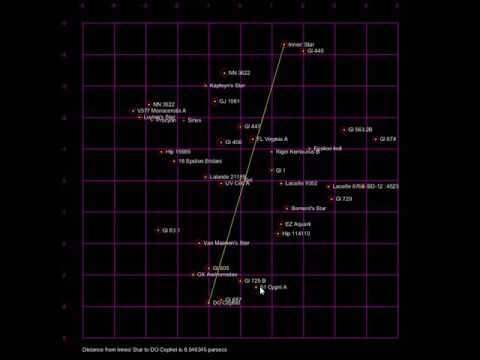
Create an interactive 3D star map visualization using py5 and pandas. You'll load real star data, plot it on a grid, and create interactive features to explore nearby stars.
Use pandas to load the HabHYG15ly.csv file. This file contains data on stars within 15 light years of the sun.
| Column | Name | Description |
|---|---|---|
| Hab? | Habitability flag | 1 = high probability of habitable planet |
| Display Name | Star name | The name of the star |
| Distance | Distance | Distance from the sun in parsecs |
| Xg, Yg, Zg | Coordinates | XYZ galactic cartesian coordinates in parsecs |
| AbsMag | Magnitude | Star's absolute magnitude (brightness/size) |
- Write a
load_data()function that loads the CSV with correct encoding - Call it from
setup()and store the DataFrame globally - Print the number of stars loaded
Write a print_stars() function that prints useful information about the stars:
- Total number of stars
- First 5 stars with their names, distances, and coordinates
- Any other interesting statistics you find
Create a coordinate grid for your star map:
Requirements:
- 50 pixel border around the edge
- Grid from -5 to 5 parsecs on both X and Y axes
- Purple gridlines every 1 parsec
- Label each gridline with its parsec value
Coordinate Conversion:
py5.remap(parsecs, -5, 5, border, py5.width - border)For each star, draw:
-
Yellow cross at the star's position (Xg, Yg)
- About 10 pixels in size
-
Red circle with diameter based on AbsMag
- Use
no_fill()for hollow circles - Scale magnitude appropriately (experiment with sizing)
- Use
-
Star name beside the star
- Left aligned, vertically centered
Add mouse interaction to explore star distances.
Behavior:
- First click: Select a star, draw yellow line from star to mouse cursor
- Second click: Select another star, draw line between them, display distance
Display format:
Distance from [STAR1] to [STAR2] is [XX.XX] parsecs
Hints:
- Use global variables to track selected stars
- Use 3D distance formula: √(dx² + dy² + dz²)
- Check if mouse is within a star's circle radius
# Star Map Visualization
# Name: [Your Name]

import py5
import pandas as pd
import math

# Global variables
stars_df = None
selected_star_1 = None
selected_star_2 = None

def load_data():
    """Load star data from CSV"""
    # Your code here
    pass

def print_stars():
    """Print star information"""
    # Your code here
    pass

def parsecs_to_pixels_x(parsecs):
    """Convert parsec X to pixel X"""
    return py5.remap(parsecs, -5, 5, 50, 750)

def parsecs_to_pixels_y(parsecs):
    """Convert parsec Y to pixel Y"""
    return py5.remap(parsecs, -5, 5, 50, 750)

def draw_grid():
    """Draw coordinate grid"""
    # Your code here
    pass

def draw_stars():
    """Draw all stars"""
    # Your code here
    pass

def find_clicked_star(mouse_x, mouse_y):
    """Find which star was clicked"""
    # Your code here
    pass

def calculate_distance(star1, star2):
    """Calculate 3D distance between stars"""
    # Your code here
    pass

def setup():
    py5.size(800, 800)
    global stars_df
    stars_df = load_data()
    print_stars()

def draw():
    py5.background(0)
    draw_grid()
    draw_stars()
    # Add interactive line drawing here

def mouse_pressed():
    """Handle mouse clicks"""
    # Your code here
    pass

py5.run_sketch()Once you complete the basic tasks, try:
- Color by habitability: Make habitable stars (Hab? = 1) a different color
- Size by distance: Scale star circles based on distance from Sol
- Filter view: Add keyboard controls to show only certain star types
- 3D visualization: Use py5's 3D mode to plot Zg as well
- Star info panel: Display detailed info when hovering over a star
- Constellation lines: Connect related stars
- Test each task individually before moving to the next
- Use print statements to debug coordinate conversions
- The sun (Sol) should appear at the center (0,0)
- Experiment with scaling factors to make visualization clear
- Use
py5.dist()for distance calculations in pixel space - Use the math formula for parsec space distances
Variables exercises:
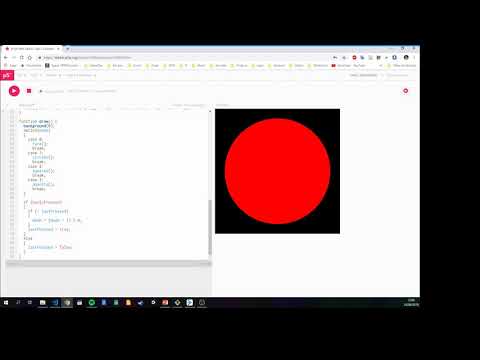
If statement Exercises:



-
Check out these music visualisers made in Processing by previous programming students
-
If you are curious, check out some of my creature videos
Write a sketch to draw the following shape:
