Added graphical reduction toy example #30
Conversation


 SimonHeybrock
left a comment
SimonHeybrock
left a comment
SimonHeybrock
left a comment
There was a problem hiding this comment.
Looks good. Some thoughts and comments:
- Make sure to "restart and clear outputs" before committing the notebook.
- If we want to show this to users, we should probably have all code in a
.py, not in the notebook. As it is, it is probably too scary? _repr_html_of the scipp module shows something akin to Mantid's workspace list. Can this be included in a widget somehow? Or just directly as a cell, before the plotting cell, so users can see what they could plot?- Should we make a really simple example that we can share with people, that works without data files? For example, first a "load" widget, which just makes some simple data (
np.linspaceand some random noise for example), a processing widget that "processes" the data (just apply a square), and a third to plot make the plot?- We could then, as a second step, do this for the SANS reduction, but at that point it would probably make sense to cleanup what we have now and move the code to a module, so we do not need to duplicate the SANS code in the notebook?
- It is nice that the plot widget can be used to plot different things (i.e., the notebook is not linear in that sense).

|
Maybe one more thing we could demonstrate is how we can have an equivalent to Mantid's algorithm dialogs? For example, we could have a simple widget for a unit conversion, with a drop-down list of potential target units? |
 Matthew-Andrew
force-pushed
the
add_graphical_example
branch
from
Matthew-Andrew
force-pushed
the
add_graphical_example
branch
from
3ba0d0f to
09d9746
Compare

|
I have added a new example which addresses these points and I think better suits the requirements of the exercise. It contains three widgets one of which creates some data, a second which allows conversions and a third which displays the currently available scipp objects and allows you to plot them. |
|
One issue which I have not yet solved is whether there is a nice way to update the list of scipp objects dynamically when they are added to the global namespace from a method which the plotting widget is not currently observing. |
Matthew-Andrew
force-pushed
the
add_graphical_example
branch
3 times, most recently
from
ed2e216 to
0df6b79
Compare
|
Note currently to get the plot widget to work you need to update the the _repr_html_ method in object_list.py to take an optional scope parameter. As shown below. |
|
Works, even with the hidden/unintentional(?) feature that you can put something like Questions (not necessarily requests to do this here and now):
|

sans/convert_helpers.py
Outdated
|
|
||
| def _on_button_clicked(self, b): | ||
| self.output.clear_output() | ||
| with self.output: |

There was a problem hiding this comment.
All this catching of matplotlib output should become much easier once the new plotting has been merged, since the figure will now itself be a widget, that can be placed in any widget box.
sans/CreateConvertPlotExample.ipynb
Outdated
| "plot_widget = PlotWidget(globals())\n", | ||
| "data_creation.subscribe(plot_widget)\n", | ||
| "data_conversion.subscribe(plot_widget)\n", | ||
| "disp.display(plot_widget)" |
There was a problem hiding this comment.
Just tried the notebook but got this error
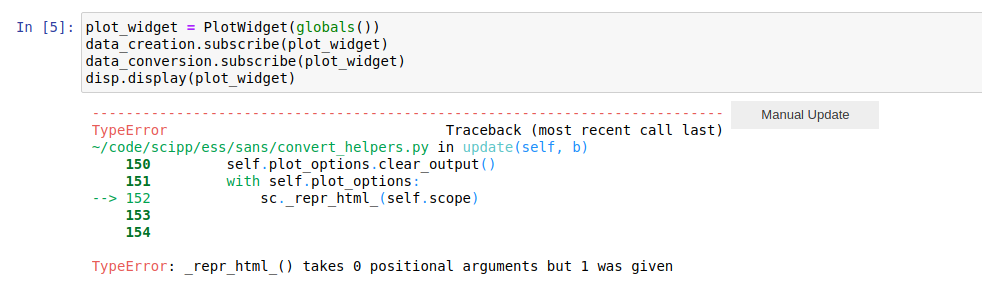
There was a problem hiding this comment.
but maybe this is reated to Simon's other PR?
There was a problem hiding this comment.
Sorry just seen your comment above...
sans/CreateConvertPlotExample.ipynb
Outdated
| "outputs": [], | ||
| "source": [ | ||
| "data_creation = DataCreationWidget(globals())\n", | ||
| "disp.display(data_creation)" |
There was a problem hiding this comment.
why do you need the disp.display() here?
why not simply
data_creation = DataCreationWidget(globals())
data_creation
?

|
Regarding the I'm not really a fan of the reduction_widget = ReductionWidget(globals())syntax. As you say, there is some brittle mechanism requiring some variables to exist in the notebook. Also, there is a big chunk of python code just before calling the graphical interface, which will look scary to non-programmers, and makes a big dent in what we are trying to show: that GUIs can be created in Jupyter. I guess there should be an input field for all these variables. They should then all be passed to the reduction backend. |
|
@nvaytet I was attempting to minimize the number of fields in the widget and had a vague idea that scientists could set up the variables which were not going to change very much in a scripted fashion and then use the interface merely for what changes run to run but you are correct that this somewhat defeats the point of the example and if we are doing it we should pass the options explicitly to the widget. Whilst I don't think in the long run we want to add graphical options for all sans reduction options I think the minimal subset here should be fine. Another option is we could institute some form of user file mechanism like the sans group do at ISIS. This is basically a file in what I believe is currently a toml format that contains all the standard settings for a reduction. These files are created for users by the instrument scientists and then a reduction is hopefully as simple as loading the user file containing all the settings, specifying run numbers and pressing go. Power users still like to modify things and play around with the nitty gritty of reduction parameters but these are probably the ones we should be encouraging to script. Do we want to bite the bullet and use a toml based user file? Or is that not a convention the ESS SANS scientists are likely to adopt. |
|
Yes, sounds good with some sort of configuration files. |
|
Ok I'll have a go updating to use configuration files. The other question I had for @nvaytet in particular was what extra fields you think might be useful to be able to specify from a plotting perspective. The other thing I want to look into is providing better feedback during long operations to the user so they know what is going on. Currently you just have to rely on jupyter telling you whether the kernel is working or not which isn't that clear. |
I know ipywidgets as some progress bar widgets ( Sounds quite complicated to me, and probably not wirth it at this stage. For this example, i would just use some data that is small and takes no time to reduce. |
|
I think (hope) we are far from the point were we need to or want to make a single big reduction widget. My favored approach (medium-term) would be:
What do I mean be configurable widgets? For example, we want a generic "load" widget, but in practice users would like to simply enter their run number. The config of the instrument would be part of the notebook, or an instrument-specific helper lib. For example: # create load widget with input box for run number
load = sc.widgets.load(path='/path/LARMOR/{}.nxs', inputs=['run-number'])In a similar way, I would imagine a generic "reduction" widget: # create reduction widget with two input boxes for names of loaded sample
# and background runs, and one for a reduction parameter (wavelength range)
from ess import loki
reduce = sc.widgets.reduce(run=loki.reduce, inputs=['sample', 'background', 'wavelength-range']) |
|
Essentially, I think what I am saying is that the widgets should be quite simple and generic, and we'd use things such as https://docs.python.org/2/library/functools.html#functools.partial to set them up in a workflow/instrument-specific way, binding configurable input fields to function args. |
|
@SimonHeybrock I was thinking along similar lines to this. Is it worth demonstrating the ability to produce generic widgets here as I don't think it should take much extra work to make the current examples generic as you suggest. |
I think so, it may be even less code, since it avoids a lot of the specific widget setup you did now? |
Matthew-Andrew
force-pushed
the
add_graphical_example
branch
from
9186cfe to
52bda8e
Compare
|
I felt that sorting out how we want to handle simple widgets was important before we tried an example with a full reduction. I've therefore removed the SANS example for now and just left the updated toy example. This has left some unnecessary commits in the history but didn't want to force push too much whilst under review. Would suggest a rebase/squash before merge though. This has been updated as Simon suggested to use more generic widgets. This leads to a slight loss in functionality in terms of input validation and auto-complete but these aren't drastic and there is no reason we couldn't pass in validators with our required inputs if we wished. Taking transformation widget as an example the basic design idea is that you pass in the following:
|
Matthew-Andrew
force-pushed
the
add_graphical_example
branch
from
1883e9e to
3158974
Compare
|
Really nice! 👍 Is there any reason we even need distinct widgets for loading and processing? Apart from making a wrapping "load" function/lambda does the run-number conversion? Or maybe more generally, could have have all widgets accept a converter applied to their argument before calling the functions? Kind of like the validator you mention, except that it would not just validate but also transform? Basically, do what you did for |
|
Currently all the input widgets do have a converter applied to their arguments before applying to the function, so you are correct the conversion from run number to filepath is not a blocker to having the load and conversion widget being the same. The reason I ended up splitting the load and conversion widgets was more to do with how the outputs are handled. For the converter you specify an output name whereas for the load widget you derive the output name from the filename. When I briefly tried to write this behavior in a generalized format specifying the outputs became quite complicated. It has just occurred to me though that if you have a function which returns more than one object that cannot be handled by the current setup so I'll have another look at the best way to specify how to handle the outputs of the function. |
Maybe we should just always require specifying the output name? If the function return multiple objects this will simply reference a tuple. |
|
Good point on the tuple, this will just be handled by python. If we return a tuple of scipp objects and assign this into the global namespace this won't be picked up by the scipp module html representation. I don't know how common a case is where we return multiple scipp objects from a function is though? I think it is a good idea to allow the users to specify the output name they want their loaded data to have. This would allow specific run numbers to be loaded and given names such as sample/vanadium. This may lead to a slight reduction in usability if someone is loading quite a lot of runs at once and auto-populating the output would probably be ideal. This case may be best solved by some sort of separate batch processing widget where you pass in a range of inputs and supply a function to generate the output name from input name. In any case I'll add in some validation and harmonise the loading/processing. |
|
In fact the more I think about it a single process/batch process is a more sensible division that load/transform was. |
|
Sounds sensible 👍 (but let us postpone the batch processing). |

This updates ProcessWidget so that the conversion functions
provided for input cells can optionally do a validation check
and throw a ValueError if this fails. This will then be handled
as a user input error by the widget. An alternative route to
pass in optional validators would be to have a seperate dict
sharing keys with the input dict which specifies options to use.
I went for this method over that because conversion and validation are often
closely linked.
Added ability to optionally specify autocomplete values for cells.
This is demonstrated for the data inputs and dimension values in the
conversion widgets. Note however that without linking up some observer
you have to re-run the cell to get the latest data to properly appear as
options. In the long term if may be worth having a notifier control object
which all widgets which create scipp objects register with and can then subscribe
to if they wish to know when scipp objects are created by have not done so currently.
Matthew-Andrew
force-pushed
the
add_graphical_example
branch
from
3158974 to
b94cb2d
Compare

Add initial widgets and converters, this has already been reviewed here scipp/ess-legacy#30 . So mergeing for now to create initial tag.


This adds a toy example of using ipywidgets in the example sans reduction.
At ISIS most of the options for a reduction are defined in the userfile which is provided to users by instrument scientists. The only options which tend to change between every reduction are the sample, transmission and background run numbers. I've therefore taken the minimal approach of providing a simple interface to load and process sets of data and a further simple interface to plot the resultant data arrays. A final example which might be useful is an easy way to save data out at the end.
I'm slightly uncertain what the best way to go here is in terms of workflow. So comments and ideas most welcome.
To test run the python notebook (you may have to run make_config.py first to set up the file paths).