Your Jupyter kernel dies with your client. It shouldn't.



Keep a Jupyter kernel—and its output—alive independently of the client. Close your editor, lose your connection, or return later; the same session is still there and still streaming.
Status: alpha. It works and it's in daily use, but you will hit rough edges. Bug reports are genuinely useful — please open an issue.
You SSH into a GPU box, start a long run in a notebook, and close your laptop. When you come back, depending on your setup:
- JupyterLab reconnects, but everything printed while you were away is gone. iopub output is streamed over the WebSocket and never persisted server-side, so there is nothing to replay.
- VSCode Jupyter ties the kernel to the extension-host process. Close the window or drop the network and the kernel dies, taking the session with it.
tmux+jupyter consolesurvives the disconnect, but you lose rich output (plots, HTML, widgets) and you can't open the same session from a second client.
The root cause is the same in all three: the source of truth for your session lives on the client, or in a channel that doesn't outlive a disconnect. Tithon moves it to the host.
Tip
And in the era of AI agents, one more: a .ipynb is JSON bloat — the same
notebook is ~250 lines of "cell_type"/"outputs" noise that Tithon keeps as
~50 lines of clean .py. Output images? Tithon keeps them as real files, so an
agent hands them to the model as actual images it can see — not base64 the
model burns thousands of tokens on and still can't read. Don't feed your AI
idiot JSON.
- Python 3.11+ for the daemon and CLI.
- A Unix-like host — the daemon uses unix domain sockets and
setsid(developed and tested on Linux). - For the notebook UI, VSCode with the Tithon extension. If the host is remote, connect over a Tunnel or Remote-SSH — the notebook then works exactly as it does locally.
On Windows, we recommend running Tithon inside WSL and connecting with VS Code using the WSL extension.
Native Windows is not currently supported.
The CLI ships on PyPI:
pip install tithon # or: uv add tithonThe VSCode extension is on the Marketplace:
code --install-extension rnoro.tithonor search for "tithon" in the Extensions view. (Marketplace page)
State — socket, log, journal, artifacts — lives under TITHON_HOME
(default ~/.tithon).
Start the daemon. It runs in the foreground, so background it:
tithon daemon &
tail -f ~/.tithon/daemon.log     # optional
Run some code. Kernel state persists across calls:
tithon run -c 'x = 41'
tithon run -c 'x += 1; print(x)'     # -> 42
tithon status
Now prove the point — kill the daemon, and the kernel lives on:
tithon run -c 'for i in range(3): print("line", i)'

pkill -9 -f 'tithon daemon'          # the daemon dies; the kernel does not
tithon daemon &                      # restart -> re-attaches the same kernel

tithon attach --since 0 --once       # full snapshot: the earlier output is back
tithon run -c 'print(x)' # -> 42, kernel state intactThe extension opens a percent-format .py (a plain script with # %% cell
markers) as a notebook backed by the daemon — same cells, same Run buttons,
same rich output as a Jupyter .ipynb, except the kernel and its output live on
the host and survive your disconnects.
- Open a
.py(it opens as plain text by default) and switch it with Open as Notebook — the CodeLens at the top of the file, or the editor title menu. - Pick the Tithon kernel and run cells as usual.
That's all. Selecting the kernel attaches the session automatically; output is journaled on the host, and when you reopen the notebook later — VSCode remembers the kernel — it is restored and resumes streaming with no command. Over a VSCode Tunnel or Remote-SSH this is identical: the extension host runs on the remote, so it talks to the daemon's host-local socket directly, with no port forwarding. Nothing special for the remote case.
Outputs are matched to cells by content hash, so they survive edits and reopens.
An output whose cell was edited after it ran is flagged stale. The .py itself
stays pure source — outputs never touch the file, so diffs stay clean.
Note
The daemon and the extension must run on the same host (they share
TITHON_HOME, default ~/.tithon). A Tunnel/Remote-SSH satisfies this for
free. If you instead run the extension on your laptop against a remote
daemon, forward the unix socket yourself (SSH RemoteForward, socat, …).
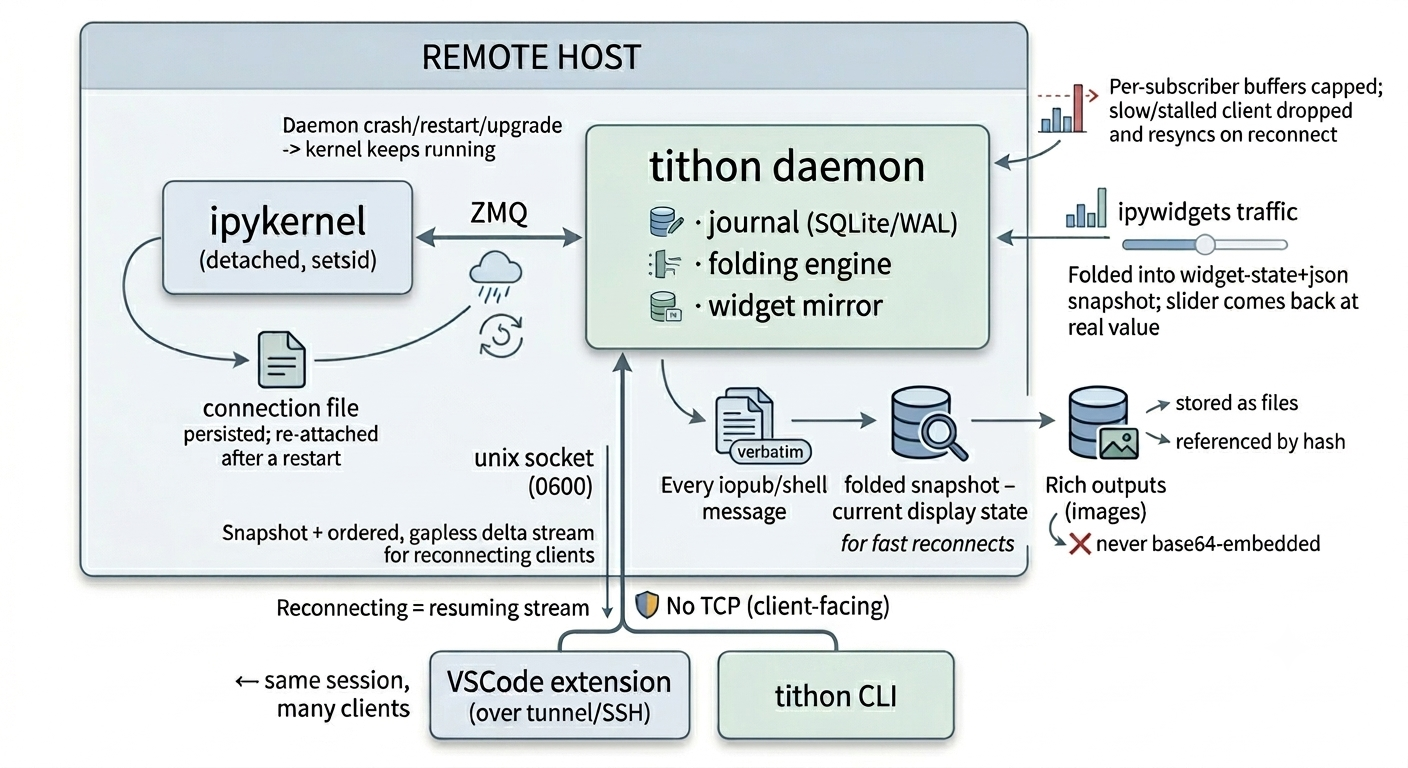
A long-lived daemon on the host owns the kernel and serves clients:
- The kernel runs detached (
setsid), so it is not a child of the daemon. The daemon can crash, restart, or be upgraded; the kernel keeps running and re-attaches through a persisted connection file. - Every iopub/shell message is journaled verbatim to append-only SQLite (WAL), alongside a per-execution folded snapshot — the current display state — so reconnects are fast.
- Clients attach with the last sequence number they saw and get a snapshot plus an ordered, gapless delta stream; reconnecting is just resuming the stream.
- Rich outputs (images) are stored as files and referenced by hash, never
base64-embedded, and
ipywidgetstraffic is folded into awidget-state+jsonsnapshot, so atqdmbar or a slider comes back at its real value. - Backpressure is bounded: per-subscriber buffers are capped, and a client that falls too far behind is dropped and resyncs on reconnect — so one slow client can't grow daemon memory or block the others.
- The daemon binds a
0600unix domain socket. No TCP.
The kernel itself is plain ipykernel — Tithon replaces the session-management
layer around it, not the execution engine. See docs/SPEC.md
for the full design.
| Command | Description |
|---|---|
tithon daemon |
Run the daemon (foreground). Owns the kernel and serves clients. |
tithon run -c CODE |
Submit code and stream its output. --no-wait prints the exec id and exits; --timeout N bounds the wait. |
tithon attach |
Stream events as NDJSON. --since N sets the resume point; --once exits after the backlog sync; --until-done exits after the next completion. |
tithon status |
Print session, queue, kernel, and widget-model status. |
attach --since is the reconnect knob:
--since 0— full folded snapshot, then live delta.--since N— replay only events after seqN, then asyncmarker, then live.--since -1— live only, ignore history.
Environment variables read by the daemon and CLI:
| Variable | Default | Purpose |
|---|---|---|
TITHON_HOME |
~/.tithon |
Root for the socket, log, journal, and artifacts. |
TITHON_SUB_QUEUE_MAX |
10000 |
Max queued events per client before it is dropped (backpressure). |
TITHON_SEND_TIMEOUT |
10.0 |
Seconds a client may stall a send before being dropped. |
TITHON_WRITE_BUFFER_HIGH |
1048576 |
Per-connection send-buffer high-water mark (bounds daemon memory). |
TITHON_SOCK_SNDBUF |
1048576 |
Per-connection kernel socket send buffer. |
TITHON_SUB_POLL |
0.5 |
Interval at which a blocked sender re-checks for drop. |
Outputs live in $TITHON_HOME/sessions/<session>/journal.db (raw messages plus
folded snapshots), with rich outputs written as files under
<workdir>/.tithon/outputs/ and referenced from the journal.
A percent-format .py holds only code, and the journal above is machine-local
(binary, unbounded, unmergeable). So alongside it the daemon keeps the folded
output state as text in your project:
<project>/.tithon/
  cells/<relpath>.json   # what each cell currently shows
  outputs/               # its images, sha256-deduplicated
Commit that directory and whoever clones the repository opens the file with your
results already in it — what .ipynb gives you, without the outputs living in
the .py. Images are referenced rather than embedded, so a plot redrawn every
step of a training loop still commits one file, not one per frame. Leave the
directory uncommitted (or .gitignore it) to keep your outputs to yourself;
nothing else depends on it, and your own session restores from the journal
either way.
Terminating a kernel yourself (tithon kill, or Tithon: Terminate Kernel…)
means you are done with that session, so reopening the file no longer restores
its cells. The history is kept — Tithon: Restore Previous Outputs brings it
back. Every involuntary loss (daemon restart, host reboot, dropped tunnel, idle
GC) still restores automatically.
Bug reports are especially welcome — Tithon's job is surviving disconnects, and the ones that matter happen on setups we don't have. See CONTRIBUTING.md for what makes a report actionable, how to set up a development environment, and how to propose a change to the design.
MIT.