Home
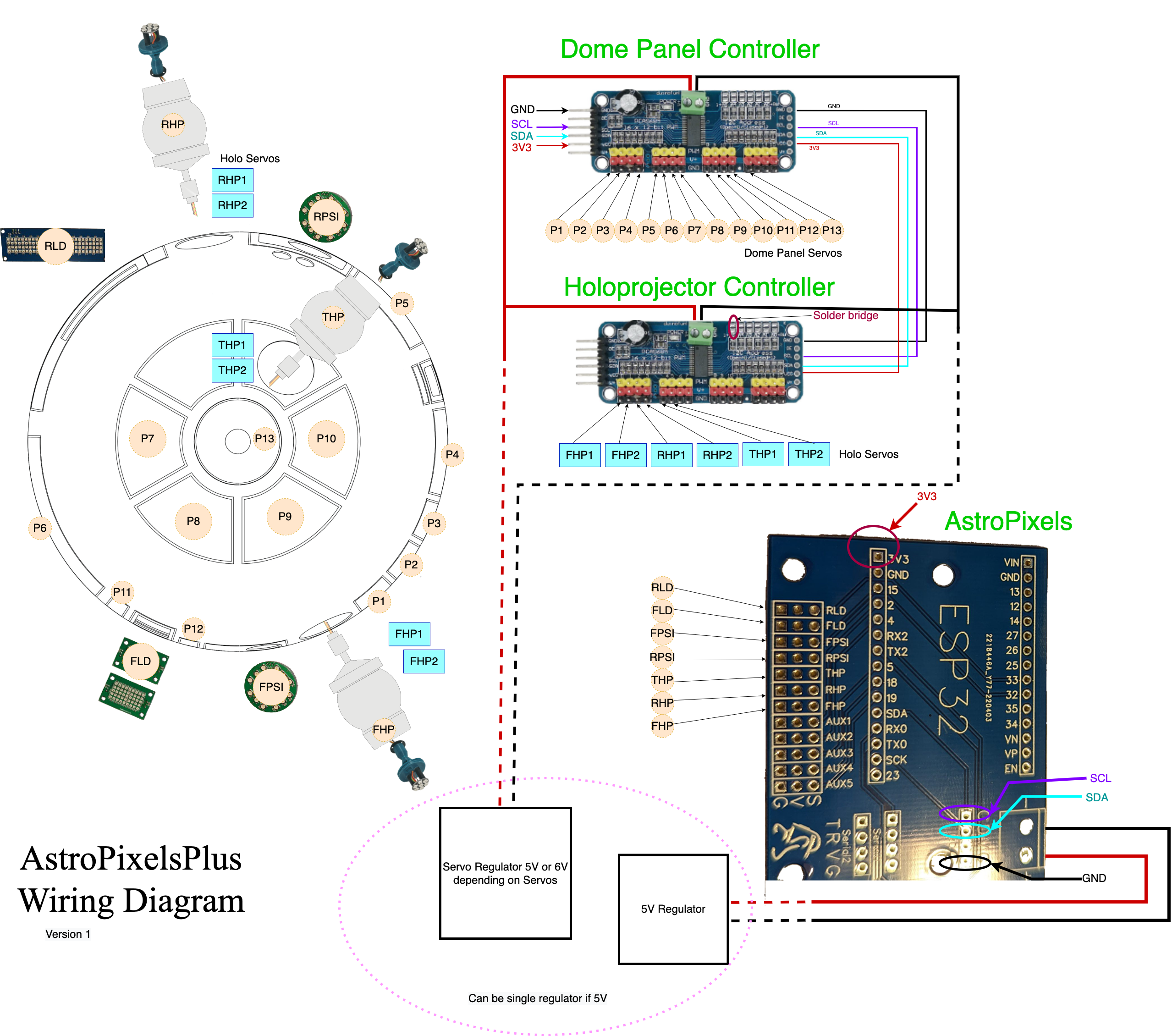
AstroPixelsPlus is an alternative firmware implementation for the AstroPixels PCBs.
You define new JawaLite (Marcduino) actions by creating blocks such as this one:
MARCDUINO_ACTION(FrontHoloOn, *ON01, ({
    // Front Holo Dim cycle random color
    ... action body ...
}))-
FrontHoloOnfunction name -
*ON01JawaLite/Marcduino action string (or prefix)
The Marcduino command handler will automatically find your action block based on the received Marcduino command string. It will do a partial match if the defined action string is shorter than the received action string. So for example if you define the Marcduino action *ON any thing starting with *ON will match that action block. The code in the action block can call Marcduino::getCommand() to receive the remainder of the received action string. getCommand() will return the string starting after the matched portion.
CommandEvents can be sent by calling CommandEvent::process(). Multiple commands can be sent by separating the commands using carriage return or line feed. For example:
CommandEvent::process(F(
   "LE000000|0\n"     /* Set all LogicEngine devices to Normal */
   "FSOFF\n"          /* Fire stripe off */
   "BMOFF\n"          /* Bad motivator off */
));CommandEvents are handled by subclasses of CommandEvent. Currently these classes are all subclasses of CommandEvent:
FireStripMagicPanelBadMotivatorHoloDisplayHoloLightsTeecesLigicsLogicEngineWelderZapperGripperInterchangeArmDataPanelChargeBayIndicatorStance
To handle CommandEvents in your own classes you need to subclass CommandEvent and define the function handleCommand. Every instance of CommandEvent will receive the CommandEvent and should check the first two characters in the command string to see if the command is directed at it.
For example from FireStrip.h (looking for commands starting with "FS")
virtual void handleCommand(const char* cmd) override
{
    if (*cmd++ == 'F' && *cmd++ == 'S')
    {
        switch (cmd[0])
        {
            case 'O':
                if (cmd[1] == 'F' && cmd[2] == 'F' && cmd[3] == '\0')
                {
                    off();
                }
                break;
            case '0':
                off();
                break;

            case '1':
                spark(atoi(&cmd[1]));
                break;
            case '2':
                burn(atoi(&cmd[1]));
                break;
        }
    }
}```

## Processing JawaLite commands

To process a received Marcduino/JawaLite command

```C++
// Close panel number one (handle by the actions in this unit)
Marcduino::processCommand(player, "*CL01");To send Marcduino/JawaLite action to another part of your droid call:
// Send open panel number one to another part of the droid
Marcduino::send("*OP01");MARCDUINO_ANIMATION(ShortSequence, :SE06)
{
DO_START()
// Logic engine alarm
DO_COMMAND("LE105000")
// Play scream-3 and wait 500ms
DO_MARCDUINO_AND_WAIT("$623", 500);
// Logic engine failure
DO_COMMAND(
// Logic engine failure (all)
"LE20000\n"
// Holo Short Circuit
"HPA007|7\n"
// Fire strip spark for 1000ms
"FS11000\n"
// Charge Bay Indicator flicker for 6s
"CB20006\n"
// Data Panel flicker for 6s
"DP20006\n"
// Smoke on
"BMON\n")
// Wait 3 seconds
DO_WAIT_SEC(3)
DO_COMMAND(
// Smoke off
"BMOFF\n"
// Fire strip off
"FSOFF\n")
// Wait 3 seconds
DO_WAIT_SEC(3)
DO_COMMAND(
// Charge Bay Indicator disabled for 8s
"CB10008\n"
// Data Panel disabled for 8s
"DP10008\n"
// Holo off
"HPA000|0\n")
// Slowly open/close all panels using limited pulse range
DO_SEQUENCE_VARSPEED(SeqPanelAllOpenCloseLong, ALL_DOME_PANELS_MASK, 700, 900);
// Fake being dead for 8 seconds
DO_WAIT_SEC(8)
// Ok We are back!
DO_RESET({
// Call out to external function to send reset commands to the various devices
resetSequence();
})
DO_END()
}Servos can be controlled individually or as a group. A servo group is defined as a bitmask. This is the default group definition:
#define SMALL_PANEL         0x0001
#define MEDIUM_PANEL        0x0002
#define BIG_PANEL           0x0004
#define PIE_PANEL           0x0008
#define TOP_PIE_PANEL       0x0010
#define MINI_PANEL          0x0020

#define HOLO_HSERVO         0x1000
#define HOLO_VSERVO         0x2000

#define DOME_PANELS_MASK        (SMALL_PANEL|MEDIUM_PANEL|BIG_PANEL)
#define PIE_PANELS_MASK         (PIE_PANEL)
#define ALL_DOME_PANELS_MASK    (MINI_PANEL|DOME_PANELS_MASK|PIE_PANELS_MASK|TOP_PIE_PANEL)
#define DOME_DANCE_PANELS_MASK  (DOME_PANELS_MASK|PIE_PANELS_MASK)
#define HOLO_SERVOS_MASK        (HOLO_HSERVO|HOLO_VSERVO)

#define PANEL_GROUP_1      (1L<<14)
#define PANEL_GROUP_2      (1L<<15)
#define PANEL_GROUP_3      (1L<<16)
#define PANEL_GROUP_4      (1L<<17)
#define PANEL_GROUP_5      (1L<<18)
#define PANEL_GROUP_6      (1L<<19)
#define PANEL_GROUP_7      (1L<<20)
#define PANEL_GROUP_8      (1L<<21)
#define PANEL_GROUP_9      (1L<<22)
#define PANEL_GROUP_10     (1L<<23)
When the servos are defined either programmatically or through the web interface you specify which groups it belongs to. A servo can belong to more than one group. For example:
const ServoSettings servoSettings[] = {
    { 1,  1550, 900, PANEL_GROUP_4|SMALL_PANEL },   /* 0: door 4 */
    { 2,  2200, 1400, PANEL_GROUP_3|SMALL_PANEL },  /* 1: door 3 */
    ...
Here servo #0 belongs to PANEL_GROUP_4 and SMALL_PANEL, and servo #1 belongs to PANEL_GROUP_3 and SMALL_PANEL. A group servo action using SMALL_PANEL will match both servos.
Servo sequencer has a series of predefined sequences in addition to the ones you define.
-
SeqPanelAllOpen- open all panels -
SeqPanelAllClose- close all panels -
SeqPanelAllOpenClose- open and close all panels -
SeqPanelAllOpenCloseLong- open and close all panels (long pause) -
SeqPanelAllFlutter- flutter all panels -
SeqPanelAllOpenCloseRepeat- open and close all panels (repeat 5 times) -
SeqPanelWave- wave all panels -
SeqPanelWaveFast- wave all panels quickly -
SeqPanelOpenCloseWave- open close wave -
SeqPanelMarchingAnts- alternating open/close panels (repeating) -
SeqPanelAlternate- alternating open/close panels (once) -
SeqPanelDance- dance sequence -
SeqPanelLongDisco- long dance sequence
New sequences can be defined:
static const ServoSequence SeqNewSequence =
{
    // Alternating pattern of on/off
    { 20,   B00000000, B00000000, B00000000, B00000000 },
    { 50,   B10101010, B10101010, B10101010, B10101010 },
    { 50,   B01010101, B01010101, B01010101, B01010101 },
    { 100,  B00000000, B00000000, B00000000, B00000000 },
};

The first number in each entry is the duration in centiseconds (1/100th of a second).
The following four binary numbers are bits representing the servo number in the matched
group for the sequence.There are five player functions available:
- Play sequence as-is:
//SEQUENCE_PLAY_ONCE(sequencer, sequence, groupMask)
// Perform a fast wave of all dome panels
SEQUENCE_PLAY_ONCE(servoSequencer, SeqPanelWaveFast, ALL_DOME_PANELS_MASK);- Play sequence at different speed:
//SEQUENCE_PLAY_ONCE_SPEED(sequencer, sequence, groupMask, speed)
// Perform a fast wave of all dome panels (longer pause in between)
SEQUENCE_PLAY_ONCE_SPEED(servoSequencer, SeqPanelWaveFast, ALL_DOME_PANELS_MASK, 1000);- Play sequence at variable (random) speed:
//SEQUENCE_PLAY_ONCE_VARSPEED(sequencer, sequence, groupMask, minspeed, maxspeed)
// Perform a fast wave of all dome panels (variable pause in between)
SEQUENCE_PLAY_ONCE_SPEED(servoSequencer, SeqPanelWaveFast, ALL_DOME_PANELS_MASK, 500, 2000);- Play sequence at random step:
//SEQUENCE_PLAY_RANDOM_STEP(sequencer, sequence, groupMask)
// Perform a fast wave of all dome panels (starting at random step)
SEQUENCE_PLAY_RANDOM_STEP(servoSequencer, SeqPanelWaveFast, ALL_DOME_PANELS_MASK);- Play sequence at random step:
//SEQUENCE_PLAY_ONCE_VARSPEED_EASING(sequencer, sequence, groupMask, \
//                                    minspeed, maxspeed, onEasing, offEasing)
// Fast wave of all dome panels (SineEaseOut when opening and BounceEaseIn when closing)
SEQUENCE_PLAY_ONCE_VARSPEED_EASING(servoSequencer, SeqPanelWaveFast, \
ALL_DOME_PANELS_MASK, 1000, 2000, Easing::SineEaseOut, Easing::BounceEaseIn);For example Marcduino::send() calls:
static void send(const char* cmd)
{
    if (SMQ::sendTopic("MARC"))
    {
        SMQ::send_string("cmd", cmd);
        SMQ::send_end();
    }
}
This will send the message topic MARC to any device that has registered an interested in receiving MARC topics. Each topic can have multiple named parameters.
Simple MARC topic handler for SMQ could look like this:
SMQMESSAGE(MARC, {
    String cmd = msg.getString("cmd");
    Serial.println("MARC: "+cmd);
})List of available easing methods:
Easing::LinearInterpolationEasing::QuadraticEaseInEasing::QuadraticEaseOutEasing::QuadraticEaseInOutEasing::CubicEaseInEasing::CubicEaseOutEasing::CubicEaseInOutEasing::QuarticEaseInEasing::QuarticEaseOutEasing::QuarticEaseInOutEasing::QuinticEaseInEasing::QuinticEaseOutEasing::QuinticEaseInOutEasing::SineEaseInEasing::SineEaseOutEasing::SineEaseInOutEasing::CircularEaseInEasing::CircularEaseOutEasing::CircularEaseInOutEasing::ExponentialEaseInEasing::ExponentialEaseOutEasing::ExponentialEaseInOutEasing::ElasticEaseInEasing::ElasticEaseOutEasing::ElasticEaseInOutEasing::BackEaseInEasing::BackEaseOutEasing::BackEaseInOutEasing::BounceEaseInEasing::BounceEaseOutEasing::BounceEaseInOut
For a interactive example of how easing methods work you can visit Easing Functions
Servo dispatch is available either as direct dispatch or over I2C to a PCA9685 Servo Controller. If you only have a small number of servos you can using ServoDispatchDirect to control the servo directly using a GPIO pin per servo. Four servos is probably a good limit. For more servos the recommendation is to use an exteral PCA9685 Servo Controller. Each PCA9685 can handle up to 16 servos and you can daisy chain them to handle up to 992 servos.
There are three types of moveTo functions. The first one (moveTo) is for moving individual servos by number. The second (moveServosTo) is for moving groups of servos. The third type (moveServoSetTo) is used for servo sequencing and specifies a set mask if the servo should be in the on or off position. The moveTo/moveServosTo/moveServoSetTo accept a floating point value in the range of 0 (closed) to 1 (open). This value is a percentage of each servos min/max range.
- Available
moveTofunctions:
    void moveTo(uint16_t num, uint32_t startDelay, uint32_t moveTime, float pos);
    void moveTo(uint16_t num, uint32_t moveTime, float pos);
    void moveTo(uint16_t num, float pos);
void moveTo(uint16_t num, uint32_t startDelay, uint32_t moveTime, float startPos, float pos);- Available
moveServosTofunctions:
    void moveServosTo(uint32_t servoGroupMask, float pos);
    void moveServosTo(uint32_t servoGroupMask, uint32_t moveTime, float pos);
    void moveServosTo(uint32_t servoGroupMask, uint32_t startDelay, uint32_t moveTime, float pos);
void moveServosTo(uint32_t servoGroupMask, uint32_t startDelay, uint32_t moveTimeMin, uint32_t moveTimeMax, float pos);- Available
moveServoSetTofunctions:
    void moveServoSetTo(uint32_t servoGroupMask, uint32_t servoSetMask, float onPos, float offPos, float (*onEasingMethod)(float) = NULL, float (*offEasingMethod)(float) = NULL);
    void moveServoSetTo(uint32_t servoGroupMask, uint32_t servoSetMask, uint32_t moveTime, float onPos, float offPos, float (*onEasingMethod)(float) = NULL, float (*offEasingMethod)(float) = NULL);
    void moveServoSetTo(uint32_t servoGroupMask, uint32_t servoSetMask, uint32_t startDelay, uint32_t moveTime, float onPos, float offPos, float (*onEasingMethod)(float) = NULL, float (*offEasingMethod)(float) = NULL);
    void moveServoSetTo(uint32_t servoGroupMask, uint32_t servoSetMask, uint32_t startDelay, uint32_t moveTimeMin, uint32_t moveTimeMax, float onPos, float offPos, float (*onEasingMethod)(float) = NULL, float (*offEasingMethod)(float) = NULL);
The pulse value functions moveToPulse/moveServosToPulse accept pulse values instead.
- Available
moveToPulsefunctions:
    void moveToPulse(uint16_t num, uint32_t startDelay, uint32_t moveTime, uint16_t pos);
    void moveToPulse(uint16_t num, uint32_t moveTime, uint16_t pos);
    void moveToPulse(uint16_t num, uint16_t pos);
void moveToPulse(uint16_t num, uint32_t startDelay, uint32_t moveTime, uint16_t startPos, uint16_t pos);- Available
moveByPulsefunctions:
    void moveByPulse(uint16_t num, uint32_t moveTime, int16_t pos);
    void moveByPulse(uint16_t num, int16_t pos);
void moveByPulse(uint16_t num, uint32_t startDelay, uint32_t moveTime, int16_t pos);- Available
moveServosToPulsefunctions:
    void moveServosToPulse(uint32_t servoGroupMask, uint16_t pos);
    void moveServosToPulse(uint32_t servoGroupMask, uint32_t moveTime, uint16_t pos);
    void moveServosToPulse(uint32_t servoGroupMask, uint32_t startDelay, uint32_t moveTime, uint16_t pos);
void moveServosToPulse(uint32_t servoGroupMask, uint32_t startDelay, uint32_t moveTimeMin, uint32_t moveTimeMax, int16_t pos);- Available
moveServosByPulsefunctions:
    void moveServosByPulse(uint32_t servoGroupMask, uint32_t moveTime, uint16_t pos);
    void moveServosByPulse(uint32_t servoGroupMask, uint32_t startDelay, uint32_t moveTime, int16_t pos);
void moveServosByPulse(uint32_t servoGroupMask, uint32_t startDelay, uint32_t moveTimeMin, uint32_t moveTimeMax, int16_t pos);- Available
moveServoSetToPulsefunctions:
    void moveServoSetToPulse(uint32_t servoGroupMask, uint32_t servoSetMask, uint16_t onPos, uint16_t offPos);
    void moveServoSetToPulse(uint32_t servoGroupMask, uint32_t servoSetMask, uint32_t moveTime, uint16_t onPos, uint16_t offPos);
    void moveServoSetToPulse(uint32_t servoGroupMask, uint32_t servoSetMask, uint32_t startDelay, uint32_t moveTime, uint16_t onPos, uint16_t offPos);
void moveServoSetToPulse(uint32_t servoGroupMask, uint32_t servoSetMask, uint32_t startDelay, uint32_t moveTimeMin, uint32_t moveTimeMax, int16_t onPos, int16_t offPos);- Available
moveServoSetByPulsefunctions:
    void moveServoSetByPulse(uint32_t servoGroupMask, uint32_t servoSetMask, uint32_t moveTime, int16_t onPos, int16_t offPos);
    void moveServoSetByPulse(uint32_t servoGroupMask, uint32_t servoSetMask, uint32_t startDelay, uint32_t moveTime, int16_t onPos, int16_t offPos);
    void moveServoSetByPulse(uint32_t servoGroupMask, uint32_t servoSetMask, uint32_t startDelay, uint32_t moveTimeMin, uint32_t moveTimeMax, int16_t onPos, int16_t offPos);