Name: Rana Hayes, Isadora Valentini, Ceren Ucan
Student Number: C21920856, D21125681, D21124013
Java program called "CerensSongVisualizer" creates a song visualizer with particles that move and change size based on audio input. It uses the Minim library for audio processing and the Processing library for graphics rendering.
A Music Visualizer program developed in Java using the Processing library. It analyzes audio for beats and generates visual effects. It utilizes the Minim library for audio playback, beat detection, and FFT analysis.
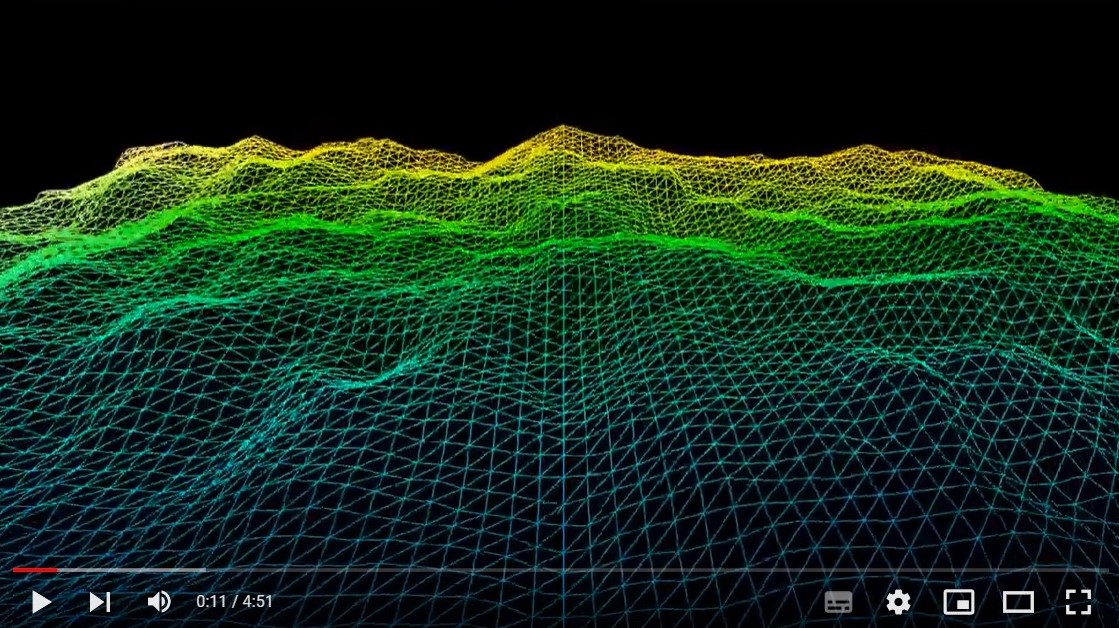
"MountainLandscape" assignment creates an interactive visualization of a mountain terrain using noise generation and mapping techniques. It utilizes the Processing library and is structured as a subclass of the "Visual" class.
The "IsaVisual" assignment is a creative visualization project that combines audio processing and visual effects. It uses the Processing and Minim libraries to create a fractal tree that responds to audio input.
The assignment combines four visual effects: Mountain Landscape, Particles, Cubes, and a Fractal Tree (Flower shape). It uses the Processing and Minim libraries and combines elements of the other assignments into a single program.
Import the Minim library. Extend the CerensSongVisualizer class from PApplet. Set the display window size in the settings() method. Initialize the Minim library, create particles, load audio, set color mode, and convert audio buffer to an array in the setup() method. Use the draw() method to update and display particles, draw audio waveform, and rotate star shape. Implement the drawWaveform() method to draw the audio waveform graph. Implement the rotateStar() method to rotate and draw the star shape based on audio amplitude. Define the Particle class for particle properties and behavior. Initialize particle properties in the Particle constructor. Implement the update() method to update particle properties. Implement the display() method to draw particles. Run the CerensSongVisualizer program.
Ensure you have Java and Processing installed on your system. Import the required libraries: ddf.minim., ddf.minim.analysis., and processing.core.PApplet. Set the size of the sketch window by calling the settings() function and specifying the desired width and height. Implement the setup() function to initialize the program. Load the audio file using the Minim library, configure the beat detection and FFT analysis objects, and create an ArrayList to store the particles. Implement the draw() function, which is the main loop of the program. Within this function, the audio is analyzed for beats, and the visual effect is updated and rendered accordingly. Particles are created and updated based on beat detection, and the squares in the corners of the screen are drawn and rotated. Implement the changeVisualEffect() function to modify the design element based on the beat. This function randomly adjusts the size, speed, and background color of the visual effect. Implement the drawVisualEffect() function to draw the squares in the four corners of the screen. Particles are also emitted from the squares when beats are detected. Implement the Particle class to define the behavior of the particles. Each particle has position, velocity, and acceleration vectors, as well as properties such as lifespan, size, and hue. The particles are updated, displayed, and eventually removed when their lifespan reaches zero. Finally, implement the stop() function to handle the clean-up tasks, such as closing the audio player and stopping the Minim library.
Ensure you have the required libraries: Processing, Minim, and ddf.minim.analysis. Import the "ie.tudublin" package. Create a new instance of the "IsaVisual" class. Set the size of the window using the "settings" method (e.g., size(1400, 800)). Provide the path to an audio file (e.g., "Parasite.mp3") and load it using the "minim.loadFile" method. Call the "play" method on the "AudioPlayer" object to start playing the audio. Customize the visual effects by modifying the parameters in the code, such as branch lengths, angles, and colors. Run the program and observe the visual display that reacts to the audio input.
Ensure you have the required libraries: Processing and ddf.minim.analysis. Import the "ie.tudublin" package. Create a new instance of the "MountainLandscape" class. Set the size of the window using the "settings" method (e.g., size(1280, 720, P3D)). Customize the visual effects by modifying the parameters in the code, such as terrain size, scaling, and colors. Run the program and observe the visual display of the mountain landscape.
Make sure you have the Processing library and the Minim library installed. Copy the provided code into a new Processing sketch. Place an audio file named "Parasite.mp3" in the same folder as the sketch. Run the sketch. Once the sketch is running, you can switch between the visual effects by pressing the corresponding number keys: Press '1' to switch to the Mountain Landscape visual effect. Press '2' to switch to the Music Visualizer visual effect. Press '3' to switch to the Isa Visual effect. Press '4' to switch to Ceren's Song Visualizer.
Set up the display window, initialize the Minim library, and load the audio file. Create an array of particles with random properties. In the draw() method, update and display particles. Draw the audio waveform using the drawWaveform() method. Rotate and draw the star shape based on audio amplitude. The Particle class defines particle properties and behavior. Continuously loop through the draw() method to animate the visualization.
The Music Visualizer program uses audio analysis to generate visual effects synchronized with beats. It loads and plays audio using the Minim library. Beat detection triggers visual effect changes. Rotating squares change size, speed, and color with beat detection. Particles are emitted, creating an animated effect. Visuals are continuously updated based on audio input.
The program uses the Minim library for audio processing. It creates an instance of the IsaVisual class and sets the window size. An audio file is loaded and played. Visual effects are customized by modifying parameters such as branch lengths and colors. The program continuously updates the visual display based on the audio input.
The program uses the noise function to generate a height map for the mountain landscape. It creates a 2D array called "terrain" to store the heights of each point on the landscape. The noise function is called for each point, and the resulting value is mapped to a suitable range to determine the height. The terrain is divided into triangles and rendered using triangle strips. In the "draw" method, the background is cleared, and the flyover parameter is updated based on the amplitude of the audio input. The camera and target vectors are adjusted according to the flyover and amplitude values. The landscape is then translated, rotated, and lit to achieve the desired perspective and lighting effects. Triangle strips are used to render the terrain, with each vertex having a corresponding color based on its position and height.
To run the program that combines the Mountain Landscape, Music Visualizer, and Isa Visual effects, follow these instructions: Import the Minim library and the Processing library into your Java project. Create a new class, let's name it "CombinedVisuals", and extend it from the PApplet class. In the setup() method, initialize the Minim library for audio processing, create instances of the MountainLandscape, MusicVisualizer, and IsaVisual classes. Load the audio file and start playing it using the MusicVisualizer class. Set up the display window size and any other necessary settings for the MountainLandscape and IsaVisual classes. In the draw() method, update and display the visual effects from all three classes. Run the CombinedVisuals program.
In this assignment, I'm actually most proud of how comfortable I have become with using git, branches, merging, committing and collaborating. I am most proud of successfully implementing the particle system and integrating it with audio visualization. The particles move and change size based on the audio input, creating an engaging and visually appealing effect. Additionally, the waveform and rotating star shape add an extra layer of visual interest to the overall visualization.
I am most proud of the creativity and interactivity achieved in the assignment. The combination of audio processing and visual effects creates a visually stimulating experience. The use of recursion in the "Branch" class allows for the creation of intricate branching patterns. The interaction between the audio input and the visual display adds a dynamic element to the assignment. Overall, the assignment demonstrates the ability to create captivating and responsive visualizations using code.
I am most proud of the realistic and dynamic nature of the mountain landscape visualization. The use of noise functions to generate the terrain creates an organic and natural appearance. The integration of audio input to control the flyover and amplitude adds an interactive element to the visualization. The implementation of lighting effects further enhances the realism of the landscape. Overall, the assignment demonstrates the ability to create visually appealing and interactive visualizations using code. I am also very proud of implementing the MainVisual (combined visual) as it required lots of re-works and changes to the visual).