[CS2113T-T12-3] Stonks XD#33
Conversation


 datn02
left a comment
datn02
left a comment
datn02
left a comment
There was a problem hiding this comment.
Pretty nice project. But you could also focus more on the overall aesthetic of the DG.
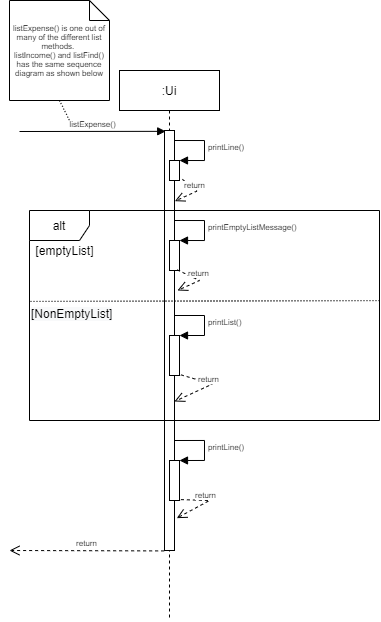
| The image below illustrates the sequence diagram in the context of listing methods | ||
| which includes listExpense, listIncome and listFind. | ||
|
|
||
|
|
||
|  |
There was a problem hiding this comment.
Isn't the return arrows in the alt block be more like a square instead of a triangle?

|  | ||
|
|
||
| The __Architecture Diagram__ above explains the high-level design of the StonksXD app. | ||
| Given below is a quick overview of the main components of the application and how they interact with each other: |
There was a problem hiding this comment.
This could look like a class diagram with the arrows and the box contains multiple sections. Maybe you should change it to another representation method to avoid confusion

| The image below shows the sequence diagram of how the `AddExpenseCommand` class is used and the other classes involved with it as well. | ||
|
|
||
|  |
There was a problem hiding this comment.
Is this part to be added? It doesn't show up on the github page

| - ####_Adding Income/ Expense entries_ | ||
| 1. Test Case: `add_ex d/DESCRIPTION a/AMOUNT c/CATEGORY`. </p> | ||
| Expected : Adds an expense item to the list. Displays confirmation message with timestamp. |
There was a problem hiding this comment.
This part shows the hashtags (#) on the Github page. Is this intentional?

| `StonksXD` is the main class of the app. It has 2 main functions: | ||
| 1. Upon opening the app, it loads saved data by calling `DataManager`. Before closing the app, it calls `DataManager` again to save data. | ||
| 2. Runs a loop receiving new user input from `Ui` and passing it to `Parser`. | ||
|
|
||
| `StonksXD` → `DataManager` | ||
|
|
||
| `Ui` → `StonksXD` → `Parser` | ||
|
|
||
| <br> | ||
|
|
||
| `Parser` is the class responsible for interpreting the user input. | ||
| It ensures the appropriate input format, and passes the input data to the appropriate command. | ||
|
|
||
| `StonksXD` → `Parser` → `Command` |
There was a problem hiding this comment.
Maybe you could provide a class diagram to show how those components interact with each other
Similar comments for other components description

 arraysius
left a comment
arraysius
left a comment
arraysius
left a comment
There was a problem hiding this comment.
The developer guide has been well written and clear for the most part. Some sections require more explanation or updated diagrams to reduce reader confusion.
| {Describe the design and implementation of the product. Use UML diagrams and short code snippets where applicable.} | ||
| ### Architecture | ||
|
|
||
|  |
There was a problem hiding this comment.

While looking at the architecture diagram, it is not entirely clear what the arrows and their directions mean between components. Maybe a note can be placed to explain the what the arrows and the direction mean.
There was a problem hiding this comment.

The 3-way arrow between Command, Financial Tracker and Budget Manager gave me the first impression that all 3 can interaction with one another. But the explanation below says
Parser → Command ↔ FinancialTracker
Parser → Command ↔ BudgetManager
Maybe two separate arrows can be used to display that Financial Tracker and BudgetManager are does not interact with one another directly.
| <br> | ||
|
|
||
| Below is a sequence diagram of the Budget component when `handleBudget` is executed: | ||
|  |
There was a problem hiding this comment.

The getLimit() method sounds like it should return a value back to BudgetManager. It might be a drawing bug where the return was left out. If not, maybe a better method name can be used.
|
|
||
| The image below illustrates the sequence diagram in the context of saving data into `StonksXD_Entries.csv`. | ||
|
|
||
|  |
There was a problem hiding this comment.

I assume that write(data:String) is void method. I think that if there is no return value, the return line can be drawn but the return word is not required.
There was a problem hiding this comment.

The lifeline should not exceed past the destruction symbol. Maybe the image can be edited to erase the extended lifeline or have a note to explain the limitation of the drawing and that it should not exceed.

| which includes listExpense, listIncome and listFind. | ||
|
|
||
|
|
||
|  |

There was a problem hiding this comment.

Should the return arrow here be square to adhere to the convention in class?
|
|
||
| <br> | ||
|
|
||
| Below is a sequence diagram of the Budget component when `handleBudget` is executed: |
There was a problem hiding this comment.

Apart from the return missing, perhaps the diagram is a bit complex and should be split into ref?

There was a problem hiding this comment.
In the budget component diagram, no return signs for all methods. It is better to add them to show that the method is done and it is returned to the previous layer?

|
|
||
| <br> | ||
|
|
||
| Below is a sequence diagram of the Budget component when `handleBudget` is executed: |
There was a problem hiding this comment.
In the budget component diagram, no return signs for all methods. It is better to add them to show that the method is done and it is returned to the previous layer?
|
|
||
| <br> | ||
|
|
||
| Below is a sequence diagram of the Budget component when `handleBudget` is executed: |
There was a problem hiding this comment.
Perhaps the Xbudget class lifeline should not extend the opt frame? Since it is created only in opt and should be executed after it

 ThaddeusLim99
left a comment
ThaddeusLim99
left a comment
ThaddeusLim99
left a comment
There was a problem hiding this comment.
Overall a very good effort so far. Needs some standardisation and correcting for sequence diagrams. Use of sequence and class diagrams are quite relevant. Explainations are generally not too long and thus not very difficult to understand.
| Snippets of code from Baeldung’s guide to unit testing of system.out.println() with junit were used. | ||
|
|
||
| {list here sources of all reused/adapted ideas, code, documentation, and third-party libraries -- include links to the original source as well} | ||
| Source: https://www.baeldung.com/java-testing-system-out-println |
There was a problem hiding this comment.
Perhaps the links could be hyperlinks instead for users to access them more easily?
| which includes listExpense, listIncome and listFind. | ||
|
|
||
|
|
||
|  |
There was a problem hiding this comment.
The comment on isExpense() could be clearer. maybe resize it box to become bigger?
|
|
||
| Below is a sequence diagram of the Budget component when `handleBudget` is executed: | ||
|  | ||
|
|
There was a problem hiding this comment.
Is the final return arrow of the BudgetManager object correct? Should the arrow not be at the end of the activation bar instead of the middle of the activation bar?

| <br> | ||
|
|
||
| Below is a sequence diagram of the Budget component when `handleBudget` is executed: | ||
|  |
There was a problem hiding this comment.
Perhaps the XBudget object box could be placed at the top along with the other object boxes for better standardization. Currently it looks a little messy.

|
|
||
| <br> | ||
|
|
||
| Below is a sequence diagram of the Budget component when `handleBudget` is executed: |
There was a problem hiding this comment.
Perhaps it would be better to standardise whether the conditional boxes (such as alt and opt) will be behind or infront of the activation bar that it crosses over with.

|
|
||
| The image below illustrates the class diagram in the context of data saving and loading. | ||
|
|
||
|  |
There was a problem hiding this comment.
Perhaps it would be better to add in the most used variables in the Class Diagram rather than leaving it empty? So that the user has a better idea on what kind of variables are in the class.
ThaddeusLim99
left a comment
ThaddeusLim99
left a comment
There was a problem hiding this comment.
Added some pictures for reference

Update developer guide for data saving and parser

…ouches

Final branch cleanup finishing touches
Update DG with sequence diagram


Checkstyle edits
…to BudgetFunction
User guide

…into branch-CurrencyTest

* 'master' of https://github.com/AY2122S1-CS2113T-T12-3/tp:
  Update
  Update user guide
  Update guides
  Update user guide
  User guide update
  Final commit
  Update code
added profile pic
Update data saving class
Final Commit
Update PPP
Update PPP
Developer guide
Make UG changes for CS2101
10 participants


Stonks XD is an expense tracker that help computing students manage their finances and provide reminders and advice regarding their spending. It is optimized for CLI users so that frequent tasks can be done faster by typing in commands.