-
Notifications
You must be signed in to change notification settings - Fork 275
[CS2113-T12-1] Study It #33
New issue
Have a question about this project? Sign up for a free GitHub account to open an issue and contact its maintainers and the community.
By clicking “Sign up for GitHub”, you agree to our terms of service and privacy statement. We’ll occasionally send you account related emails.
Already on GitHub? Sign in to your account
base: master
Are you sure you want to change the base?
Changes from 250 commits
e433da5
63a94fe
bf576ab
ede767b
0b93195
cc50ed9
bd400c1
0d97ebe
8939902
c422573
7c9ad39
bcb78fe
21f006d
bb09536
7ad8005
77eb7c7
1aeb272
9d35453
7548e68
1f6c922
47901a1
17a73f9
a87fa7e
9dbc598
3dc8e44
2cf2472
4d10833
6bc6959
261a6bc
db8684d
d60a867
b24f6ae
33ded77
1d20836
ecd0e39
957aa79
69ad963
d16dcbf
58e615f
2f84a88
7d523fa
79daf49
a140843
6e94d18
51c8f36
5ee9ae0
07796e4
7c2877a
6275f87
5d08f75
36ff78e
4f64410
dcdbaa0
f186fb1
34a43da
a594f2d
b9a978c
3a6beec
66ba56b
df8b653
b9a4757
4ef1a0f
9955b64
ddef071
8834524
7a89e23
40d76b5
363e487
212bf02
2861898
ed1d05f
4658a99
feb66a0
768ade0
0aae6ce
3341879
d3ea408
3030432
7455a84
a891406
a4efb0f
b2fcc6f
74f437f
05813a0
fc842a9
07fba65
19de4c1
8fc20eb
4310fbb
229bc09
91be8c2
a7b631e
7c92214
fc9fc6e
619f98a
8d57db5
cf8f8a3
6af4055
d973fed
d6f6308
aea5ad1
13282e2
d2da045
b5db25a
7aaf736
226e356
5dac20f
a38f849
aedc0ee
3395f7c
457c713
99be017
c2d5dff
5b3a1fc
0047ca4
dc6809a
0534172
4583d6d
dc2ee42
4f2f5ae
a94ad57
765d2ed
ecad292
bdc9ca1
0a9d366
99c8dd7
146a199
09f73bd
9945b24
da17881
53f0590
8cf0a52
8e13ace
d86af2e
7821db6
cf675b2
2123112
11c05a3
4bc804d
b5ca8bc
ae34695
b1ab02e
3c741fb
2791a9b
fff359c
78a586c
f7246ec
a0f9387
42007b9
009ae5a
5450927
05cad40
1b8d464
ef93f67
be6e0f7
73ad083
39ac5d8
a240811
562d04c
7ed74fd
f7b2f01
ca5cf91
a420a05
52d29c7
b0de810
9d22aaf
c982063
055bb6b
e38c54d
3c72a51
02e1916
071d98a
462b20e
ba3071c
61ecc0a
95fb5c5
6227efb
0aa101a
d0add4b
06d0028
a54be3c
469f2aa
29814f0
3bba288
74f113f
8eaa3bf
2a457ec
c806da2
be25225
14d40d2
b7a9efd
0eae80b
57f7546
675fbfc
6b6745b
f8ec446
7408d16
bfd6ba9
7f5f070
6b20baf
40adcaf
a6d1277
314dfd5
8e2964d
a02f5c5
cd80e3a
ccb39ec
199fc04
b670fee
a20011a
240ea3e
ccc516c
1665bec
b77a586
f9fef40
0925435
8c2535c
b4c0062
255baff
0547ff4
013f842
337aad1
d5a739f
0cc6440
a1ce4ae
e7c59ec
fb9f534
71ac781
d08054a
43f9a5b
9ecac5e
d5443e4
9f9b27f
5bc3474
0f0cfef
b67ed15
b50588d
e606514
f9e1c0f
0bebeec
daa03be
011b5e5
79de0de
c6b0f26
9b2c41f
ef21ee1
b6f99da
10a7fcb
4296fc4
a7e5c8e
File filter
Filter by extension
Conversations
Jump to
Diff view
Diff view
There are no files selected for viewing
| Original file line number | Diff line number | Diff line change |
|---|---|---|
| @@ -0,0 +1 @@ | ||
| <mxfile host="app.diagrams.net" modified="2020-10-27T15:37:53.968Z" agent="5.0 (Macintosh; Intel Mac OS X 10_15_6) AppleWebKit/537.36 (KHTML, like Gecko) Chrome/86.0.4240.80 Safari/537.36" version="13.8.5" etag="Q__1dEfyX0H9rvN0JhJ6" type="github"><diagram id="qLeCXLTED2RQiu_f9R3-">UzV2zq1wL0osyPDNT0nNUTV2VTV2LsrPL4GwciucU3NyVI0MMlNUjV1UjYwMgFjVyA2HrCFY1qAgsSg1rwSLBiADYTaQg2Y1AA==</diagram></mxfile> |
Large diffs are not rendered by default.
| Original file line number | Diff line number | Diff line change |
|---|---|---|
| @@ -1,33 +1,212 @@ | ||
| # Developer Guide | ||
| ##Content | ||
| [to be filled] | ||
|
|
||
| ## Setting up, Getting Started | ||
| ###Setting up the project in your computer | ||
|
There was a problem hiding this comment. Choose a reason for hiding this commentThe reason will be displayed to describe this comment to others. Learn more. This header is incorrectly rendered in Github Pages There was a problem hiding this comment. Choose a reason for hiding this commentThe reason will be displayed to describe this comment to others. Learn more. You can instead use a space before the title. instead of |
||
|
|
||
| First, **fork** this repo, and **clone** the fork into your computer. | ||
|
|
||
| If you plan to use Intellij IDEA (highly recommended): | ||
| 1. Configure the JDK: Configuring the JDK to ensure Intellij is configured to use JDK 11. | ||
| 2. Import the project as a Gradle project. | ||
| 3. Run the studyit.StudyIt and try a few commands. | ||
| 4. Run the tests to ensure they all pass. | ||
|
|
||
| ###Before writing code | ||
|
|
||
| 1. Configure the coding style. | ||
| Ensure Coding style is standardised throughout. | ||
| 2. Learn the design. | ||
| When you are ready to start coding, we recommend that you get some | ||
|
There was a problem hiding this comment. Choose a reason for hiding this commentThe reason will be displayed to describe this comment to others. Learn more. I think it would be good to specify more details? Learn which design, and what coding style to refer to. |
||
| sense of the overall design by reading about AddressBook’s architecture. | ||
|
|
||
| ## Design & implementation | ||
| ###Architecture | ||
| [to be filled] | ||
| ###Bookmark Component | ||
|
|
||
| This bookmark section consists of how the bookmark feature is implemented. | ||
| The bookmark feature is implemented similarly to the main architecture, however, | ||
| in a smaller scale and a more bookmark-specific way. Figure 1 illustrates the general overview, | ||
| the associations and the multiplicity of the bookmark classes. | ||
|
|
||
|  | ||
|
|
||
|
Comment on lines
+33
to
+193
There was a problem hiding this comment. Choose a reason for hiding this commentThe reason will be displayed to describe this comment to others. Learn more. It would be nice to have a label for each association. There was a problem hiding this comment. Choose a reason for hiding this commentThe reason will be displayed to describe this comment to others. Learn more. You can add lables under each figure. |
||
| API: java.bookmarkRun | ||
|
|
||
| The bookmark component consists of six major classes: `BookmarkRun`, `BookmarkStorage`, `BookmarkUi`, | ||
| `BookmarkCategory`, `BookmarkList` and `BookmarkParser`. | ||
| As shown in figure 1, `BookmarkRun` is | ||
| * The main class to be called when the bookmark mode is accessed. | ||
| * The main class to access other bookmark classes. | ||
|
|
||
| Given below, Figure 2, is the sequence diagram of how the classes interact with each | ||
| other when bookmark mode is accessed from the main function. | ||
|
|
||
|  | ||
|
|
||
|
Comment on lines
+46
to
+206
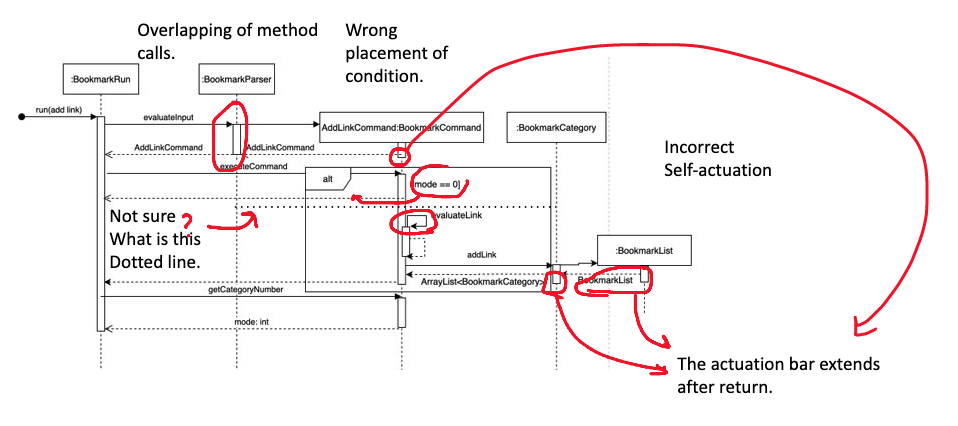
There was a problem hiding this comment. Choose a reason for hiding this commentThe reason will be displayed to describe this comment to others. Learn more. There are some problems in this diagram.
There was a problem hiding this comment. Choose a reason for hiding this commentThe reason will be displayed to describe this comment to others. Learn more. |
||
| The bookmark component has two modes: the main bookmark mode and the category mode. | ||
| As shown in Figure 2, when `BookmarkRun` is called, | ||
| `BookmarkParser` will be called and return a `BookmarkCommand`. | ||
| Afterwards, `BookmarkRun` will then call `executeCommand` in `BookmarkCommand` which executes | ||
| the intended actions | ||
| Then, it will call `getCategorymode` to get the current mode the user is in. | ||
|
|
||
| **Bookmark Implementation** | ||
|
|
||
| A more detailed explanation of `BookmarkCommand`, `BookmarkCategory` and `BookmarkList` will be | ||
| shown below. `BookmarkUi` and `BookmarkStorage` follow the same design implementations as the main | ||
| architecture. The below figure shows the command classes available and they are called based on the | ||
| `BookmarkParser` class as illustrated in Figure 2. | ||
|
|
||
|  | ||
|
|
||
|
Comment on lines
+62
to
+221
There was a problem hiding this comment. Choose a reason for hiding this commentThe reason will be displayed to describe this comment to others. Learn more. Some lines are detached. Use the inheritance arrow instead of association here. There was a problem hiding this comment. Choose a reason for hiding this commentThe reason will be displayed to describe this comment to others. Learn more. You might also need to use dotted lines. |
||
| Figure 4 shows a more detailed sequence diagram of how the `BookmarkCategory`, `BookmarkCommand` | ||
| and `BookmarkList` interacts with each other for the scenario when the user input an `AddLinkCommand` | ||
| in Bookmark mode. | ||
|
|
||
|  | ||
|
|
||
|
Comment on lines
+68
to
+268
There was a problem hiding this comment. Choose a reason for hiding this commentThe reason will be displayed to describe this comment to others. Learn more. Is this an exact copy of the Bookmark Sequence diagram above? |
||
| ### **Academic Component** | ||
|
|
||
| This section will describe in detail how some features inside the academic tracker section have been implemented. | ||
| Figure x illustrates the general overview, the associations and the multiplicity of the academic classes. | ||
|
|
||
|  | ||
|
There was a problem hiding this comment. Choose a reason for hiding this commentThe reason will be displayed to describe this comment to others. Learn more. The resolution of this image is a bit low, perhaps can export the diagram with a higher resolution? There was a problem hiding this comment. Choose a reason for hiding this commentThe reason will be displayed to describe this comment to others. Learn more. Perhaps the diagram can be broken down into two separate parts. The :BookmarkRun, :TimetableRun, :AcademicRun and :FlashcardRun components could be grouped into a separate sub diagram and represented in the main diagram with a black-box. This will make the diagram more readable. |
||
|
|
||
| API: `java.academic` | ||
|
There was a problem hiding this comment. Choose a reason for hiding this commentThe reason will be displayed to describe this comment to others. Learn more. Should it be |
||
|
|
||
| The above diagram looks at the overall structure of how the academic tracker is being implemented. | ||
| This component is split into 7 different classes, | ||
| their associations and multiplicity as explained in the above diagram x. | ||
| The functions of the academic tracker will be called through the `AcademicRun` class | ||
| when the program is in academic mode, which will subsequently call | ||
| the functions in `PersonBook` or `GradeBook`. | ||
|
|
||
| The academic component: | ||
| * initialises two arraylists, `ArrayList<Grade>` and `ArrayList<People>` | ||
| to store the relevant `Grade` and `People` objects. | ||
| * uses `AcademicCommandParser` to parse the user command. | ||
| * identifies `AcademicCommandType` to decide | ||
| which of the commands under `PersonBook` or `GradeBook` is to be executed. | ||
| * calls `AcademicStorage` to store the current set of data into the local storage file. | ||
|
|
||
| **Academic Implementation** | ||
|
|
||
| This section explains the details on how certain features | ||
| are implemented in the academic tracker. | ||
|
|
||
| **GradeBook Features** | ||
| The grade features are facilitated `Gradebook`, which further make use of `Grade`. | ||
| All grades are stored internally under `AcademicRun` as an array list `ArrayList<Grade>`. | ||
| It implements the following operations: | ||
| * `addGrade(String[], ArrayList<Grade>)`:Adds a `Grade` to the `ArrayList<Grade>`. | ||
| * `printCap(ArrayList<Grade>)`:Calculate the current CAP based on the `ArrayList<Grade>`. | ||
| * `printListOfGrades(ArrayList<Grade>)`:Print out all the `Grade` that are currently stored inside `ArrayList<Grade>`. | ||
| * `deleteGrade(Integer, ArrayList<Grade>)`:Delete a `Grade` from a specified index inside `ArrayList<Grade>`. | ||
| * `suGradeInGradeBook(Integer, ArrayList<Grade>)`:Su a `Grade` from a specified index inside `ArrayList<Grade>`. | ||
| * `starGrade(Integer, ArrayList<Grade>)`:Star a `Grade` from a specified index inside `ArrayList<Grade>`. | ||
| * `combineGradeDetails(Grade)`:Print out the details of a particular `Grade`. | ||
|
|
||
| ### **Flashcard Component** | ||
|
|
||
| This section will describe in detail how the flashcard feature is implemented. | ||
|
|
||
|  | ||
|
|
||
|
Comment on lines
+115
to
+344
There was a problem hiding this comment. Choose a reason for hiding this commentThe reason will be displayed to describe this comment to others. Learn more. Some arrows are not quite clear. Maybe you can point out both directions of multiplicity. There was a problem hiding this comment. Choose a reason for hiding this commentThe reason will be displayed to describe this comment to others. Learn more. Are Flashcard and FlashcardSotorage abstract? Would be nice if you specify using the label {abstract}, if they are not, you can remove the italics. |
||
| The above diagram looks at the overall structure of how the flashcard component is being implemented. | ||
| This component is split into 4 different classes, their associations and multiplicity as explained in | ||
| the above Figure 7. As shown in Figure 7, the main class `FlashcardRun` will be accessed when the | ||
| flashcard mode is called in `StudyIt` Class. `FlashcardRun` class is associated with `FlashcardStorage` | ||
| class that is used to store data in .txt file and `FlashcardDeck` class which contains any number of `Flashcards`. | ||
|
|
||
| **Flashcard Implementation** | ||
|
|
||
|  | ||
|
|
||
|
Comment on lines
+358
to
+360
There was a problem hiding this comment. Choose a reason for hiding this commentThe reason will be displayed to describe this comment to others. Learn more. Specify the names of the function calls here. |
||
| With reference to Figure 8, when `FlashcardRun` is first initialised by `StudyIt`, it will construct | ||
| the `FlashcardDeck` class. As an add card command is given by the user, `FlashcardRun` will take in the | ||
| command and call `addCard()` method in `FlashcardDeck` which constructs a new Flashcard object and stores | ||
| it inside the `FlashcardDeck` object.The `addCard()` function will then show the user the question and | ||
| answer of the flashcard that have been created. | ||
|
|
||
| {Describe the design and implementation of the product. Use UML diagrams and short code snippets where applicable.} | ||
| ##Documentation, logging, testing, configuration, dev-ops | ||
| ###Testing guide | ||
|
There was a problem hiding this comment. Choose a reason for hiding this commentThe reason will be displayed to describe this comment to others. Learn more. The headers are not rendered correctly in Github Pages. You might want to add a space. |
||
| Running tests: | ||
| The main way that was used to run the test for Study It is: | ||
| Using IntelliJ JUnit test runner. | ||
| A. To run all tests, right-click on the src/test/java folder and choose | ||
| Run Test in ‘tp.test’ | ||
| B. To run a subset of tests, you can right-click on a test package, | ||
| test class or a test and choose Run ‘ABC’. | ||
| Type of Tests | ||
| This project has 5 types of tests. 4 tests to test each feature and 1 test to test the main integration of the whole application. | ||
|
|
||
| ###Logging guide | ||
| We are using java.util.logging package for logging | ||
| The StudyItLog class is used to manage the logging levels and logging destinations. | ||
| Log messages are output through the console and to a .log file. | ||
| The output logging level can be controlled using .setlevel( ) | ||
| When choosing a level for a log message, follow the following conventions: | ||
| 1. SEVERE: A critical problem detected which may cause the termination of the application. | ||
| 2. WARNING: Can continue, but with caution. | ||
| 3. INFO: Information showing the noteworthy actions by the App. | ||
| 4. FINE: Details that are not usually noteworthy but may be useful in debugging. | ||
|
Comment on lines
+392
to
+395
There was a problem hiding this comment. Choose a reason for hiding this commentThe reason will be displayed to describe this comment to others. Learn more. You can emphasize the log message levels. |
||
|
|
||
| ## Product scope | ||
| ### Target user profile | ||
|
|
||
| {Describe the target user profile} | ||
| ###DevOps Guide | ||
| Build automation | ||
| This project uses Gradle for build automation management. | ||
| ./gradlew build - check for checkstyle error and runs all tests | ||
| Code coverage | ||
| This project uses code coverage that is in IntelliJ IDE to check for the coverage of the code. | ||
|
|
||
| ### Value proposition | ||
| ##Appendix: Requirement | ||
|
There was a problem hiding this comment. Choose a reason for hiding this commentThe reason will be displayed to describe this comment to others. Learn more. Missing |
||
| ### Product scope | ||
| **Target user profile:** | ||
| * studies in NUS | ||
| * has a need to manage a significant number of links | ||
| * has a need to manage their classes in a timetable | ||
| * has a need to manage their grades | ||
| * has a need to manage contact numbers of professors and teaching assistants. | ||
| * has a need to memorise content to study | ||
| * prefer desktop apps over other types | ||
| * can type fast | ||
| * prefers typing to mouse interactions | ||
| * is reasonably comfortable using CLI apps | ||
|
|
||
| {Describe the value proposition: what problem does it solve?} | ||
| **Value proposition:** | ||
| * manage links faster than a typical mouse/GUI driven app | ||
| * manage grades more easily than a typical mouse/GUI driven app | ||
| * manage contact numbers of professors and teaching assistants more effectively than a typical mouse/GUI driven app | ||
| * manage timetable in a more organised manner than a typical mouse/GUI driven app | ||
| * manage study content more efficiently than a typical mouse/GUI driven app | ||
|
|
||
| ## User Stories | ||
| #### User Stories | ||
|
|
||
| |Version| As a ... | I want to ... | So that I can ...| | ||
| |Version| As a ... | I want to ... | So that I ...| | ||
| |--------|----------|---------------|------------------| | ||
| |v1.0|new user|see usage instructions|refer to them when I forget how to use the application| | ||
| |v2.0|user|find a to-do item by name|locate a to-do without having to go through the entire list| | ||
| |v1.0|Student in Nus|organise my zoom links|don’t need to find the zoom link everytime lectures/tutorials start.| | ||
| |v1.0|student attending online classes|keep track of the timetable of my lessons whether it is online or offline|do not miss any lessons.| | ||
| |v2.0|Student in Nus|organise all the useful signup links (internship/ hackathon/ talks) sent to our emails|can keep track of my time and dates of any relevant events.| | ||
| |v1.0|Student in Nus|keep track of my results and the number of SUs I have left,|can plan my semester properly| | ||
| |v1.0|student with packed timetables|see clashes in my timetable |can plan things without overlapping events.| | ||
| |v1.0|student taking a mod that requires me to memorize a lot of contents|organize the contents into flashcards|can revise them on the go.| | ||
| |v1.0|student who is worried about my results|calculate my CAP based on estimated grades|know i won’t get expelled :’)| | ||
| |v1.0|Student in Nus|keep track of my profs and ta’s contacts|know who to find when i have troubles.| | ||
| |v1.0|Student in Nus|bookmark all the important NUS websites|can access them more easily| | ||
|
|
||
| ## Non-Functional Requirements | ||
| #### Non-Functional Requirements | ||
|
|
||
| {Give non-functional requirements} | ||
| * Should work on any [mainstream OS](#glossary) as long as it has Java 11 or above installed. | ||
| * A user with above average typing speed for regular English text | ||
| (i.e. not code, not system admin commands) should be able to accomplish most of the | ||
| tasks faster using commands than using the mouse. | ||
|
|
||
| ## Glossary | ||
|
|
||
| * *glossary item* - Definition | ||
| * *Mainstream OS* - Windows, Unix, Linux, OS-X | ||
|
|
||
| ## Instructions for manual testing | ||
|
|
||
|
|
||

There was a problem hiding this comment.
Choose a reason for hiding this comment
The reason will be displayed to describe this comment to others. Learn more.
Add an introduction to the developer guide.