[CS2113T-T09-2] Ravi#27
Conversation


 Nazryl
left a comment
Nazryl
left a comment
Nazryl
left a comment
There was a problem hiding this comment.
Overall the UG looks clean and neat. Love how some features are being shown. Minor problem is that the photos should indicate what kind of diagram and an overall description of the diagram will help reading go easier on the developers!
| # Developer Guide for ra.VI | ||
|
|
||
| ## Design & implementation | ||
| ## Table of Contents |
| viewed as a simple layer of abstraction on top of Command and CommandResult to facilitate the execution of user | ||
| commands. Command is a dependency of Parser as Parser creates Command objects to return to the main loop. | ||
|
|
||
|  |
There was a problem hiding this comment.
Could add a picture caption for the Main Class object at the bottom of the picture.
| viewed as a simple layer of abstraction on top of Command and CommandResult to facilitate the execution of user | ||
| commands. Command is a dependency of Parser as Parser creates Command objects to return to the main loop. | ||
|
|
||
|  |
There was a problem hiding this comment.
If adding a private variable for Duke and TextUI, consider adding for the rest of the classes or just leave it out.
| however, are dependencies of Command as there are commands for using/manipulating each one of them. InputOutputManager | ||
| and Command are then dependencies of the main class Duke. | ||
|
|
||
|  |
There was a problem hiding this comment.
I believe the initialization should be as follows
-undoStack: Stack
-moduleCode: String
|
|
||
| The main sequence diagram can be broken into three parts representing each of these phases. | ||
|
|
||
|  |
There was a problem hiding this comment.
Unused classes should be removed as it is uninformative.
| TimeTableManager may need user input to be initialised, and so it is placed in a validation loop. | ||
| A welcome message is shown at the end of the initialisation phase. | ||
|
|
||
|  |
There was a problem hiding this comment.
I like how there are comments on the sequence diagram to explain what's going on.
There was a problem hiding this comment.
The activation bar on both ends should be closed and not left protruding out of the picture.


| * DeleteTask - Deletes a task from the task list through `TaskManager.delete()` | ||
| * DeleteModule - Deletes a module from the module list through `ModuleManager.delete()` | ||
|
|
||
| 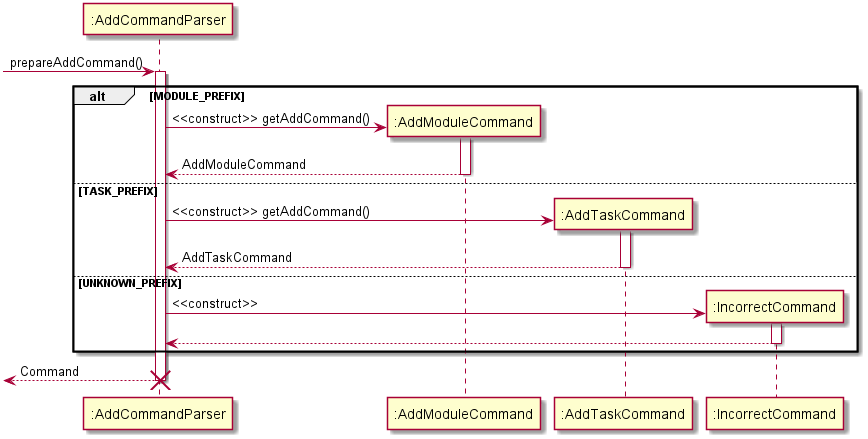 |
There was a problem hiding this comment.
Should term "construct" above constructor arrows be omitted for creation of new objects as it is implied by UML diagram notation?
| * `CapCommand.gradeConvert` - Takes the grade of a module and assigns it a value according to the NUS grading schematic | ||
| * `CapCommand.calculateCap` - Uses a formula to calculate the user's current cap, with the user's total Module Credit taken and current CAP. | ||
|
|
||
| 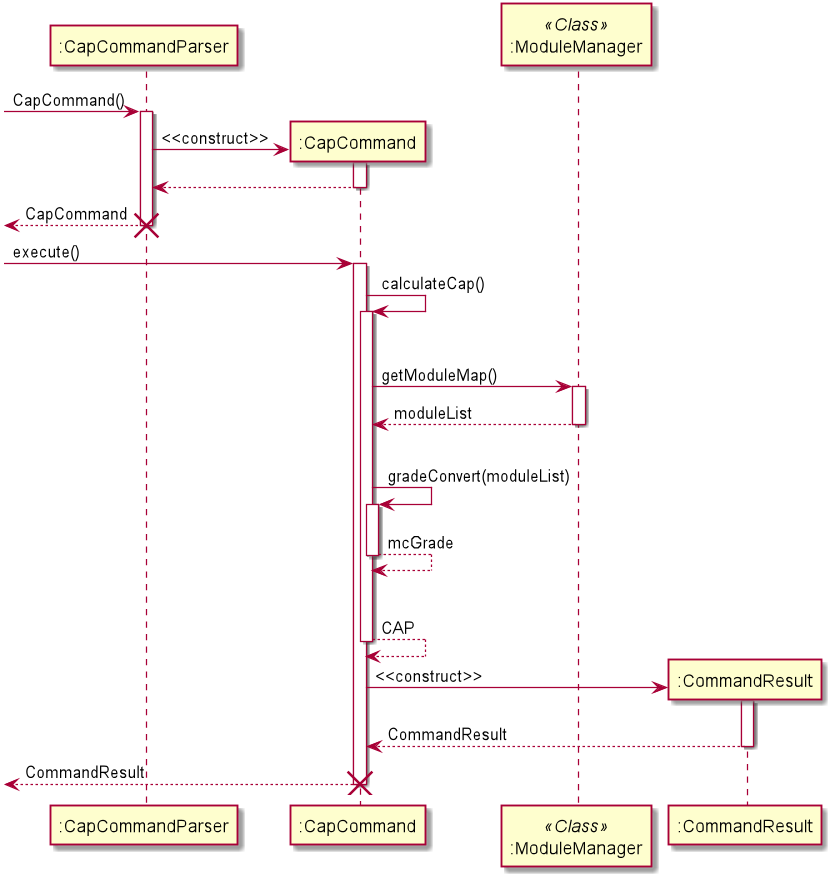 |
There was a problem hiding this comment.
Should there be an indication that methods in :ModuleManager are static?
| * DeleteTask - Deletes a task from the task list through `TaskManager.delete()` | ||
| * DeleteModule - Deletes a module from the module list through `ModuleManager.delete()` | ||
|
|
||
|  |
There was a problem hiding this comment.
Is the end of lifeline supposed to be directly at the end of the activation bar?

 JohnNub
left a comment
JohnNub
left a comment
JohnNub
left a comment
There was a problem hiding this comment.
Overall the developer guide is very detailed and contains good information about the overall configuration of the program. The use of abstraction to handle parsing errors is one of the more unique implementations I've come across.
However, I did not see the design considerations for the features listed anywhere in the document. Perhaps that is something worth considering as an addition.
| # Developer Guide for ra.VI | ||
|
|
||
| ## Design & implementation | ||
| ## Table of Contents |
There was a problem hiding this comment.
Should the table of contents be filled out?
| ## Table of Contents | ||
|
|
||
| {Describe the design and implementation of the product. Use UML diagrams and short code snippets where applicable.} | ||
| ## Setting up |
There was a problem hiding this comment.
Should the individual section headings be numbered for clarity?
| ## Setting up | ||
| The following section describes how to set up ra.VI on your own computer. | ||
|
|
||
| ### Software Prerequisites |
There was a problem hiding this comment.
The glow effect on the chosen webpage style might make it hard to tell level 2 and level 3 headings apart. Numbering the sub-sections should help with this greatly.
|  | ||
| ra.VI's `start()` method initialises all the classes used by the main class, like TextUi, InputOutputManager, and more. | ||
| TimeTableManager may need user input to be initialised, and so it is placed in a validation loop. | ||
| A welcome message is shown at the end of the initialisation phase. | ||
|
|
||
|  | ||
| The main loop is contained in the 'runCommandLoopUntilExitCommand()' method. | ||
| The main loop follows the following steps: | ||
| 1. Get the user command as a string. | ||
| 2. Parse the command using Parser. Parser will return a Command object. | ||
| 3. Execute the Command object with the `execute()` method. This will do the necessary work and return a CommandResult object. | ||
| 4. If any data was changed, StateManager will run `saveState()` to facilitate undo commands. | ||
| 5. Finally, use the CommandResult object to show the result of the command to the user using TextUi. | ||
|
|
||
| Note that the Command and CommandResult objects are destroyed at the end of the method. Additionally, the Parser object | ||
| is destroyed after each use. | ||
|
|
||
|  |
There was a problem hiding this comment.
These diagrams are extremely complex and there is a lot of information. While a lot of effort has been put into annotating the information, I feel like it could be easier to comprehend if it was split into simpler subsections.
For example, since you only want to talk about the start() command at the beginning, you could do a diagram on which functions are triggered by start(), then for 2nd one you can cover all functions run by runCommandLoopUntilExitCommand(). Focusing on just these functions alone (and not what invokes the functions) would help reduce the amount of stacking activation bars as well as give you a nice simple diagram for the 1st one with less redundant classes. If you still want to cover the entire execution of main() and run() you can add those in a separate diagram with no additional classes to cover the broad level scope of the program invocation and functions called.
| * DeleteTask - Deletes a task from the task list through `TaskManager.delete()` | ||
| * DeleteModule - Deletes a module from the module list through `ModuleManager.delete()` | ||
|
|
||
|  |
There was a problem hiding this comment.
I like this diagram a lot more than the previous one as it doesn't show any unnecessary classes making it much easier to read.
However, I couldn't find any references to prepareAddCommand() anywhere in the document. Could this be better explained to the reader?
| 2. The user inputs `add -m CS2101` into ra.VI, as the user wants to note down a module named ‘CS2101’ and add it to their module list.\ | ||
| The Ui receives the input as a string. Parser parses the string, and thereafter the AddCommandParser, before creating an AddModuleCommand. |
There was a problem hiding this comment.
Parser parses the string, and thereafter the AddCommandParser
This phrasing is rather ambiguous, is it implying that the string is parsed twice? What is the result of the first parsing step? Why are there two parsing steps? According to your document it is mentioned that the Parser will create a command, but this section appears to suggest that the Parser just forwards the string to another parser class.
Could this be better explained to reduce ambiguity?
| Given below is an example usage scenario and how the cap feature behaves at each step. | ||
| 1. The user launches the application for the first time. | ||
| 2. The user inputs `add -t Read book` into ra.VI, adding the task to the task list in TaskManager. The user keys in multiple other tasks of the following: | ||
| * `add -t Return book -by 2-10-2020 1400` | ||
| * `add -t Meeting` | ||
|
|
||
| 3. The user inputs `add -m CS2113T` into ra.VI, adding the module to the module map in ModuleManager. The user keys in multiple other modules of the following: | ||
| * `add -m CS2101` | ||
| * `add -m CG2271` | ||
|
|
||
| 4. The user inputs `list -t`. The CommandResult returns | ||
| ``` | ||
| 1. Read book [x] | ||
| 2. Return book [x], by 02:00PM, Friday, 02 Oct 20 | ||
| 3. Meeting [x] | ||
| ``` | ||
| Step 5. The user inputs `list -m`. The CommandResult returns | ||
| ``` | ||
| 1. CS2113T: Software Engineering & Object-Oriented Programming: No grade yet | ||
| 2. CG2271: Real-Time Operating Systems: No grade yet | ||
| 3. CS2101: Effective Communication for Computing Professionals: No grade yet | ||
| ``` | ||
|
|
There was a problem hiding this comment.
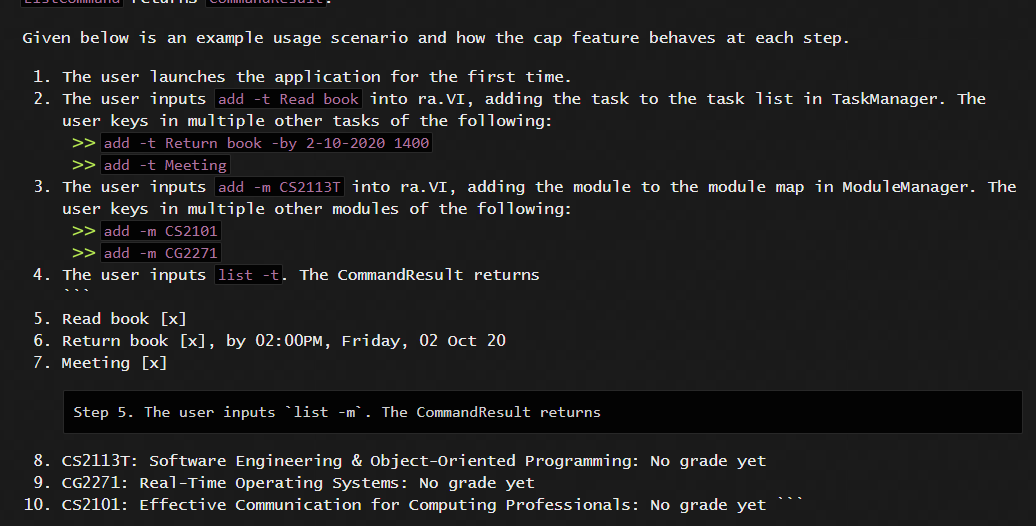
Should the formatting appear like this?
Why is it labeled "Step 5" when the first 4 points do not use the prefix term "Step"?
| Given below is an example usage scenario and how the grade feature behaves at each step. | ||
|
|
||
| 1. The user launches the application. The user inputs `add -m CS2101` into ra.VI, as the user wants to note down | ||
| a module named ‘CS2101’ and add it to their module list. This input is received by the Ui ,which processes it into |
There was a problem hiding this comment.
Should the comma be attached to the "which"?
|
|
||
| ## Non-Functional Requirements | ||
|
|
||
| {Give non-functional requirements} |
| Step 4. The TimeTableAddCommand is executed, returning a `CommandResult` containing a success message if the Lessons have | ||
| been successfully added. Otherwise, an exception message will be shown explaining the exception to the user.\ | ||
| Common reasons for failure include: |
There was a problem hiding this comment.
The earlier 3 points do not use the "Step" prefix, should this be amended as well?


* Add missing features to user story table

Update UG to add in expected output
Fix DG based on Prof's comments
breakspace

Quick Fix: IOManager doesn't load NUSMods if data dir doesn't exist
Cut more PPP
Cut more PPP
Amend toc for the gui
DG and PPP update
Cut more

* commit '0d1ed258ba9d0aea04a2f2472f1ee044684ec825':
  Cut more
  Cut
  Cut more P
  Amend toc for the gui
  Fix merge conflict in DG, update PPP
  Cut more PPP
  Cut more spacing
  Updates for DG and diagrams; moved more stuff to Executor
  Trying out attribute
  Updates to Data section of DG
Update PPP
Fixed typos and conflicts
8 participants


The Ravi application is a simple yet powerful task management system that is dedicated to providing NUS freshman a more efficient way to organise their modules and tasks.