Name:Wissam Hadjarab
Student Number: C21404706 TU858/2
Name: Iria Parada Murciego
Student Number: c22305863
github : iriaPM
class group: TU 856 /2
Name: Amber Kane
Student Number: C22400154
github : C22400154
class group: TU 856 /2
Name: Mymuna Alom Munma
Student Number: C22368271
GitHub: mymunaalom
Class Group: TU856/2
- Fork this repository and use it a starter project for your assignment
- Create a new package named your student number and put all your code in this package.
- You should start by creating a subclass of ie.tudublin.Visual
- There is an example visualiser called MyVisual in the example package
- Check out the WaveForm and AudioBandsVisual for examples of how to call the Processing functions from other classes that are not subclasses of PApplet
For our group assignment we chose to do the music visualiser as a team. We chose the squidward tiki song from spongebob for a more light hearted visiualizer and stuck to the theme of spongebob throughout the different images.
Wissam -- We initially worked on a seperate file each, one visiualiser each and designed and coded that section on our own. For my file I included different elements whilst in line with the theme. I included a background of a grid along with an imported picture of the spongebob beach background too to give it more emphasis. I created a outline of the screen to go in beat and pulse with the song with different altitudes and colour to give more dimention and a 'pop' to add something to the screen that will stand out and resemble to frequencies of the audio. for (int i = 0; i < ab.size(); i++) { float cx = width / 2; lerpedBuffer[i] = lerp(lerpedBuffer[i], ab.get(i), 0.1f); float hue = map(i, 0, ab.size(), 0, 256); float s = lerpedBuffer[i] * cx * 2;
        // from left side to right
        stroke(40, 255, 255);
        line(0, i, s, i);
        // from right side to left
        line(width, i, width - s, i);
        // from top to bottom
        line(i, 0, i, s);
        // from bottom to top
        line(i, height, i, height - s);
I also wanted to include a moving element onto the screen and tried to keep it with theme so I decided to make an ocean wave based on one frequency wave from the audio. I implented it so that it would take the width of third of the screeen and change the colour to represent the ocean.
    // Ocean wave parameters
    float waveSpeed = 0.0000000000000000001f; // Speed of the waves
    float waveAmplitude = 10; // Amplitude of the waves
    float waveFrequency = 0.025f; // Frequency of the waves

    for (int z = 0; z < width; z++) {
        stroke(160, 255, 255); // HSB color (blue)
        float waveHeight = sin(z * waveFrequency + off) * waveAmplitude;
        line(z, height * 2 / 3 + waveHeight, z, height); // Drawing waves from the center of the canvas to the bottom
    }
To encorperate another moving element, I wanted to put something across the screen as it seemed a bit empty. I included a class to bring another imported image of bananas and put them in an list to be called in a for loop to also be in line with the music using the amplitude and calling it in the display. bananaPic = loadImage("banana_pic.png"); bananas = new ArrayList();
    bg = loadImage("spongeBG.png");

    int numBananas = 30;
    float bananaSpacing = width / (numBananas + 1); // calculate spacing between bananas
    for (int i = 1; i <= numBananas; i++) {
        float bananaX = i * bananaSpacing ;
        bananas.add(new Banana(bananaX, 0)); // Add bananas to the list
    }
int numBananas = 15;
    float bananaSpacing = width / (numBananas + 1); // calculate spacing between tikis


    for (int i = 1; i <= numBananas; i++) {
        float bananaX  = i * bananaSpacing - 100; // Calculate X position

        // move bananas with music
        float amplitude = map(sin(frameCount * 0.05f), -1, 1, 0, ab.size() / 8);
        float bananaY = -amplitude * 0.5f;
        float bananaSize = map(amplitude, 0, 50, 10, 50);

        float hue = map(amplitude, 0, 50, 0, 360);
        fill(hue, 100, 100);

    }

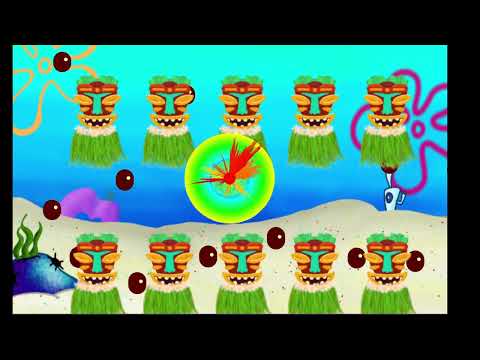
Iria -- IriaVisual is composed of a background picture that everyone in the group has, to follow the spongebob theme; Then I have two sets of images one on the top half and the other one on the bottom half, they are tiki faces with a hawaiian skirt, these images are not directly from spongebob series but they are inspired by the ‘tikiland’ song sequence. I used PImage to display the images onto the screen, I Initialise them in a method called tiki_face(), using Pvector I was able to position the images where I wanted them to be and also allow them to move up and down with the music, using the amplitude variable and ab.size();
  // move tiki with music
  float amplitude = map(sin(frameCount * 0.05f), -1, 1, 0, ab.size() / 8);//
  PVector tikiPos = new PVector(tikiX, height / 12 + amplitude);//
  PVector tikiPos2 = new PVector(tikiX, height / 1.50f + amplitude);

  // skirt
  PVector skirtPos = new PVector(tikiX , height / 3.4f + amplitude);
  PVector skirtPos2 = new PVector(tikiX , height / 1.14f + amplitude);
The coconuts are also a big part of this visual, when cliked via mouse/touchscreen a coconut will appear on the screen and fall then go back up, once it reaches the bottom twice the coconut disappears(doesnt go back up). For this effect, I created an array to store all the coconuts that appear on screen, I used a class called ‘Coconut’, I used Pvector to also position the coconuts. Inside this class I made a method called update(), this is the method that updates the coconut position to make it appear on screen, I used pushmatrix() to save the current position of the coconut, then I made the coconut using two ellipses one for the brown part and another one for the little hole on the top corner. To make them fall I add 3 to the yposition.and then used an if statement making it go back up once it reaches the bottom, but once it reaches it twice the coconut gets removed from the array.
  pushMatrix(); // save the current transformation matrix
  translate(position.x, position.y); // translate to the coconut's position
  noStroke();
  fill(360, 100, 36);
  ellipse(0, 0, coconutSize, coconutSize); // draw coconut at the translated position

  // Draw small circle inside the coconut
  float smallCircleSize = 20;
  float smallCircleOffsetX = coconutSize / 2 - 30;
  float smallCircleOffsetY = -coconutSize / 2 + 30;
  fill(67, 37, 100);
  ellipse(smallCircleOffsetX, smallCircleOffsetY, smallCircleSize, smallCircleSize);

  popMatrix(); // restore the previous transformation matrix

  // makes coconut falls down
  position.y += 3;
  if (position.y > height) {
      position.y = 0; // coconut goes back up when it reaches the bottom
      timesReachedEnd++;
  }
  if (timesReachedEnd >= 2) {
      coconuts.remove(this); // remove coconut from the list if reached the end twice
  }
For the coconuts to appear on screen I made a method(outside of the coconut class), that used the built-in mousepressed function in an if statement and so add a coconut to the array in the position of the mouse, using mouseX, mouseY. this function is then called in draw() and i use get() to to display the coconut.
  public void reactToMouseMovement() {
        // make coconuts appear on screen when clicked by mouse
        if (mousePressed) {
            coconuts.add(new Coconut(new PVector(mouseX, mouseY)));// create new coconuts + add to list
        }
    }
In the center of the screen I have several elements, for them I used the lerped buffer and smoothed amplitude that we used in the labs to make the shapes expand with the music.
The first shape is a line that using a for loop and adding cos and sin into the parameters make it this cool shape, that expands with the bass of the music. I also have a circle behind it that in the same way expands as the music gets louder. inside this circle I have a line that makes a circle inside it formed by multiple lines that change color with the music. For the use of color I used the HSB mode.

Amber -- "ambersVisual" brings the beat of "Squidward's Tiki Land Psy-Trance Remix" to life with bouncing palm trees, floating clouds, and colorful flowers. The trees dance along with the song's rhythm, while clouds drift across the screen at random speeds. When the music drops, various colourful and vibrant flowers pop up, adding bursts of color to the scene. The drawTree() function draws stylized trees using rectangles and Bezier curves. It consists of trunk and leaf shapes drawn with various vertices and Bezier curves to create a palm tree-like appearance.
	void drawTree(float x, float y, float scale)
    {
        //trunk
        fill(55, 40, 28);
        rect(x - 10 * scale, y, 20 * scale, 150 * scale);

        //leaves
        fill(19, 128, 99);

        //topleft
        beginShape();
        vertex(x + 10 * scale, y);
        bezierVertex(x - 50 * scale, y - 60 * scale, x - 70 * scale, y + 20 * scale, x - 50 * scale, y + 60 * scale);
        bezierVertex(x - 20 * scale, y + 20 * scale, x - 40 * scale, y - 10 * scale, x, y);
        endShape(CLOSE);

        //left
        beginShape();
        vertex(x - 10 * scale, y);
        bezierVertex(x - 80 * scale, y - 30 * scale, x - 90 * scale, y + 10 * scale, x - 70 * scale, y + 50 * scale);
        bezierVertex(x - 30 * scale, y + 20 * scale, x - 40 * scale, y - 10 * scale, x - 10 * scale, y);
        endShape(CLOSE);

        //right
        beginShape();
        vertex(x + 10 * scale, y);
        bezierVertex(x + 80 * scale, y - 30 * scale, x + 90 * scale, y + 10 * scale, x + 70 * scale, y + 50 * scale);
        bezierVertex(x + 30 * scale, y + 20 * scale, x + 40 * scale, y - 10 * scale, x + 10 * scale, y);
        endShape(CLOSE);
        //topright
        beginShape();
        vertex(x + 10 * scale, y);
        bezierVertex(x + 50 * scale, y - 60 * scale, x + 80 * scale, y - 20 * scale, x + 50 * scale, y + 20 * scale);
        bezierVertex(x + 20 * scale, y - 20 * scale, x + 30 * scale, y - 40 * scale, x + 10 * scale, y);
        endShape(CLOSE);
    }
The Cloud class defines objects representing clouds in the visualization. Each cloud has properties like position, size, and speed, and methods for display and movement. The display() method draws the cloud using ellipse shapes, while the move() method updates the cloud's position.
	class Cloud
    {
        float x, y, size, speed;
        Cloud(float x, float y, float size, float speed)
        {
            this.x = x;
            this.y = y;
            this.size = size;
            this.speed = speed;
        }
        void display()
        {
            noStroke();
            fill(255);
            float angleStep = TWO_PI / 10;
            ellipse(x, y, size * 2, size * 0.8f);
            for (float angle = 0; angle < TWO_PI; angle += angleStep)
            {
                float vx = x + cos(angle) * size;
                float vy = y + sin(angle) * size * 0.5f;
                ellipse(vx, vy, (float)(size * 0.8), (float)(size * 0.8));
            }
        }
        void move()
        {
            x += speed;
            if (x > width + size / 2)
            {
                x = -size / 2;
            }
        }
    }
The Flower class represents individual flowers in the visualization. Each flower has properties like position, velocity, size, and color, and methods for updating and displaying. The update() method updates the flower's position, while the display() method draws the flower as a series of ellipse shapes. The startFlowers() function generates the 75 flowers with random attributes, adding them to the display for visual enhancement.
	public class Flower
    {
        float x, y;
        float vx, vy;
        float size;
        int color;

        public Flower(float x, float y, float vx, float vy, float size, int color)
        {
            this.x = x;
            this.y = y;
            this.vx = vx * 2;
            this.vy = vy * 2;
            this.size = size;
            this.color = color;
        }

        public void update()
        {
            x += vx;
            y += vy;
        }

        public void display(PApplet p)
        {
            p.noStroke();
            p.fill(color);
            float petalAngleIncrement = TWO_PI / 5;
            for (int i = 0; i < 5; i++) {
                float angle = i * petalAngleIncrement;
                float petalX = x + cos(angle) * size * 0.8f;
                float petalY = y + sin(angle) * size * 0.8f;
                p.ellipse(petalX, petalY, size * 1.1f, size * 1.1f);
            }
        }
    }
    void startFlowers()
    {
        for (int i = 0; i < 75; i++)
        {
            float x = random(width);
            float y = random(height);
            float vx = random(-2, 2);
            float vy = random(-2, 2);
            float size = random(20, 40);
            int color = color(random(255), random(255), random(255));
            flowers.add(new Flower(x, y, vx, vy, size, color));
        }
    }
These components collectively create an engaging audio visualization experience within the SpongeBob theme.

Mymuna --
moonVisual brings you straight into Bikini Bottom, the mysterious flower's native to the town can be seen pulsing to the beat of Squidward's Tiki Land Psy-Trance Remix. In the flowers() class, I used an image with a transparent background to bring it to life. To get the flowers to move with the song, I used the map function, and used my knowledge of angles to put them in a ring depending on the number of flowers used.
    public void flowers(float amplitude) {
        int numflowers = 7;
        float angleIn = TWO_PI / numflowers;

        float flowerSize = map(amplitude, 0, 1, 10, 100);

        for (int i = 0; i < numflowers; i++) {
            float angle = i * angleIn;
            float radius = flowerSize * (i + 10);
            float flowerPosX = width / 2 + cos(angle) * radius-100;
            float flowerPosY = height / 2 + sin(angle) * radius-100;
            image(flower, flowerPosX, flowerPosY, flower.width / 6, flower.height / 6);
        }
    }
The drawStrobeLights() function uses ellipses to create a ring of strobing lights of every colour in the rainbow! I hhave variables for the number of lights, the distance between each light, the radius of each ellipse, their coordinates, their size and, of course, their colours as well. I caluclated the colour of each ellipse based on the timing. The size of the ellipses change depending on the beat of the song, which I used smoothedAmplitude for.
    void drawStrobeLights() {
        int numLights = 20;
        float angleStep = TWO_PI / numLights;
        float radius = min(width, height) * 0.4f;
        float centerX = width / 2;
        float centerY = height / 2;

        for (int i = 0; i < numLights; i++) {

            float x = centerX + cos(angleStep * i) * radius;
            float y = centerY + sin(angleStep * i) * radius;


            float lightSize = map(smoothedAmplitude, 0, 1, 10, 50);


            int lightColor = color((frameCount + i * 10) % 255, 255, 255);


            fill(lightColor);
            stroke(lightColor);

            ellipse(x, y, lightSize, lightSize);
        }
    }
Within the draw() method, I created the center square, which starts as black but eventually fills with different colours and gradually increases in size with the beat of the song. For this, I used Fast Fourier Transforms and Bands. I got the waveAmplitude using the map() function, which is used to get the coordinates of the wave in the square.
        float squareSize = map(smoothedAmplitude, 0, 1, 10, 400);
        float squareX = width / 2 - squareSize / 2;
        float squareY = height / 2 - squareSize / 2;
        int rainbowColor = color((frameCount / 2) % 255, (frameCount / 3) % 255, (frameCount / 4) % 255);
        stroke(rainbowColor);
        fill(0);
        rect(squareX, squareY, squareSize, squareSize);

        float waveAmplitude = map(smoothedAmplitude, 0, 1, 0, squareSize / 2);
        fft.forward(ap.mix);
        for (int i = 0; i < fft.specSize(); i++) {
            float x = map(i, 0, fft.specSize(), squareX, squareX + squareSize);
            float y = squareY + squareSize / 2 + fft.getBand(i) * waveAmplitude;
            point(x, y);
        }
I also found a background of Bikini Bottom, which we all applied to our visuals to make them all flow into each other!

| Class/asset | Source |
|---|---|
| Squidward's Tiki Land Psy-Trance Remix.mp3 | From Youtube |
| Tiki_face.png | from google images |
| skirt.png | from google images |
| bg.png | from spongebob |
| Coconut class | Self written |
| banana_pic.png | from google images |
| banana class | Self written |


| Class/asset | Source |
|---|---|
| Squidward's Tiki Land Psy-Trance Remix.mp3 | From Youtube |
| Cloud class | Self written |
| Flower class | Self written |
Wissam - Undergoing this assignment, I am proud to have learned a lot of things. In regards to the group, I am proud of the teaming working together. We didn't have specific roles but all managed our tasks together in an organized manner and set up different forms of communication like group chats and OneNote combined pages to address all our roles and make sure we were all handling our tasks to get it done. I am proud of learning more aspects to coding, in group and individual and learn more about functions and classes, how to efficiently use them in the code and to make sure the code is neat for all other group members to understand. I like how my visual turned out, if I had enough time I would go back an adjust small things but I am happy that it was in line with our team and was very fun getting to create something from scratch and exploring new, different and interactive ways of coding.
Iria — Being honest, I am very proud about the overall visual that I made, I really like the shapes in the center and the cool effect they have especially as the music gets louder and they expand and you can see them clearly; But I am very proud about figuring out the coconuts part, I like that it makes the visualiser interactive. This was the hardest element for me as I couldnt figure out how to do this effect, at the start I coudnt get the coconuts to look properly, also at the start they would appear at random points, and then I wanted to change it to make it more interacte, thats when i made the array to make as many as the user wants and also remove then from the screen. Another thing I am proud of is figuring out how to display all of the teams files together. We had been trying for days to make the switch statement in "ourvisuals.java" work but it just didn't, so last minute I made a new file and I separated the draw() from each file into a new methos in the new “allfiles.java” file to display them all from the same file.
Amber -- What I'm really proud of in this assignment is how well everything fits together. The way the visuals, like the bouncing trees and drifting clouds, match up with the music creates a really fun experience. It took some work to get it just right, but seeing it all come together and capture the vibe of SpongeBob SquarePants makes me feel proud about what I've done.
Mymuna -- I'm really proud of myself as I find OOP to be one of the hardest and demanding module's yet. I would spend hours on the labs, and I'm so happy that I was able to pump out a visual like the one I created. It took me a long time to figure out the flowers and how to get them perfect, I probably fiddled with them for a few days, and when I finally got them how I wanted it, I was elated. I'm just so incredibly proud of myself for being able to complete this project, and I'm happy I was able to do it with my friends :)
Wissam - During the duration of this assignment I learned a variety of different things that took me a while to grasp including github. I would say that was my biggest obstacle to overcome and I still have a lot to learn but it was good have experience with it for the first time and got me to start using it. I learned as well fully the difference between classes and functions whilst I was setting up other elements of my visualiser as I had issues getting it to be called in the display function but worked eventually when I split the code to be in my main function and encorperated the claass. I also got to learn more about using external data, such as the images and sound and using it in my code and could manipulate it to do different things which I found to be cool especially with the music.
Iria - In the process of this assignment I learned a lot more about github, like the use of branches, which we struggled at the start but we figured it out anyway. In terms of programming, it also took me some time to fully understand how all the coordinates work, although we used them in the labs, making my own shapes forced me to know how to position shapes besides being in the center of the screen. I feel like creating the shape that I wanted also forced me to use some maths concepts such as sin and cos, to make a line look like a circle or like a flower.
Amber -- Java is not my strong suit however, I feel like I learned a lot throughout this project. I learned more about GitHub, especially how to use branches, though it was tough at first. In programming, understanding coordinates took me some time. Making my own shapes made me figure out how to position them properly on the screen as well as altering the speeds, sizes and perfecting the colours I wanted.
Mymuna -- I had little to no knowledge on GitHub before this project, and the little I did have was from the previous labs. In doing this project I learned a lot about it though. One thing I struggled a lot with during this project was committing, as I would always get merge conflicts and it would take me a long time to solve them. But as I progressed more and my knowledge evolved, I found myself getting less of them when I committed. This is a simple skill that I will use a lot in the future, and I'm glad I learned it from this project.