-
참고 사이트
https://wiki.dfrobot.com/HUSKYLENS_V1.0_SKU_SEN0305_SEN0336 -
libraries 폴더 안에 있는 폴더(메카넘 휠 사용, 허스키렌즈 사용 라이브러리)들을 아래 폴더로 복사하여 라이브러리를 사용할 수 있도록 준비함 C:\Users\사용자 계정\Documents\Arduino\libraries
-
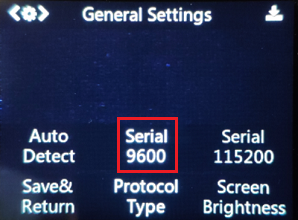
허스키 렌즈 세팅에서 통신속도를 설정함
-
허스키 렌지의 Object Tracking에서 하나의 타겟을 설정함
- 아두이노 IDE를 새로 실행하여 아래 코드를 실행함
#include "HUSKYLENS.h"
#include "SoftwareSerial.h"

HUSKYLENS huskylens;
SoftwareSerial mySerial(2, 3); // RX, TX

void setup() {
    Serial.begin(115200);
    mySerial.begin(9600);
    while (!huskylens.begin(mySerial))
    {
        Serial.println(F("Begin failed!"));
        Serial.println(F("1.Please recheck the \"Protocol Type\" in HUSKYLENS (General Settings>>Protocol Type>>Serial 9600)"));
        Serial.println(F("2.Please recheck the connection."));
        delay(100);
    }
}

void loop() {
    if (!huskylens.request()) Serial.println(F("Fail to request data from HUSKYLENS, recheck the connection!"));
    else if(!huskylens.isLearned()) Serial.println(F("Nothing learned, press learn button on HUSKYLENS to learn one!"));
    else if(!huskylens.available()) Serial.println(F("No block or arrow appears on the screen!"));
    else
    {
        while (huskylens.available())
        {
            HUSKYLENSResult result = huskylens.read();
            printResult(result);
        }
    }
}

void printResult(HUSKYLENSResult result){
    if (result.command == COMMAND_RETURN_BLOCK){
        Serial.println(String()+F("Block:xCenter=")+result.xCenter+F(",yCenter=")+result.yCenter+F(",width=")+result.width+F(",height=")+result.height+F(",ID=")+result.ID);
    }
    else if (result.command == COMMAND_RETURN_ARROW){
        Serial.println(String()+F("Arrow:xOrigin=")+result.xOrigin+F(",yOrigin=")+result.yOrigin+F(",xTarget=")+result.xTarget+F(",yTarget=")+result.yTarget+F(",ID=")+result.ID);
    }
    else{
        Serial.println("Object unknown!");
    }
}
-
시리얼 모니터를 통해 설정한 타겟이 인식되었을 때 입력되는 정보를 확인하고 필요에 따라 수정함
-
허스키 렌즈의 해상도는 320*240