Small bash script that builds a menu (via dialog) from your ~/.ssh/config.
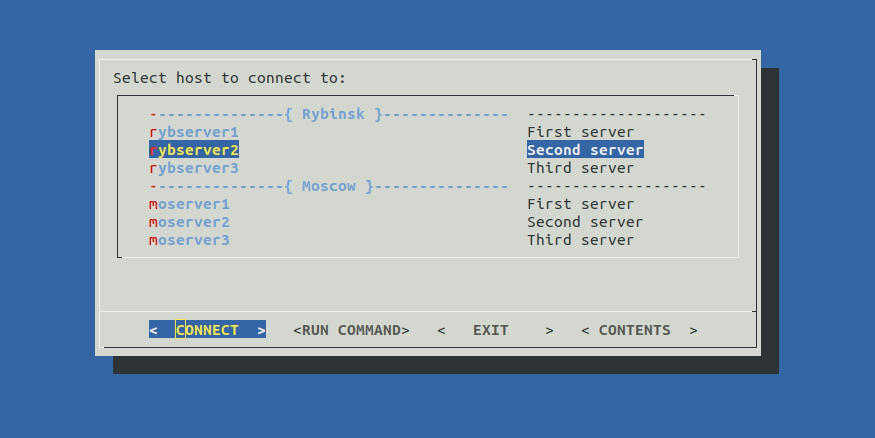
Allows you to connect to your servers or run commands from menu. Available commands:

Your commands can be easily added to this list. Just edit this part of the script:
cmdlist_renew () { cmdlist=(
    #Command#  #Description#
    "Username" "Change ssh username to $GUEST"
    ''         ''
    "ls  -la"  "List Files"
    "free -h"  "Show free memory"
    "df  -ih"  "Show free inodes"
    "df   -h"  "Show free disk space"
    ''         ''
    "Info"     "Full system info"
    "Sshkey"   "Add my ssh key to $target"
    "Alias"    "Add my usefull aliases to $target"
    "Copy"     "Copy selected file or dir to $target"
    ''         ''
    "Dest"     "Change destination folder $DEST on $target"
    "Upload"   "Upload   file or folder from $PWD to $target:$DEST"
    "Download" "Download file or folder from $target:$DEST to $PWD"
    ''         ''
    "Local"    "Change local  port $LOCAL"
    "Remote"   "Change remote port $REMOTE"
    "Tunnel"   "Start portunneling from $target port $REMOTE to local port $LOCAL"
); }
First collumn - command, second - description.
Simple commands like 'ls -la' can be added as is.
A list of commands or a complicated logic better add via function.
Empty string is used as a delimiter.
You can quick jump to the selected server via CONNECT button.
When you done press ^D it'll bring you back to sshto commands section.
Hosts description needs to be added like this:
Host server1 #DESCRIPTION
HostName 192.168.0.1
Port 22
User admin
Start menu delimiters '---{ TEXT }---' can be added like this:
#Host DUMMY #TEXT#
~/.ssh/config example:
#Host DUMMY #Rybinsk#

Host rybserver1 #First server
HostName localhost

Host rybserver2 #Second server
HostName localhost

Host rybserver3 #Third server
HostName localhost

#Host DUMMY #Moscow#

Host moserver1 #First server
HostName localhost

Host moserver2 #Second server
HostName localhost

Host moserver3 #Third server
HostName localhost
Script greps data from multiple config files via pattername 'config*' in ~/.ssh dir.
So you can split config to multiple files and use them with Include directive, example:
Include config_moscow
Include config_rybinsk
Include config*
You can customize dialog colors by creating a config file:
dialog --create-rc ~/.dialogrc
Clone\download this project, go to it's folder and run:
sudo cp sshto /usr/bin/

#and to unistall
sudo rm /usr/bin/sshto
Tom Lawrens video guide about ssh config and sshto