

An Obsidian plugin for rigorous, vault-wide citation management. Converts numeric footnotes into stable hex identifiers that survive reorderings, logs each citation into a per-citation file for Bases/Dataview queries, dedupes citations that point at the same URL, and parses pasted research output from Perplexity / Google AI / Claude into the same canonical format on the way in.
New in 0.3.0: every citation is visible to the plugin again (98% were being missed); Promote to canonical source keeps key sources (PDF + full text) in your vault; Enrich citations fills in authors, dates, publishers, and logos, with a review before every write; settings are searchable. Requires Obsidian 1.13 or later. Release notes →
Cite Wide is part of a suite of plugins designed to help you build a robust, citation-aware knowledge base in Obsidian. Other plugins in the suite include:
- Cite Wide - Vault-wide citation management
- Image Gin - Image generation and embedding for several Generative AI image generation services.
- Perplexed - Versatile prompt modal to query Perplexity AI or Perplexica, with additional API support in free form. Governs quality and consistency of AI responses.
- Metafetch - Pull OpenGraph metadata for a URL into note frontmatter via OpenGraph.io or Microlink.
- Filestarter Kit - Clean, updated starter to clone with various common operations. Our favorite: YAML frontmatter templates and easy form inputs. Others: assemble table of contents, normalize whitespace. Others are primarily there as examples of how to use the Obsidian API and build a plugin.
Content Farm is a loosely coupled monorepo, open source, and we operate an Open Project Board on GitHub where you can request features, share ideas, track progress, and contribute. If you're not getting into the code, we recommend you install each plugin separately to avoid potential frustrations.
Contributors welcome, just post to the board and we will get going.
Obsidian (in reader mode) (and several other content tools) reorder citations into perfect integer sequence based on their order of appearance.
- This opens the door to using unique variables within the citation delimiters, which can be used to enable greater functionality across not only the Obsidian vault, but many other content tools -- including publishing to the web.

- Converts numeric citations
[1]into unique hex codes[^a1b2c3] - Each new hex code is a random 6-character base-36 ID, checked against codes already issued, so markers stay unique and survive reordering
- Maintains vault-wide consistency across all documents
- Logs unique hex codes and their reference information into an Obsidian base, which requires saving sources to a dedicated folder
- Ensures consistent hex codes per reference, across all files in the vault.
- Maintains vault-wide consistency across all documents
- Extract metadata from a link using a curl request, generating a response with more complete metadata.
- Watch reference definitions magically reformat and populate as the response is parsed.
- If promoted to a vault-wide source, a reference file with complete metadata is created, accessible through Bases.
- formatted citations from URLs use Jina.ai Reader API
- Highlights a URL and automatically generates citation in a preferred format.
- Default is our preferred format:
[^1b34df]: 2016, May. "[Originals, by Adam Grant | Bob's Books](https://bobsbeenreading.com/2016/05/08/originals-by-adam-grant/)" schoultz. [Bob's Books](https://bobsbeenreading.com/). - Updates existing footnotes or creates new ones
- Works without API key, but adding one can avoid rate limits

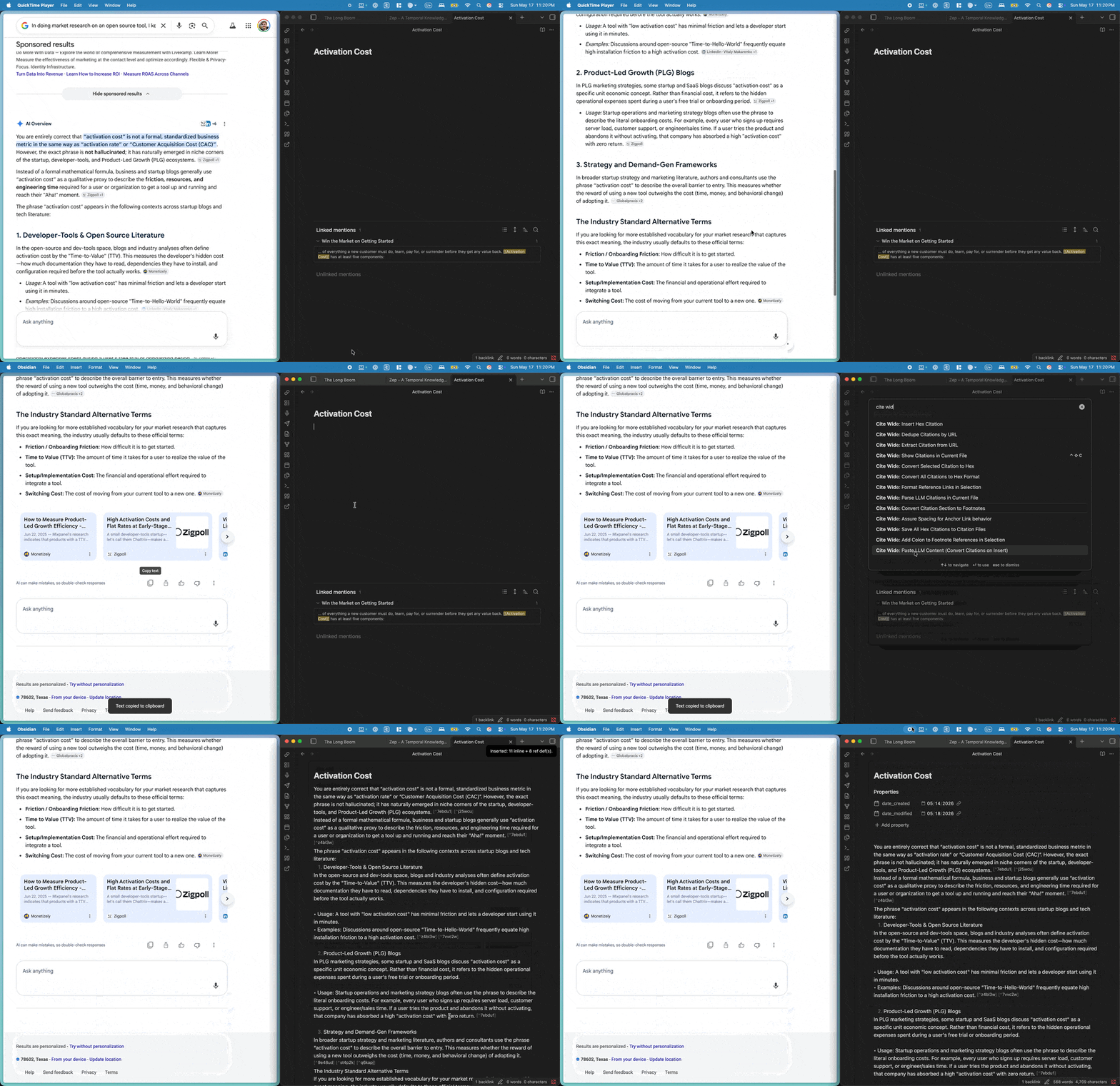
Two commands for handling pasted research output from device-native LLM tools (Google AI, Perplexity AI, and similar). Both share the same parser;
- one runs in-place on an existing file,
- one intercepts at paste-time before content lands in the file at all.
Recognized inline patterns: comma-multi [1, 2, 3] (Google AI), adjacent-multi [1][2] (Perplexity), space-separated singles [1] [2] [3], and word-or-punctuation-glued text.[1] / changes[2].
Recognized reference-list patterns: [N] [Title](url) (Google AI markdown link) and [N] Title https://url (Perplexity title-then-URL). Both are converted to the Lossless canonical [^hex]: [Title](url) markdown-link shape on the way out.
Spec conformance on output: every converted line gets a final whitespace pass that ensures (a) one space between content and citation (after ., ,, :, ;, !, ?, or any non-whitespace word boundary), and (b) one space between consecutive [^hex] [^hex] markers — per the Lossless inline-citation spec.

- Opens a modal listing every detected
[N]numeric citation in the current file with its proposed[^hex]replacement, the reference-def text preview, and clickable line links to every inline occurrence. - Per-row controls: checkbox to opt in/out, per-row Convert button that handles a single citation in place and re-renders the modal so you can keep working incrementally, line-link anchors that scroll the editor.
- Header: single tri-state All checkbox (browser-native indeterminate state when some-but-not-all are selected) and an Apply button for batch conversion.
- Multi-form citations partially convert: if
[1, 2, 3]has a ref def only for[2], the output is[1] [^xxx] [3]— orphan numerics survive untouched and get flagged. - Already-
[^hex]citations are preserved verbatim — mid-file human conversions never get re-touched. - Detects collisions (same numeric defined twice — likely two LLM-output sections pasted into one file) and refuses to corrupt them; surfaces orphans (cited inline but no ref def, and vice versa) as flags.
- Opens a modal with a big textarea + provider radio (Google AI Overviews / Perplexity) + Insert button. Paste your LLM output, click Insert, and the converted form lands at the cursor in one step.
- Stops the colliding-numerics problem at its source instead of post-hoc — no risk that two pasted Perplexity responses with overlapping
[1]…[N]series corrupt each other in the same file. - Collects the host document's hex namespace before generating new hex IDs, so the inserted citations never collide with
[^hex]markers already in the file.
- Moves citations after punctuation (e.g.,
text[1].→text. [1]) - Ensures proper spacing between multiple citations
- Maintains clean, readable document structure
- Automatically creates citation files in a dedicated folder for Dataview/Bases queries
- Rich metadata including title, author, URL, usage count, and file tracking
- Comprehensive frontmatter for powerful Dataview/Bases queries and organization


Most citations are passing references. A few deserve to live on: the industry report everyone quotes, the book that frames the argument. Promote to canonical source gives those few a complete, reusable record in your Citations folder.
Put the cursor on a footnote marker ([^80nyxu]) or on its definition line, then run the command. Cite Wide:
- Reads what's already known. It parses the footnote for the title, URL, date, authors, and publisher, and keeps everything already in
Citations/<id>.md. - Reads the source's own metadata. It fetches the page once and reads its Open Graph, article, and scholarly
citation_*tags, including every author on a multi-author paper. If that leaves the title or authors empty, it asks Jina Reader too. A slow or failed fetch falls back to the footnote. - Asks you to confirm. A modal shows the title, subtitle, authors, date published, publisher, publication type, and URL, all editable.
- Captures the source (on by default). A PDF, EPUB, or Office document is saved to
Citations/_files/<id>.<ext>, and the text is imported as markdown toCitations/_text/<id>.md, with a link back to the citation. If Jina Reader is unavailable, the citation is still promoted and the notice tells you the text wasn't imported. - Upgrades the citation file to the canonical schema, keeping its body and every existing property.
The canonical file adds canonical: true, internal_uuid, reference_hexcode, default_slug, subtitle, authors, date_published, publisher, publisher_url, publication_type, first_accessed_at_url, date_added, date_fetched, piece_og_image, publisher_favicon_url, cited_in_files, and, when captured, downloaded_content_path and source_text_path. Promoting again is safe: internal_uuid, first_accessed_at_url, and date_added never change once set, and your edits in the modal always win over fetched values. Filter canonical sources in Dataview with WHERE canonical = true.
Citation files fill in unevenly: whatever the footnote happened to contain, plus whatever an older extraction wrote, junk included. Enrich all citations fills in what's missing across your whole Citations folder, and shows you every change before it writes anything. Enrich this citation does the same for the citation under the cursor, or for the citation file you have open.
- Finds where each citation is used. It reads your vault once, including symlinked folders, for every
[^id]and[^id]:footnote. - Reads each source, four at a time, the same way Promote to canonical source does: the footnote, the page's own metadata, Jina Reader when that leaves gaps, and the publisher's homepage for brand assets. A notice shows "Enriching 12 / 70…" with a Cancel button.
- Shows you the plan. A modal lists each citation with changes, old → new per field, with a checkbox per citation (all on). Close it and nothing is written.
- Writes only what you approve, then saves a report to
Citations/_reports/Enrichment-<YYYY-MM-DD-HHmm>.md: what changed (per field), dead or blocked links, citations with no footnote anywhere, and fields still empty.
What it will and won't touch:
| Field | Rule |
|---|---|
title, url, date, source, referenceText |
Filled when empty. A junk title ("Page not found | MRU", "Just a moment…") counts as empty; ’-style entities are decoded. A real value is never overwritten. |
author |
Filled when empty, or replaced when it isn't a name ("3 minutes", "Super User", sentence fragments). |
authors |
Added when absent; replaced only when no entry is a name. |
publisher, publisher_url, date_published, piece_og_image, publisher_* brand fields |
Added when absent; a stored value is never blanked. |
filesUsedIn |
Rewritten as [[full/path|Alias]] links to the notes that cite it today, so renames don't strand it. Kept when no note cites it. |
date_fetched |
When the source was last fetched (ISO timestamp). |
canonical, everything else |
Never touched. Promotion stays a deliberate act. |
Running it again is safe: an enriched vault proposes no changes. A citation whose only change would be date_fetched isn't listed or written.
Requires Obsidian 1.13 or later (desktop only).
In Obsidian: Settings → Community plugins → Browse → search "Cite Wide" → Install → Enable.
Prefer to install by hand? Download main.js, manifest.json, and styles.css from the latest release into <your vault>/.obsidian/plugins/cite-wide/. Every release asset is cryptographically attested to the commit and workflow that built it. Verify before enabling:
gh attestation verify main.js --repo lossless-group/cite-wideThe plugin automatically creates citation files for Dataview integration:
- Open Obsidian Settings → Community Plugins → Cite Wide
- Set your preferred citations folder (default: "Citations")
- Citation files will be created automatically when you use citation commands
Settings search finds every Cite Wide setting: type "Jina", "citations folder", or "auto-save" in Obsidian's settings search box.
The URL citation extraction feature works without an API key, but adding one can help avoid rate limits:
- Get a Jina.ai API key from https://jina.ai/
- Open Obsidian Settings → Community Plugins → Cite Wide
- Enter your API key in the settings (optional)
- Save the settings
Note: The feature works perfectly without an API key, but you may encounter rate limits with heavy usage.
- Highlight a URL in your document
- Run the "Extract citation from URL" command (Ctrl/Cmd + P)
- The URL will be replaced with a citation reference like
[^a1b2c3] - A properly formatted citation will be added to the Footnotes section
Example:
- URL:
https://bobsbeenreading.com/2016/05/08/originals-by-adam-grant/ - Becomes:
[^1b34df]: 2016, May. "[Originals, by Adam Grant | Bob's Books](https://bobsbeenreading.com/2016/05/08/originals-by-adam-grant/)" schoultz. [Bob's Books](https://bobsbeenreading.com/).
For existing footnotes:
- Before:
[^028ee3]: @https://bobsbeenreading.com/2016/05/08/originals-by-adam-grant/ - After:
[^028ee3]: 2016, May. "[Originals, by Adam Grant | Bob's Books](https://bobsbeenreading.com/2016/05/08/originals-by-adam-grant/)" schoultz. [Bob's Books](https://bobsbeenreading.com/).
The plugin automatically creates citation files with rich metadata for powerful Dataview queries. Each citation file includes:
---
hexId: "a1b2c3"
title: "Article Title"
author: "Author Name"
url: "https://example.com/article"
date: "2024"
source: "example.com"
tags: []
created: "2024-01-15T10:30:00.000Z"
lastModified: "2024-01-15T10:30:00.000Z"
referenceText: "Full reference text"
usageCount: 1
filesUsedIn: ["path/to/file.md"]
---Basic citation table:
TABLE title, author, date, usageCount
FROM "Citations"
SORT created DESC
Most used citations:
TABLE title, author, source, filesUsedIn
FROM "Citations"
WHERE usageCount > 1
SORT usageCount DESC
Citations by author:
TABLE title, date, usageCount, url
FROM "Citations"
WHERE author
SORT author ASC, date DESC
See examples/dataview-citations-examples.md for comprehensive Dataview query examples.
0.3.1 — 2026-10-15 · Google AI pastes convert cleanly again
- Fixed: Google AI answers now cite with
[1] (url), [2] (url)after each sentence and no source list. Paste LLM content and Parse LLM citations turn these into[^hex]footnotes, one per distinct source, and turn•bullets into markdown lists. - Full notes:
changelog/releases/0.3.1.md.
0.3.0 — 2026-10-06 · requires Obsidian 1.13
- Fixed: citations with IDs using letters past "f" (about 98% of them) were invisible to Show citations, Save all, and the conversion commands; empty citation files are now filled from their footnotes.
- Promote to canonical source: a full citation record, plus the source file and its text, saved into the vault.
- Enrich all citations / Enrich this citation: fill in titles, authors, dates, publishers, and brand assets, with a review step before any write and a report note after.
- "Cited in" (
filesUsedIn) is stored as[[path|Title]]wikilinks that survive renames; a newdate_fetchedfield records when each source was last fetched. - Settings rebuilt on Obsidian 1.13's declarative API, so every setting is searchable.
- Full notes:
changelog/releases/0.3.0.md.
0.2.3 — 2026-05-18 · every release asset cryptographically attested. Notes.
Requires Node.js 22 and pnpm.
git clone https://github.com/lossless-group/cite-wide.git
cd cite-wide
pnpm install
pnpm dev      # esbuild watch: rebuilds main.js and styles.css on change
pnpm test     # Node's built-in test runner; no network calls
pnpm build    # tsc + ESLint (Obsidian's review-bot rules) + production bundle
To use your working copy in a vault, symlink it into the vault's plugins folder. The folder name must be the plugin id, cite-wide:
ln -s /path/to/cite-wide /path/to/your-vault/.obsidian/plugins/cite-wideThen run pnpm dev. Reload the plugin to pick up new builds: toggle it off and on in Community plugins, or quit and reopen Obsidian.
Releasing. Bump manifest.json, package.json, and versions.json together (three-part semver), write changelog/releases/<version>.md, and push a tag with no v prefix (for example 0.3.0). .github/workflows/release.yml then builds, attests, and publishes the release with those notes.
MIT. See LICENSE. If Cite Wide saves you time, buy us a coffee.