
Declarative management of fleets of edge devices and their workloads.





User Documentation • Developer Documentation • Contributing
Flight Control aims to provide simple, scalable, and secure management of edge devices and applications. Users declare the operating system version, host configuration, and set of applications they want to run on an individual device or a whole fleet of devices, and Flight Control rolls out the target configuration to devices. A device agent running on each device automatically applies changes and reports progress and health status back.
Flight Control is designed for modern, container-centric toolchains and operational best practices. It works best on image-based Linux operating systems running bootc or ostree, with container workloads running on Podman/Docker or Kubernetes (MicroShift). APIs are Kubernetes-like, so they instantly feel familiar to Kubernetes users and allow reuse of existing tools and toolchains.

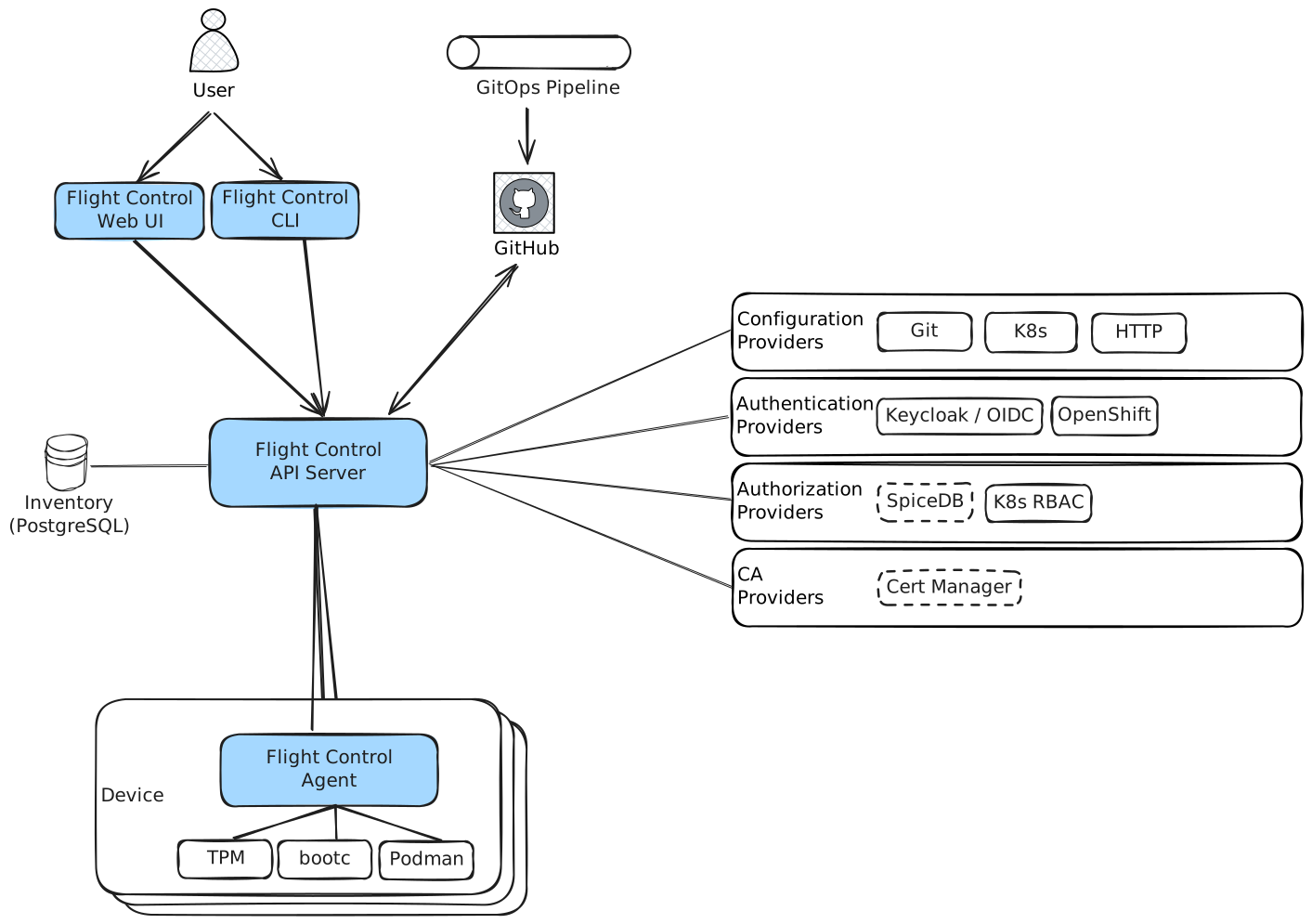
The Flight Control Service exposes two API endpoints — a user-facing HTTPS endpoint (authenticated via JWT from an external OIDC provider) and an agent-facing mTLS endpoint (authenticated via device certificates bootstrapped from hardware root-of-trust). The Flight Control Agent runs on each managed device, calls home, polls for target configuration, applies updates autonomously, and reports status back.
- Declarative / GitOps API — Kubernetes-like API lets you store fleet and device configuration in Git;
ResourceSyncpolls repositories or receives webhooks. - Fleet management — Define a device template and rollout policy once; it automatically applies to all current and future member devices. Supports disruption budgets and staged rollouts.
- Secure device lifecycle — Friction-free enrollment, automatic certificate rotation, TPM-backed attestation, and decommissioning.
- OS image updates — OTA updates via bootc or rpm-ostree with transactional rollback (Greenboot integration). The agent downloads assets before applying, so updates survive network interruptions.
- Container and VM workloads — Podman containers (docker-compose, Quadlets), MicroShift/Kubernetes workloads (Helm, kustomize).
- OS image building —
ImageBuildproduces bootc container images with the embedded agent;ImageExportexports to qcow2, vmdk, or iso. - Remote console — Live console sessions to managed devices directly from the CLI or UI.
- Pluggable auth and RBAC — Keycloak, generic OIDC, OpenShift OAuth, AAP, PAM; SpiceDB or Kubernetes RBAC for authorization.
- Observability — Prometheus metrics, Alertmanager integration, OpenTelemetry telemetry gateway, and a CVE view at device and fleet level.
- Web UI — Browser-based dashboard for device inventory, fleet management, and ClickOps workflows.
The fastest path to a running local environment uses kind (Kubernetes in Docker):
# 1. Build all binaries
make build

# 2. Deploy to a local kind cluster (builds containers, installs Helm chart)
make deploy

# 3. Authenticate with the CLI
# The server URL is written to ~/.flightctl/client.yaml by make deploy
bin/flightctl login $(cat ~/.flightctl/client.yaml | grep server | awk '{print $2}') --web --certificate-authority ~/.flightctl/certs/ca.crt

# 4. Apply an example fleet and verify
bin/flightctl apply -f examples/fleet.yaml
bin/flightctl get fleets
bin/flightctl get devices
For a Linux-native setup using systemd + Podman (no Kubernetes required):
make deploy-quadletsCertificates and client configuration are written to ~/.flightctl/.
| Tool | Minimum version | Notes |
|---|---|---|
go |
1.24 | Required to build |
make |
any | Build orchestration |
podman |
any | Container builds and integration tests |
openssl / openssl-devel |
any | TLS certificate generation |
buildah |
any | Container image builds |
pam-devel |
any | PAM issuer build |
kind |
≥ 0.31.0 | Local Kubernetes cluster (make deploy) |
kubectl |
any | Kubernetes interaction |
For agent development, enable the Podman socket:
systemctl --user enable --now podman.socket| Make target | Description |
|---|---|
make build |
Build all binaries |
make generate |
Re-generate API client code and mocks |
make generate-proto |
Re-generate gRPC protobuf bindings |
make unit-test |
Run unit tests (requires gotestsum) |
make integration-test |
Run integration tests (requires Podman; starts Postgres, Redis, Alertmanager via testcontainers) |
make e2e-test |
Run end-to-end tests against a kind cluster |
make lint |
Run golangci-lint (installs automatically) |
make lint-openapi |
Lint OpenAPI specs |
make lint-docs |
Lint user documentation (markdownlint) |
make tidy |
Tidy go.mod files |
make clean |
Remove containers and volumes |
make clean-all |
Full cleanup including bin/ |
Install test tooling:
go install gotest.tools/gotestsum@latest
go install go.uber.org/mock/mockgen@v0.4.0
Integration tests accept these environment variables: INTEGRATION_PROCS=N for parallelism, TEST_DIR=./test/integration/store for a specific suite, INTEGRATION_GINKGO_FOCUS="pattern" for individual tests.
| Method | Command / Notes |
|---|---|
| Kind (local dev) | make deploy — builds containers, deploys Helm chart to a kind cluster |
| Quadlets (Linux/systemd) | make deploy-quadlets or install the flightctl-services RPM and systemctl start flightctl.target |
| Kubernetes / OpenShift | helm install my-flightctl oci://quay.io/flightctl/charts/flightctl — requires Gateway API and cert-manager |
| MicroShift | Same Helm chart; see installing on Kubernetes |
| Disconnected / air-gapped | See disconnected OpenShift install guide |
| Linux RPM | sudo dnf config-manager --add-repo https://rpm.flightctl.io/flightctl-epel.repo && sudo dnf install -y flightctl-services |
Pre-built container images are published to quay.io/flightctl/ for each release. Helm charts are published to oci://quay.io/flightctl/charts/flightctl.
The flightctl CLI communicates with the Flight Control Service to manage resources.
| Command | Description |
|---|---|
login |
Authenticate (OIDC web flow, token, or PAM) |
get |
List or describe resources (devices, fleets, enrollmentrequests, …) |
apply |
Create or update resources from a YAML file |
edit |
Open a resource in your editor for interactive editing |
delete |
Delete resources |
approve / deny |
Approve or deny enrollment requests |
decommission |
Decommission a device |
console |
Open a remote console session to a device |
certificate |
Manage certificates |
logs |
Stream logs from an ImageBuild or ImageExport |
download |
Download an ImageExport artifact |
cancel |
Cancel a running operation |
version |
Print CLI and server versions |
completion |
Generate shell completion scripts |
Output formats: table (default), json, yaml, wide. Configuration defaults to ~/.config/flightctl/client.yaml.
For the full reference see CLI documentation.
| Concept | Description |
|---|---|
| Device | A (real or virtual) machine together with its OS and application workloads. |
| Fleet | A group of devices governed by a common device template and management policies. |
| Device Template | A template for device specifications that controls configuration drift across a fleet. |
| Labels | Key-value pairs for organizing devices (e.g. region=emea, site=factory-berlin). |
| ResourceSync | Polls a Git repository (or receives a webhook) and syncs Fleet/Device resources from it. |
| Agent | The Flight Control Agent process that runs on each managed device, enrolls it, applies updates, and reports status. |
See Introduction for a full explanation of all concepts.
| Area | Link |
|---|---|
| User documentation (install, configure, use) | docs/user/README.md |
| Developer documentation (build, run, architecture) | docs/developer/README.md |
| Installing on Kubernetes / OpenShift | docs/user/installing/ |
| Installing the agent | docs/user/installing/installing-agent.md |
| API resources reference | docs/user/references/api-resources.md |
| Architecture | docs/developer/architecture/ |
| Enhancement proposals (FEPs) | docs/developer/enhancements/ |
Contributions are welcome! Please read CONTRIBUTING.md for the full workflow and then docs/developer/README.md for build and development setup.
Key rules:
- Signed commits are required (GPG or SSH).
- Commit message prefix — use a Jira issue key (
EDM-1234: description) orNO-ISSUE:for trivial changes. - Before pushing — run
make unit-test,make integration-test, andmake lint. Fix any failures. - API changes — edit OpenAPI YAML and hand-maintained types, then run
make generate. Do not edit*.gen.goby hand.
For larger changes, consider opening a Flight Control Enhancement Proposal (FEP) under docs/developer/enhancements/ before implementing.
- flightctl-ansible — Ansible collection for Flight Control
- flightctl-ui — Web UI
Flight Control is licensed under the Apache License 2.0.