Yaatri is a mobile application designed to provide users with essential features related to train travel. It offers functionalities such as finding trains between two stations, checking PNR status, and tracking live train status. This documentation serves as a guide to understand the project structure, functionalities, and usage. This application is developed using react native (expo).

To run Yaatri locally, follow these steps:
-
Clone the repository from GitHub:
git clone https://github.com/kanishk6103/RailApp.git -
Navigate into the project directory:
cd RailApp -
Install dependencies using npm or yarn:
npm installor
yarn install -
Run Yaatri on Android:
npm start
Yaatri provides the following functionalities:
-
Users can search for trains between two stations by providing the source and destination station codes. The application fetches relevant train information from the database and displays it to the user, like the train name, date and time of arrival, departure at the source station and at the destination station. User can also press a live status button to track the current location of that train.
-
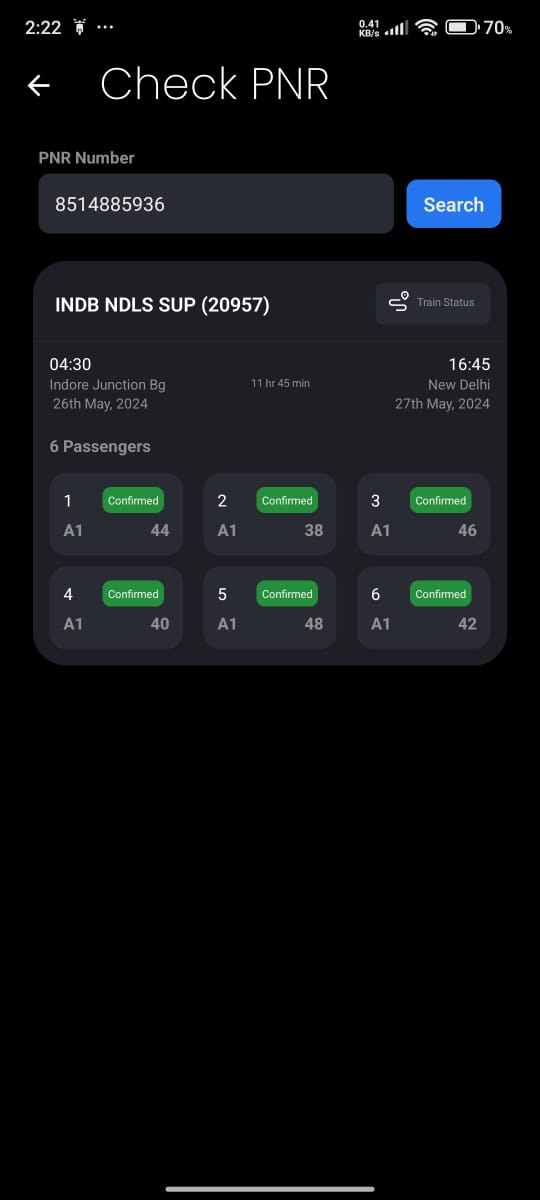
Users can check the PNR status of their booked tickets by entering their PNR number. The application retrieves real-time PNR status information from the server and presents it to the user.
-
Users can track the live status of a specific train by entering its train number. The application fetches live tracking data from the server and displays it to the user, including current location, estimated arrival time, and delays if any.




The project follows a typical React Native folder structure:
RailApp/
│
├── assets
│ ├── Components/ # Some Reusable SVG functions
│ ├── fonts/ # Fonts used for the application
│ ├── SVG/ # SVGs converted into functions
│ └── Others assets (Images, SVGs etc)
├── components/ # Components for each screen
│ ├── Contributors/
│ ├── Find Trains/
│ ├── Home/
│ ├── PNRCheck/
│ ├── TrainRunningStatus/
│ └── Other Components that are common for all screens
├── navigation/ # Code for managing app navigation
│ └── appNavigation.js # Contains the navigation stack
├── screens/ # React Native source code
│ ├── Contributors.jsx
│ ├── FindTrainsScreen.jsx
│ ├── HomeScreen.jsx
│ ├── PNRCheckScreen.jsx
│ ├── SeatAvailability.js
│ └──TrainRunningStatus.jsx
├── utils/ # utility functions like date converters
│ └── dateConverter.js # functions to convert dates to appropriate formats accordingly
├── App.jsx # Main Entry Point
├── globals.css # Main CSS File
├── react-native.config.js # React native configurations
├── tailwind.config.js # tailwind/nativewind configurations
├── package.json # Project dependencies and scripts
└── README.md # Project documentation
The React Native Train Tracker application utilizes the following key dependencies:
-
React Native: A framework for building native applications using React.
-
React Navigation: A library for implementing navigation in React Native applications.
-
Expo
-
Nativewind: A library which lets users use tailwindCSS syntax for react native development.
-
react-native-date-picker: A dependency which helps users pick dates from date inputs.
-
react-native-svg: A dependency which facilitates users with SVGs in react native. This also requires a dev dependency "react-native-svg-transformer".
-
react-native-reanimated: An animation library for react native which helps in animating elements.
Contributions to Yaatri are welcome! If you have any suggestions, bug reports, or feature requests, please open an issue or submit a pull request on GitHub.
To make the API work, insert your irctc rapid API key in individual screen codes, since we couldn't find a workaround for dotenv not working on the react native environment.
Yaatri is licensed under the MIT License.
Feel free to customize this template according to your project's specific details, and don't forget to include any additional information that might be relevant or useful for users and contributors.