
A PowerShell-based utility for backing up and restoring JAMF Pro configurations through the JAMF API.
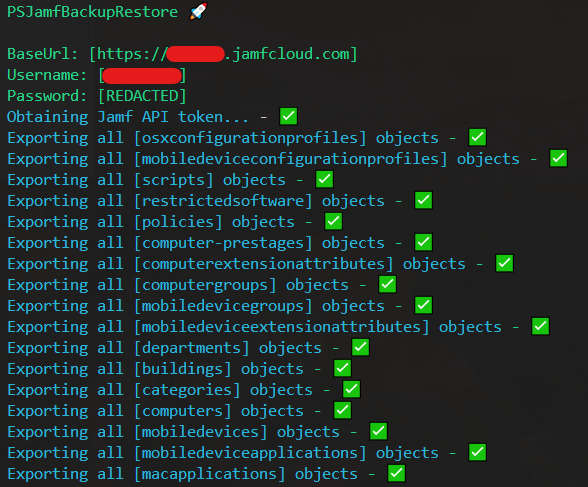
-
Authentication support for both:
- 🔑 Username/Password
- 🎫 OAuth Client ID/Secret
-
Support for multiple configuration types:
- 💻 Computers & Computer Groups
- 📱 Mobile Devices & Device Groups
- ⚙️ Configuration Profiles (macOS & iOS)
- 📦 Mobile Device Applications
- 🔧 Scripts & Extension Attributes
- 🎯 Policies
- 🔄 Computer Prestages
- 🏢 Buildings & Departments
- 🏷️ Categories
- 🚫 Restricted Software
- 📊 Extension Attributes
- PowerShell 5.1 or higher
- JAMF Pro admin credentials or API Role Credentials
- Network access to your JAMF Pro instance
- Clone this repository or download the files
- Configure
config.ps1with your JAMF Pro instance details
[hashtable]$script:Config = @{
    BaseUrl      = "https://example.jamfcloud.com"
    Username     = "username"           # Leave empty if using API credentials
    Password     = "password"           # Leave empty if using API credentials
    #clientId     = "your-client-id"    # Fill if using API credentials
    #clientSecret = "your-client-secret"# Fill if using API credentials
    DataFolder   = Join-Path (Get-Location) "JAMF_Backup"
    ApiVersion   = "classic"           # Use 'v1','v2' or 'classic'
    Token        = $null
}
# Import Configs and Functions:
. (Join-Path (Get-Location) "config.ps1")
. (Join-Path (Get-Location) "JamfBackupRestoreFunctions.ps1")

if ($null -eq $script:Config) {
    throw "Config is not initialized."
}

$tokenParams = @{
    Username    = $script:Config.Username
    Password    = $script:Config.Password
    BaseUrl     = $script:Config.BaseUrl
}
$script:Config.Token = Get-JamfToken @tokenParams

# Download multiple resource objects from Jamf Pro
@(
    "osxconfigurationprofiles",
    "mobiledeviceconfigurationprofiles",
    "scripts",
    "restrictedsoftware",
    "policies",
    "computer-prestages",
    "computerextensionattributes",
    "computergroups",
    "mobiledevicegroups",
    "mobiledeviceextensionattributes",
    "departments",
    "buildings",
    "categories",
    "computers",
    "mobiledevices",
    "mobiledeviceapplications"
) | ForEach-Object {
    Download-JamfObjects -resource $_ -ClearExports
}

# Download a single object from Jamf Pro
Download-JamfObject -ID "3" -Resource "osxconfigurationprofiles"

# Upload an updated object back into Jamf Pro
Upload-JamfObject `
    -Token $script:Config.Token `
    -FilePath "$($script:Config.DataFolder)/osxconfigurationprofiles/9_Browser_Profile_Settings.xml" `
    -Resource "osxconfigurationprofiles" `
    -Id "9" `
    -Update

#Upload an updated policy object into Jamf Pro
Upload-JamfObject `
    -Token $script:Config.Token `
    -Resource "policies" `
    -FilePath "$($script:Config.DataFolder)/policies/3_Google_Chrome.xml" `
    -Id "3" `
    -Update

# Upload a new category object into Jamf Pro
Upload-JamfObject `
    -Token $script:Config.Token `
    -FilePath "$($script:Config.DataFolder)/categories/Security.xml" `
    -Resource "categories"

# Upload all policies from backup
Upload-JamfObjects -Resource "policies"

# Update specific policies by ID
Upload-JamfObjects -Resource "departments" -Ids @(1, 2) -Update

# Upload and update existing objects
Upload-JamfObjects -Resource "buildings" -Update

# Upload from a custom directory
Upload-JamfObjects -Resource "policies" -SourceDirectory (Join-Path (Get-Location) "CustomBackup/policies")

# Revoke Token
Invalidate-JamfToken -Token $script:Config.TokenBackups are organized in the following structure:
JAMF_Backup/
├── buildings/
├── categories/
├── computer-prestages/
├── computerextensionattributes/
├── computergroups/
├── computers/
├── departments/
├── mobiledeviceapplications/
├── mobiledeviceconfigurationprofiles/
├── mobiledeviceextensionattributes/
├── mobiledevicegroups/
├── mobiledevices/
├── osxconfigurationprofiles/
└── policies/
    ├── 1_Policy_Name.xml
    └── 2_Policy_Name.xml
├── restrictedsoftware/
└── scripts/
    ├── 1_Script_Name.xml
    ├── 1_Script_Name.sh
    ├── 2_Script_Name.xml
    └── 2_Script_Name.sh
- Secure token-based authentication
- Token auto-renewal
- Token invalidation on completion
- Support for OAuth client credentials
Get-JamfToken         # Authenticate and obtain API token
Download-JamfObjects  # Backup multiple objects
Upload-JamfObjects    # Restore multiple objects
Test-AndRenewAPIToken # Handle token renewal
Invalidate-JamfToken # Secure token cleanupContributions are welcome! Please feel free to submit pull requests.
This project is licensed under the MIT License - see the LICENSE file for details.
For issues and feature requests, please open an issue in the repository.