test: getParameter Test case #171
Conversation

 Jagrutiti
commented
Jagrutiti
commented
Oct 22, 2022
Jagrutiti
commented
- Make sure you are opening from a topic/feature/bugfix branch (right side) and not your main branch!
- Ensure that the pull request title represents the desired changelog entry
- Please describe what you did
- Link to relevant issues in GitHub or Jira
- Link to relevant pull requests, esp. upstream and downstream changes
- Ensure you have provided tests - that demonstrates feature works or fixes the issue


|
Hey @MarkEWaite I intend to complete the My best guess is I have to assert the But I was not sure how to initialize |

|
I think there are at least two alternatives. The most typical technique will test more deeply, but runs slower. It involves using a JenkinsRule to define a job with a node parameter then run the job and get the resulting run as a build. That path will let you explore Jenkins objects as they are used in Jenkins core. See AllNodesForLabelBuildParameterFactoryTest.java for an example of that technique. The less typical technique tests less deeply but runs faster. It involves using mock objects to create the desired Java objects. Refer to https://github.com/jenkinsci/embeddable-build-status-plugin/pull/117/files for an example of that technique that arrived during Hacktoberfest. I have a personal preference for the first technique because it is more widely used and tests more of the components, but it is only usable in the Jenkins code base. However, the second technique is valid and is a good technique to use in many different code bases, not just the Jenkins code base. I've had bad experiences with mocking in tests in the past and those bad experiences tend to lead me away from mock objects. Mock objects applied with skill and care can be a great help. Mock objects applied too broadly or poorly can create a "mess" for later maintainers. |
|
Hey @MarkEWaite Thanks for sharing the link to the test case. It helped me understand how to proceed. I found the class I am testing and the one you shared as a reference quite similar (feel free to correct me). Though their function is different. From the The JenkinsRule documentation is huge. I made sure not to skip the methods invoked by JenkinsRules in In I was confused about how do I decide which method I should use from JenkinsRule. Though the following line in
and the below in
is common. I did not understand how to test it. |
|
Also, I forgot to mention I am using the first technique. I do not have the expertise to mock. And would like to try |
I won't be able to help until the end of this week at the earliest. I'm traveling with family and visiting friends. |
|
Hey @MarkEWaite Happy Holidays. I would await your guidance when you're back. |
|
Thanks. I'm afraid that there are other reviews and improvements that are much higher on my list than this one. It will likely be several more weeks before I'm able to look at this. Sorry about that. |
|
Hey @MarkEWaite Thank you for replying. I hope you will remember that I am waiting for your guidance when you are free from your priority work. Or if you give me an estimation of when I can text you, I will ping you again. |
|
Ping me again in two weeks |
|
Hey @MarkEWaite Is this a good time to ping you again? |
|
Thanks for the reminder. It will be another week before I can help here. There is a pull request on the git plugin that I need to test, merge, and release before I can help here. See jenkinsci/git-plugin#1305 for details |
|
Hey @MarkEWaite Do you think I can lend you a hand with this release? |
That's a great idea! I need to test by duplicating JENKINS-42971 while running the most recent release of the git plugin, then confirm that the issue is resolved after installing the most recent plugin build (hpi file) from that pull request. Once that is confirmed, I need some exploratory testing to confirm that the change did not harm any other functionality of the plugin. Once I've completed that testing, I'll merge that pull request and release a new version of the git plugin. Any help that you can give to those efforts would be greatly appreciated. If you need a Docker container to help with that setup and want to experiment with docker, you could use my docker-lfs branch lts-with-plugins that already includes that git plugin version in its definition. I also understand if you're not available to help with that. Testing and releasing that plugin is my responsibility, but I'd love to have any help that you can offer. Even if that help is "I installed the pre-release of the plugin and found no issues in my interactive testing". |
|
Hey @MarkEWaite I am available to help you with this :) |
|
Hey @MarkEWaite Where would I get the docker command to install the plugin? I mean I went through the command in docker-lfs read.me file but did not find the instructions to install it. You have shared this line of code but I am not sure how to use it. |
|
If you checkout the If the container image has problems building (since I've not checked with others that it works outside my environment), then you can place that plugins.txt in a directory and run the following bash script: #!/bin/bash
JENKINS_WAR_VERSION=2.361.4
JENKINS_WAR=jenkins-${JENKINS_WAR_VERSION}.war
PLUGIN_MANAGER_VERSION=2.12.9
PLUGIN_MANAGER_JAR=jenkins-plugin-manager-${PLUGIN_MANAGER_VERSION}.jar
if [ ! -f ../$PLUGIN_MANAGER_JAR ]; then
wget https://github.com/jenkinsci/plugin-installation-manager-tool/releases/download/${PLUGIN_MANAGER_VERSION}/$PLUGIN_MANAGER_JAR
mv $PLUGIN_MANAGER_JAR ..
fi
if [ ! -d plugins ]; then
mkdir plugins
fi
java -jar ../$PLUGIN_MANAGER_JAR --jenkins-version $JENKINS_WAR_VERSION \
--latest false --plugin-download-directory plugins --plugin-file plugins.txt
if [ ! -f ../$JENKINS_WAR ]; then
wget https://get.jenkins.io/war-stable/${JENKINS_WAR_VERSION}/jenkins.war
mv jenkins.war ../$JENKINS_WAR
fi
JENKINS_HOME=. java -jar ../$JENKINS_WAR
|
|
Hey @MarkEWaite From the instructions and reading the issue, I understand that it is manual testing and I have to install the plugin (before and after release). If you could share with me what I have to install from where, I hope I am not increasing your task by asking for help. I am here to take some workload off you. If I am taking too much of your time I would understand if you do not want to guide me on this issue. |
This helps. I will try it. Thanks. |
|
That python script is unlikely to work on Windows. I've wanted to develop the instructions for Windows anyway, so this is a good excuse to create instructions for Windows. Will need some time so that I can finish current Jenkins and work meetings |
|
Here is the batch file that does most of the same things that bash script does: |
Hey @MarkEWaite Here are the steps I followed:
Use these credentials below to login in command prompt:
Step no.5 is still in progress. The download speed of my internet speed is 30 Mbps. It has been almost an hour since the command is executed. Keeping you posted. Let me know the next steps after this. |
|
Hey @MarkEWaite Step no.5 from above fails: This command throws the error: When I run it individually this way:
I get: |
|
Hey @MarkEWaite The good news is I tried again and it worked. It is stuck asking me to paste the password. I do not know where to paste the password. I know what the password is. Here are the logs: The cursor just blinks with no prompt to paste the password. Something like in the screenshot.
|

I'm glad it worked. Open your web browser to http://localhost:8080 and then you can configure Jenkins from inside your web browser. https://www.jenkins.io/doc/tutorials/#tools provides tutorials that can guide your experimenting as well |
|
Hey @MarkEWaite It worked. I am installing the recommended plugins. What is the next step? |
Follow the instructions in JENKINS-42971 to duplicate the problem, then install the new build of the plugin and confirm that the problem is resolved by the git plugin pull request build: |
|
Hey @MarkEWaite Step 3 to recreate the issue is: Which URL does it mean? And where shall I add it? I have completed the first two steps. Attaching a screenshot.
|
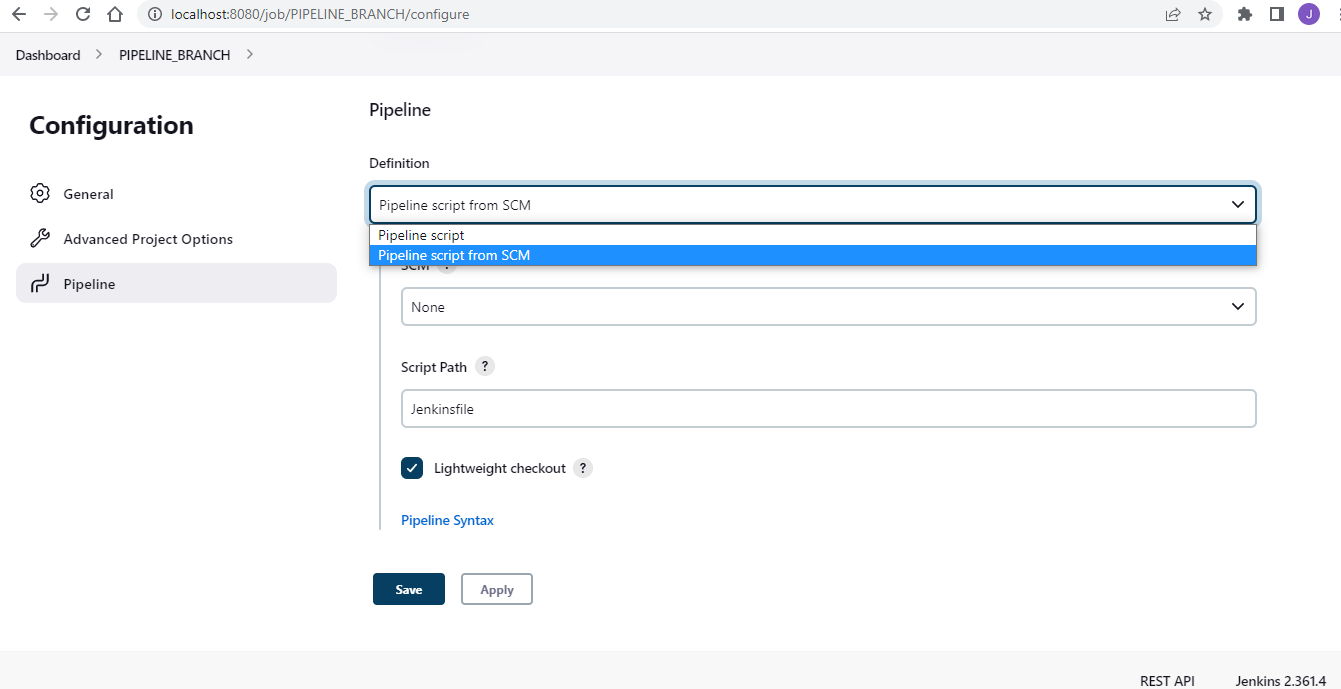
|
In my case, I entered the URL of a repository that I use for bug verification
The surprising thing is that even with the patched git plugin, I still see the error that is noted in the bug report. |
|
Hey @MarkEWaite You are right. It fails for me too. Does this mean the issue is not resolved yet? The testing stops here? |
Thanks for confirming it! Yes, the testing is done. I'll need to switch into a debugger to understand why the case that we're testing still fails. The code changes seem reasonable to me, but there may be something missing in order to complete the fix of the issue. |
I cannot help you with anything as of now? |
|
Do you think I can document the steps? The Windows script you shared with me? If it isn't documented yet? |
That would be a nice addition to add as a comment in |
|
Hey @MarkEWaite Let me know anything else I can assist you with :) To sum up what I did, The script that you shared was to install Jenkins on my local machine? Then I recreated the issue. Right? |
Yes, though I'd describe it a little differently. You helped me evaluate a pull request by performing interactive testing of the original issue that the pull request is trying to resolve. In order to help me evaluate that pull request, you installed Jenkins, configured a test job, and observed the results of the test job. You compared behavior with lightweight checkout with the behavior without lightweight checkout. That provided some insights into a portion of the many different ways that Jenkins is used. |
I did not stand the meaning of the jargon Thank you for giving me an opportunity to assist you. I created a build a pipeline myself for the first time last night. I see Jenkins at work every day but never got this clarity until yesterday. |

|
Just to clarify, the lightweight checkout is "testable" only if you can use jenkinsci/workflow-cps-plugin#577 . It was currently drafted because it was waiting for the git plugin (there seems to be some cyclic dependency between the plugins mainly in tests). If you want to test the entire flow, I can undraft that PR jenkinsci/workflow-cps-plugin#577 and can use incremental build to test the lightweight checkout. (Actually that is how we use it in production) |

|
@Jagrutiti I am sincerely sorry, but I don't expect to have time to implement these tests in the next 1-2 months. I'm closing this pull request. We can decide to reopen it or create it anew in the future. |

3 participants


