
Reference-led 3D studies rebuilt as inspectable, animation-ready Three.js code — running live in the browser.





Open a study, orbit the model, inspect its parts, trigger its actions, and follow the source back to the code.
Gallery · How it works · Contribute · Develop · Community
The landing page opens with Latest showcases, highlighting the three most recently
updated studies across Three.js, PixiJS and standalone experiences. The same updatedAt
ordering drives 04 / THE ARCHIVE and Find a Study; the newest archive card is marked
Latest Showcase.
Use the Interior filter for img2interior rooms. Living Room — Blender + Three.js
opens the dedicated /living-room/ viewer and is no longer listed under Objects.
Its thumbnail remains explicitly labeled Design reference, not a captured live render.
Existing #/x/<id> links still open the requested Three.js study directly.
Warm Modern — Three-Storey House is a draft interior study at /warm-modern-house/.
Its 25 navigation cells include rooms, landings and stair flights across three floors.
The original design studies are AI-generated concepts and the layout is authored, not surveyed.
The gallery and viewer use the same reference image: a frame from the supplied video. The 3D
interior was authored from separate synthetic design references and is not an exact match.
The published runtime is the house-final-r03-encode delivery. Its recorded runtime budget
passes (largest P0 transfer 30,084,260 B against the 40,000,000 B limit, no budget overrides),
but no browser performance benchmark has been run or accepted. Native and portable downloads are
not included in this draft; the original footage and film render are not part of the viewer package.
The viewer fills the window. Every view and control lives in the Panel (Views, Move, Style,
About tabs), room views are grouped by floor, and the Fullscreen button or the F key
toggles browser fullscreen where the browser supports it. A floor-by-floor loading screen
follows the real loading steps.
The viewer's SHA-256-pinned runtime bundle is fetched by npm run build:warm-modern-house and
built under /warm-modern-house/. Historical source-image hashes are recorded in the asset
lock for provenance; those images are not shown as references in the showcase.
For local development, run npm run dev:warm-modern-house.
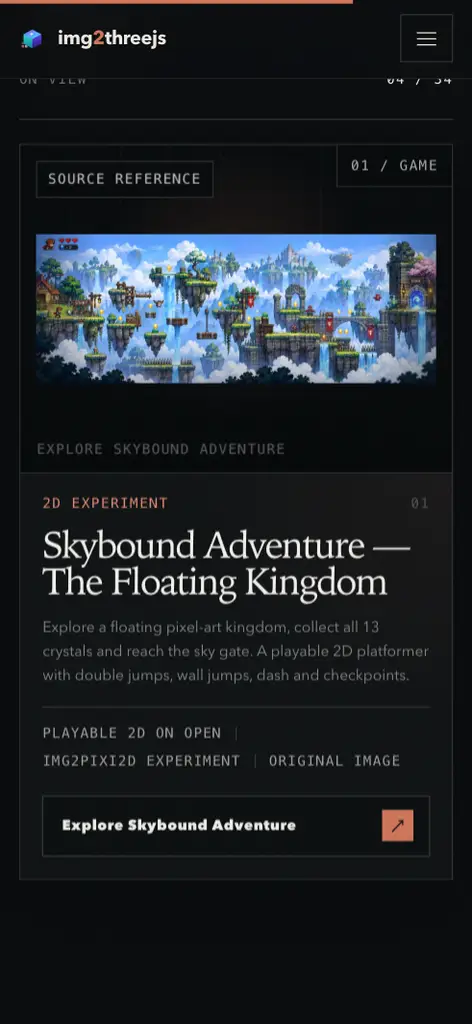
Open Skybound Adventure — The Floating Kingdom in the home-page Archive, or
use the 2D Games filter. The card displays the supplied original reference
image, not a gameplay screenshot; Explore Skybound Adventure opens the
standalone /skybound-adventure.html game.

Production-browser captures (PR evidence, not shipped game assets): gallery card · native-fullscreen gameplay.
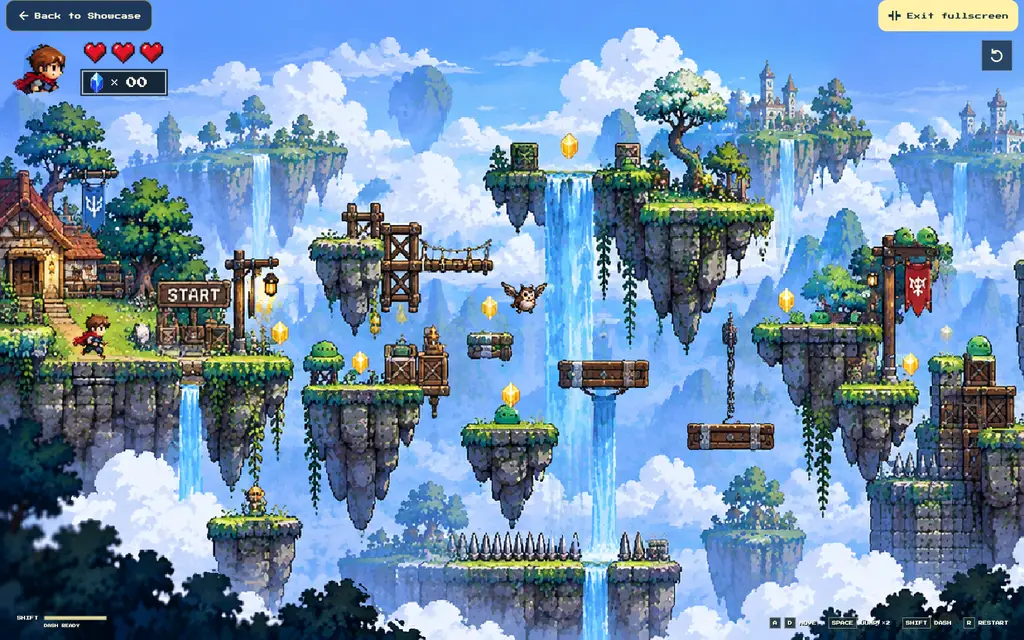
The game fills the browser viewport without an inspector/sidebar. Begin requests native fullscreen when supported; the fullscreen button or F toggles it and Esc leaves it. Browsers that deny native fullscreen still get full-window gameplay. Back to Showcase returns to the gallery.
- A/D or arrow keys move; Space jumps, double-jumps or wall-jumps; Shift dashes.
- Collect up to 13 crystals, activate checkpoints and reach the sky gate. Coins remain optional in ordinary play.
- Losses with hearts remaining respawn at the checkpoint without refilling those hearts. The last heart starts a fresh run after the death animation, resetting spawn, collectibles, enemies, checkpoint, moving platforms and run counters.
- Keyboard controls are required; touch movement controls are not implemented.
npm run test:skyboundruns the ported gameplay regression suite, including the all-13 route and exhausted-heart reset.npm run buildincludes the standalone page.
Implementation: src/demos/skybound-adventure/.
Runtime layers and locally bundled Press Start 2P font:
public/skybound-adventure/.
The full supplied image is reference.png;
the archive WebP is a downscaled copy within the catalog's 800 KiB limit.

Provenance and limits: this is an experimental source-derived PixiJS raster
game, not a procedural Three.js model or a claim of recovered original layers.
Hidden artwork/support and actor animation are authored/inferred. Existing
background reconstruction limitations remain; the reference is not relicensed
by this port and redistribution rights require maintainer confirmation. The
bundled pixel font retains its license in the game's fonts/ directory.
Experimental img2pixi2D study; rendering and provenance limits remain documented below.
This study ports the existing Greenvale 2D game into a standalone /greenvale.html
entry, alongside the existing standalone iPhone Duo page. It does not register a
Three.js model, modify the gallery router, or depend on the separate Moonlight Cafe PR.
npm ci
npm run dev -- --host 127.0.0.1
# Open /greenvale.html on the URL printed by Vite.
The home page Archive lists Greenvale — Playable 2D Village among its first cards, with a 2D Experiment label and an actual gameplay overview. Use the 2D Games filter or search for Greenvale/img2pixi2D; Play the 2D Game opens the standalone page rather than a Three.js inspector.

The 960×640 WebP is captured from the running PixiJS scene, not the source reference or a generated mockup. It is a runtime asset for the gallery card and the standalone loading screen.
- A village-art loading screen appears from initial HTML, before the game module downloads. The same screen reports font, asset and renderer setup without fake percentages or an artificial delay. Pixel pulses respect reduced motion; module failures stop the animation, while boot failures reveal the retry alert.
- Native PixiJS 8.22.0 containers, source-derived sprite layers, editable actor rigs, native HUD text/graphics, lighting, water, smoke and skill VFX; no 3D runtime.
- WASD/arrows walk; Shift runs; E interacts. 1/2/3 cast Heal/Ice/Fire; J/K/L/U/I/O trigger Slash/Combo/Thrust/Spin/Dash/Ground Strike.
- Touch devices receive a joystick, hold-to-run, interaction and all nine skill buttons. The first click/tap requests fullscreen where supported; F toggles fullscreen, P pauses and R resets. No outer settings panel or header.
- The 1536×1024 artboard keeps its proportions. Portrait screens have substantial letterboxing; landscape touch controls can overlap the map.
- Landscape controls use translucent circles (24% button fill, 12% joystick fill), a larger Slash button, arc-arranged attacks and colored Heal/Ice/Fire symbols. Held controls brighten; keyboard badges are hidden in landscape. Touch targets remain at least 48px; portrait and desktop styling is preserved.
Implementation: src/greenvale/.
Bundled artwork, runtime layer manifests and fonts:
public/greenvale/.
The host owns the Pixi Application, ticker, input and resource lifetime;
scene.ts owns the reusable scene.
Provenance and limits: artwork derives from a user-supplied flattened Greenvale reference. Hidden ground/joints and actor background plates are inferred, not recovered original layers. Mirrored front-view poses are not true side/rear sprite sheets. Attack effects are visual actions, not an enemy/damage combat system. Artwork is not relicensed by this experiment; redistribution rights still require maintainer confirmation. Bundled Be Vietnam Pro fonts retain their SIL OFL.
Runtime-only Greenvale files: keep greenvale.html, src/greenvale/,
the three public/greenvale/*/manifest.json files, their referenced PNGs,
all bundled fonts with OFL.txt, and public/greenvale/showcase-preview.webp
for the gallery. The manifests retain source hashes and
inference notes. Build/local-server configuration and the dependency lockfile
remain required. Extraction masks, unused per-layer metadata, separate character
provenance, screenshots, verification reports and the Greenvale test harness have
been removed; gameplay and other showcase scenes are unchanged.
To check locally, open /greenvale.html, walk/run with WASD and Shift, try the
nine skill keys and resize to mobile landscape for the translucent controls.
Physical-device and Safari checks were not performed.
Runtime-only cleanup check: TypeScript passes; Chromium loads all 47 manifest
images and 12 font files, renders one canvas, and accepts all nine keyboard
skills. Walk/run move 25/47 pixels over four 0.05-second simulation steps driven
by native keyboard input. At 844×390, translucent controls render without page
overflow and the pointer Combo button invokes the Combo action.
Fullscreen is preserved: the first click enters browser fullscreen, F exits and
re-enters it, and Combo works while fullscreen is active. Chromium checks confirm
the stage fills both 1440×960 and 844×390 viewports, including mobile controls.
Browsers require a user gesture for fullscreen; where the API is unavailable,
the game still fills the browser viewport.
Gallery checks: the overview loads at 960×640 on desktop and mobile; counts are
33 total studies, 18 objects, 14 characters and one 2D game after integrating main.
Object/character
filters exclude Greenvale; search and the archive card both open /greenvale.html,
where a subsequent click enters fullscreen. No JavaScript errors were recorded
in those navigation checks.
After integrating the current main branch, the complete npm run build passes:
prebuild donation/iPhone/Tropical Island checks, TypeScript, Vite production
bundles, 30 portable Three.js source archives and the postbuild dist check.
The earlier source-ZIP traversal failure no longer occurs in this integrated
version; no build gate was skipped.
This repository is the public gallery for img2threejs. Each study pairs its reference with a reviewable TypeScript implementation, catalog metadata, and a live Three.js scene or a dedicated PixiJS 2D artboard. The result is not a sealed render: it is code you can inspect, diff, animate, and extend.
|
Reference-led Silhouette, proportions, materials, and visible details are measured against the supplied source. |
Code-owned Runtime geometry and behavior live in the repository. Demo code cannot depend on remote meshes, CDNs, or network calls. |
Animation-ready Named parts, pivots, rigs, contact pairs, and effects are authored for interaction rather than flattened into a single asset. |
The catalog keeps honest status metadata: final entries are completed reconstructions;
placeholder entries remain visible while their final rebuild is in progress. The live source
of truth is src/demos/registry.ts.
| Study | What to explore |
|---|---|
| Man Robot · Segment Color Studio | A source-preserving 65-joint robot on a procedural street, with arrow-key walking, Shift-to-run, nine numbered skills, six paint regions, and WebGPU rendering with a WebGL2 fallback. |
| Tropical Island — code-only measured study | Ten force-measured TypeScript surfaces, procedural terrain/water/foliage, 27 selectable parts, and no runtime GLB or source texture maps. |
| Moonlight Cafe — PixiJS 2D study | Source-derived café layers, ambient sky/water/boats, the approved seated cat with tail-only sway, and a collapsible description/reference panel at #/demo/coffee-house. |
| Ocean Blue PRS Guitar | Measured vertex color and PBR samples preserved in code, six addressable strings, and opt-in water-flow actions. |
| Groot — Heart of the Forest | A navigable woodland scene with retargeted movement, grounded combat, living-wood effects, and lantern spirits. |
| Mars Cat | Seventeen measured regions streamed at three quality levels without shipping the reference GLB, textures, or UV atlas. |
| Starship + Super Heavy | Procedural stainless shells, heat-shield tiles, flaps, grid fins, engine arrays, and a staged separation sequence. |
Hold the arrow keys to walk relative to the camera; hold Shift + arrow keys to run, and release Shift to return to walking. Walk and Run use their original native clips; diagonal movement keeps the same speed within each gait, and the camera follows without replacing your orbit. Shift alone does not move the robot.
1–3: Box 01–03 · 4–5: Front Kick 01–02 · 6–7: Muay Thai 01–02 · 8: US Greeting · 9: Gentleman. The number row and numpad both work, or click the matching skill button. Each numbered skill plays once; an already-held arrow resumes movement afterward (running if Shift is held), while a fresh arrow press interrupts the skill. Shortcuts do not intercept text, color, or select editing.
The street starts with the robot's original white-and-green appearance. Skills do not cycle its colors; segment painting, the full 23-clip motion library, and exports remain available.
 Sony WF-1000XM3 Open the case, lift both earbuds, spin them through a full turn, and settle them back into place. |
 Gerber Paracord Knife A stonewashed tanto profile, skeletonized tang, hex pommel, and woven orange cord. |
 Doraemon House An isometric street diorama with layered roofs, overhead wires, a garden, and animated atmosphere. |
 War-Hauler “SECTOR 07” A weathered six-wheel hauler with a riveted plow, reactor-lit hubs, and drifting exhaust. |
graph LR
    A[Reference image or measured source] --> B[Analysis and sculpt specification]
    B --> C[TypeScript model factory]
    C --> D[Quality and safety gates]
    D --> E[Interactive Three.js study]
- Study the source. Record visible proportions, silhouette, material behavior, and unknown depth.
- Build in code. Assemble geometry, materials, named parts, and optional actions in a TypeScript factory.
- Measure the result. Compare the render with the source, document inference, and iterate on the largest visible gaps.
- Publish the study. Add catalog metadata and a local reference; CI builds the gallery and runs the static safety gate.
For the reconstruction workflow itself, start with the img2threejs repository.
Have an img2threejs model worth sharing? The repository includes a scaffold command and a purpose-built contribution path.
git clone https://github.com/<your-user>/img2threejs-showcase.git
cd img2threejs-showcase
npm ci

git switch -c add-demo/<id>
npm run new-demo -- <id> "<Title>" object   # or: character

# Add the factory and reference, then complete the generated registry entry.
npm run build
node scripts/check-showcase-safety.mjs --base main
A submission must:
- for Three.js studies, build geometry in code without fetching remote meshes, textures, fonts or scripts; owner-reviewed source-derived PixiJS studies use the dedicated local-asset path documented below;
- include a catalog reference image you have the right to use (
.png,.jpg,.jpegor.webp, at most 800 KiB); - use a kebab-case id unique across both catalogs and complete the selected renderer's required fields;
- set
status: 'final'once the real implementation replaces the scaffold; - pass both the production build and the same safety scan used by CI.
Read the full contribution guide before opening a pull request.
- Node.js 20
- npm
npm ci
npm run dev            # start Vite in development mode
npm run build          # run project checks, TypeScript, and the production build
npm run preview        # serve the production build locally
npm run new-demo -- --help
npm run star-history   # regenerate the chart below; requires GITHUB_TOKEN
The gallery uses hash routes (#/ and #/demo/:id) so direct navigation remains compatible
with static hosting.
The private Robin & Nami / Thousand Sunny entry appears in the archive only when the Vite
development site is opened on localhost. It links to the separate local scene server at
http://127.0.0.1:18774/thousandsunny/ and uses its preview image. The private job is not
included in this repository: it must provide the thousandsunny link to cinematic and
evidence/home-robin-nami-sunny-preview.jpg. Start its server with
python3 ~/.img2/jobs/robin-bikini-transfer-01/serve.py 18774. The entry and its assets
are not included in the public production gallery.
This checkout includes Moonlight Cafe at #/demo/coffee-house, discoverable in the
archive's Objects filter and the Find a Study command palette. It is an integrated gallery
demo, not a separate HTML entry or a Three.js group with invented camera metadata.
src/demos/coffee-house/contains the production scene, animation modules and bundled layout/motion manifests. The source-derived mattes and hidden-background reconstruction remain authored approximations; this study does not claim artist-alpha reconstruction.src/pixi/registry.tsowns 2D metadata and runtime-selected renderer/artwork plugins.src/pages/pixi-demo.tsowns the hash-route shell and serialized atlas leases;src/pixi/showcase.tsowns the Application, uniform artboard fit, ambient clock and cleanup. The existing Three.js registry, cameras, inspector and exporters remain separate.- Browser extensions are registered before Application initialization, with automatic extension imports disabled. Vite keeps Pixi in one lazy runtime chunk so the 2D route does not need a separate browser/worker environment fetch; 3D routes do not load it.
- The panel contains only the description and original reference. Desktop starts expanded; mobile starts folded. Info / Hide, Enter and Escape control it; folded content is inert and the expanded mobile panel scrolls independently. Reduced motion stops scene playback. Painting modes, Zoom/pan, Explore, part selection and 3D inspector/export tabs are absent.
public/coffee-house/motion-atlas.pngsupplies every live scene texture. The original PNG atpublic/coffee-house/reference.pngis shown in the reference panel; the gallery usespublic/references/coffee-house.webp(189,598 bytes, below the 800 KiB catalog limit). Manifests are static imports; there is no direct factoryfetchor external asset service. The full artboard and reference are not cropped.- The scene exposes only its root, clock and disposal. It does not ship the source app's Original mode, selection markers or configurable effect controls, and does not load the separate original-mode atlas. Development screenshots and verification logs are not checked into the production contribution.
- Artwork redistribution rights still require maintainer approval. No public deployment or independent artwork-license verification is claimed.
Open #/demo/tropical-island. The demo has 27 selectable parts, a coupled
shallow-water simulation, moored boat buoyancy, wind-driven foliage, a day/night
cycle and procedural fire, smoke and water-entry effects. Click/tap clear deep
sea to drop a rock, drag to orbit, and press R to repeat at the last water
point. Strong shore impacts extinguish the campfire; click its retained wood or
stone to relight it. Reduced motion holds the scene and disables physical drops.
Eligible, unobstructed water shows a gold aim cursor with a dark outline. Hover
uses the same depth, solid-prop, occupied-column and pool-capacity admission as
clicks. The native 32×32 SVG cursor has a centered hotspot, falls back to
crosshair, adds no animation loop, and clears on dragging, leaving the canvas,
blur or a click/R drop.
The ten prop surfaces in measured/
follow the img2threejs force-measured route: u16 positions, octahedral 8+8-bit
normals, sampled vertex colors and lossless indices decoded into ordinary
Three.js geometry. These are surface buffers, not a base64-wrapped GLB.
Runtime uses no GLB/GLTF/BIN, GLTF/DRACO loader, source texture image or UV atlas.
The reference WebP is a gallery thumbnail, not a model texture.
The measurement manifest
records source hashes, topology, transforms and sampling conventions. Across ten
source meshes, 708,881 vertices and 1,145,710 triangles retain their original
index order before the existing palm/fire cleanup. Independent local parity
checks measured maximum position error of 7.62939453125e-6 in source mesh
units and nonzero-normal error below 0.95°.
Fidelity limit: base color is sampled at vertices; roughness and metalness use measured sampled medians. Sub-vertex texture detail and source normal maps are not retained, so this is not pixel-identical PBR texture shading. Surface streams load asynchronously as 60 bounded TypeScript chunks before the synchronous model factory runs. Raw positions, normals, sampled colors and index order are preserved; the split removes the monolithic parser workload. The complete island payload remains about 11.04 MB gzip. Build guards enforce 512 KiB runtime/metadata chunks, 300 KiB numeric chunks and 11 MiB aggregate gzip. Vite receives an 8 GiB Node heap ceiling for full-gallery builds; this is not a browser allocation or a quality setting.
Numerical runtime. MUSCL/HLL reconstruction and face fluxes use a generated
11,810-byte WebAssembly SIMD kernel with strict float64 arithmetic. Each water
instance owns its memory, and typed-array views avoid per-step copying.
Neighboring-cell foam lookups retain binary-search fallback for longer travel;
incident-wave dispersion is cached by exact depth. Regeneration uses the retained
C sources and node pipelines/tropical-island/water-kernel/build-water-kernel.mjs
(LLVM clang with wasm32 support and wasm-ld required). Normal builds use the
checked-in waterKernelCode.ts, with no compiler or external .wasm download.
Runtime requires WebAssembly SIMD and DecompressionStream.
Body and parcel sources now enter the field after every existing CFL substep,
before the next CFL scan. Contact sampling reads live water instead of the last
GPU upload; visual effects and texture uploads remain once per render frame.
This fixes uneven-frame feedback that could eject a submerged rock and make
the solver's CFL speed signal explode. The repeating schedule
1/60, 0.05, 1/120, 0.026 seconds previously reached 31,784; the corrected real
scene completed 6.026 physical seconds with a maximum of 30.59 and a submerged
rock. Coastal-jitter and stale-contact regressions both failed before their fixes.
No geometry/effects were removed; no velocity clamp, FPS cap, simulation-clock
slowdown, LOD, decimation or busy worker was introduced.
Verification. All 95 island tests passed. With identical source scheduling, 116 frames across still water, incident waves, prescribed impacts and mixed wet/dry lanes were byte-identical to the original solver across 16 fields. Physical clocks, soil absorption and non-finite errors matched; four full-grid foam-transport cases also matched, including long backtraces and signed zero. The body-coupling fix deliberately changes source scheduling rather than preserving the unstable trajectory.
Process CPU measurement: Chrome 154 / Apple M1 Metal, headless 1280×960 at DPR 1, production assets, the same executable and a dedicated profile. Each default-scene run lasted 40 seconds; values average the final 30 seconds. CDP per-process CPU-time deltas use 100% for one CPU core, not the whole machine. No profiler, build or test job ran during capture.
| Measurement | Previous runtime | Optimized |
|---|---|---|
| Total Chrome-process CPU | 107.4% | 79.8% |
| Renderer-process CPU | 85.6% | 57.7% |
| Main-thread occupancy | 81.2% | 52.6% |
| Observed FPS | 42.8 | 40.6 |
| Mean scene tick CPU per frame | 17.25 ms | 11.18 ms |
A trusted click and eight seconds of impact/settling averaged 84.0% total Chrome CPU. These are measured workload results, not locked-60-FPS or other-hardware guarantees. Browser checks covered sinking, boat response, fire extinction and mesh-click relight, keyboard repeat, orbit cancellation, reduced motion, eligible and blocked cursor states, full-pool rejection and native portrait touch.
npm run build checks island source/public assets before building and checks
dist/ afterward. Focused physics and interaction regression tests:
node --test pipelines/tropical-island/*.test.mjs
npm run check:tropical-island
npm run build
The offline encoder and independent verifier are retained as code in
pipelines/tropical-island/. Regeneration requires Python 3 with Pillow and the
original GLBs under the gitignored work/tropical-island/reference-models/:
python3 pipelines/tropical-island/encode-surfaces.py
node pipelines/tropical-island/verify-surfaces.mjs
Normal builds do not need Python or the offline GLBs. Original models, temporary state/specs, generation logs and historical QA images/videos are not part of this showcase submission. Optional inspector GLB export remains available; static exports do not bake the simulation, wind or volumetric effects.
Open a Three.js study, choose Export, then Download source code under
Export a 3D Asset / From Stage. The <showcase-id>-source.zip contains only
that showcase's runtime dependency graph, not the entire gallery. Source download
is independent of asset export scope, isolation and the current pose.
Man Robot Studio has these download controls in its component console. Download GLB exports the robot alone (not the studio floor/lights); the format selector also offers glTF, OBJ, STL, PLY and USDZ, and Export all formats bundles all six with a validation manifest. GLB/glTF retain the source texture, current segment tints, 65-joint rig and 23 runtime clips. Static formats bake the visible pose with their stated material/rig limits. Runtime scan shaders and gesture corrections remain in the source ZIP, not the interchange files. Asset exports temporarily lock motion and painting, then resume the existing playback state. Source download works before the model is ready.
Unlike GLB/glTF asset export, the source ZIP retains the original TypeScript factories,
all reachable quality/data modules, animation controllers, shaders, procedural VFX,
lighting and stage interaction hooks. Required textures and JSON assets are included;
their URLs resolve within the downloaded package, including after a subpath production
build. No .glb/.gltf model file or GLTFLoader dependency is allowed in these packages.
Static studies remain static: downloading source does not invent animation.
Each ZIP includes package.json, manifest.json, an executable browser example and
integration instructions:
npm install
npm run dev
# Production example:
npm run build
To reuse it, copy both src/ and assets/, preserving their relative layout, into
a TypeScript-aware, asset-aware Three.js project. Install the ZIP's declared dependencies
and share a compatible Three.js instance with the host.
For standard Viewer-based packages:
import { mountShowcase } from './downloaded-showcase/src/index';

const asset = await mountShowcase(container);
const animation = asset.runtime?.animationController;
const action = animation?.actions[0];
if (action) animation.play(action.id);
// On unmount:
asset.dispose();
Use createShowcase(scene) for an existing scene and advance its update(dt, elapsed)
and prepareRender() from your own loop. Do not advance these again with mountShowcase;
its included Viewer already does so. Camera-dependent game interactions require the
included Viewer or an adaptation to the host engine. The package README explains both
integration paths and resource ownership. Existing provenance/attribution remains;
downloading does not grant new rights to third-party references or textures.
The Robot Studio package instead mounts its original component editor, motion library
and WebGPU/WebGL-fallback stage. mountShowcase(container) returns { dispose };
its controls own playback and painting. Use the exported robot model/animation APIs
when integrating into an existing scene. It includes the six robot runtime assets,
but omits the gallery's download panel to keep the standalone package free of
GLTFLoader.
Archives are generated from the selected registry entry and its actual imports by
scripts/source-archives.mjs. npm run build writes deterministic ZIPs to
.release/showcase-sources/, outside the Pages artifact. Only the small
dist/source/index.json catalog ships with Pages; development still generates
/source/<id>.zip on demand.
Production downloads use native browser attachments from a content-addressed
GitHub Release,
not cross-origin fetch/Blob downloads: the release blob host does not provide
the CORS headers that flow needs. The catalog binds each showcase to its filename,
byte size, SHA-256 and immutable release URL. A source change produces a new tag;
there is no mutable latest download or manually maintained list of showcases.
The Pages workflow runs npm run publish:source before uploading its site
artifact. Publication verifies local bytes and server-side digests, resumes an
incomplete draft, reuses an identical published release, and refuses to overwrite
different published assets. Only the trusted deployment build receives
contents: write; PR builds generate and check packages without publishing.
For an authorized manual publication, build first, authenticate gh with release
write access, then run npm run publish:source.
npm run build also runs npm run test:source and rejects a Pages output larger
than 1,000,000,000 bytes. The verified clean gallery output with both living-room
and modern-bedroom is 858,270,609 bytes / 525 files, including demos.json.
Procedural Source ZIPs stay on Releases; runtime texture values and original
editable exports are unchanged.
After building, validate all packages in isolated consumers with:
node scripts/check-source-archives.mjs
# Or specific studies:
node scripts/check-source-archives.mjs leesin tropical-islandsrc/
main.ts application bootstrap and route mounting
content.ts editorial copy for the gallery shell
site-data.ts canonical links, release, sponsor, and roadmap data
pages/demo.ts Three.js study viewer and information panel
pages/pixi-demo.ts dedicated PixiJS route shell and serialized asset lifecycle
pages/workbench.ts inspection and export workbench
scene.ts renderer, camera, controls, lighting, and disposal
exporters.ts browser-side export flows
demos/registry.ts Three.js catalog metadata and lazy runtime loaders
pixi/registry.ts PixiJS 2D catalog and runtime-selected plugins
pixi/showcase.ts PixiJS artboard, description/reference panel, clock and cleanup
demos/<id>/ one implementation folder per study
public/references/ bounded local catalog reference images
public/coffee-house/ local café atlases and full original reference
scripts/
new-showcase.mjs contributor scaffold
check-showcase-safety.mjs static pull-request safety gate
generate-star-history.mjs repository-owned star chart generator
Pull requests targeting main run the shared Node 20 quality workflow. The repository adds
showcase-specific checks for unsafe network access, reference formats and sizes, unique ids
across both renderer catalogs, and contribution boundaries. Merged changes are deployed automatically.
The archive card opens /living-room/: a Blender-authored room rendered in Three.js,
with PBR materials, baked ambient lighting, a shadowed sun, editable sofa finishes,
interactive curtains, reference comparison, and a collapsible Panel. This is not a
procedural img2threejs reconstruction. The synthetic Customuse reference is labelled
as a design image; Poly Haven materials/models are CC0, not the synthetic reference.
showcases/living-room/ is an independent npm workspace pinning Three.js 0.180.0 and
Vite 6.4.1. The gallery keeps its existing dependency versions and procedural safety
rules. npm ci installs both dependency sets; Python 3 is also required.
npm run buildbuilds the child before the gallery.build:living-roomuses Vite modeshowcaseand base/living-room/, writing generated files topublic/living-room/.- Before gallery development, run
npm run build:living-room, thennpm run dev.npm run dev:living-roomruns the standalone viewer;preview:living-roomserves its gallery build. - Large binaries are pinned in
showcases/living-room/assets.lock.json, fetched from the versioned runtime asset release, and verified against bundle and per-file SHA-256 checksums. They are not Git blobs. - The Pages build contains runtime assets only. Source ZIP, portable GLB and packed Blender downloads point to the release, avoiding a duplicate half-gigabyte archive in Pages. They contain the original open-curtain / cream-sofa state, not live edits.
- Runtime lightmaps use ZIP-compressed HALF EXRs instead of FLOAT EXRs. The pinned Three.js loader already decoded the originals to HALF: all five replacement maps produce bit-identical decoded RGBA texture buffers, saving 216,008,767 Pages bytes. Original source, portable GLB and packed Blender downloads remain on the immutable v1 release; this is not a reduction of the original editable exports.
- To prepare a new runtime release from verified local assets, run
node showcases/living-room/scripts/pack_runtime_assets.mjs --tag <new-tag> --output <new-directory>. The tool verifies every input checksum, rejects changed decoded texels, and emits the bundle, replacement maps, new lock and per-map proof. Publish the bundle and proof under the new tag before committing its lock; never replace a published tag. - Ordinary standalone
npm run buildkeeps local downloads and includes all assets in its Source ZIP. The downloaded source is independently runnable. - Hide panel / Show panel fills the browser viewport and preserves edits on desktop and narrow screens; it does not request operating-system fullscreen.
npm run sync:living-room -- --from <canonical-project>explicitly refreshes viewer sources and manifest-declared assets. It preserves the gallery-specific publication adapter and requires matching dependency pins and the download override hook.
The Interior gallery card opens /modern-bedroom/. The 3D canvas fills the browser
viewport; the Panel button opens an overlay without resizing or resetting the
camera. The panel contains the overview, synthetic design reference, room-colour
customisation and source / portable GLB / editable Blender downloads.
showcases/modern-bedroom/pins Three.js 0.180.0 and Vite 6.4.1.- Run
npm run dev:modern-bedroomfor the standalone viewer, ornpm run build:modern-bedroombefore gallery development. npm run buildbuilds both interior workspaces before the gallery.- The runtime uses meshopt geometry, KTX2 textures/lightmaps and static lighting
samples. Its versioned release bundle and individual files are SHA-256-pinned in
showcases/modern-bedroom/assets.lock.json; binary assets are not Git blobs. - Source, portable GLB and packed Blender downloads are separate release assets, not duplicated in the Pages output. The static exports do not capture live palette, curtain or throw changes. Baked indirect lighting does not rebounce when colours change.
- Throw contacts use each particle's updated position after every triangle projection, avoiding stacked stale-position pushes. Fringe strands align their bearing before the gravity/ground pitch, preventing unstable sideways flips.
- The viewer omits the visible provider-credit footer; CC0 provenance remains in the authoring resource metadata.
- Dimensions and unseen surfaces are authored estimates from one synthetic reference, not measured reconstruction.
- Discord — feedback, reconstruction discussion, and work-in-progress studies
- Issue tracker — gallery bugs and showcase submissions
- YouTube · X / @NickDevFE — build logs and releases
img2threejs and this gallery are open source. If they save you time, you can support ongoing work through Ko-fi or the project donation page.

Generated in-repository by scripts/generate-star-history.mjs and refreshed daily.