Tomato is a full-stack food delivery web application designed to provide users with a seamless experience for ordering their favorite meals online. Built using the MERN stack (MongoDB, Express, React, Node.js), Tomato features user authentication , Intuitive UI to browse restaurants, menus, and customize orders.Precise delivery location selection, ensuring efficient and accurate delivery services.












Client: TailwindCSS, React, Redux
Server: Nodejs , Expressjs , MongoDB ### 🌟 Features
-
User Authentication — Secure signup and login with JWT-based authentication.
-
Browse Foods & Menus — Explore multiple Food with detailed menus and item descriptions.
-
Add to Cart & Order — Easily add items to the cart, customize orders, and place secure orders.
-
Address Selection — Easily enter and save your delivery address accurately for smooth order processing.
-
Responsive Design — Fully responsive UI that works smoothly on mobile, tablet, and desktop devices.
-
Admin Dashboard — Manage restaurants, menus, and orders efficiently (if implemented).
-
Order History — Users can view past orders for quick reordering.
- UserModel
- OrderModel
- LocationModel
- foodModel## API Reference
POST /api/user/signup| Parameter | Type | Description |
|---|---|---|
Name |
string |
Required. The name of the user |
email |
string |
Required. The email address of the user |
password |
string |
Required. The password for the account |
POST /api/user/login| Parameter | Type | Description |
|---|---|---|
email |
string |
Required. The name of the email |
password |
string |
Required. The name of the password |
POST /api/food/add| Parameter | Type | Description |
|---|---|---|
name |
string |
Required. The name of the food item |
description |
string |
Required. A brief description of the item |
price |
number |
Required. The price of the food item |
category |
string |
Required. The category of the food (e.g., Pizza, Burger, Dessert) |
image |
string |
Required. The image URL of the food item |
GET /api/food/list POST /api/food/remove| Parameter | Type | Description |
|---|---|---|
id |
string |
Required. The unique ID of the food item to remove |
POST /api/cart/add| Parameter | Type | Description |
|---|---|---|
userId |
string |
Required. The unique ID of the user adding the item to cart |
itemId |
string |
Required. The unique ID of the food item to add |
quantity |
number |
Required. The number of units of the food item |
POST /api/cart/remove| Parameter | Type | Description |
|---|---|---|
userId |
string |
Required. The unique ID of the user whose cart is being updated |
itemId |
string |
Required. The unique ID of the food item to remove (decrease quantity by 1) |
POST /api/cart/get| Parameter | Type | Description |
|---|---|---|
userId |
string |
Required. The unique ID of the user whose cart data is being fetched |
POST /api/location/get-coordinates| Parameter | Type | Description |
|---|---|---|
address |
string |
Required. The full delivery address to fetch latitude and longitude coordinates |
POST /api/order/place| Parameter | Type | Description |
|---|---|---|
userId |
string |
Required. The unique ID of the user placing the order |
items |
array |
Required. List of food items in the order, including name, price, and quantity |
amount |
number |
Required. The total order amount (excluding delivery charges) |
address |
string |
Required. The delivery address for the order |
POST /api/order/verify| Parameter | Type | Description |
|---|---|---|
orderId |
string |
Required. The unique ID of the order to verify |
success |
boolean or string |
Required. Indicates whether the payment was successful (true or "true") |
POST /api/order/userorders| Parameter | Type | Description |
|---|---|---|
userId |
string |
Required. The unique ID of the user whose orders are being fetched |
GET /api/order/list GET /api/order/status| Parameter | Type | Description |
|---|---|---|
orderId |
string |
Required. The unique ID of the order whose status needs updating |
status |
string |
Required. The new status of the order (e.g., "Preparing", "Out for Delivery", "Delivered") |
To run this project, you will need to add the following environment variables to your .env file
MONGODB_URI =
PORT =
JWT_SECRET =
STRIPE_SECRET_KEY =
Install my-project with npm
  npm install my-project
cd my-project npm install npm install axios npm i vite@latest npm i react npm i react-router-dom npm i react-toastify npm i -D @type/react npm i -D @type/react-dom npm i -D eslint npm install npm install express npm i dotenv npm i axios npm i body-parser npm i bcryptjs npm i multer npm i stripe npm i @stripe/react-stripe-js npm i @stripe/stripe-js npm i jsonwebtoken npm i mongoose npm i validator npm i cors npm i -D nodemon npm i vite@latest npm i react npm i @react-google-maps/api npm i @react-google-maps npm i @stripe/react-stripe-js npm i @stripe/stripe-js npm i axios npm i react-dom npm i react-router-dom npm i eslintClone the project
git clone https://github.com/i-himanshu29/Food-Delivery-Website.git cd adminInstall dependencies
npm install vite@latestStart the admin
npm run dev cd backendInstall dependencies
npm installStart the server
node ./server.js cd frontendInstall dependencies
npm install vite@latestStart the server
npm run devThe Project is deployed on Render.
Check out the live demo of the project here:
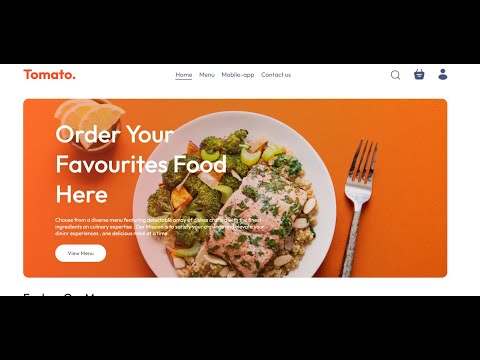
Click the thumbnail above to watch the demo on YouTube.
tomato-food-delivery/
│
├── 📁 backend/                      # Backend - Node.js + Express
│   ├── 📁 config/                   # Config files (DB, etc.)
│   ├── 📁 controllers/              # Route controllers
│   ├── 📁 middleware/               # Middleware functions
│   ├── 📁 models/                   # Mongoose models
│   ├── 📁 routes/                   # Express routes
│   ├── 📁 utils/                    # Utility functions
│   ├── 📄 server.js                 # Entry point for backend
│   └── 📄 package.json              # Backend dependencies
│
├── 📁 frontend/                     # Frontend - React app
│   ├── 📁 public/                   # Static files (index.html, favicon)
│   ├── 📁 src/
│   │   ├── 📁 assets/               # Images, icons, fonts
│   │   ├── 📁 components/           # Reusable React components
│   │   ├── 📁 contexts/             # React context providers
│   │   ├── 📁 pages/                # React pages/views
│   │   ├── 📁 services/             # API service calls
│   │   ├── 📁 styles/               # CSS / Tailwind files
│   │   ├── 📁 utils/                # Utility/helper functions
│   │   ├── 📄 App.js                # Main React component
│   │   ├── 📄 index.js              # React DOM rendering
│   │   └── 📄 package.json          # Frontend dependencies
│
├── 📄 .gitignore                   # Git ignore file
├── 📄 README.md                    # Project readme
└── 📄 README.so                    # (If used for editor version)
Hello, I'm Himanshu Maurya, a passionate Software Developer who loves building innovative and efficient software.
JavaScript , React.js , Tailwindcss , Next.js , Node.js , Express.js , MongoDB , PostgreSql , Redis , Kafka , Deployment , Docker , WebSocket , Testing , Git/GitHub , AWS , etc.


