CarBooking is a ride-sharing platform using microservice architecture. The platform has 2 primary group of users, namely the passengers and drivers. During creation of passenger account, first name, last name, mobile number, and email address are required. Subsequently, users can update any information in their account, but they are not able to delete their accounts for audit purposes.For driver account creation, first name, last name, mobile number, email address, identification number and car license number are required. Drivers can update all information except their identification number. Similarly, a driver account cannot be deleted.
A passenger can request for a trip with the postal codes of the pick-up and drop-off location. The platform will assign an available driver, who is not driving a passenger, to the trip. This driver will then be able to initiate a start trip or end trip. The passenger can retrieve all trips he/she has taken before in reverse chronological order.
Passenger can:
- Sign up
- Update info
- Request trip(status- pending)
- Retrieve trips in reverse chronological order.
Driver can
- Sign up
- Update info
- initiate a start trip or end trip—accept assignment(status confirmed) , destination reached(status completed)
Main domains:
- Passenger account management: This domain is centred around account management for passenger users. Passengers can create a new account and update their account details.
- Driver account management: This domain is centred around account management for driver users. Drivers can create a new account and update their account details.
- Trip booking management: This domain is centred around trip booking management for passenger and driver users. Passengers can make a new trip booking and view their booking history. Drivers can initiate a start trip for pending bookings and end the trip once the destination is reached.
Design considerations
- Each service is responsible for a single part of the functionality. Each microservice will handle only one functionality for a certain user only(either driver or passenger). For example, one microservice for driver account management and one microservice for passenger account management. Having a single concern makes the microservice easier to maintain and scale.
- Domain driven: each microservice is domain-specific, and covers a single-bounded context. For example, passenger account microservice covers the domain passenger account management.
- Have separate databases for each microservice. Each database will store the data needed for the microservice and used onlt for that microservice. For example, passenger account management microservice has its own passenger database and driver account management has its own driver database.
- Loosely coupled design: A loosely coupled service depends minimally on other services. Microservices are loosely coupled if you can change one service without requiring other services to be updated at the same time. For example, bugs in the passenger account microservice can be fixed and updated without having to modify the driver account microservice.
- High cohesion: Each microservice should perform only one main function and do it well. Having high cohesion requires that the design of the service should follow the single responsibility principle. Each microservice is designed so that it has minimal dependencies on other microservice. For example, passenger account management microservice should only cover management of passenger accounts and not include booking functions.
Architecture diagram:
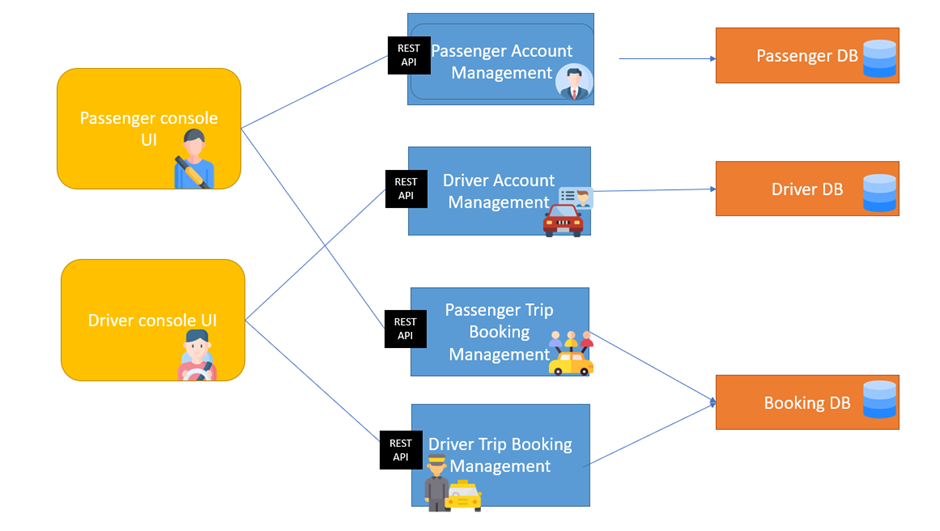
Microservice architecture:
- consists of small, individually deployable services performing different operations.
- focus on a single business domain that can be implemented as fully independent deployable services
- Using domain driven design
As shown in the diagram, the microservices are:
- Passenger account management
- Driver account management
- Passenger trip booking management
- Driver trip booking management
Databases for storing data from each domain:
- Passenger database Stores passenger details such as Identification number, FirstName, LastName, Mobile, Email, Password
- Driver Database Stores driver details such as Identification number, FirstName, LastName, CarNumber, Mobile, Email, Password
- Booking database Stores booking details such as PassengerID, DriverID, PickUp, DropOff, BookingDateTime, BookingStatus
System interactions within the architecture:
- The passenger account management microservice sends passenger details to the REST API and updates the database whenever a passenger user creates a new account. Similarly, when passengers update their account details, the updated details will be sent to the database and a PUT request will be send to the REST API. User prompts will be displayed to the passenger console UI which users will interact with and enter their information.
- The driver account management microservice sends the driver details to the REST API and update the driver database whenever a driver user creates a new account. Similarly, when driver update their account details, the updated details will be sent to the database and a PUT request will be send to the REST API. User prompts will be displayed to the driver console UI which users will interact with and enter their information.
- Whenever a passenger makes a new booking, the passenger booking management microservice sends the booking details to the REST API. Details of pending booking can be retrieved via the REST API by the driver booking management microservice. When a driver initiates a start trip, the updated booking with driver ID and booking status of ‘confirmed’ will be sent to the REST API. When the trip has ended, and the status has been updated to ‘completed’, a PUT request will be sent to the rest API. The booking details will be saved to the booking database. Passengers can retrieve their booking history which the passenger booking management microservice will get the data from the booking database and display to the passenger console UI. Communications between the microservices are done via the REST API.
Instructions for setting up and running the microservices:
Clone the files in the github repository. For each of the .go files, create a folder to store each file and initialise each file by running the command ‘go mod init [folder name]’ in the command terminal. Add the folders to a workspace in visual studio code. Run the DB files to set up connection to the SQL databases and connect to the REST API. Run the console files using the command terminal to open the console menu. (go run “c:\Users[file path where go file is found]”
Setting up SQL database
Open the sql files using MySQL. Execute each file to set up the database table.
Passenger user
- Passenger account management
-
To create new passenger account, choose option 1
-
Enter your identification number, first name, mobile number, email and password.
-
There will be a message displayed if account is created successfully.
-
To update your account, enter option 2.
-
Enter your identification number.
-
The system will then prompt for your updated details.
-
There will be a message displayed if account is updated successfully.
- Passenger trip booking management
- To book a car ride, choose option 1.
- Enter your pickup postal code and drop off postal code.
- A booking will be created with status pending(waiting for a driver to accept the assignment).
- If a driver has accepted the assignment, the status will change to confirmed
- To view all past bookings, choose option 2.
- The system will display all booking records in reverse chronological order
Driver User
- Driver account management
-
To create new driver account, choose option 1
-
Enter your identification number, first name, car number, mobile number, email and password.
-
There will be a message displayed if account is created successfully.
-
To update your account, enter option 2.
-
Enter your identification number.
-
The system will then prompt for your updated details.
-
There will be a message displayed if account is updated successfully.
- Driver trip booking management
- To accept an assignment, choose option 1.
- The booking status for the booking record will change to ‘confirmed’.
- The driver can then proceed to pick up the passenger at the pickup location.
- To end the trip, choose option 2.
- The booking status for the booking record will change to ‘completed’.
- The passenger can then alight at the destination and the trip has been completed successfully.
Done by: Hannah Loh S10186258
References: