Github for team 42's final project in CS492.
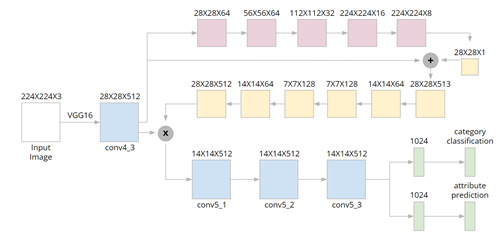
Python 3, PyTorch >= 0.4.0, and make sure you have installed TensorboardX:
pip install tensorboardX
Download the "Category and Attribute Prediction Benchmark" of the DeepFashion dataset here. Extract all the files to a folder and put all the images in a folder named "img".
Also, for evaluation, we used the images from MUSINSA. Download the images here. The images will be in a folder named "real".
For example, if you choose to put the dataset to /home/user/datasets/benchmark1/, the structure of this folder will be:
benchmark1/
    Anno/
    Eval/
    img/
    real/
Please modify the variable "base_path" in src/const.py correspondingly:
# in src/const.py
base_path = "/home/user/datasets/benchmark1/"
python -m src.create_info
Please make sure you have modified the variable "base_path" in src/const.py, otherwise you may encounter a FileNotFound error. After the script finishes, you will find a file named "info.csv" in your "base_path"
To train the model from scratch, run:
python -m src.train --conf src.conf.whole
To reproduce the results for images from MUSINSA, download the pre-trained model "whole.pkl" here. The location for the model should be:
DeepFashion/
    __MACOSX/
    models/
        whole.pkl
    README.md
    scripts/
    src/
To reproduce the results, run:
python -m src.val --conf src.conf.whole
The original images, attention maps and landmark location maps will be saved as image files in the directory. The output category of each images will be printed in category numbers. You can find out corresponding category in the link of the full dataset above.