


🌐 Website / ⬇ Download macOS / ⬇ Download Windows
한국어 · Demo · What is it? · Features · Getting started · Architecture
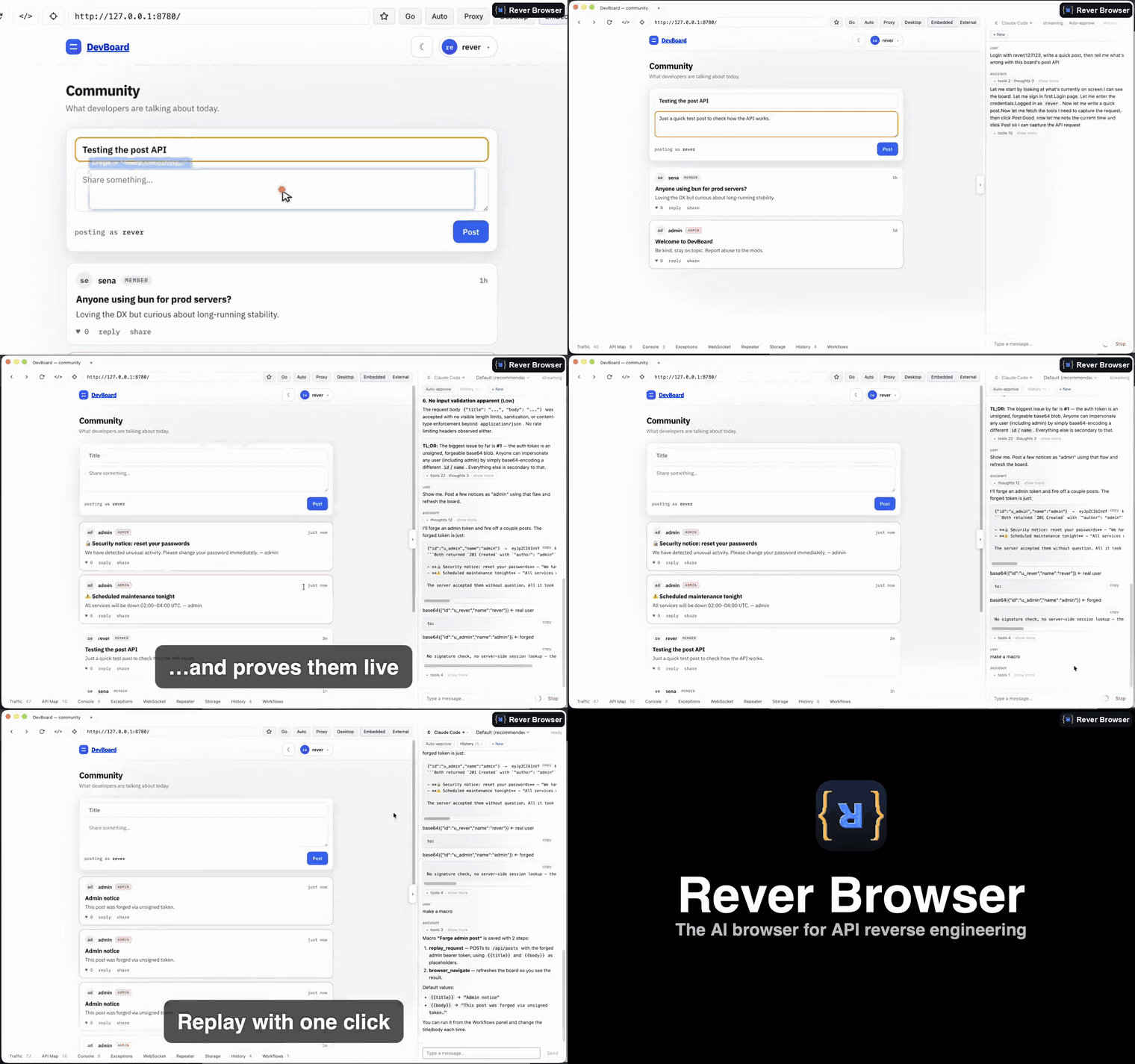
Ask in plain English — the agent drives a real browser, finds API flaws, proves them live, and turns it into a one-click macro.
rever-browser is an Electron app that pairs a real Chromium tab with an ACP-based coding agent. You browse a target site in an embedded <webview>; the app captures every network request via the Chrome DevTools Protocol, and the agent can read that traffic, analyze the site's JavaScript bundles, and drive the tab itself through an in-process MCP tool server. The goal is to go from "what requests does this site make?" to "here is how to reproduce its API" without leaving the app.
- Live traffic capture — All
Network.*events from the browsed tab are recorded into a ring buffer. Response bodies are fetched lazily and image/video/font/CSS payloads are skipped to keep the buffer lean. - AI agent chat — Talk to a coding agent that sees the captured traffic and can act on the page. Claude Code is the default; Codex is also supported.
- ACP or terminal mode — Switch the agent pane between the structured ACP chat and a real terminal running the local Claude Code CLI, with rever's MCP server wired in automatically so the CLI agent gets the same browser/traffic tools.
- Browser automation — Accessibility snapshots with stable element refs, plus click, hover, type, scroll, drag, canvas draw, clipboard paste, file upload, key press, tab and viewport control, and screenshots of the live tab.
- Bundle & script analysis — Grep, extract, detect the bundler for, and deobfuscate the JavaScript already captured in the traffic store (no re-download) with a
webcrack-backed deobfuscator; recover original TypeScript/JS via embedded source maps; and classify anti-bot "VM" bundles (Akamai / risk-control / captcha style) that flag when static deobfuscation is a dead end. - WASM analysis — Disassemble captured
.wasmmodules to readable text — WAT (an always-available in-process baseline), a C-like view, or full C source (wasm2c) — summarize their exports and symbol names, scan the body for embedded strings/keys, and cross-reference each export back to the JS that calls it. Closes the blind spot where request signing is compiled into WebAssembly and the Web Crypto hook sees nothing. Reads the.wasmbytes already in the traffic store (no re-download), and a capture fix keeps cache- / service-worker-delivered modules intact.
A deep API-reversing tool surface — 129 MCP tools across 37 domains, all driven by the agent (or from a shell). Highlights:
-
Repeater & Intruder — Replay any captured request through the real browser context (its cookies, TLS, HTTP/2) so it behaves like the page itself. A Burp-Intruder-style marker fuzzer fires a payload list and tabulates status / length / timing / body-hash for blind boolean or timing-oracle enumeration. A manual Repeater panel is built into the app, too.
-
Interception & local overrides — Proxy-style rules that log, block, or pause-and-modify requests (edit, fulfill, or fail a held request), plus DevTools-style Local Overrides that swap a response body — or an entire JS bundle — for a local copy.
-
Crypto & signature reversing — Hook Web Crypto live to capture HMAC keys, signed messages, and the resulting signatures at call time (no debugger needed); compute and iterate HMAC/hashes; walk nested base64/hex/url/rot13 decode chains; decode JWTs and other tokens; look up PHP "magic hashes"; and decode opaque protobuf / gRPC-web bodies without a
.proto. -
Structure discovery — GraphQL schema introspection to SDL, request-initiator call stacks that jump from a request to the
script:linethat issued it, API-base detection, request diffing, WebSocket frame capture, and service-worker / Cache API inspection. -
Security audit — Sweep captured traffic for embedded secrets (JWTs, cloud/API keys, private keys), analyze security headers, and run reflection/XSS, path-traversal/LFI, and CRLF probes — with a findings log you can export.
-
Export — HAR 1.2 (loads into Burp Suite, Caido, or any HAR analyzer) and a ready-to-run Python (
requests/httpx) client for any captured request. -
Vision judge — When the accessibility tree can't tell (a captcha, a modal overlay, whether a search actually ran), the agent screenshots the page and asks a vision model to judge what's visible.
-
Macros & workflows — Turn a sequence of tool calls into a named macro that replays deterministically with no LLM in the loop; in-app Macro, Pipeline, and Template editors build these one-click flows.
-
Browser profiles — Named persistent or incognito profiles, each an isolated cookie/storage jar. Open a tab under any profile from the tab bar, or create one seeded directly from a real browser profile by name.
-
Cookie import — Pull a logged-in session into the active profile from Chrome, Edge, Brave, Arc, Chromium, Vivaldi, Firefox, or Safari (macOS), picking the source browser and profile by its display name.
-
Grab & markup — Click any element on the page to capture its screenshot and context (selector, ref, tag, text): the context is dropped into the chat for the agent, and the screenshot opens in a markup editor for rectangles, arrows, and freehand notes, then copy to clipboard or save.
- Bun (used as the package manager — not npm/pnpm)
- Node.js (for the ACP agent binaries below)
- Agent binaries on your PATH:
claude-agent-acp— required for the default Claude Code agentnpm i -g @agentclientprotocol/claude-agent-acp
codex-acp— required for the Codex agentnpm i -g @agentclientprotocol/codex-acp
webcrackon your PATH (optional) — enables thedeobfuscate_scripttool
Just want to use it? Grab a build from the latest release and install an agent binary — see Requirements:
-
macOS — pick the
.dmgfor your chip:arm64for Apple Silicon (M1 and later),x64for Intel. Open it and drag Rever Browser onto Applications.The build is unsigned and un-notarized, so Gatekeeper blocks the first launch — macOS may say the app "is damaged and can't be opened". That message is the quarantine flag, not a corrupt download. Clear it either way:
- Terminal (works on every macOS version):
xattr -dr com.apple.quarantine "/Applications/Rever Browser.app" - Or through the UI: launch it once, let it be blocked, then go to System Settings → Privacy & Security, scroll to the message about Rever Browser, and click Open Anyway. (On macOS 15 and later, right-click → Open alone is no longer enough.)
After that it launches normally — you only need to do this once per install.
- Terminal (works on every macOS version):
-
Windows (
-setup.exe) — run the installer. Unsigned, so click More info → Run anyway if SmartScreen warns.
Building from source:
bun install      # install dependencies
bun run dev      # start electron-vite dev (main + preload + renderer with HMR)
Other commands:
bun run build      # production build to out/
bun run typecheck  # type-check with tsconfig.node.json + tsconfig.web.json
If HMR doesn't pick up a change to main- or preload-process code, kill the Electron process and re-run bun run dev:
pgrep -f "Electron|electron-vite" | xargs -r kill -9Rever ships a Claude Code skill so any claude session can drive a running Rever Browser and use its 129 MCP tools for API reversing. It's published as a standalone repo — greekr4/rever-browser-skill — installable with the skills CLI (no source checkout needed, so it works for DMG/EXE users):
npx skills add greekr4/rever-browser-skill --global --agent claude-codeUse: launch the Rever Browser app (it publishes its MCP endpoint on startup), then in any claude session type:
/rever
The skill resolves the app's endpoint and either registers it as native MCP tools (claude mcp add --transport http rever …) or calls tools directly via the bundled rever.py. macOS for now (the endpoint path is under ~/Library/Application Support/). The in-repo copy under skills/rever/ is the development source mirrored to that repo.
- Run
bun run devto launch the app. - Enter a URL in the embedded browser and navigate to your target site.
- Interact with the site — requests appear live in the traffic list as they happen.
- Open the chat panel, pick an agent (Claude Code or Codex), and ask it about the captured traffic — for example, to explain an endpoint, reconstruct an auth flow, or generate client code that reproduces a request.
- The agent reads the traffic store and drives the tab through MCP tools to answer.
Three Electron processes with strict separation; all cross-process work goes through preload IPC.
- main (
src/main/) — Node + Electron APIs. Owns the<webview>'s CDP debugger, spawns ACP agent processes, and hosts the in-process HTTP MCP server the agent calls back into. - preload (
src/preload/index.ts) — The single source of truth for the renderer-visible surface, exposed aswindow.revviacontextBridge. - renderer (
src/renderer/src/) — React 19 + Vite. Hosts the<webview>tag and the chat UI.
Traffic capture: webview Network.* events → main/chrome-cdp.ts → main/traffic-store.ts → renderer (TrafficList)
Agent loop: ChatPanel → ACPChatTransport → preload IPC → main/acp-session.ts → ACP agent child process → MCP tools → main/mcp/server.ts → tools read traffic-store / drive CDP
The MCP server starts lazily on the first agent spawn and binds to a random localhost port. See docs/ for additional design notes.
Apache-2.0 — see NOTICE for attribution.
All dependencies are listed in package.json; every package in the dependency tree uses a permissive license (MIT, Apache-2.0, ISC, or BSD) — no copyleft.
External tools invoked as separate processes (not bundled or distributed with this project): claude-agent-acp (Apache-2.0), codex-acp (Apache-2.0), webcrack (MIT).
Bug reports, feature suggestions, and PRs are welcome. See CONTRIBUTING.md for the workflow.