



Gut Check gives your Home Assistant install a weekly checkup. It finds entities that stopped reporting, updates that might break something, and integrations that quietly failed to start. It also suggests fixes for loose ends: devices with no area, sensors with no type, and clutter on your dashboards. Jev, a decision model from TypeSafe AI, makes the judgment calls and says how sure it is, and Gut Check leaves alone anything it isn't sure about. Anything that needs you waits in Settings > Repairs for you to act on or ignore.

- What it does
- How Gut Check decides
- What Gut Check will never do
- Install and set up
- Options
- Running the checks
- Cost
- What gets sent, and what does not
- Reference
- Remove
Gut Check performs 8 checks ("recipes" if you will):
- Home health check: Sorts unavailable entities into expected, worth fixing and safe to remove.
- Update review: Flags pending updates that might break something.
- Area suggestions: Suggests an area for each device that has none.
- Device class suggestions: Suggests a type for sensors that report a unit but have none.
- Stuck integration check: Sorts integrations that failed to start into passing glitches, sign-in problems and broken for good.
- Critical label suggestions: Finds safety devices that are missing your critical label.
- Diagnostic sensor suggestions: Suggests hiding sensors about the device itself, such as Wi-Fi signal, that clutter your dashboards.
- Recorder suggestions: Finds the entities that fill the recorder fastest and suggests which to leave out of it.
The first five are on when you add Gut Check. Switch the others on in Configure.
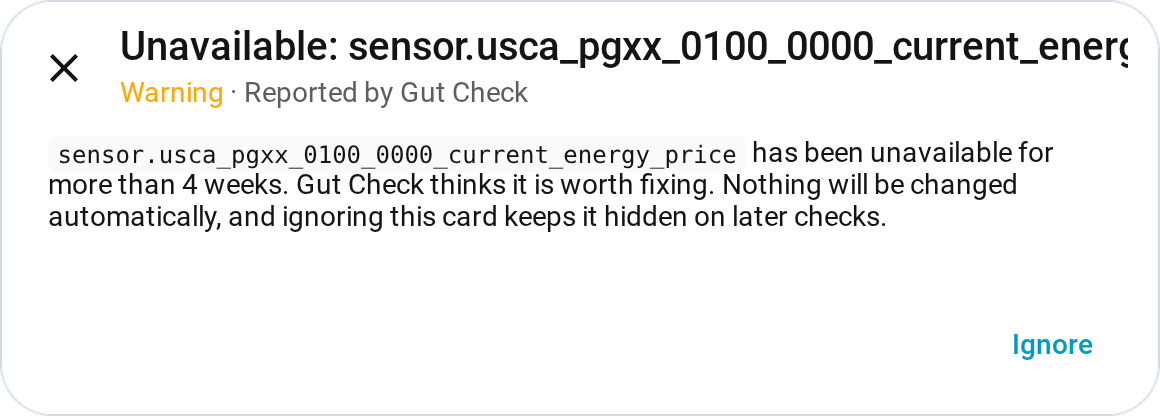
Unavailable entities pile up and most are harmless, so the few that need fixing get lost. Gut Check sorts them into expected (normal, nothing to do), worth fixing (should be working), and safe to remove (left over from something no longer installed). Each worth-fixing entity gets a Repairs card, which clears itself once the entity comes back.

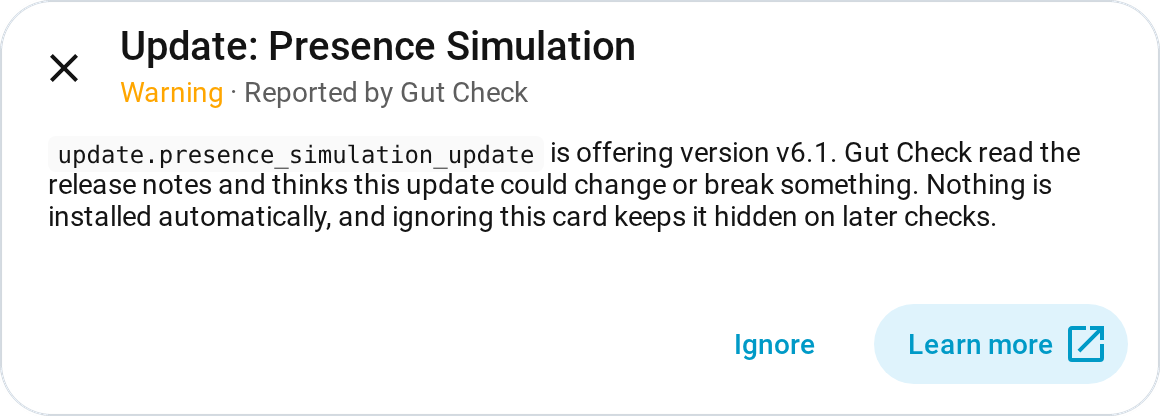
Most updates are safe to install, but now and then one renames or removes something your setup relies on. Gut Check reads each pending update's release notes and scores it routine, feature (adds something, nothing existing changes), or possibly breaking (removes or renames something, or needs a manual step other than a restart). Each possibly-breaking update gets a Repairs card, linking to its release notes where the integration provides them.

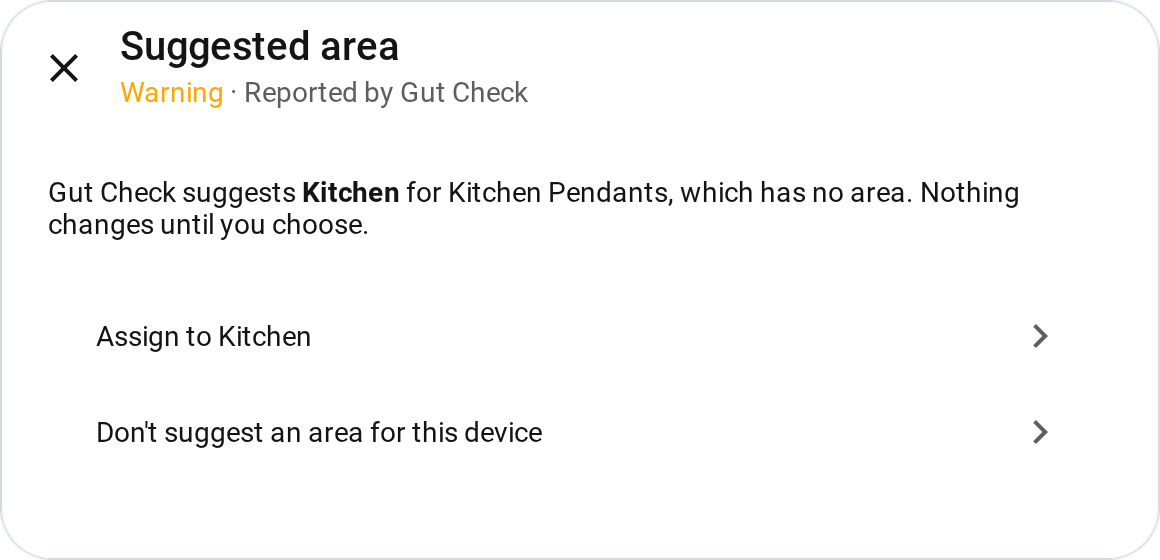
A device with no area is left out of room pages, room-based voice commands, and automations that target a whole room. Gut Check suggests one of your existing areas for each such device, or nothing when it isn't sure. From the suggestion's Repairs card you assign the area, or tell Gut Check not to suggest one for that device.

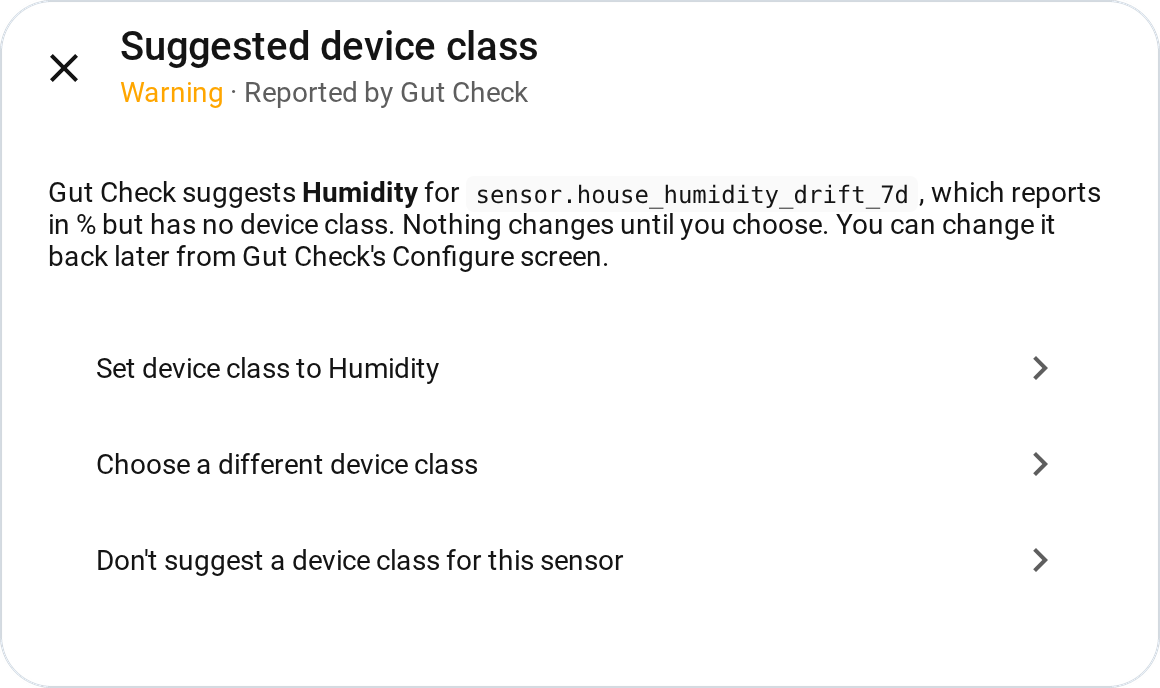
A device class tells Home Assistant what a sensor measures, such as temperature, energy or humidity. Without one, the sensor gets a generic icon, its units can't be converted, and an energy, gas or water sensor can't go on the Energy dashboard. Gut Check suggests a class for sensors that report a unit but have none, choosing only from classes that accept that unit. You set it, pick a different class, or decline from its Repairs card.

An integration that fails to start only shows an error in the integrations list, so it's easy to miss for weeks. Gut Check reads the error each one reported and sorts it as a passing glitch, a sign-in problem, or broken for good (the device or account is gone, or Home Assistant stopped retrying). Sign-in problems and broken integrations get a Repairs card linking to the integration's page. So does any integration Gut Check stays unsure about for a week; that card shows the error and makes no guess at the cause.
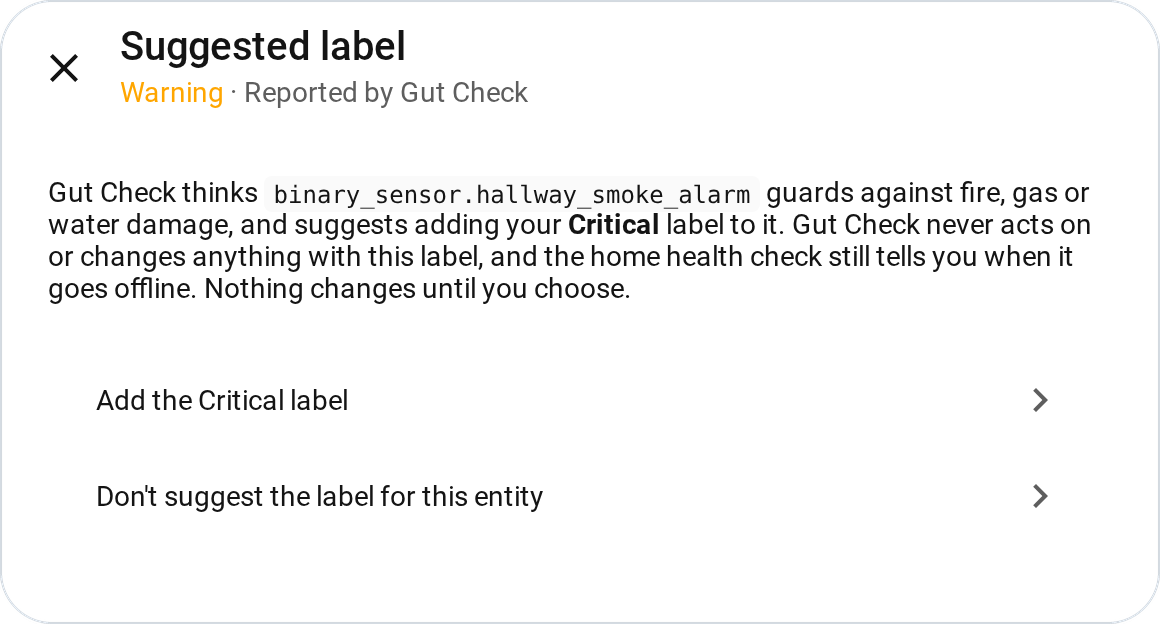
Your critical label marks the entities and devices Gut Check must never act on, such as smoke alarms, leak sensors and water shutoff valves. The health check still tells you when one goes offline. This check finds the ones you haven't labelled yet. Smoke, carbon monoxide and gas sensors are suggested from their type alone, and Gut Check asks Jev about valves, switches, sirens and moisture sensors. Confirming a card adds the label to that entity only. Pick your critical label in Configure first.

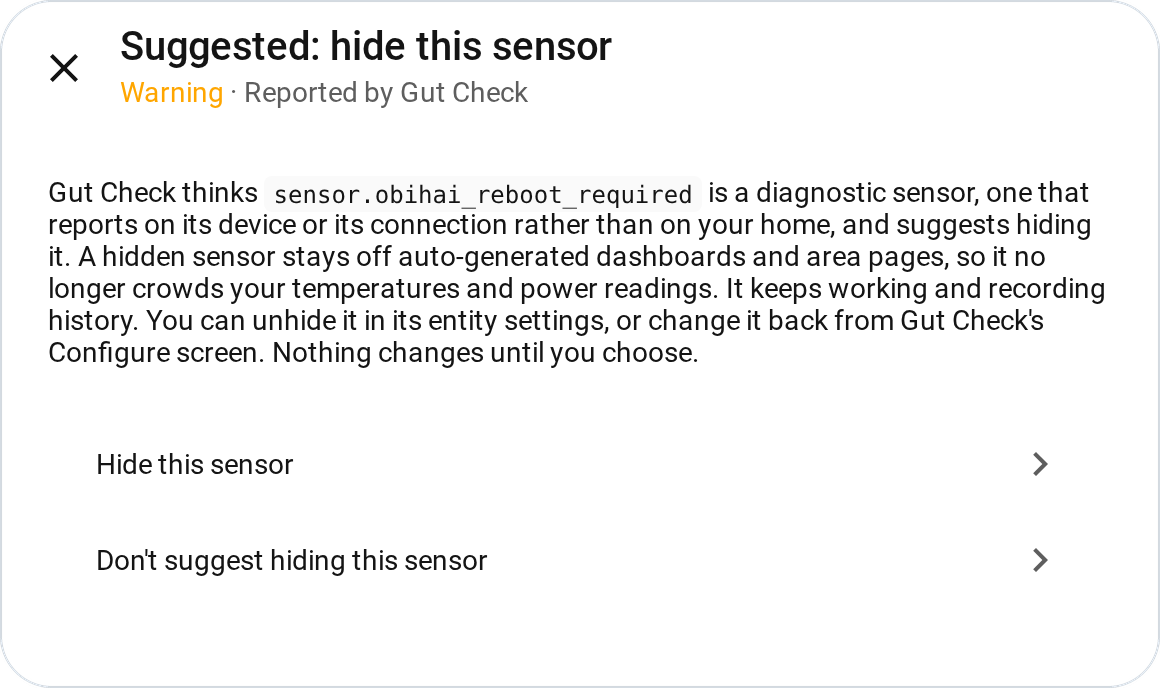
Many integrations add sensors about the device itself rather than your home, such as Wi-Fi signal strength, the network a phone is on, or its SIM carrier or storage. They crowd your temperatures and power readings on auto-generated dashboards and area pages. Gut Check suggests hiding them. A hidden sensor keeps working and recording history, and you can change it back from Configure.

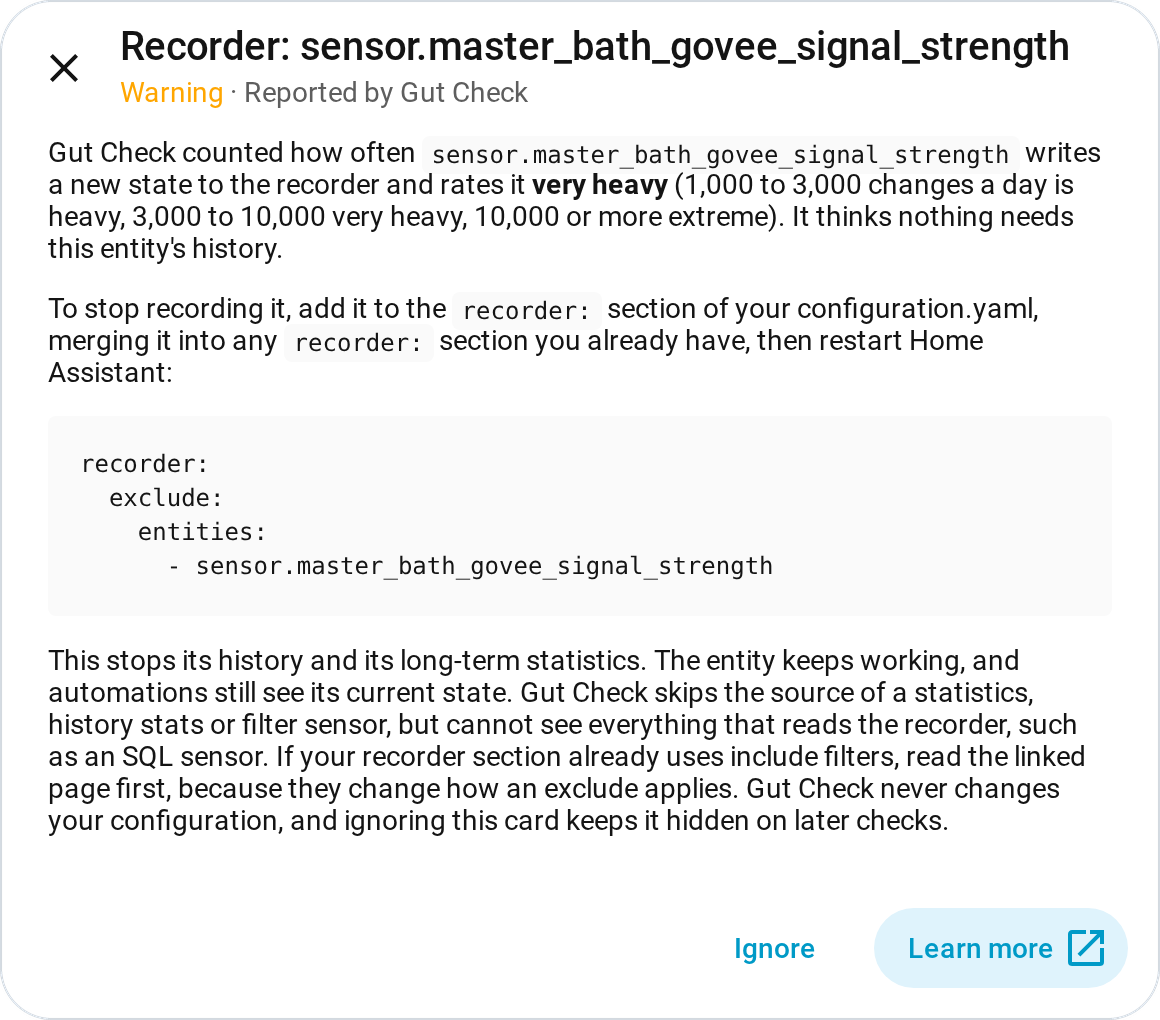
Home Assistant's recorder keeps every state change for its history and statistics, and a few chatty entities, such as a sensor that updates every few seconds, can take up much of the database. Gut Check counts each entity's changes over the last week from the recorder itself. For the busiest ones it asks whether the history is worth keeping as it is, worth keeping at a slower rate (a setting on the device or integration), or not needed. Up to ten "not needed" answers a run, busiest first, get a Repairs card with a snippet to add to your configuration.yaml yourself. Gut Check never changes your recorder settings, and this check is off until you switch it on.

Gut Check uses Jev, a decision model from TypeSafe AI that answers one kind of question: given these facts, which of these answers fits? Gut Check sends a short description of each item along with a fixed list of answers. Jev picks one and says how likely it is to be right.
Jev can't write a reply, make up a new option, or tell Home Assistant to do anything. When it isn't confident, Gut Check marks the item unsure and leaves it alone. A weekly run of every check costs about a cent; see Cost.
- Control a lock, alarm panel, garage door or cover. The health check leaves them out entirely.
- Install, skip or change an update, for any device.
- Reload, reconfigure, sign in to, disable or delete an integration.
- Act on its own. Every actionable finding waits for you in Repairs.
- Remove your critical label from anything, or change any other label it carries.
- Hide a sensor you haven't confirmed, or unhide one on its own.
- Change your recorder settings or edit a configuration file.
- Guess. When it isn't confident in an answer, it does nothing.
-
HACS must already be installed; see hacs.xyz if it is not. Add this repository to HACS as a custom repository (category: Integration), then install Gut Check from HACS as usual:
https://github.com/funkadelic/ha-gutcheck -
Create a TypeSafe AI account and an API key at console.typesafe.ai/keys. The key is the only setup. There is no add-on or local model to run.
-
Add the integration from Settings > Devices & services and paste the key. Gut Check tries it with one cheap question before creating the entry, so a wrong key is caught right away rather than at the first run.
If the key is ever rejected later, Home Assistant opens a repair asking for a new one, and until you supply it each check keeps its last result. A check whose run hits the rejected key shows api key rejected in its sensor's last_error attribute. A check that has never finished a run shows unavailable instead.
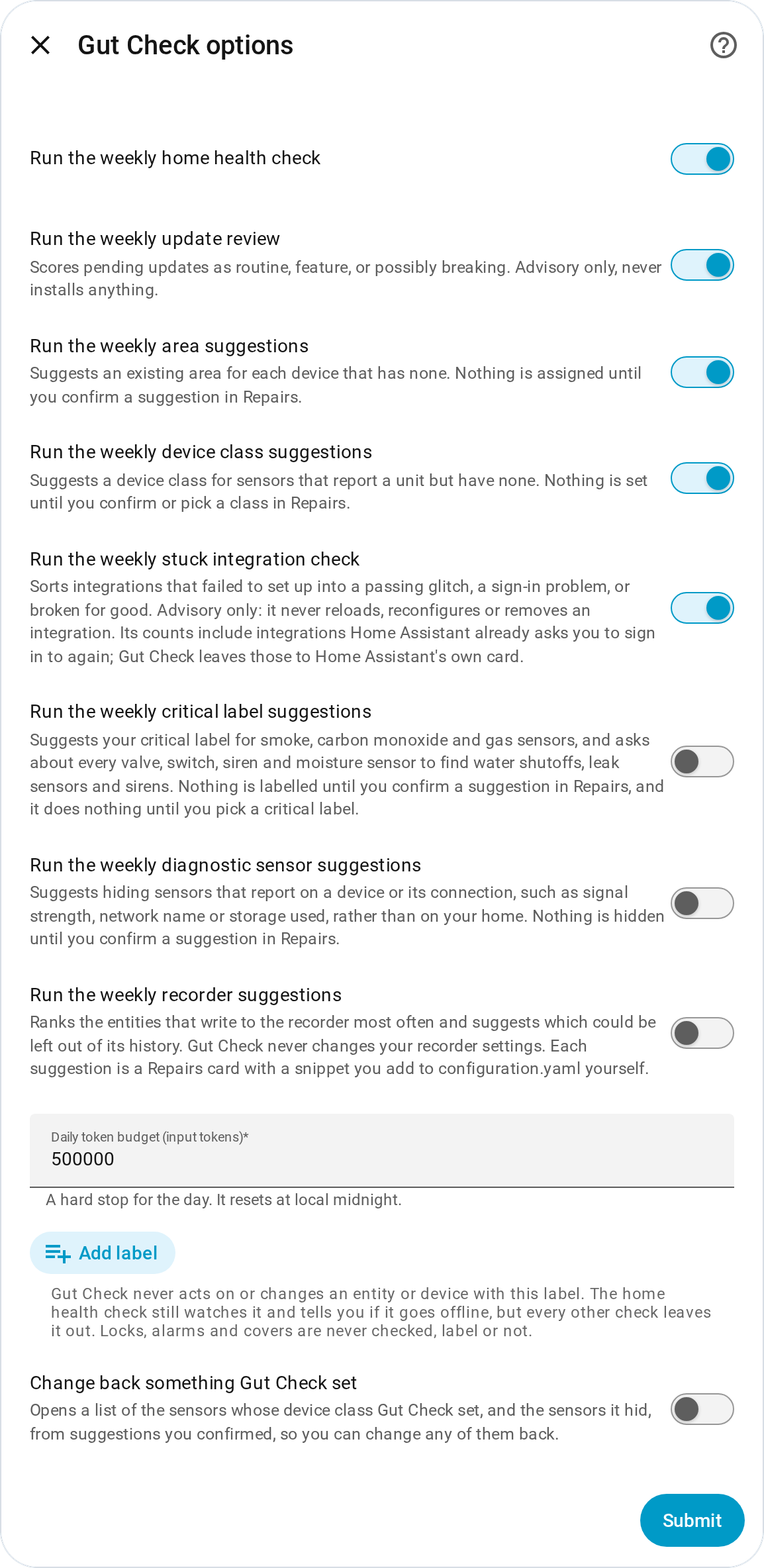
Open the integration's Configure screen to:
- Turn the home health check on or off
- Turn the update review on or off
- Turn area suggestions on or off
- Turn device class suggestions on or off
- Turn the stuck integration check on or off
- Turn critical label suggestions on or off (off by default)
- Turn diagnostic sensor suggestions on or off (off by default)
- Turn recorder suggestions on or off (off by default)
- Set the daily token budget (default 500,000 tokens)
- Pick your critical label; Gut Check never acts on or changes anything carrying it, on the entity or its device. The home health check still tells you when a labelled entity goes offline; every other check leaves it out entirely.
- Change back a device class Gut Check set or a sensor it hid, once anything is recorded
You don't need to set up a schedule. Once you add the integration, each check that is switched on runs by itself when Home Assistant finishes starting, then once a week after that. Restarting Home Assistant doesn't start an extra run: Gut Check keeps the last result and runs again when the week is up. If a run fails, it tries again an hour later, reusing the answers it already paid for and sending only the requests that went unanswered.
To run a check now, go to Settings > Devices & services > Gut Check, open the Gut Check service, and press that check's Run button. Pressing a check's button while that check is already running shows an error and starts nothing. The other checks' buttons still work.
TypeSafe AI measures usage in tokens, about three characters of text each, and charges only for what Gut Check sends. Measured on a real install with about 1,300 entities:
| Check | Tokens per run | Cost per run |
|---|---|---|
| Home health check | 66,045 for 149 unavailable entities on a real run (15 requests) | about $0.0028 |
| Area suggestions | 18,632 for 48 devices on a real run (5 requests) | under $0.001 |
| Update review | 0 when nothing is pending or changed; 2,253 for 5 pending updates on a real run (about 450 each); up to about 41,000 estimated when 50 updates all carry full-length release notes | under $0.002 |
| Device class suggestions | 21,899 for 58 asked sensors on a real run (6 requests) | under $0.001 |
| Stuck integration check | 0 when nothing is stuck; about 550 estimated per stuck integration | under $0.0001 per stuck integration (estimated) |
| Critical label suggestions | 0 when only smoke, carbon monoxide or gas sensors qualify; 26,701 for 59 asked entities on a real run | about $0.0011 |
| Diagnostic sensor suggestions | 0 when only signal-strength sensors qualify; 58,661 for 122 asked sensors on a real run (13 requests) | about $0.0025 |
| Recorder suggestions | 0 when nothing writes more than 1,000 times a day; 21,641 for 30 asked entities on a real run (3 requests) | under $0.001 |
One run of every check on that install comes to about a cent.
Gut Check enforces a daily token budget so cost stays predictable. sensor.gut_check_tokens_used_today and sensor.gut_check_cost_today show what has been spent and what it cost, both resetting at local midnight. The default of 500,000 tokens leaves room for a first run on a large install; running checks by hand several times in one day can reach it.
Gut Check sizes up each run before sending it. A run that would go over what is left of the day's budget is refused whole, so it spends nothing and never stops halfway. The check's sensor keeps its last result and its last_error attribute says why. A run that needs more than the whole daily budget is refused every day until you raise it.
For each unavailable entity, Gut Check sends only: its domain, device class, integration, how long it has been unavailable (grouped, for example "1 to 4 weeks"), whether it is a restored entity with no integration behind it any more, its entity category, whether the same device has other entities that are still available, and, when it has one, the setup state of the config entry behind it (for example loaded, setup retry or setup error). Nothing else goes out, names and entity IDs included; the model matches its answers back to entities by position in the list.
For each pending update, Gut Check sends the integration name, the installed and latest version, a code-computed size for the jump between them, the update's title, and a cleaned excerpt of its release summary and its release notes, each capped at 1,500 characters. The update's release url is never sent; Gut Check keeps it only to build the Repairs card's link. The title, release summary and release notes all come from whoever publishes the update, and Gut Check treats all three only as a description, never as instructions: the three levels it can choose between are fixed in code, so nothing in an update's own text can add a fourth option, widen the scale, or make Gut Check act instead of just scoring.
For each device with no area, Gut Check sends its name (as you or its maker named it, cleaned and shortened), manufacturer, model, integration, and the kinds and device classes of its entities, plus your existing area names as the options it can pick from. It never sends entity names or entity IDs, never another device's area, and never the area of a hub or account the device sits behind. The device's name is read only as a description, never as an instruction.
A run can ask about several qualifying sensors at once. For each sensor with a unit but no device class, when at least one device class accepts that unit, Gut Check sends the sensor's name, its device's name, manufacturer, model, integration, unit and entity category, plus the device classes that accept its unit as the options it can pick from. It never sends a reading, an entity ID, an area, or any entity that does not qualify. The name and device name are read only as a description, never as an instruction.
For each integration the stuck integration check looks at, Gut Check sends its integration name, whether Home Assistant is still retrying it or has stopped, how long Gut Check has seen it failing (grouped, for example "longer than 1 week"; the first time it reads unknown), and the error message the integration reported, with email addresses and any login, query or fragment in a web address removed, then cleaned and cut to 300 characters. It never sends the entry's title (often an account email), its settings, or anything about its devices or entities. The error text is read only as a description, never as instructions, and the three answers it can choose between are fixed in code.
For each asked valve, switch, siren or moisture sensor, Gut Check sends its domain, device class, name, device name, manufacturer, model, integration and entity category. It never sends an entity ID, area, state or any label; names are read only as a description, never as an instruction. A settings or diagnostic entity is never asked, whatever its domain. A smoke, carbon monoxide or gas sensor is decided by its device class alone and sends nothing.
For each asked sensor with no device class, Gut Check sends its name, its device's name, manufacturer and model, integration, unit and state class. It never sends a reading or any other state, an entity ID, an area or a label. Names are read only as a description, never as an instruction. A signal-strength sensor is decided by its device class alone and sends nothing.
For each asked entity, recorder suggestions send its name, its device's name, manufacturer and model, its domain, integration, device class and unit, how often it changes (grouped as heavy, very heavy or extreme, never the count), whether Home Assistant keeps long-term statistics for it, whether an automation, script, scene or group lists it, and whether a dashboard Gut Check could read shows its history. They never send an entity ID, a count, a reading or any other state, an area or a label. Names are read only as a description, never as an instruction.
To see exactly what was sent on the last completed run, open Developer tools > States, find the check's sensor, and look at its last_payload attribute. A run that went out as several requests shows one entry per request. A run that fails partway leaves the previous run's payload in place.
The integration's three-dot menu also offers a diagnostics download. It replaces the API key with a redacted marker; everything else, your device and area names and the last payload among them, comes through as it is, so read the file before attaching it to an issue.
The home health check skips disabled entities, locks, alarm panels, garage doors and covers, but checks entities carrying your critical label: it only reads whether they are available and never acts, so a dead smoke or leak sensor can still get a worth-fixing card.
The update review reads every pending update except disabled ones, including firmware for locks, alarm panels, garage doors and covers, since each is an ordinary update entity; it only scores them. To keep a device's updates out of the review, put your critical label on the device.
Area suggestions skip service devices such as add-ons and accounts, disabled devices, devices that already have an area, devices with no entities, anything with a device tracker, devices where you placed any entity's area by hand, and anything carrying your critical label, on the device or on any of its entities. They do cover devices with locks, alarm panels, garage doors or covers, because an area is only a label on the device, and it changes only when you confirm the card.
Device class suggestions skip sensors with no unit, sensors that already have a device class (their own or one set by their integration), disabled sensors, sensors or devices carrying your critical label, Gut Check's own sensors, and units that no device class accepts. Gut Check asks the model even when only one class accepts the unit, because some integrations reuse a unit symbol for something else (a water filter reporting months as "m", which Home Assistant reads as meters).
The stuck integration check only looks at integrations stuck retrying or stopped with a setup error; ignored and disabled integrations never start, so they are never included, and an integration Home Assistant is already asking you to sign in to again is counted with no question and no card. It ignores your critical label, because it reads only an integration's setup state and error, never its entities or devices, and it never acts. An integration behind a lock or alarm is checked like any other.
Critical label suggestions only consider valves, switches, sirens and binary sensors whose device class is smoke, carbon monoxide, gas or moisture. They never consider a disabled entity, Gut Check's own, a lock, an alarm panel, a cover, a settings or diagnostic entity, or anything already carrying the label on itself or its device. Moisture sensors are asked because Home Assistant gives the same device class to a water leak sensor and to a rain or soil moisture sensor.
Diagnostic sensor suggestions only consider sensors with no device class or a signal-strength one. They never consider another device class (battery, timestamp and data size included), a binary sensor or any other kind of entity, a sensor that is already hidden or already a settings or diagnostic entity, a disabled sensor, Gut Check's own sensors, or anything carrying your critical label on itself or its device. A sensor with an open device class card waits until you set or refuse its class. Each sensor with no device class is asked one question: does it describe the device or its connection, or something in your home you would watch or automate on?
Recorder suggestions only rank entities that changed at least 1,000 times a day on average over the last week, or over the recorder's whole history when it keeps less. They never consider a lock, alarm panel, cover, disabled entity, Gut Check's own entities, or anything carrying your critical label, and they skip an entity your recorder settings already leave out. An entity in the Energy dashboard, a sensor whose statistics are totals, and the source of a statistics, history stats or filter sensor (these read the recorder, not the live state) are kept without asking. At most 30 are asked per run, the busiest first, and the rest are listed only. An entity with no unique ID is listed but never asked, since a card could not be tied to it. An entity whose history a dashboard card draws never gets a card. That covers history and statistics graphs, statistic and logbook cards, a sensor card with a graph, a graph header or footer on an entities card, a tile card's trend graph, and the ApexCharts, mini graph, Plotly, history explorer and mini history custom cards. Other custom cards are not recognised. After a restart, a card does not come back for an entity your recorder settings now leave out, or one you have since added to the Energy dashboard or a history card.
A restored entity is one its integration no longer provides. The health check sorts it as safe to remove without asking the model once it has been gone for 31 days, as long as its integration is still loaded or it has none. If the recorder keeps less history than that (purge_keep_days, 10 days by default) and has recorded the outage, being gone for that whole history is enough. With the recorder off this rarely applies, because a restart resets the entity's last-changed time, the only other date Gut Check has. These entities carry no confidence value in the sensor's attributes.
Each enabled check gets one sensor. Its state is how many of that check's Repairs cards are open, not counting cards you ignored, and it changes as soon as a card is ignored, fixed or cleared. The size of every group is in its counts attribute. When a run is refused or fails, the sensor keeps its last result and last_error says why; it clears once a run goes through. A check that has never finished a run shows unavailable.
sensor.gut_check_home_health_check counts the open worth-fixing cards. Its attributes carry the full list for each group, plus an unsure list for anything below the confidence threshold or that did not clearly fit any group. Unsure entities are never turned into a Repairs card, and never treated as worth fixing. An unsure entity can also carry a lean: needs_attention when worth fixing and safe to remove together reach 70 percent probability, or expected when expected alone does. A lean never raises a Repairs card.
sensor.gut_check_update_review counts the open possibly-breaking cards, while every pending update is still scored routine, feature, or possibly breaking. Its attributes carry the full list for each level, plus an unsure list the same way. An update Gut Check already scored is re-read only when its installed, offered or skipped version changes, and one that landed in unsure is re-read on every run. Pressing the Run update review button re-reads every pending update whether or not anything changed, still at most 50 per run; the rest, and any update entity that is unavailable at the time, keep their last score until a later run reaches them.
sensor.gut_check_area_suggestions counts the suggestion cards waiting in Repairs. Suggestions held back by the ten-new-cards-per-run cap, and ones you chose not to have, are not counted. Its attributes list each one with its suggested area and confidence, plus an unsure list for anything below the confidence threshold or where none of the listed areas clearly fit.
sensor.gut_check_device_class_suggestions counts the device class cards waiting in Repairs, held back the same way. Its attributes list each suggested sensor with its class and confidence, plus an unsure list for the rest.
The stuck integration check's sensor, sensor.gut_check_stuck_integration_check, counts all three kinds of open card: sign-in problem, broken for good, and unsure for a week or more. Its attributes list every stuck integration by group with its integration name, title, the error it reported, when Gut Check first saw it failing, how long, and confidence. reauth_in_progress true means Home Assistant's own sign-in card already covers it, so there is no Gut Check card for it. Passing glitches are listed too but never get a card, and an unsure list holds the rest.
sensor.gut_check_diagnostic_sensor_suggestions counts the open hide cards. Its attributes list suggested sensors (a signal-strength one carries no confidence), a primary list for sensors Gut Check judged to be about your home, and an unsure list.
sensor.gut_check_recorder_suggestions counts the open recorder cards. Its attributes list every ranked entity with its changes per day and rate word, grouped as exclude, throttle, keep (with why, for those kept without asking or because a dashboard shows them) and not_asked (with why), plus an unsure list.
sensor.gut_check_critical_label_suggestions counts the open critical label cards. Its attributes list suggested entities (a smoke, carbon monoxide or gas sensor decided by device class alone carries no confidence), a not_critical list, and an unsure list.
Cards appear under Settings > Repairs. The health check, update review, stuck integration check and recorder suggestions raise advisory cards that point you at something to look into:
- Worth fixing: One card per entity. It clears once the entity is available again, and ignoring it hides it on later runs too.
- Possibly breaking: One card per update, linking to its release notes where the integration provides them. It clears when the update is installed or skipped, not on a version bump alone, so an open card still has an unread update behind it.
- Stuck integration: One card per sign-in problem or broken-for-good integration, and one per integration Gut Check has stayed unsure about for a week or more, each linking to the integration's page. It clears once the integration loads, is disabled or is removed, and stays through a retry that fails again. Ignoring it hides it for as long as the integration keeps getting a card, even if the card changes kind. Turning the check off clears its cards, ignored ones included.
- Recorder: One card per entity Gut Check thinks needs no history, at most ten, busiest first. It shows the snippet to add to the recorder section of your configuration.yaml and links to the recorder docs; restart Home Assistant after adding it. The card clears on a later run once the entity no longer comes back as not needed. Ignoring it hides it on later checks, including when you turn the check off and back on.
The four suggestion checks raise cards that change something when you confirm them, and they share these rules:
- One card per device or entity, at most ten new cards per run. Suggestions decided from device class alone come first, then the rest by confidence, and the rest wait for a later run or a button press.
- A card clears when you confirm it, when the same change is made another way, when its device or entity stops qualifying, or when a later run no longer suggests it.
- Declining moves the card to your ignored repairs. It stays there as long as the device or entity still qualifies, including when you turn the check off and back on. An ignored critical label card also stays when you clear your critical label, and an ignored diagnostic sensor card stays while you keep the sensor hidden yourself.
- If the device or entity, the suggested area, or your critical label changed by the time you open a card, confirming does nothing, tells you so, and removes the card.
| Card | Choices |
|---|---|
| Area | Assign the suggested area, or don't suggest one for this device |
| Device class | Set the suggested class, pick a different class that accepts the sensor's unit (offered when another fits), or don't suggest one for this sensor |
| Critical label | Add your critical label to this entity only, never its device, leaving its other labels alone; or don't suggest it |
| Diagnostic sensor | Hide the sensor, or don't suggest hiding it |
Home Assistant's own entity settings have no device class control for a sensor, so Gut Check gives you one. Open the integration's Configure screen, tick Change back something Gut Check set, and pick sensors in either list: the sensors whose device class Gut Check set, and the sensors it hid. Gut Check clears a class it set or unhides a sensor it hid, leaves any that were changed since, and stops making that suggestion for them. Unhiding a sensor from its own entity settings instead lets Gut Check suggest hiding it again later; changing it back from Configure is what stops that. Removing Gut Check keeps the classes it set and the sensors it hid, so change them back first if you want those gone too.
Delete the integration from Settings > Devices & services. That removes its entities, clears every Repairs card it created (ignored ones included), and deletes its stored budget and check results. Then remove the download from HACS.
Nothing Gut Check suggested and you accepted is undone: a device you moved to an area, for example, stays where you put it. A label added from a card stays too, like an area or a device class Gut Check set, and so does a sensor hidden from a card. A recorder exclusion you added yourself stays in your configuration.yaml.