A backend service for collaborative calendar system that supports scheduling meetings between multiple participants, ensuring no time conflicts, handling timezone differences, and providing automatic conflict resolution suggestions.
The system implements Clean Architecture with clear separation of concerns:
├── API/             # REST Controllers and HTTP endpoints
├── Application/     # Business logic and services
├── Domain/          # Core entities (User, Meeting)
└── Infrastructure/  # Data repositories and database access
Technologies: .NET 8, Entity Framework Core, PostgreSQL, xUnit
- Conflict Detection: Automatically checks for scheduling conflicts across participants
- Intelligent Suggestions: Provides up to 3 alternative time slots when conflicts occur
- Multi-Timezone Support: Handles participants in different time zones with working hours validation
- Efficient Data Structures: Uses optimized queries for handling thousands of meetings per user
- Working Hours Overlap Analysis: Calculates common available time windows between participants
- Unique ID, Name, TimeZone
- Working hours: 08:00-18:00 local time
- Unique ID, Title, StartTime (UTC), EndTime (UTC), List of Participants
- .NET 8 SDK
- PostgreSQL
Database Setup: The project comes with a pre-configured AWS RDS PostgreSQL database that is already set up and ready to use. No additional database configuration is required.
The connection string in appsettings.json is already configured:
{
  "ConnectionStrings": {
    "DefaultConnection": "Host=database-1.c4pg4geema71.us-east-1.rds.amazonaws.com;Database=MyCalendar;Username=postgres;Password=postgres123"
  }
}
Optional - Local Database Setup: If you prefer to use your own local PostgreSQL database:
- Install PostgreSQL locally
- Update the connection string in
appsettings.json:
{
  "ConnectionStrings": {
    "DefaultConnection": "Host=localhost;Database=MyCalendar;Username=postgres;Password=your-password"
  }
}- Apply database migrations:
dotnet ef database updatecd src/MyCalendar.API
dotnet runThe application will be available at:
- API Documentation:
https://localhost:5089/ - Interactive Demo:
https://localhost:5089/demo
The project includes a comprehensive web-based demo interface that showcases all system capabilities:
Why Visual Demo? Complex scheduling APIs with timezone conflicts and calendar data are nearly impossible to understand through JSON responses alone. This visual interface transforms complex API data into clear, intuitive insights.
What you'll see: Direct comparison between raw JSON endpoints and visual representations, showing how calendar conflicts, timezone overlaps, and meeting patterns become immediately comprehensible through proper visualization.
Access: Run the application and navigate to
/demoto experience the interactive interface that makes this API's capabilities truly visible.
- 👤 User Management: Create and manage users with different timezones
- 📅 Meeting Scheduling: Schedule meetings with real-time conflict detection
- 🔍 Conflict Analysis: Analyze working hours overlap between participants
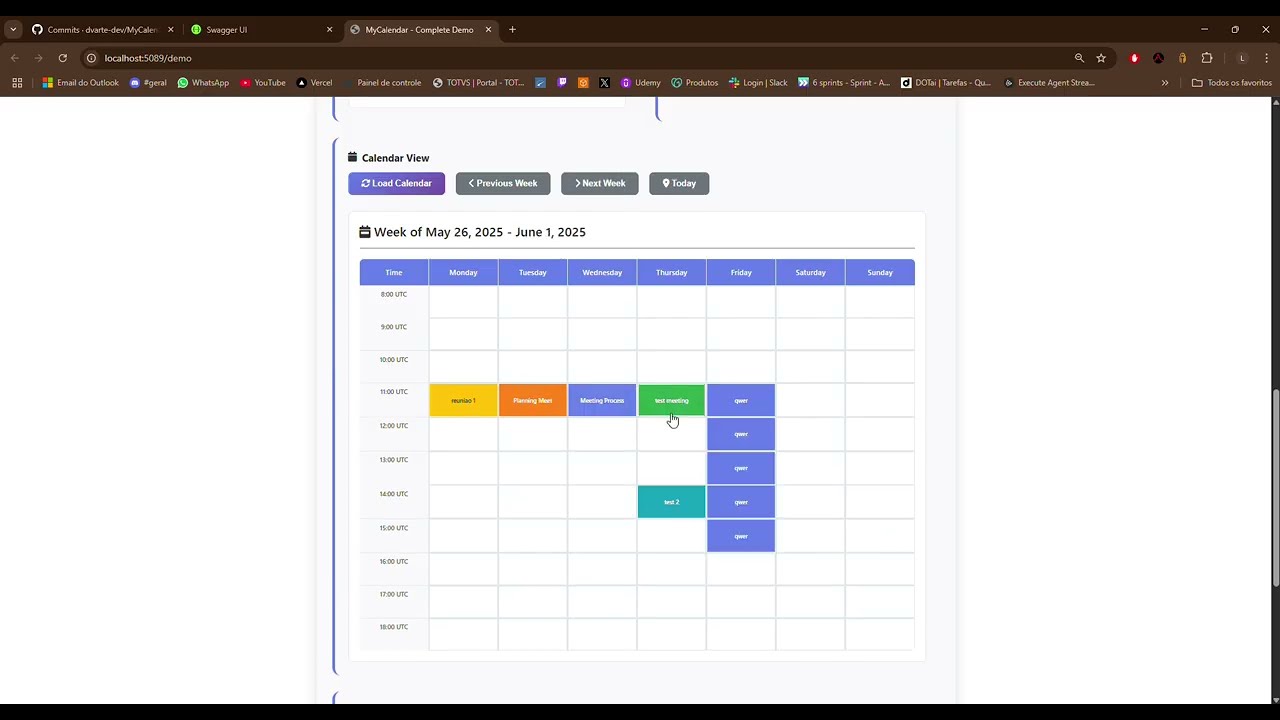
- 📊 Calendar View: Visual calendar with meeting display and timezone handling
- Global Timezone Support: Test with users from Japan, Brazil, USA, Europe, and more
- Conflict Detection: See intelligent suggestions when scheduling conflicts occur
- Visual Calendar: Week view showing meetings across different timezones
- Smart Suggestions: Get optimal meeting times based on participant availability
- Request Logging: Monitor all API calls and responses in real-time
- Start the application and navigate to
/demo - Create sample users from different timezones using the "Create Sample Data" button
- Schedule meetings and observe conflict detection in action
- View the calendar to see meetings displayed in UTC with timezone context
- Analyze conflicts to understand working hours overlap between global participants
The demo interface provides a complete testing environment without requiring external tools like Postman or curl.
| Method | Endpoint | Description |
|---|---|---|
POST |
/api/users |
Create user with timezone |
GET |
/api/users |
List all users |
POST |
/api/meetings/schedule |
Schedule meeting with conflict detection |
GET |
/api/meetings |
List all meetings |
POST |
/api/meetings/analyze-conflicts |
Analyze working hours overlap |
GET |
/api/meetings/available-slots |
Find available time slots |
POST /api/users
{
  "name": "João Silva",
  "timeZone": "UTC-3:00"
}POST /api/meetings/schedule
{
"title": "Planning Meeting",
"startTime": "2024-01-15T14:00:00Z",
"endTime": "2024-01-15T15:00:00Z",
"participantIds": ["user1-id", "user2-id"]
}{
"isSuccess": false,
"message": "Time conflict detected for one or more participants.",
"suggestedTimeSlots": [
{
"startTime": "2024-01-15T15:00:00Z",
"endTime": "2024-01-15T16:00:00Z"
}
]
}The system correctly handles complex timezone scenarios:
- UTC-3:00 (Brazil): 08:00-18:00 local = 11:00-21:00 UTC
- UTC+1:00 (Europe): 08:00-18:00 local = 07:00-17:00 UTC
- UTC+9:00 (Japan): 08:00-18:00 local = 23:00-09:00 UTC (crosses midnight)
- UTC+10:00 (Australia): 08:00-18:00 local = 22:00-08:00 UTC (crosses midnight)
The system calculates common working hours between participants. When participants are in time zones with no overlapping business hours, the system will indicate that no common working time exists. In such cases, meetings would require participants to work outside their normal business hours or arrange overtime.
dotnet testCore Functionality
- Scheduling logic with comprehensive conflict detection
- Multi-timezone support including edge cases
- Repository pattern implementation
- Performance validation under load
API Testing
- Complete endpoint coverage
- Error handling scenarios
- Integration with database layer
Specialized Scenarios
- Cross-timezone meeting coordination
- Midnight boundary calculations
- Intelligent scheduling suggestions
- Business hours overlap analysis
- Input validation and edge cases
Performance Benchmarks
- Optimized for handling thousands of meetings
- Efficient database queries with proper indexing
- Fast conflict detection algorithms
Built by dvarte.dev