A dependency-free custom Lovelace card for Home Assistant that renders a Material Design 3 style segmented button control bound to an input_select helper.
- Binds directly to an
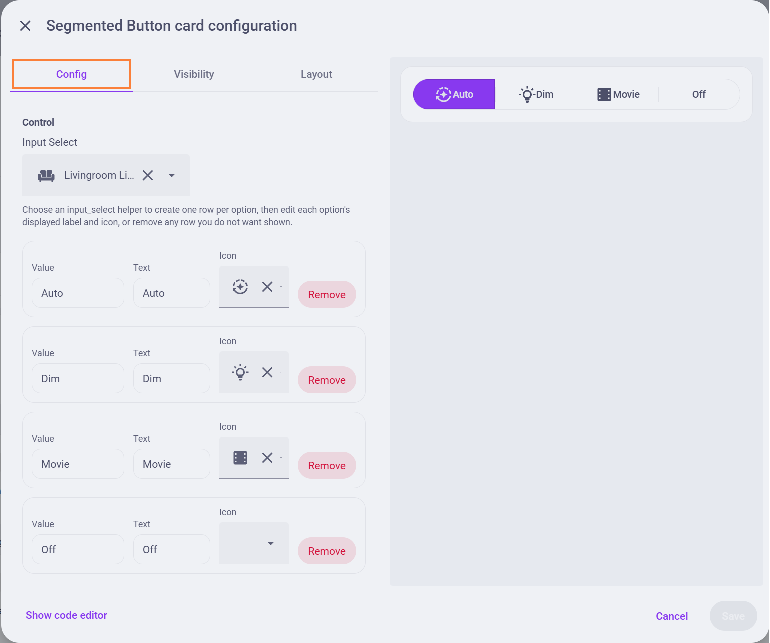
input_selecthelper entity. It'll create one segment per option in the boundinput_select - Lets you edit the displayed text and icon for each option
- Lets you remove unwanted options from the card without having to remove them from the
input_select - Responsive segmented layout with selected-state styling inspired by Material Design 3
- Built-in visual Lovelace config editor for entity and segment rows
- Add this repository in HACS as a custom repository of type
Dashboard. - Install the card from HACS.
- HACS will install the Lovelace resource for you and serve it from
/hacsfiles/ha-segmented-button-card.js. - Edit your dashboard, and add a new Segmented Button Card
- Copy
ha-segmented-button-card.jsto a location served by Home Assistant, such as/config/www/. - Add the resource in Lovelace:
resources:
  - url: /local/ha-segmented-button-card.js
type: module- Reload the dashboard and add a new Segmented Button Card

type: custom:ha-segmented-button-card
entity: input_select.climate_mode
segments:
  - value: Off
    text: Off
    icon: mdi:power
  - value: Heat
    text: Heat
    icon: mdi:fire
  - value: Cool
    text: Cool
    icon: mdi:snowflake