



A collaborative editing plugin for Lexical Rich Editor built with Loro CRDT, providing real-time collaborative editing capabilities with conflict-free synchronization.
This package provides three main components for building collaborative text editors:
LoroCollaborativePlugin.tsx- A Lexical plugin that integrates Loro CRDT for real-time collaborative editingLexicalModelPython Library - A standalone document model for Lexical content with CRDT capabilitieslexical-loroWebSocket Server - A Python server using loro-py for real-time collaboration
import { LoroCollaborativePlugin } from './src/LoroCollaborativePlugin';

function MyEditor() {
  return (
    <LexicalComposer initialConfig={editorConfig}>
      <RichTextPlugin />
      <LoroCollaborativePlugin
        websocketUrl="ws://localhost:8081"
        docId="my-document"
        username="user1"
      />
    </LexicalComposer>
  );
}from lexical_loro import LexicalModel
# Create a new document
model = LexicalModel.create_document("my-document")
# Add content
model.add_block({
"text": "My Document",
"format": 0,
"style": ""
}, "heading1")
model.add_block({
"text": "This is a paragraph.",
"format": 0,
"style": ""
}, "paragraph")
# Save to file
model.save_to_file("document.json")
# Load from file
loaded_model = LexicalModel.load_from_file("document.json")# Install the Python package
pip install -e .
# Start the server
lexical-loro-server --port 8081For complete working examples, see the src/examples/ directory which contains:
- Full React application with dual editor support
- Server selection interface
- Connection status indicators
- Rich text formatting examples
DISCLAIMER Collaborative Cursors still need fixes, see this issue.
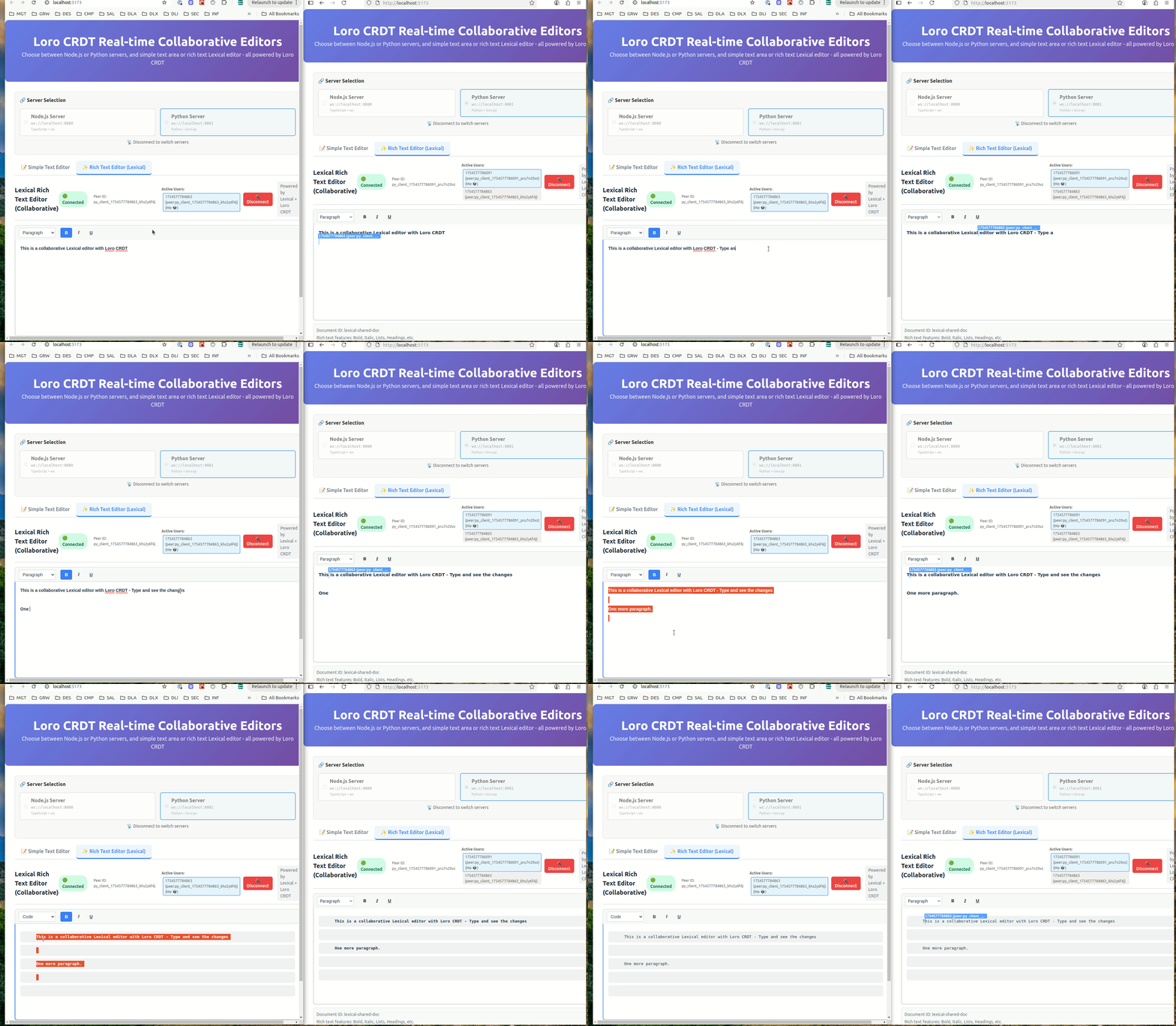
- 🔄 Real-time Collaboration: Multiple users can edit the same document simultaneously
- 🚀 Conflict-free: Uses Loro CRDT to automatically resolve conflicts
- 📝 Lexical Integration: Seamless integration with Lexical rich text editor
- 📚 Standalone Library: Use LexicalModel independently for document management
- 🌐 WebSocket Server: Python server for maintaining document state
- 📡 Connection Management: Robust WebSocket connection handling
- ✨ Rich Text Support: Preserves formatting during collaborative editing
- 💾 Serialization: JSON export/import and file persistence
- 🔧 Extensible: Plugin-based architecture for easy customization
Core Dependencies:
- Lexical: v0.33.1 (Facebook's extensible text editor framework)
- Loro CRDT: v1.5.10 (Conflict-free replicated data types)
- React: 18/19 (for plugin hooks and components)
- Python: 3.8+ with loro-py and websockets
Development Dependencies:
- TypeScript: For type safety
- Vite: For building and development (examples only)
- pytest: Python testing
- ESLint: Code linting
The Lexical plugin is a single TypeScript/React component that you can copy into your project:
# Copy the plugin file
cp src/LoroCollaborativePlugin.tsx your-project/src/
Dependencies required:
npm install lexical @lexical/react @lexical/selection loro-crdt react react-domInstall the Python WebSocket server:
# Install from this repository
pip install -e .

# Or install specific dependencies
pip install websockets click loroAdd the plugin to your Lexical editor:
import { LexicalComposer } from '@lexical/react/LexicalComposer';
import { RichTextPlugin } from '@lexical/react/LexicalRichTextPlugin';
import { ContentEditable } from '@lexical/react/LexicalContentEditable';
import { LoroCollaborativePlugin } from './LoroCollaborativePlugin';

const editorConfig = {
  namespace: 'MyEditor',
  theme: {},
  onError: console.error,
};

function CollaborativeEditor() {
  return (
    <LexicalComposer initialConfig={editorConfig}>
      <div className="editor-container">
        <RichTextPlugin
          contentEditable={<ContentEditable className="editor-input" />}
          placeholder={<div className="editor-placeholder">Start typing...</div>}
          ErrorBoundary={() => <div>Error occurred</div>}
        />
        <LoroCollaborativePlugin
          websocketUrl="ws://localhost:8081"
          docId="shared-document"
          username="user123"
        />
      </div>
    </LexicalComposer>
  );
}Use the LexicalModel library independently for document management:
from lexical_loro import LexicalModel

# Create a new document
model = LexicalModel.create_document("my-document")

# Add different types of content
model.add_block({
    "text": "My Document",
    "format": 0,
    "style": ""
}, "heading1")

model.add_block({
    "text": "This is a paragraph with **bold** text.",
    "format": 0,
    "style": ""
}, "paragraph")

model.add_block({
    "text": "",
    "format": 0,
    "style": ""
}, "list")

# Serialize to JSON
json_data = model.to_json()

# Save to file
model.save_to_file("document.json")

# Load from file
loaded_model = LexicalModel.load_from_file("document.json")

# Access blocks
for block in loaded_model.get_blocks():
    print(f"{block['type']}: {block.get('text', '')}")
For more examples, see:
examples/memory_only_example.py- Basic document creation and manipulationexamples/file_sync_example.py- File persistence and batch operationsexamples/collaboration_example.py- Simulating collaborative editingdocs/LEXICAL_MODEL_GUIDE.md- Comprehensive documentation
Start the WebSocket server:
# Default port (8081)
lexical-loro-server

# Custom port
lexical-loro-server --port 8082

# With debug logging
lexical-loro-server --port 8081 --log-level DEBUGimport asyncio
from lexical_loro import LoroWebSocketServer
async def main():
server = LoroWebSocketServer(port=8081)
await server.start()
print("Server running on ws://localhost:8081")
if __name__ == "__main__":
asyncio.run(main())For detailed API documentation, see docs/API.md.
interface LoroCollaborativePluginProps {
  websocketUrl: string;          // WebSocket server URL
  docId: string;                 // Unique document identifier
  username: string;              // User identifier
  userColor?: string;            // User cursor color (optional)
  debug?: boolean;               // Enable debug logging (optional)
}See docs/INITIALIZATION_GUIDE.md for comprehensive guidance on:
- Proper plugin ordering
- Initialization callbacks
- Error handling
- Common anti-patterns to avoid
For complete working examples and demonstrations, see the src/examples/ directory:
# Run the example application
npm install
npm run example

# This starts both Node.js and Python servers plus a React demo app
# Open http://localhost:5173 to see dual editor interface
The examples include:
- Complete React App: Full collaborative editor with UI
- Server Selection: Switch between Node.js and Python backends
- Dual Editors: Simple text area and rich Lexical editor
- Real-time Demo: Multi-user collaboration testing
See src/examples/README.md for detailed example documentation.
EDITOR 1                                           EDITOR 2

loro                                               loro
- node(data: root(1))                              - node(data: root(12))
  - node(data: element(2))                           - node(data: element(22))
    - node(data: text(3))                              - node(data: text(13))
  - node(data: counter(4))                           - node(data: counter(4))

                <---- loro updates via websocket ------>
                <---- loro node ids are the same ------>
             <---- lexical node keys are different ------>

lexical                                            lexical
- root(1)                                          - root(12)
  - element(2)                                       - element(22)
    - text(3)                                          - text(13)
  - counter(4)                                       - counter(49)
Loro examples
Y.js examples (for reference)