Name: Bianca Claudette Palileo
Student Number: C18326906
Class Group: DT228/4 or TU856/4
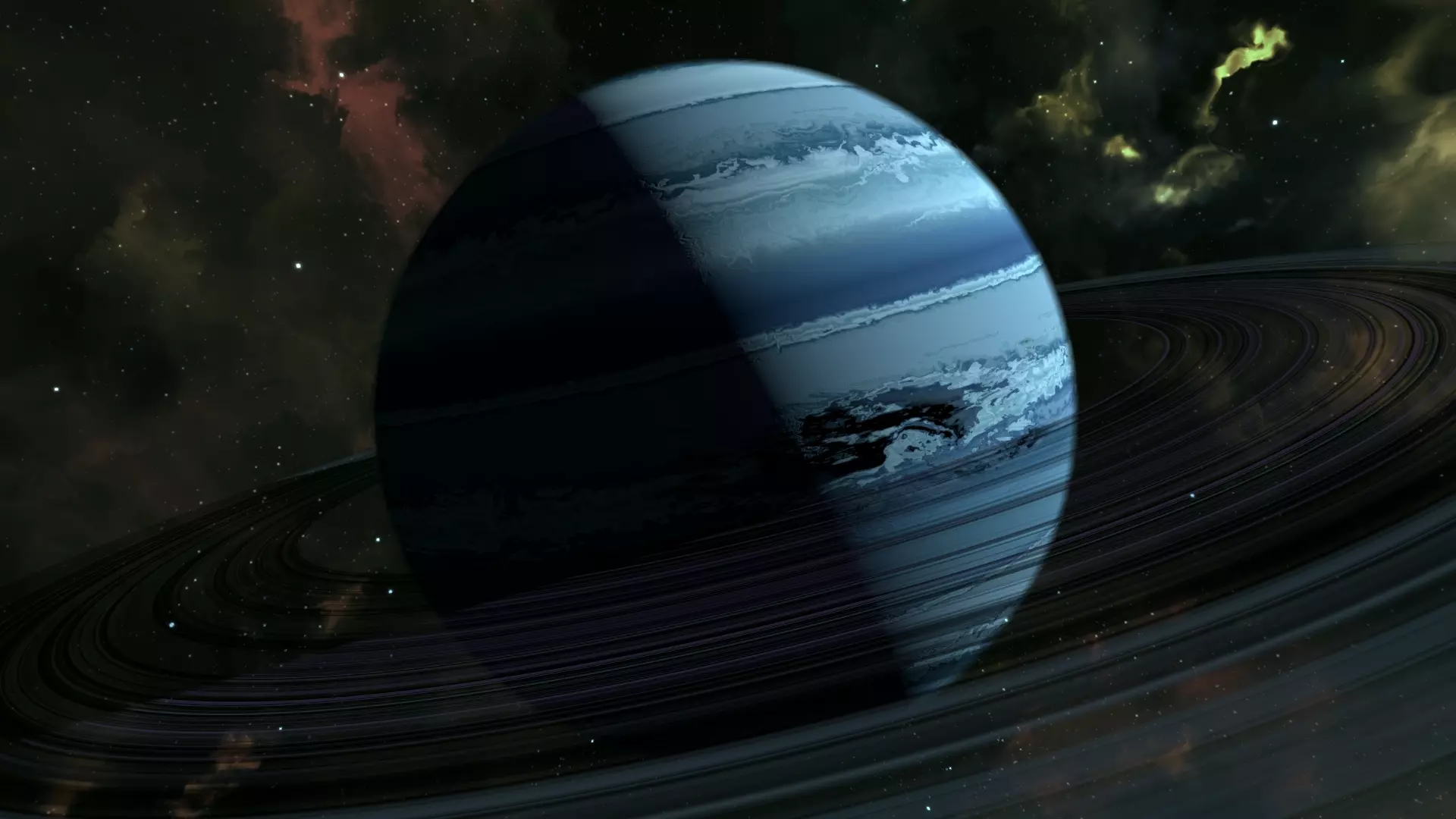
The project shows randomized planets with all different terrain and designs, all procedurally generated.
The picture painted in code is about an astronaut wandering space and seeing beautiful planets in the void.
The universe is contained in a galaxy sphere with stars and contains nebulas.
The player can simply let the astronaut guide themselves around the universe. Otherwise, the player can press space and control the astronaut slowly around with W, A, S, D keys and look around with the mouse.
The movement is quite slow because it is hard to move in space and the astronaut uses velocity to move through space
The astronaut has a toggle between moving on their own (AI) and controlling themselves (player controls) using the [SPACE] key.
void Update()
{
    if(Input.GetKeyUp("space"))
    {
        StartCoroutine(delayToggle());
    }
}
A coroutine is used to allow for the appearance of space movement (slow movement)
IEnumerator delayToggle()
{
    yield return new WaitForSeconds(1);

    controller.enabled = !controller.enabled;
    movement.enabled = !movement.enabled;
}
The astronaut moves on it's own by getting a walkpoint, rotating and moving towards that walkpoint, when the walkpoint is close enough to the astronaut or the astronaut is finished rotating to the walkpoint, the walkpoint changes.
void Update()
{
    rigidbody.AddForce(transform.forward * speed * Time.deltaTime);

    if (Vector3.Angle(walkpoint - transform.position, transform.forward) < 5f)
    {
        walkpoint = GetWalkPoint();
    }
    else
    {
        transform.localRotation = Quaternion.LookRotation(Vector3.RotateTowards(transform.forward, walkpoint - transform.position, lookSpeed * Time.deltaTime, 0.0f), Vector3.up);
    }

    Vector3 distanceToWalkpoint = transform.position - walkpoint;

    if(distanceToWalkpoint.magnitude < 5f)
    {
        walkpoint = GetWalkPoint();
    }
}
The walkpoint is set by using Random.Range() on the x, y and z co-ordinates.
private Vector3 GetWalkPoint()
{
    // Calculate random point in range
    float randomX = Random.Range(-walkPointRange, walkPointRange);
    float randomY = Random.Range(-walkPointRange, walkPointRange);
    float randomZ = Random.Range(-walkPointRange, walkPointRange);

    return new Vector3(randomX, randomY, randomZ);
}
The astronaut can be controlled by the character by using the W, A, S, D keys and look around the scene using the mouse.
void Update()
{
    float mouseX = Input.GetAxis("Mouse X");
    float mouseY = Input.GetAxis("Mouse Y");
    float x = Input.GetAxis("Horizontal");
    float z = Input.GetAxis("Vertical");

    angleX = angleX + (mouseX % 1);
    angleY = angleY + (mouseY % 1);

    transform.localRotation = Quaternion.Lerp(transform.rotation, Quaternion.Euler(-angleY, angleX, 0), lookSpeed * Time.deltaTime);

    if(x > 0)
    {
        rigidbody.AddForce(transform.right * speed * Time.deltaTime);
    }
    else if(x < 0)
    {
        rigidbody.AddForce(-transform.right * speed * Time.deltaTime);
    }
    if(z > 0)
    {
        rigidbody.AddForce(transform.forward * speed * Time.deltaTime);
    }
    else if(z < 0)
    {
        rigidbody.AddForce(-transform.forward * speed * Time.deltaTime);
    }
}The background consists of a particle system for the stars and a new camera set the Environment's Background Type to be Solid Color and Background to black, to create the void. Along with this, the new camera had to contain a script to follow the rotation of the main camera, and the main camera's Environment's Background Type also has to be Solid Color and Background to black.
void Update()
{
    transform.rotation = target.rotation;
}To create the nebulas, a particle system was used and the settings were changed using the respective ParticleSystem modules. The nebulas have three distinct shapes; Donut, SingleSidedEdge and Circle. The shape was chosen for a nebula using the Random.Range() on the distinct shapes. GenerateNebula() returns a nebula randomized settings for the radius, orbitalX, orbitalY and orbitalZ velocities and, the amount of colours and colours.
public ParticleSystem GenerateNebula(ParticleSystem nebula)
{
    ParticleSystem.MainModule main = nebula.main;
    ParticleSystem.EmissionModule emission = nebula.emission;
    ParticleSystem.ShapeModule shape = nebula.shape;
    ParticleSystem.VelocityOverLifetimeModule velocityOverLifetime = nebula.velocityOverLifetime;
    ParticleSystem.ColorOverLifetimeModule colourOverLifetime = nebula.colorOverLifetime;

    main.duration = 99999;
    main.loop = true;
    main.startLifetime = 10;
    main.startSize = 5;
    main.maxParticles = 1000;

    emission.rateOverTime = 100;

    shape.shapeType = shapes[Random.Range(0, 3)];
    if(shape.shapeType == ParticleSystemShapeType.Donut)
    {
        shape.radius = Random.Range(5, 10);
    }
    else if(shape.shapeType == ParticleSystemShapeType.SingleSidedEdge)
    {
        shape.radius = Random.Range(30, 50);
    }
    else if(shape.shapeType == ParticleSystemShapeType.Circle)
    {
        shape.radius = Random.Range(2, 10);
    }

    velocityOverLifetime.enabled = true;
    velocityOverLifetime.orbitalX = Random.Range(-0.5f, 0.5f);
    velocityOverLifetime.orbitalY = Random.Range(-0.5f, 0.5f);
    velocityOverLifetime.orbitalZ = Random.Range(-0.5f, 0.5f);

    colourOverLifetime.enabled = true;
    Gradient gradient = new Gradient();
    gradient = getColour(gradient);
    colourOverLifetime.color = new ParticleSystem.MinMaxGradient(gradient);

    return nebula;
}
The Gradient for the nebula is set by creating between 3 to 6 GradientColorKeys using the Random.Range(), and also using Random.Range() function to create a new Color in the RGB parameters for each GradientColorKey. The GradientColorKeys, and 2 GradientAlphaKeys at 100% to the start and end of the gradient are then set to the gradient's keys. Lastly the gradient is set to the gradient in the nebula's ColorOverLifetime module's color parameter.
private Gradient getColour(Gradient gradient)
{
    colourAmount = Random.Range(3, 6);
    gradientColorKeys = new GradientColorKey[colourAmount];

    for(int i = 0; i < colourAmount; i++)
    {
        if(i == 0)
        {
            Color color = new Color(Random.Range(0f, 1f), Random.Range(0f, 1f), Random.Range(0f, 1f));
            gradientColorKey = new GradientColorKey(color, (float) i);
        }
        else if(i == colourAmount)
        {
            Color color = new Color(Random.Range(0f, 1f), Random.Range(0f, 1f), Random.Range(0f, 1f));
            gradientColorKey = new GradientColorKey(color, 1f);
        }
        else
        {
            Color color = new Color(Random.Range(0f, 1f), Random.Range(0f, 1f), Random.Range(0f, 1f));
            gradientColorKey = new GradientColorKey(color, Random.Range(0f, 1f));
        }

        gradientColorKeys[i] = gradientColorKey;
    }

    gradient.SetKeys(gradientColorKeys, new GradientAlphaKey[] { new GradientAlphaKey(1.0f, 0.0f), new GradientAlphaKey(1.0f, 1.0f) });

    return gradient;
}
The nebula spawner creates a specified amount of nebulas (10) in the scene and Instantiates() the nebulas in a random position using the Random.Range() for the x, y and z co-ordinates.
void Start()
{
    nebulaGenerator = GetComponent<NebulaGenerator>();

    for(int i = 0; i < nebulaAmount; i++)
    {
        nebula = nebulaGenerator.GenerateNebula(nebula);

        Vector3 setNebulaPosition = getNebulaPosition();

        Instantiate(nebula, setNebulaPosition, Quaternion.identity);
    }
}
This spawner is different to the planets because nebulas can only spawn outside of the universe which is the size of a cube of scale (100, 100, 100). The positions were chosen by choosing either x, y or z co-ordinate to take a value above the universe's respective scale in addition to an offset, and the other co-ordinates will take any value between the universe's scale and it's negative value.
private Vector3 getNebulaPosition()
{
    chosenCoordinate = Random.Range(0, 3);

    if(chosenCoordinate == 0)
    {
        float xPositive = Random.Range(universeSize, universeSize + offset);
        float xNegative = Random.Range(-universeSize, -universeSize - offset);

        nebulaPosition = new Vector3(
            Random.Range(0, 2) == 0 ? xPositive : xNegative,
            Random.Range(-universeSize, universeSize),
            Random.Range(-universeSize, universeSize)
        );
    }
    else if(chosenCoordinate == 1)
    {
        float yPositive = Random.Range(universeSize, universeSize + offset);
        float yNegative = Random.Range(-universeSize, -universeSize - offset);

        nebulaPosition = new Vector3(
            Random.Range(-universeSize, universeSize),
            Random.Range(0, 2) == 0 ? yPositive : yNegative,
            Random.Range(-universeSize, universeSize)
        );
    }
    else
    {
        float zPositive = Random.Range(universeSize, universeSize + offset);
        float zNegative = Random.Range(-universeSize, -universeSize - offset);

        nebulaPosition = new Vector3(
            Random.Range(-universeSize, universeSize),
            Random.Range(-universeSize, universeSize),
            Random.Range(0, 2) == 0 ? zPositive : zNegative
        );

    }

    return nebulaPosition;
}Shape and Terrain The Planet shape was created by creating a 2D triangular mesh with a certain amount of vertices (resolution), and placing them at each direction ( Vector3.up, Vector3.down, Vector3.left, Vector3.right, Vector3.forward, Vector3.back ) to create a cube. This cube was then formed into a spherical shape by normalizing the vertices.
public TerrainFaces(TerrainGenerator terrainGenerator, Mesh mesh, int resolution, Vector3 localVector)
{
    this.terrainGenerator = terrainGenerator;
    this.mesh = mesh;
    this.resolution = resolution;
    // localVector goes up locally
    this.localVector = localVector;

    // axisA goes right locally
    axisA = new Vector3(localVector.y, localVector.z, localVector.x);
    // cross product is the perpendicular of the two vectors that start from (0, 0, 0)
    //  therefore, axis B goes towards locally.
    axisB = Vector3.Cross(localVector, axisA);
}

public void ConstructMesh()
{
    Vector3[] vertices = new Vector3[resolution * resolution];
    // the amount of vertices for each triangle
    //  is each sqaure (resolution (vertices per line) - 1)
    //  squared so the amount of squares is 2D,
    //  multiplied by 2 since there are two triangles per square and
    //  multiplied by 3 since each triangle has 3 vertices.
    int[] triangleVertices = new int[(resolution - 1) * (resolution - 1) * 6];
    int triangleVertex = 0;

    for(int y = 0; y < resolution; y++)
    {
        for(int x = 0; x < resolution; x++)
        {
            int i = x + y * resolution;
            // when x is 0, it is in the first vertex of the mesh
            // divided by resolution - 1 because there is no need to create triangles
            //  on the last vertex
            Vector2 vertex = new Vector2(x, y) / (resolution - 1);
            // starts at (-1, 1, -1) vertex and ends at (1, 1, 1) vertex
            Vector3 pointOnUnitCube = localVector + (vertex.x - 0.5f) * 2 * axisA + (vertex.y - 0.5f) * 2 * axisB;
            // the vertices are changed to be between -1.0 and 1.0 to create an almost spherical shape
            Vector3 pointOnUnitSphere = pointOnUnitCube.normalized;
            vertices[i] = terrainGenerator.CalculatePointOnPlanet(pointOnUnitSphere);

            // Create the triangles starting from a vertex
            //  except the very right vertex
            if(x != resolution - 1 && y != resolution - 1)
            {
                triangleVertices[triangleVertex] = i;
                triangleVertices[triangleVertex + 1] = i + resolution + 1;
                triangleVertices[triangleVertex + 2] = i + resolution;

                triangleVertices[triangleVertex + 3] = i;
                triangleVertices[triangleVertex + 4] = i + 1;
                triangleVertices[triangleVertex + 5] = i + resolution + 1;
                triangleVertex += 6;
            }
        }
    }

    // clear previous data of mesh
    mesh.Clear();
    // set vertices and triangles of mesh
    mesh.vertices = vertices;
    mesh.triangles = triangleVertices;
    // reset perpendicular of each triangle
    mesh.RecalculateNormals();
}
The TerrainGenerator calculates the heights of each vertex in the terrain for each NoiseLayer in the TerrainShapeSettings. NoiseLayers have a set of NoiseSettings whose parameters are randomly set using Random.Range(). NoiseFilters are created for each NoiseLayer which then calculates the heights of each vertex in the mesh using the NoiseSettings and Noise.
public void UpdateShapeSettings(TerrainShapeSettings shapeSettings)
{
    this.shapeSettings = shapeSettings;
    noiseFilters = new NoiseFilter[shapeSettings.noiseLayers.Length];

    for (int i = 0; i < noiseFilters.Length; i++)
    {
        noiseFilters[i] = new NoiseFilter(shapeSettings.noiseLayers[i].noiseSettings);
    }

    heights = new Heights();
}

public Vector3 CalculatePointOnPlanet(Vector3 pointOnUnitSphere)
{
    float elevation = 0;

    for (int i = 0; i < noiseFilters.Length; i++)
    {
        if(shapeSettings.noiseLayers[i].enabled)
        {
            elevation += noiseFilters[i].Evaluate(pointOnUnitSphere);
        }
    }

    elevation = shapeSettings.planetRadius * (1 + elevation);
    heights.ChangeMaxMin(elevation);

    return pointOnUnitSphere * elevation;
}public float planetRadius = 1f;
public NoiseLayer[] noiseLayers;
[System.Serializable]
public class NoiseLayer
{
public bool enabled = true;
public NoiseSettings noiseSettings;
}[Range(1, 8)]
public int numLayers = 5;
public float height = Random.Range(0.15f, 0.35f);
public float amount = 0.94f;
public float roughness = Random.Range(2f, 3f);
public Vector3 rotate = new Vector3(Random.Range(0, 100), Random.Range(0, 100), Random.Range(0, 100));
public float connection = Random.Range(-0.25f, 0.25f);
public float protrusion = Random.Range(0.1f, 1f);public float Evaluate(Vector3 point)
{
float noiseValue = 0;
float frequency = noiseSettings.amount;
float amplitude = 1;
for(int i = 0; i < noiseSettings.numLayers; i++)
{
float newPoint = noise.Evaluate(point * frequency + noiseSettings.rotate);
noiseValue += (newPoint + 1) * 0.5f * amplitude;
frequency *= noiseSettings.roughness;
amplitude *= noiseSettings.connection;
}
noiseValue = Mathf.Max(0, noiseValue - noiseSettings.protrusion);
return noiseValue * noiseSettings.height;
}Colour The material's minimum and maximum heights are set to the smallest and largest distance of the mesh's vertex from the center. The gradient is generated in the ColourSettings using the same function for the nebula gradient. The texture has a set resolution and the gradient's range is applied to the texture's pixels. The texture is then applied to the material. This creates the gradient range according to the height in the planet.
public void UpdateColourSettings(ColourSettings colourSettings)
{
    this.colourSettings = colourSettings;
    texture = new Texture2D(textureResolution, 1);
}

public void UpdateHeights(Heights heights)
{
    colourSettings.planetMaterial.SetVector("_heights", new Vector4(heights.Min, heights.Max));
}

public void UpdateColours()
{
    Color[] colours = new Color[textureResolution];

    for (int i = 0; i < textureResolution; i++)
    {
        colours[i] = colourSettings.planetGradient.Evaluate(i / (textureResolution - 1f));
    }

    texture.SetPixels(colours);
    texture.Apply();

    colourSettings.planetMaterial.SetTexture("_texture", texture);
    colourSettings.getColour();
}public Gradient planetGradient;
public Material planetMaterial;
public int colourAmount;
GradientColorKey[] gradientColorKeys;
GradientColorKey gradientColorKey;- getColour() function is also in ColourSettings.cs
Spawner The planet spawner creates a GameObject for each planet to be created by a specified amount. Each planet gets a Planet script, a new TerrainShapeSetting, a new NoiseSetting for each NoiseLayer created, and a new ColourSetting. The NoiseSetting's parameters are randomly generated using Random.Range(). The Planet script then generates a new planet with these settings.
void Awake()
{
    for (int i = 0; i < planetAmount; i++)
    {
        GameObject planet = new GameObject("Planet " + i);
        script = planet.AddComponent<Planet>();

        TerrainShapeSettings terrainShapeSettings = new TerrainShapeSettings();
        terrainShapeSettings.planetRadius = Random.Range(3f, 10f);
        terrainShapeSettings.noiseLayers = new TerrainShapeSettings.NoiseLayer[2];

        for (int j = 0; j < terrainShapeSettings.noiseLayers.Length; j++)
        {
            TerrainShapeSettings.NoiseLayer newLayer = new TerrainShapeSettings.NoiseLayer();
            newLayer.enabled = true;

            NoiseSettings noiseSettings = new NoiseSettings();

            noiseSettings.numLayers = 5;
            noiseSettings.amount = 0.94f;
            if(j == 0)
            {
                noiseSettings.height = Random.Range(0.15f, 0.2f);
                noiseSettings.roughness = Random.Range(2f, 2.5f);
                noiseSettings.rotate = new Vector3(Random.Range(0, 100), Random.Range(0, 100), Random.Range(0, 100));
                noiseSettings.connection = Random.Range(-0.25f, 0f);
                noiseSettings.protrusion = Random.Range(0.1f, 0.5f);
            }
            else if(j == 1)
            {
                noiseSettings.height = Random.Range(0.35f, 0.5f);
                noiseSettings.roughness = Random.Range(2.5f, 3f);
                noiseSettings.rotate = new Vector3(Random.Range(0, 100), Random.Range(0, 100), Random.Range(0, 100));
                noiseSettings.connection = Random.Range(0f, 0.25f);
                noiseSettings.protrusion = Random.Range(0.5f, 1f);
            }

            newLayer.noiseSettings = noiseSettings;

            terrainShapeSettings.noiseLayers[j] = newLayer;
        }

        ColourSettings colourSettings = new ColourSettings();
        colourSettings.planetGradient = new Gradient();
        colourSettings.planetMaterial = new Material(Resources.Load<Shader>("Planet"));

        script.ConstructNewPlanet(100, terrainShapeSettings, colourSettings);

        planets.Add(planet);
    }
}
These generated planets are added to a List of GameObjects and iterated through once to position them into the scene. The positions are generated for each planet using Random.Range() for x, y and z co-ordinates.
IEnumerator MovePlanets(List<GameObject> planets){
    for(int i = 0; i < planetAmount; i++){
        planets[i].transform.position = new Vector3(
            Random.Range(-universeSize, universeSize),
            Random.Range(-universeSize, universeSize),
            Random.Range(-universeSize, universeSize)
        );
    }

    positionPlanets = false;

    yield return new WaitForSeconds(1);
}
Generating Planets
The Planet script generates random planets when called by the PlanetSpawner. When creating planet prefabs, GeneratePlanet() is called. It creates the terrain and the colour gradient. In the Initialize, the script creates 6 new MeshFilters for each face of the cube sphere and 6 TerrainFaces. For each face it creates a new GameObject called "mesh". A MeshRenderer is added to the GameObject alongside a MeshFilter. The face's mesh Gameobject is then set a new mesh, and a material is set onto the MeshFilter's material. For each TerrainFace, instantiate a new TerrainFace. GenerateMesh() then generates a mesh for each face and GenerateColours() generates the gradient for the planet.
public void ConstructNewPlanet(int resolution, TerrainShapeSettings terrainShapeSettings, ColourSettings colourSettings)
{
    this.resolution = resolution;
    this.terrainShapeSettings = terrainShapeSettings;
    this.colourSettings = colourSettings;

    generated = true;

    GeneratePlanet();
}
public void GeneratePlanet()
{
Initialize();
GenerateMesh();
GenerateColours();
}void Initialize()
{
terrainGenerator.UpdateShapeSettings(terrainShapeSettings);
colourGenerator.UpdateColourSettings(colourSettings);
if(meshFilters == null || meshFilters.Length == 0)
{
meshFilters = new MeshFilter[faces];
}
terrainFaces = new TerrainFaces[faces];
Vector3[] directions = { Vector3.up, Vector3.down, Vector3.left, Vector3.right, Vector3.forward, Vector3.back };
for (int i = 0; i < faces; i++)
{
if(meshFilters[i] == null)
{
GameObject mesh = new GameObject("mesh");
mesh.transform.parent = transform;
mesh.AddComponent<MeshRenderer>();
meshFilters[i] = mesh.AddComponent<MeshFilter>();
meshFilters[i].mesh = new Mesh();
}
meshFilters[i].GetComponent<MeshRenderer>().material = colourSettings.planetMaterial;
terrainFaces[i] = new TerrainFaces(terrainGenerator, meshFilters[i].sharedMesh, resolution, directions[i]);
}
}void GenerateMesh()
{
foreach(TerrainFaces face in terrainFaces)
{
face.ConstructMesh();
}
colourGenerator.UpdateHeights(terrainGenerator.heights);
}public void GenerateColours()
{
colourGenerator.UpdateColours();
}| Class/asset | Source |
|---|---|
| AstroController.cs | Self written |
| AstroMovement.cs | Self written |
| AstroToggle.cs | Self written |
| ColourGenerator.cs | From Procedural Planets (E04 shader) |
| ColourSettings.cs | Modified Procedural Planets (E02 settings editor) |
| FollowCamera.cs | Self written |
| Heights.cs | From Procedural Planets (E04 shader) |
| NebulaGenerator.cs | Self written |
| NebulaSpawner.cs | Self written |
| Noise.cs | From Procedural Planets (E03 layered noise) |
| NoiseFilter.cs | From Procedural Planets (E03 layered noise) |
| NoiseSettings.cs | Modified from Procedural Planets (E03 layered noise) |
| Planet.cs | Modified from Procedural Planets (E01 the sphere) |
| PlanetSpawner.cs | Self written |
| TerrainFaces.cs | From Procedural Planets (E01 the sphere) |
| TerrainGenerator.cs | From Procedural Planets (E02 settings editor) |
| TerrainShapeSettings.cs | From Procedural Planets (E02 settings editor) |
| PlanetEditor.cs | From Procedural Planets (E02 settings editor) |
- Procedural Planets (E01 the sphere)
- Procedural Planets (E02 settings editor)
- Procedural Planets (E03 layered noise)
- Procedural Planets (E04 shader)
I am most proud of generating the nebulas' and planets' shapes and colours randomly and spawning them in random points in the galaxy range using scripts to do so, rather than changing values in the editors themselves.
I am also proud of this project because it is my first Unity project.
Lastly, I am proud of being able to incorporate code from references and link them to my own work (where I learned and used, inheritance, Unity classes, coroutines, spawners, character controls and physics, particle systems, procedural generation and simplex noise!) to make a cool visual project.
For my Games Engines project, I would like to build a universe that use procedurally generated terrain, colour and textures for the planet.
The user will be able to:
- move through the universe as an astronaut and look around to see the nebulas, stars and planets.
- float through the universe by toggling controls.