- About
- Installation
- Updating
- Large Font Display of the Callsign and Talkgroup or DG-ID
- City, State, Country Lookups for Callsigns (DMR only)
- Commandline Options
- Daily Log Rotation
- User-Custom Talkgroup List (DMR only)
- QSO, Kerchunk, and MMDVM Error Counts
- More About the Large Font Support
- One More Thing About Large Fonts
- Other Notes
- Getting Help
- Special Thanks
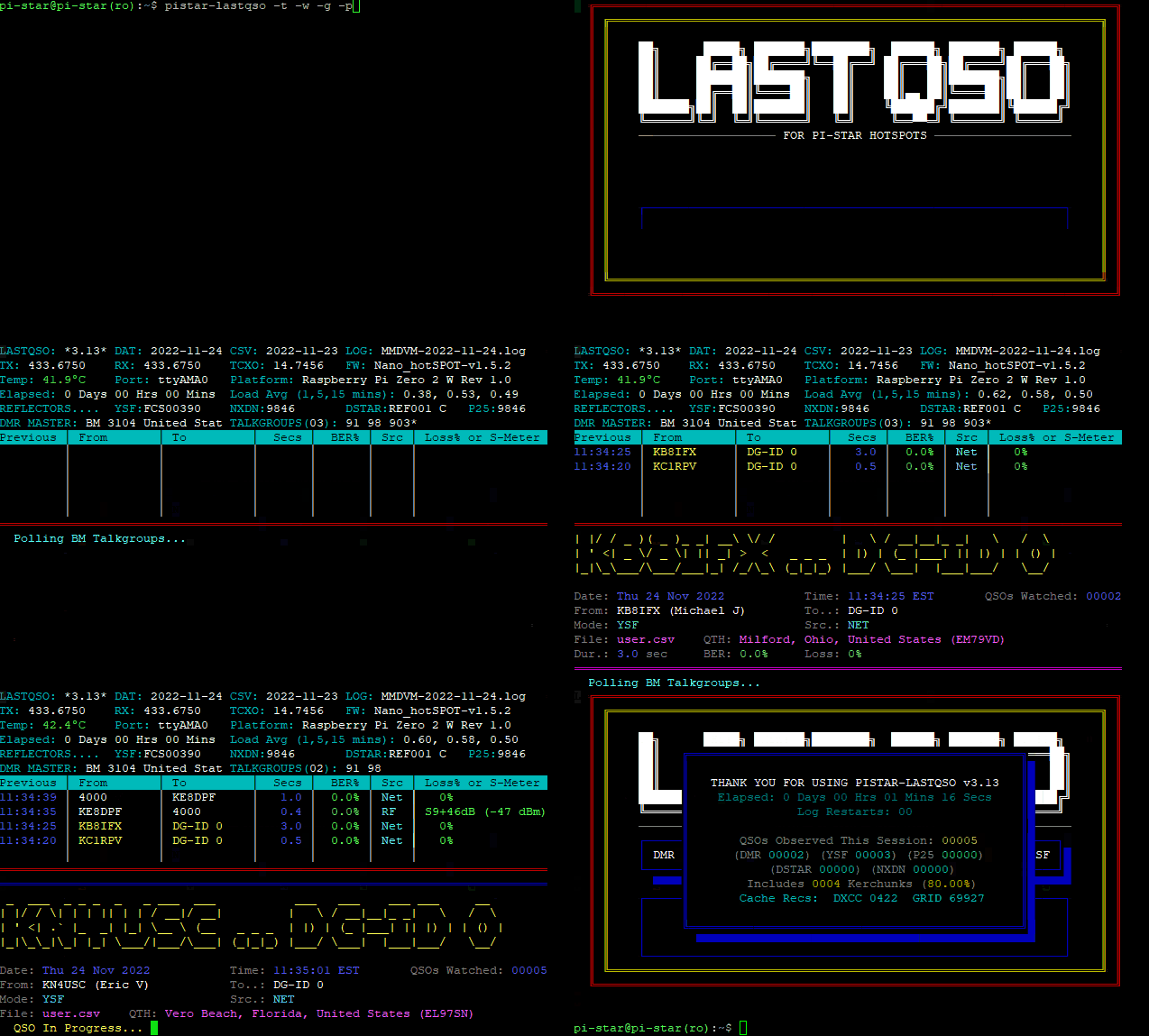
pistar-lastqso is a tool to monitor DMR and YSF traffic (including DMR2YSF and YSF2DMR cross-modes) on a PI-STAR node, either via SSH, or, on an HDMI-connected console. Written as a bash shell script (with just a few lines of python), no web browser or other GUI client is required.
For each QSO (either DMR or YSF), the program displays the following data:
- The localized Time and Date of the contact
- The running count of QSOs observed since launch
- The Sender (From)
- The Recipient (To)
- The Duration of the contact (in seconds)
- The BER, and Loss (Net), or Signal Strength (RF)
In Addition:
- Any MMDVM errors appearing in the log while the tool is monitoring
For each DMR (Only) QSO, the program displays the following data beyond what the PI-STAR dashboard can show:
- The contact's Name (from PI-STAR's DMRIds.dat file)
- The contact's QTH (from the downloaded user.csv file)
- The contact's Talker Alias (Note #1, below)
- The talkgroup's Name (Note #2, below)
- The contact's DMR ID# (Note #3, below)
Note #1: Talker Alias data is shown, only if present and complete. Kerchunkers don't stick around long enough for TA data to be gathered. Partial TA data (or that which is received as empty/null) is not shown.
Note #2: See the "User-Custom Talkgroup List" section below, for more info.
Note #3: The MMDVMHost daemon internally knows the actual DMR ID# of the user, and does ID number to Callsign lookups from DMRIds.dat. However, in the logfile, you end up with the Callsign, and lose the ID number. Disabling this lookup gains you the ID numbers in the logfile, but loses the Callsigns. If I were to disable the lookups for the MMDVMHost process, I could quite easily perform an ID to Callsign lookup within the program, but the PI-STAR web interface would suffer the loss of the Callsign. Pi-star web-based Dashboard users wouldn't appreciate that at all. So, I work backwords, taking the Callsign that MMDVMHost writes to the logs, and looking up the ID in the DMRIds.dat file.
But there's a small problem with that approach...
In the early days of DMR, some users were registering for multiple IDs (one for each radio, one for each hotspot, etc.) The prefered method of identifying hotspots today is by adding a two-digit suffix to the user's normal 7-digit ID, for example. However, those earlier cases of multiple ID numbers mapped to the same Callsign still exist in the file. Each DMR ID links to only one Callsign, but not every Callsign links to just one ID. (I saw one callsign that has EIGHT consecutive DMR ID numbers associated with it.) With no guarantee that I'm picking the correct ID linked to a given Callsign, I just arbitrarily pick the first number, on the assumption that that's the one that represents the user, not one of their hotspots, etc. I wish MMDVMHost would log both Callsign and ID#. But it's one or the other, not both. For the vast (VAST!) majority of cases, my "lesser of two evils" approach will serve well enough.
If the Callsign maps to multiple ID#'s, I indicate that the ID shown is just a "guess", by displaying an asterisk, immediately after the ID#.
pistar-lastqso comes with an "install" script. To install pistar-lastqso, log in to your PI-STAR hotspot with SSH, and perform the following steps:
Put the PI-STAR filesystem in read-write mode...
  $ rpi-rw

Pull down the pistar-lastqso files...
  $ git clone https://github.com/kencormack/pistar-lastqso.git

Change to the "pistar-lastqso" directory that was just created...
  $ cd pistar-lastqso

Run the install script...
  $ ./install
  (The install script will return the filesystem to read-only mode)

You are now ready to monitor DMR and/or YSF traffic from the commandline.
  $ pistar-lastqso
To update, log in with SSH, 'cd' into the directory into which you originally cloned pistar-lastqso, and run the following commands:
$ rpi-rw
$ git pull
$ ./install
  (The install script will return the filesystem to read-only mode)
That should do it.
If, for any reason, git detects that your local copy has changed, and gives the following message...
error: Your local changes to the following files would be overwritten by merge:
        <filename>
Please commit your changes or stash them before you merge.
... copy your local changed file to an alternate location, and run the following command to reset git's pointers:
$ git reset --hard origin
... and then re-try the "git pull". This will overwrite your local changes with the update from github.
Once the "git pull" is successful, run the install script, as described above.
One of the functions of the "install" script (see the "Installation" section, above) is to install the package "figlet" on your system. With figlet, pistar-lastqso can display the Callsign and TG or DG-IG as a large banner, at the beginning of each QSO.
If figlet is disabled (see the "Commandline options" section, below), the large character display is omitted, but all other information is still displayed normally.
SEE ADDITIONAL INFORMATION BELOW REGARDING LARGE-FONT SUPPORT
Upon first run, pistar-lastqso will download the latest version of the user.csv file from https://database.radioid.net/static/user.csv
If the user.csv file is already present on your hotspot, but is older than 7 days, pistar-lastqso will update the file to it's latest version automatically. You can also force an update to the latest version at any time, using the "-c | --csv" commandline option.
pistar-lastqso uses the user.csv file to display the "City", "State", and "Country" data related to the callsign.
pistar-lastqso supports a number of commandline options, as shown in the Usage and Help screens, below. Multiple options can be specified at the same time. For example, specifying "-c -n -t" (or "--csv --nobig --top") will download the latest updated user.csv file, disable the large font display of the callsigns, and activate the non-scrolling information section at the top of the screen.
The program remembers which options (if any) you specified at launch, so that it can re-apply those same options when it re-launches itself, either when PI-STAR's nightly update momentarily cycles the services, or when log rotation to a new day's log is detected. However, if the "-c" (or "--csv") option is specified, the program will update the user.csv file only upon initial invocation. It will then strip that option from any chain of options supplied at inital launch, so that it is not re-downloading the file each time the program re-starts itself.


When pistar-lastqso is launched, it searches for the most recent MMDVM log in the /var/log/pi-star directory. It then watches only that log, to perform it's monitoring. When the MMDVMHost service opens a new day's log (at midnight UTC), this program detects this, and re-launches itself to monitor the new log.
In order to display the name of a Talkgroup, pistar-lastqso consults the PI-STAR file "/usr/local/etc/TGList_BM.txt". This file is updated automatically by PI-STAR, but does NOT include talkgroup names that include characters with umlauts, or those found in German and other languages (ä ö ü ß), etc. To compensate, this program allows the user to build their own custom file containing any missing talkgroup (or "private" contact ID) names the user wishes to display.
Create the file "/usr/local/etc/MY_LIST.txt". Records in that file must appear in the same format as PI-STAR's TGList_BM.txt file.
Examples should look like the following:
2627;0;BADEN-WUERTTEMBERG;TG2627
2629;0;SACHSEN/THUERINGEN;TG2629
26232;0;DREILAENDERECK-MITTE-DEUTSCHLAND;TG26232
26274;0;BW-BOEBLINGEN;TG26274
26283;0;REGION-MUENCHEN;TG26283
26287;0;ALLGAEU-BODENSEE;TG26287
26298;0;THUERINGEN;TG26298
262277;0;KIEL-GRUPPE;TG262277
You can also add certain 'private contact' IDs here that may not be listed. Note the "PC", rather than "TG" references, in the last field of each line. Users who take advantage of PI-STAR's "remote commands" can include references to those in their MY_LIST.txt file, if desired:
9990;0;PARROT;PC9990
262993;0;GPS-WX;PC262993
310999;0;APRS;PC310999
9999995;0;PISTAR-HOSTFILES;PC9999995
9999996;0;PISTAR-SHUTDOWN;PC9999996
9999997;0;PISTAR-REBOOT;PC9999997
9999998;0;PISTAR-SVC-RESTART;PC9999998
9999999;0;PISTAR-SVC-KILL;PC9999999
pistar-lastqso counts the number of QSOs it has watched since last launched by the user. With each QSO the running count is displayed. Connections lasting less than 2 seconds are considered "kerchunks", which are also counted. These are noted on the screen as kerchunks, but the running count is not displayed. When the user quits the program using Ctrl-C, the closing screen shows the number of QSOs the program watched, and how many of these were considered kerchunks.
The program also watches the MMDVM log for any errors reported by the MMDVMhost daemon that is the real "engine" behind PI-STAR. Any errors noted in the MMDVM log are reported by pistar-lastqso as they occur, and are tallied. The total number of errors counted (if any) since pistar-lastqso was launched by the user, are reported on the exit screen, in a red pop-up box. If no errors were tallied, the red pop-up box does not appear.
It is the user's responsibility to judge the severity, and find the fix, for any MMDVM log errors reported by pistar-lastqso. These MMDVM log errors are not caused, controlled, or solveable, by pistar-lastqso. The script only reports what gets logged by the MMDVMhost daemon. pistar-lastqso does not create, diagnose, or eliminate the logged errors.
Don't panic if you see a single transient occurrance of something like a "queue overflow". Things like that may show up occasionally. But if you see dozens of them, you will want to look into it. Other types of errors may require more research on your part. If you need to investigate any errors, search your /var/log/pi-star/MMDVM-YYYY-MM-DD.log for any lines beginning with "E:".
Please visit the PI-STAR forums, if you need help diagnosing any errors found in the MMDVM log.
Finally, all three of the counters (QSO, Kerchunks, and Errors) are reset each time the user exits pistar-lastqso using Ctrl-C. However, when the script auto-restarts itself, either at log rotation or when PI-STAR's services get cycled during the nightly PI-STAR update, the running counts for each counter are carried forward to the restarted session.
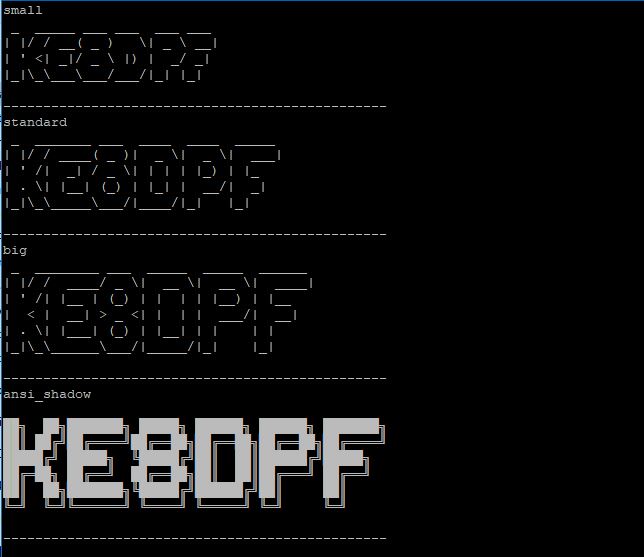
By default, pistar-lastqso will use one of three basic large fonts to display the contact and TG or DG-ID at the beginning of each QSO. Which of the fonts is selected is based on the width of the display, in columns. The program dynamically senses when the screen size has been changed, such as when a user re-sizes an SSH window on-the-fly, and selects an appropriately sized font accordingly. This auto-selection of font, based on screen width, helps to avoid unnecessary line-wrap, of figlet's output. The default font selections are as follows:
  <= 80 chars... "small" font
 81-120 chars... "standard" font
  > 120 chars... "big" font
pistar-lastqso supports a "-f | --font " commandline option to override auto-selection, and force a given font regardless of screen-width. If the -f option is omitted, or is passed an invalid value, pistar-lastqso will auto-select an appropriately sized font as just described above.
The "-f | --font" commandline option requires a numeric parameter to select between the fonts:
  "-f 1" or "--font 1" will force figlet's "small" font
  "-f 2" or "--font 2" will force figlet's "standard" font
  "-f 3" or "--font 3" will force figlet's "big" font
In addition to the above fonts, which come with the base figlet package, the "install" script adds an additional supplemental "ansi_shadow" font.
The "ansi_shadow" font can be utilized by specifying "-f | --font 4" on the pistar-lastqso commandline.
"-f 4" or "--font 4" will force the "ansi_shadow" font.
If you specify an invalid numeric parameter for the "-f | --font" option, pistar-lastqso will behave just as if the -f parameter was never given on the commandline, and will select the appropriate basic font dynamically.
Note that for any given font you specify with the "-f | --font" option, figlet may decide it needs to line-wrap the output. This can waste a lot of screen space if you force a too-large font on a too-small screen. If that happens, try a lower-numbered parameter for the "-f | --font" option, to select a smaller font.
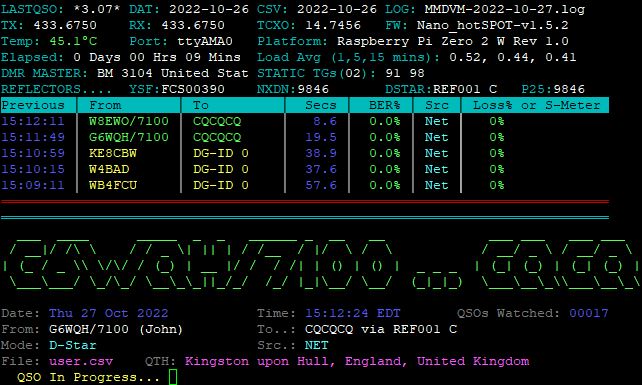
Sample Screenshot:
With "-t | --top" option, for the large font display of the callsign...
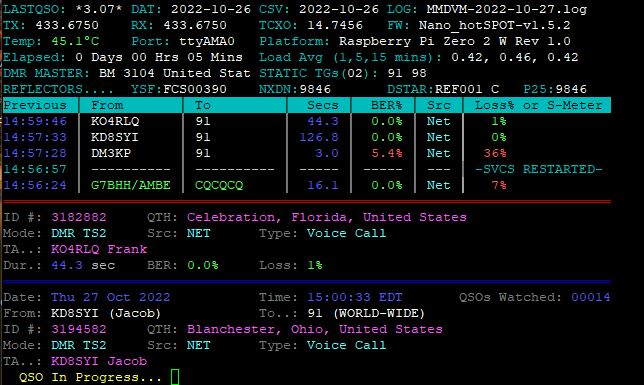
Sample Screenshot:
With "-t | --top" option, when the "-n | --nobig" option is also used...
Sample Screenshot:
These are the 3 basic fonts supplied with the basic "figlet" package, along with the supplemental "ansi_shadow" font.
pistar-lastqso is heavily commented, and shouldn't be too difficult to figure out, by those wishing to modify it for other modes of traffic (D-Star, or whatever.)
Key elements of the tool's operation include:
- determining which log is the latest
- the background process, forked to monitor whether MMDVMHost has the logfile open
- a trigger phrase written to the log by that fork, which signals the main loop to exit
- skipping past the trigger phrase when the loop re-starts (to prevent subsequent false exits from the loop)
- having the program re-launch itself when the current log has been closed/re-opened, or a new log started
- passing any options supplied at runtime (other than "-c | --csv"), to subsequent automatic restarts
The rest of the program is mainly parsing the log entries, and presenting the data on-screen.
pistar-lastqso's operation is dependent upon a fully operational PI-STAR configuration. If your PI-STAR setup has problems, those problems cannot be solved here. Please visit the PI-STAR forums instead. This program only reads the PI-STAR MMDVM log... What goes into that log is PI-STAR's doing.
Likewise, please don't expect the PI-STAR forums to offer any assistance with pistar-lastqso.
Every effort has been made to anticipate and address any questions users may have about pistar-lastqso, in this README. Please read through the above carefully. That having been said, should you have questions, or encounter a problem that is not addressed above, please use the "Issues" tab at the top of this page, to report it. Others will then be able to look to see if a problem they are having has already been resolved.
This program is free software; you can redistribute it and/or modify it under the terms of the GNU General Public License as published by the Free Software Foundation, either version 3 of the License, or (at your option) any later version.
This program is distributed in the hope that it will be useful, but WITHOUT ANY WARRANTY; without even the implied warranty of MERCHANTABILITY or FITNESS FOR A PARTICULAR PURPOSE. See the GNU General Public License for more details.
I want to offer a big "Vielen Dank!" to Wolfgang Wendefeuer (DC6LK), for the testing, input, discussion, ideas, and sample TG entries he provided. Thanks also, to Facebook users Cal Kutemeier (N9KO) for spotting a time-sensitive bug in the conversion of UTC date-stamps to local dates, and "Neil Neil" for reporting a problem with Talker Alias.