
Find the right places. Discover the right prospects. Make better choices.
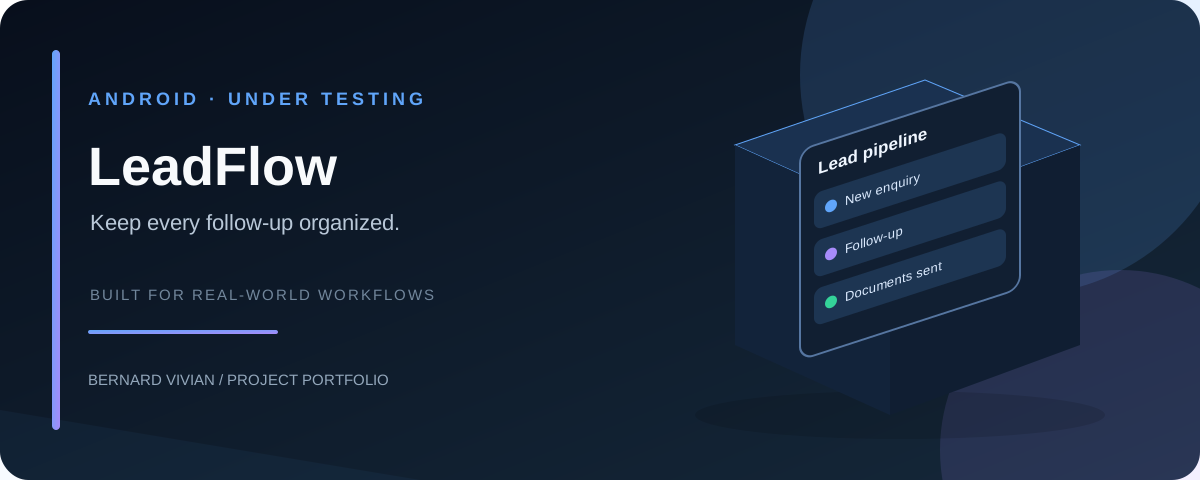
LeadFlow is a business discovery and local exploration concept for Android. It is designed to help people discover relevant businesses using location, category, public ratings and review information — whether they are finding prospects for work or choosing somewhere to eat or stay.
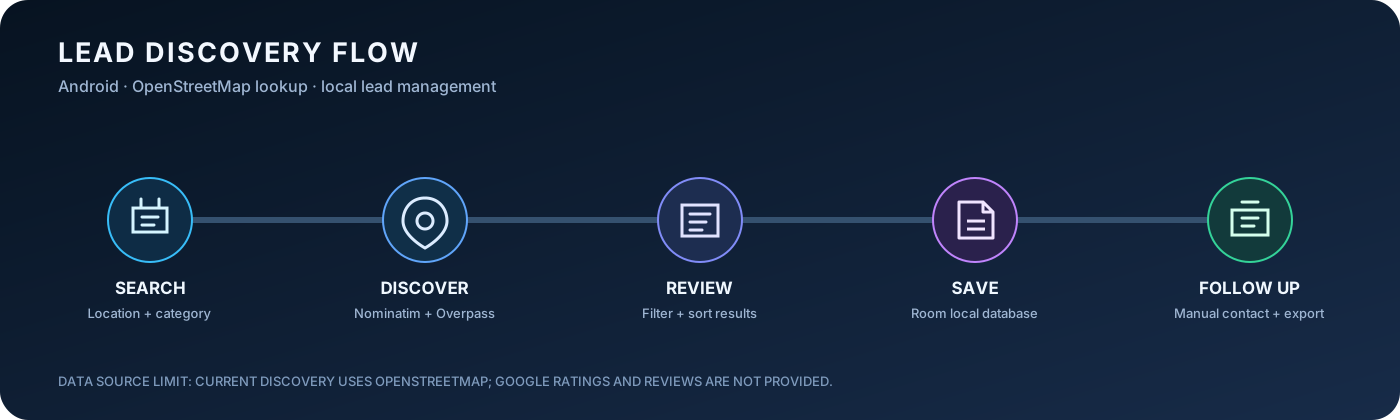
Current implementation flow. Place discovery uses OpenStreetMap; Google ratings and review text are not currently supplied.
If this project is useful to you, consider sponsoring my open-source work. Your support helps fund ongoing maintenance, testing, documentation, and future improvements.
Help sales teams, agencies, consultants, suppliers and local service providers find businesses that match their target market.
Example: Search for Restaurants in Pondicherry, filter by rating, review count or website availability, sort the results and save promising prospects for follow-up.
Planned filters include:
| Filter | Examples | Purpose |
|---|---|---|
| Business category | Restaurants, hotels, bakeries, salons | Target the right industry |
| Location | Pondicherry, Cuddalore, Villupuram | Focus on a city or service area |
| Rating | 3.5+, 4.0+, 4.5+ | Narrow results by public rating |
| Review count | 10+, 50+, 200+ | Compare the amount of available feedback |
| Website | With / without website | Find businesses with different online-presence needs |
| Phone availability | Has a listed phone number | Prioritize prospects with public contact details |
| Subcategory / keywords | Café, family restaurant, boutique hotel | Refine the search |
| Distance / radius | Nearby, within a selected radius | Focus on a local area |
| Sort order | Rating, review count, distance, relevance | Put useful matches first |
LeadFlow can help users identify prospects, but ratings alone do not prove a business needs a particular service. All filters will depend on the fields available from the selected data source.
A tourist or local resident can search for restaurants, cafés, hotels and other places nearby, filter by rating or review count, and see the strongest matches in a clear ranked list.
Planned capabilities:
- Search by current/selected location, category and radius
- Filter by minimum rating and review count
- Sort by rating, review volume, distance or relevance
- Show available address, hours, phone, website and map/listing link
- Make the reason for a recommendation clear, such as rating threshold or proximity
- Link users to the original listing so they can check current details before visiting
A high rating is only one signal, not a guarantee of quality. Where possible, ranking should account for both rating and review volume rather than treating a 5.0 rating from very few reviews as automatically better than a well-reviewed alternative. Results should identify the source and when information was last retrieved when that information is available.
This planned companion feature focuses on a different question:
“What dish should I try at this restaurant?”
Rather than promoting paid placements or repeating influencer recommendations, Dish Insights aims to surface dishes that real customers explicitly mention in public reviews of a restaurant or hotel.
Planned approach:
- Retrieve review information only through a permitted data source.
- Prioritize the newest available reviews and show the review date when supplied.
- Identify specific dish names mentioned by reviewers.
- Show a concise explanation based on the review, with a link or reference to the original review/listing where permitted.
- Distinguish positive, mixed and negative customer comments; do not label a dish “best” simply because it appears once.
- Indicate how many recent reviews mention a dish and how recent that evidence is, when enough data is available.
- Clearly label cases where evidence is limited or no dish-specific feedback was found.
Authenticity principle: Dish Insights is intended to be based on genuine customer experiences, not paid promotion by restaurants, owners or influencers. The product should not sell ranking placement or present sponsored content as organic customer feedback. It should also avoid claiming that a dish is a proven customer favorite unless the available review evidence supports that conclusion.
Review access, display, quotation and analysis must follow the data provider's terms and applicable rules. If a provider does not permit access to review text or dish-level analysis, the feature must use another permitted source or clearly explain the limitation rather than bypassing access controls. Google Maps/Places data availability and API terms must be checked before implementation; not all reviews or review history are necessarily available.
Business lead discovery
- Choose a category and location.
- Apply filters such as rating, review count, website and phone availability.
- Review and sort matching business listings.
- Save relevant prospects and detect possible duplicates.
- Track statuses, notes and follow-up dates.
- Export a shortlist to CSV, Excel or PDF and contact businesses manually.
Tourist and local discovery
- Select a place category and location or nearby search.
- Set a rating threshold, review-count preference and radius.
- Compare ranked results and open the original listing for details.
Dish discovery
- Select a restaurant.
- Review dish names found in the newest available customer reviews.
- Compare the supporting feedback and dates where available.
- Open the source listing/review to check context before deciding what to order.
LeadFlow now includes an initial working place-discovery flow alongside its local lead-management foundation.
Built with:
- Kotlin and Jetpack Compose for the native Android interface
- Room for local lead storage
- OpenStreetMap Nominatim for location lookup
- OpenStreetMap Overpass API for nearby place listings
- Kotlin coroutines for background network requests
Implemented in the app:
- Home, Discover Places, Add Lead, Leads, Export and Settings screens
- Search places by category, typed location and configurable radius (500–25,000 metres)
- Initial category coverage for restaurants, hotels/guest houses, cafés, bakeries, bars, pharmacies, supermarkets, salons and hospitals
- Filter fetched results by name, address or category
- Sort results by name, category or distance from the search centre
- Show each result's distance from the search centre
- Normalize discovered Indian phone numbers to valid 10-digit mobile numbers before saving; retain listed landlines in lead notes
- View available address, phone number and website details
- Open a discovered place in Google Maps
- When OpenStreetMap discovery is unavailable, show a concise service-unavailable message and offer a Google Maps search using the same category and location; this opens Maps externally and does not import its results into LeadFlow
- Save a discovered place into the local lead database
- Check for an existing lead with the same normalized business name and address before saving
- Show save feedback for new and duplicate leads
- Display OpenStreetMap attribution and a link to its copyright page
- Provide an external Google Maps search fallback when OpenStreetMap discovery requests fail
- Local lead search and management with pipeline statuses (New, Contacted, Interested, Converted, Not Interested)
- Set, change or clear a follow-up date for each saved lead
- Edit and review notes on saved leads
- Edit a saved lead's business name, address/area and validated 10-digit phone number without recreating the lead
- Store optional email and website details, prefill websites from OpenStreetMap discovery, and search leads by either field
- Open a saved email address in the device's email app or launch a saved website directly from its lead card
- Include email and website in CSV, XLSX and PDF lead exports
- Add comma-separated tags such as GST or Restaurant; search also matches tags
- Set each lead priority to High, Medium or Low and filter the lead list by priority
- Log calls, WhatsApp conversations, meetings, emails and outcomes with timestamps on each lead
- Open a scrollable full activity timeline for each lead, showing every logged interaction newest first
- View pipeline counts and conversion rate on the home dashboard
- Follow-up dashboard summaries for overdue, due-today and upcoming active leads, with tap-to-filter cards
- Existing export utilities and WhatsApp click-to-open support
Data-source limitations: The current discovery implementation uses OpenStreetMap listings. It does not provide Google ratings, review counts, customer review text, opening hours in the current result model, or verified business rankings. The result filter searches already-fetched listings; it is not a Google review/rating filter. Nominatim and Overpass are community services with usage policies and availability limits, so requests should be paced and a production deployment should assess service policies and a suitable hosted data provider. If Overpass is unavailable, the app offers a Google Maps search link for the same category and location; this is an external fallback only, and Google Maps results are not imported or saved as LeadFlow leads. A successful CI build confirms compilation and APK packaging, not end-to-end network behavior on a physical phone.
Read Build Log 01: Turning Local Business Discovery into an Android Lead Workflow for the engineering decisions, current data-source boundaries, implementation workflow, and next verification steps.
- Build the initial category-and-location place discovery screen
- Integrate OpenStreetMap geocoding and nearby place lookup
- Add result filtering by name, address and category
- Add sorting by name and category
- Save discovered places to the local lead database
- Prevent duplicate discovered leads by business name and address
- Add OpenStreetMap attribution in the discovery interface
- Verify search behavior and lead saving on a physical Android device
- Cap discovery results at 300 and prevent unknown categories from matching every named place
- Normalize discovered phone numbers to 10-digit mobiles so WhatsApp links work; keep landlines in notes
- Show distance from the search centre and sort by distance
- Add unit tests for phone normalization and place parsing
- Improve request pacing and resilient data-source behavior
- Add pagination for large searches (a hard 300-result cap is in place)
- Add lead pipeline statuses and status updates
- Add per-lead follow-up date management with database migration
- Add overdue, due-today and upcoming follow-up dashboard summaries with selectable filters
- Add editable notes to saved leads
- Add editable lead tags and include them in lead search
- Add editable High/Medium/Low lead priority and priority filtering
- Filter saved leads by pipeline status and contact availability, with a combined clear-all action
- Sort saved leads by recent creation, business name, priority and follow-up date
- Add timestamped activity history for calls, WhatsApp, meetings and email follow-ups
- Add home dashboard pipeline counts and conversion rate
- Add note history and richer tag management
- Integrate a permitted data source that supplies ratings and review counts
- Add transparent rating/review-count-aware ranking when reliable fields are available
- Explore review-source permissions and feasibility for Dish Insights
- Prototype dish-name extraction only from permitted, available review data
- Show recent review dates, supporting evidence and uncertainty
- Test discovery, ranking and export workflows end-to-end on Android
- Android Studio (current stable release)
- JDK 17
- Gradle 8.2
- Android SDK Platform 34 and matching build tools
- Android 7.0 (API 24) or newer for device/emulator testing
The project uses Android Gradle Plugin 8.2.2, Kotlin 1.9.22 and Compose compiler extension 1.5.8.
Gradle wrapper note: the repository currently has the wrapper properties file but does not include gradlew, gradlew.bat or the wrapper JAR. Install Gradle 8.2 and use the system gradle command; wrapper commands will not work until the complete wrapper is added.
- Install JDK 17 and Android Studio.
- Install Android SDK Platform 34 from Tools > SDK Manager.
- Open the repository in Android Studio.
- Set the Gradle JDK to JDK 17 in the Gradle settings.
- Install Gradle 8.2 and confirm it is available on your PATH.
- From the repository root, run:
gradle testDebugUnitTest assembleDebug --stacktraceOr use Android Studio's Build > Build Bundle(s) / APK(s) > Build APK(s) to build without running the unit-test task.
# JVM unit tests
gradle :app:testDebugUnitTest

# Debug APK
gradle :app:assembleDebug

# Android lint
gradle :app:lintDebug

# Third-party dependency licence report
gradle :app:generateLicenseReport
The current JVM tests are in app/src/test/java/com/leadflow/app/: OpenPlaceSearchTest.kt and PhoneFormatTest.kt.
- Unit test report:
app/build/reports/tests/testDebugUnitTest/index.html - Debug APK:
app/build/outputs/apk/debug/app-debug.apk - Lint report:
app/build/reports/lint-results-debug.html - Dependency licence report:
app/build/reports/dependency-license/
The Build APK GitHub Actions workflow uses JDK 17 and Gradle 8.2, runs unit tests, builds the debug APK and generates the dependency licence report. Open the repository's Actions tab to inspect a run; successful runs upload the APK and licence report as artifacts.
To install the APK on an Android device, open it from the phone's file manager and approve installation from that source if prompted. Alternatively, use adb install app-debug.apk with USB debugging enabled.
A passing unit-test task verifies the local JVM tests. A successful APK build verifies compilation and packaging, not live network behavior or device-specific flows. Test changes to location, discovery, permissions, saving and exports on an emulator or physical device where applicable. See CONTRIBUTING.md for the complete contributor setup, testing and pull request guide.
| File | Responsibility |
|---|---|
MainActivity.kt |
Navigation |
LeadViewModel.kt |
Lead state, operations and duplicate checks |
data/Lead.kt |
Lead model |
data/OpenPlaceSearch.kt |
OpenStreetMap geocoding and nearby place search |
ui/DiscoveryScreen.kt |
Category/location discovery, result filtering and sorting |
data/LeadDao.kt |
Database queries |
data/AppDatabase.kt |
Room database |
ui/HomeScreen.kt |
Dashboard |
ui/AddLeadScreen.kt |
Manual lead entry |
ui/LeadsScreen.kt |
Saved leads |
ui/ExportScreen.kt |
Export interface |
ui/SettingsScreen.kt |
Preferences |
util/Exporter.kt |
CSV, XLSX and PDF generation |
util/FileStore.kt |
Export storage and sharing |
Source files are under app/src/main/java/com/leadflow/app/ unless otherwise noted.
LeadFlow is licensed under the Apache License 2.0. You may use, modify and distribute the project under the terms of that license. See the LICENSE file for the complete license text. See THIRD_PARTY_NOTICES.md for the generated inventory of third-party runtime dependencies and their published licence metadata.


LeadFlow is intended for useful discovery and informed decisions, not automated unsolicited messaging or deceptive rankings. Data availability, review access and permitted use depend on each provider. Integrations must respect source terms, privacy requirements and applicable law. Recommendations should be transparent about their criteria, and customer reviews should not be fabricated, manipulated or misrepresented.
Want to help build LeadFlow? New contributors are welcome. You do not need to be an Android expert to make a useful contribution. Documentation, accessibility, UI polish, reproducible bug reports and focused tests are valuable starting points.
- Browse the repository's open issues and look for the
good first issuelabel. - Comment on an issue before starting so the work can be coordinated.
- Read CONTRIBUTING.md for setup, testing and pull request expectations.
- Submit a focused pull request and describe how you verified the change.
Contributors are credited through their own GitHub commits and accepted pull requests. You can build a public contribution history and portfolio; GitHub controls its profile contribution counts and achievements, so no badge or achievement is guaranteed.
Suggestions and contributions are especially welcome around Android usability, search/filter design, accessibility, search reliability, tests, permitted data-source integration, duplicate detection and reliable exports. Features should be tested and documented before being marked complete.
- Filter lead creation reports by Today, last 7 days, last 30 days, All time, or a custom date range.
- Choose custom start and end dates with native Android date pickers; the report keeps the selected range in its summary and CSV export.
- Review pipeline status counts, high-priority lead count, and conversion rate (converted divided by leads excluding Not Interested).
- Share a compact CSV summary from the report screen.