
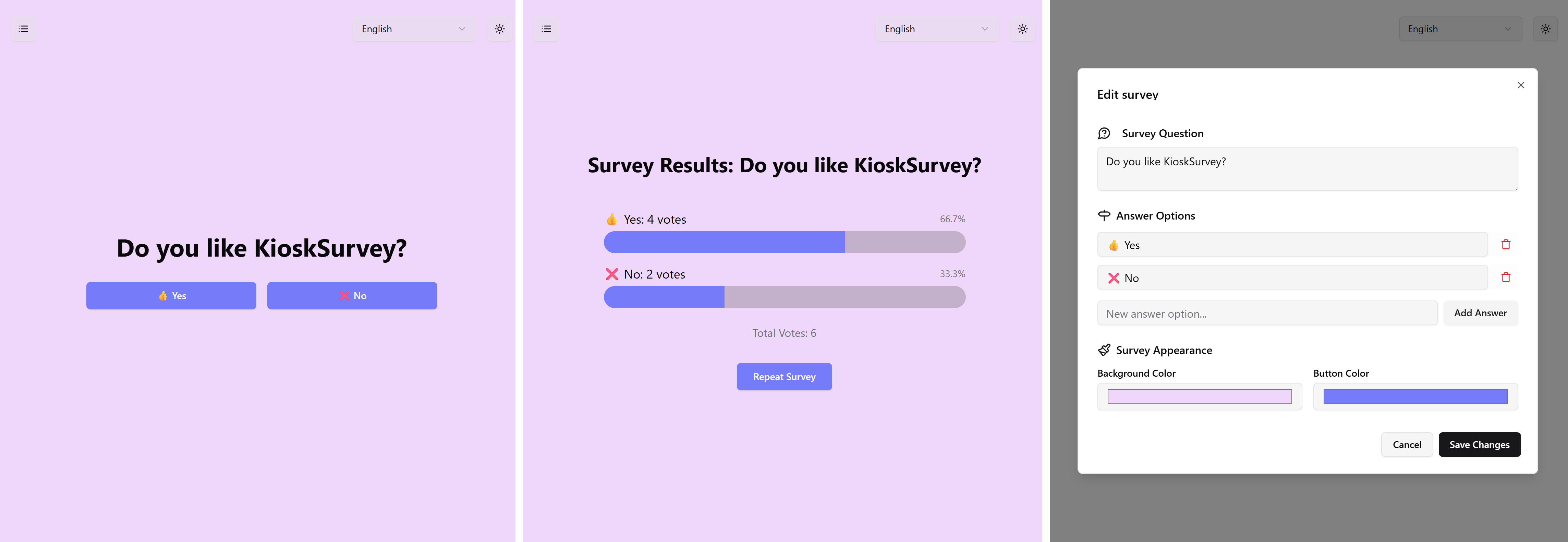
KioskSurvey is a web application designed for creating and conducting simple surveys, optimized for kiosk environments or standalone tablet use. It allows users to easily set up questions with multiple-choice answers and view results in real-time. The interface is multilingual, supporting English and German out of the box.
Check it out here.
- Easy Survey Creation: Quickly create new surveys with a single question and multiple customizable answer options.
- Simple Participation: Users can take surveys with a clean, touch-friendly interface.
- Real-time Results: View aggregated survey results dynamically.
- Customizable Appearance: Adjust background and button colors for each survey to match branding or preference.
- Multilingual Support: Currently supports English and German, with the ability to switch languages on the fly.
- Persistent Storage: Survey configurations and results are saved in the browser's local storage.
- Responsive Design: Adapts to various screen sizes, suitable for tablets and desktops.
KioskSurvey is also available as an Android app. The APK bundles the web app, so it runs fully offline. Each release on GitHub includes a signed APK built by the Android Release workflow.
Obtainium installs apps directly from their GitHub releases and keeps them updated.
- Install Obtainium from its releases page or F-Droid.
- Open Obtainium and tap Add App.
- Enter the source URL
https://github.com/Spenhouet/kiosk-surveyand tap Add. - Tap Install. Allow Obtainium to install unknown apps if Android asks.
Obtainium checks for new releases in the background and offers updates when a new version is published.
Alternatively, add KioskSurvey to Obtainium directly from your Android device.
Download the latest kiosk-survey-*.apk from the releases page and open it on your device.
Requires JDK 21 and the Android SDK.
CAPACITOR=1 bun run build
bunx cap sync android
cd android && ./gradlew assembleReleasePush a version tag. The workflow builds the APK, signs it and attaches it to a GitHub release.
git tag v1.0.0
git push origin v1.0.0
Signing uses the repository secrets ANDROID_KEYSTORE_BASE64, ANDROID_KEYSTORE_PASSWORD, ANDROID_KEY_ALIAS and ANDROID_KEY_PASSWORD. Every release must be signed with the same key, otherwise Android refuses to install the update.
- SvelteKit: Frontend framework for building the application.
- Svelte 5 (Runes): Utilizes the latest Svelte features for reactivity and state management.
- TypeScript: For type safety and improved developer experience.
- shadcn & Tailwind CSS: For styling the user interface.
- Paraglide JS: For internationalization (i18n) and managing translations.
- Capacitor: Packages the web app as an Android APK.
- Vite: Build tool for fast development and optimized production builds.
- Bun: Used as the runtime and package manager (implied by
bun.lockb). - Playwright: For End-to-End testing.
- Vitest: For unit and component testing.
- Bun (latest version recommended)
- Node.js (if not using Bun exclusively for all Node-related tasks)
-
Clone the repository:
git clone <repository-url>
cd kiosk-survey
-
Install dependencies:
bun install
-
Run the development server:
bun run dev
This will start the application, typically on
http://localhost:5173. -
Build for production (static site): The project is configured with
@sveltejs/adapter-static.bun run build
The static files will be generated in the
builddirectory.
- Run unit and component tests:
bun run test:unit
- Run End-to-End tests (requires a running dev server or build):
bun run test:e2e
src/routes/(app): Contains the SvelteKit page and layout components.+page.svelte: Main page for managing surveys.survey/+page.svelte: Page for taking a survey.results/+page.svelte: Page for viewing survey results.+layout.svelte: Root layout, handles language switching and global styles.
src/lib/stores.ts: Manages the state of surveys (creation, results, persistence to local storage).src/lib/components/: Reusable Svelte components (e.g., dialogs, buttons).messages/: Source JSON files for translations (e.g.,en.json,de.json).
Contributions are welcome! If you'd like to contribute, please follow these general guidelines:
- Fork the repository.
- Create a new branch for your feature or bug fix (
git checkout -b feature/your-feature-nameorbugfix/issue-number). - Make your changes.
- Ensure tests pass (
bun run test:unit,bun run test:e2e). - Commit your changes with clear and descriptive messages.
- Push to your forked repository.
- Open a pull request to the main repository.
Please ensure your code adheres to the existing coding style and linting rules (bun run lint).
This project is licensed under the MIT License.