Home
Welcome to the list of things that need to be done (made by aiden as of rn)
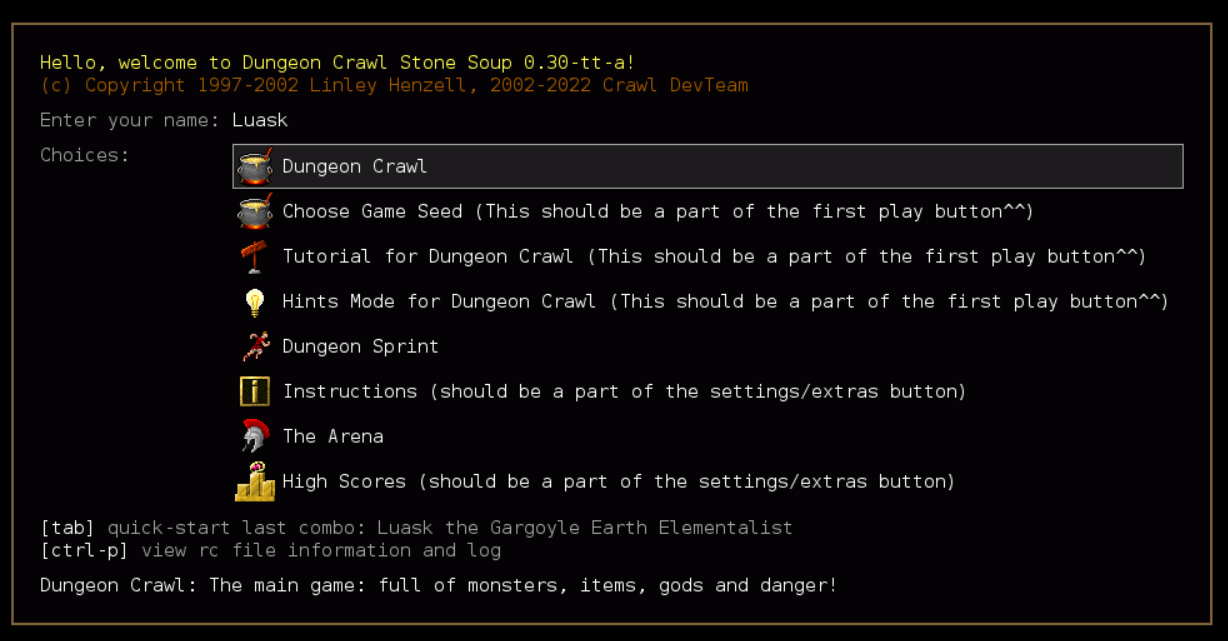
Startup page UI improvements (goal is to make the menu more user friendly, as of now there are too many things to select on the first screen):
- Figure out how it goes from Menu Option (start game, for example) to the next UI screen when you click button
- (Initial Page is created in startup.cc)
- (Race selection is created in newgame.cc)
- It seems like it uses ui.cc and stuff like run_layout/push_layout
- Figure out how to create a new screen
- Collapse similar menu options into one Play Game button/page
- Dungeon Crawl button, Select Game Seed button, Tutorial, and Hints Mode button should all be on a second screen that comes up when the player selects the new 'Play Game' Option.
- Make a unified Extra Options page
- make a cute lil settings gear icon or something that will appear in the top corner, as it is not that necessary that it needs to be a main menu option
- collapse High Scores and Instructions into this page
- make a separate page that these will go on.
https://www.figma.com/file/eIZcCZXyBmpTLCtPphZ6Cf/yo?node-id=2%3A51