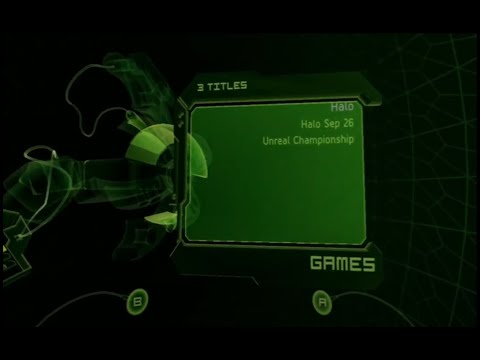
UIX, originally released in 2003, was a modification of source code developed by JbOnE/TeamUIX. In 2020, during the Covid-19 pandemic, various parts of the original Xbox source code tree, along with snippets of code from pre-UIX modifications like XboxDashNext (tHc Final), were discovered, sparking the revival of UIX as UIX Lite. Initially, UIX Ultra Lite was introduced during the launch of Insignia as a streamlined game launcher within the 5960 dashboard. It was designed to maintain Xbox Live (Insignia) support while preserving the original dashboard's aesthetic. However, as is common with many projects, "Ultra Lite" evolved over time. By August 2024, it became our mainline project and was rebranded simply as UIX Lite. Concurrently, a reverse engineering project focused on the 5960 dashboard is being developed privately.
In the early 2000s, limited access to source code led to the creation of several pioneering projects like tHc, tHc Lite, TrueBlue, BlackStormX (BSX), User.Interface.X, and Dash2GAM. These projects laid the groundwork for what UIX would eventually become. The foundation of UIX was built by a dedicated sub-community within the Xbox scene, focused on modifying retail dashboard files. Contributions from notable figures such as JbOnE, Gcue, fuckdb, Vulgasprofanum,Xbox-Scene forums, and the xboxdash[.]net community were instrumental in shaping both UIX and TeamUIX. Today, we continue to explore these archives, integrating patches and mods from this rich legacy into a modern, live-enabled dashboard.
Our ultimate goal is to provide a legal, open-source, and distributable patch set, along with comprehensive tutorials to ensure ease of use.
Please note that a modified console is required to run this project. However, we will leverage two decades of modification techniques to simplify the process for end users as much as possible.
For more information and community support, join us in #teamuix on Discord.
As stated in the title above UIX Lite is a collection of patches and XIP edits that adds some of the features of UIX to the stock 5960 MS Dash. Some of these features include;
- A customizable Launcher to launch titles from your Xbox hard disk.
- The ability to customize the Main Menu items.
- An option to select the tHc Main Orb style.
- Define up to four QuickLaunch titles.
- Modify the Xbox Live item to say Insignia.
- All configuration changes can be made in-dashboard via Settings>UIX Settings.
- Since UIX Lite is merely patches for the MS Dash, you must first have a complete working copy of the 5960 MS Dash installed in the root of your C partition before attempting either of the two methods below.
- DO NOT USE ON AN UNMODIFIED XBOX. It won’t work, and you'll brick your Xbox. Make sure you have a modchip or softmod installed that doesn’t rely on the dashboard files to boot.
- DO NOT DELETE YOUR ORIGINAL MS DASHBOARD FILES. SIMPLY REPLACE THE EXISTING FILES WITH THE MODIFIED FILES ONLY. KEEP ANY UNMODIFIED FILES.
- Download the latest UIX-Lite-v0.5.XXXXXX.zip from the assets in the pre-patched release.
- Extract and Copy the pre-patched 5960 Dashboard files via ftp to the root of the C partition on your Xbox.
- Download
UIXToolbox.xbefrom theReleasessection of the repository. - Install it as an application on your Xbox, for example in
E:\Apps\UIXLiteToolbox\default.xbe. - Once running the
UIXToolbox.xbe, go to the installer section,Restore Original MSDash 5960, thenInstall UIX Lite. - Congratulations! You have successfully installed UIX Lite on your Xbox.
- You can customize the Main Menu, Launcher Menu, and other settings in-dash by navigating to Settings>UIX Settings.
- When configuring the Main Menu, advanced users can enable Advanced Mode. When this is enabled, selecting a setting will bring up the Xbox onscreen keyboard for custom input instead of using the built-in toggles.
- When configuring the Launcher, you may define both the “Title” for a content type and the relative “Path(s)” to the content for any number (eight is the default) of launcher menu items. The Launcher will scan the relative paths provided on each partition and compile a list of the subdirectories found. The name of these subdirectories should correspond to the name of the title and contain the title's default.xbe. Use a semicolon as a separator when defining multiple relative paths to like content.
- You can fast scroll most menus by pressing Left/Right on the directional pad to PageUp/PageDown.
- To re-launch a recently launched title, simply press the X button while in the Launcher menu.
- You can assign a QuickLaunch path to each of the A, B, X, and Y buttons. To active the QuickLaunch feature, while in the Main Menu hold both triggers and press the assigned button.
NOTE: The Xbox onscreen keyboard does not allow you to enter an empty text string. Therefore, to delete an entry just enter a single "x" and select "DONE".
NOTE: The Xbox onscreen keyboard is limited to 31 characters. So, if you need more characters, just enter as much as you can and select "DONE". Then edit it again and some of the text will be moved into the title bar and you can add more text.
- You can add Japanese, German, French, Spanish, Italian, Korean, Chinese, and Portuguese language translations by placing the optional xlate.ini into the
C:\UIX Configs\folder.
- As of UIX Lite v0.4 you are now able to apply custom skins to UIX Lite. Simply replace the skin.xip and xboxdash.xbe with ones from a prebuilt skin or use the tools created by Rocky5, and provided here, such as the Xboxdash 5960 Colourizer to patch the colors in the xboxdash.xbe or the UIX Lite Skins Maker to create your own custom skin.
- As of UIX Lite v0.5 the Skin.xip is optional and can be removed if desired.
- As of UIX Lite v0.4 you can now see the icon of your title as you browse through the list in the Launcher. For this feature to work you must have the Icons.ini located in
C:\UIX Configs\to indicate to UIX Lite the TitleID for each of your titles. The format is<FolderName>=<TitleID>where<FolderName>is the name of the directory that contains the title.
NOTE: As of Release v0.5, the icon files are no longer required to be inserted into the the default.xip and will be loaded directly from UDATA.
- You can use the "UIX Icon Installer" from the Tools release to create the Icons.ini automatically and also add any missing icons to your
E:\UDATAif they are available in the online repository.
- As of UIX Lite v0.4 UIX Lite we have implemented title caching, which on first run will scan your partition for titles and add them to a cache. This is done so you don't have to rescan the partitions after every restart. As a consequence, if you add or remove any titles, the cache must be refreshed. This can be done by pressing Y while in the Launcher or by navigating to Setting>UIX Settings>General Settings>Rescan Partitions.
[default]
MainOrbStyle=Stock
ShowInsignia=false
ConfigPanelIcon=Globe
LauncherOrbIcon=Xbox
UseMainMenuAttract=false
UsetHcScreenSaver=true

[MainMenu]
MainMenuItems=5
Button1Text=MEMORY
Button1Action=GoToMemory()
Button2Text=MUSIC
Button2Action=GoToMusic()
Button3Text=XONLINE
Button3Action=GoToXOnline()
Button4Text=LAUNCHER
Button4Action=GoToLauncher()
ButtonYXAction=ToggleNoisyCam()
AdvancedMode=false

[LauncherMenu]
Title0=Applications
Path0=Applications;Apps
Title1=Dashboards
Path1=Dashboards
Title2=Games
Path2=Games
Title3=Emulators
Path3=Emulators;Emus
Title4=Homebrew
Path4=Homebrew
Title5=
Path5=
Title6=
Path6=
Title7=
Path7=

[ShowInSettings]
Memory=false
Music=false
XOnline=false
Launcher=false
Configuration=true
StartFTP=false
Reboot=true
Shutdown=true

[QuickLaunch]
QuickLaunchA=E:\Dashboards\UnleashX\default.xbe
QuickLaunchB=
QuickLaunchX=
QuickLaunchY=
- The original TeamUIX and members of xboxdash.net
- The Xbox-Scene Community
- Insignia Live; Without you guys making an effort to revive Xbox Live, we wouldn't have cared if this dash was compatible.
- The xemu project
- Figure out what else we can add in the binaries whitespace without breaking it.
We successfully got the HDD Loader from tHc Lite (Which is why the POC Video here is called tHc Ultra-Lite) to launch XBE's from within 5960.