

Recipe Book Access is a simple Fabric API designed to intuitively add support for external inventory access in any crafting screen.
It redirects the recipe book functionality to check and fill from a customisable list of inventories, instead of just the player's.
See for yourself!
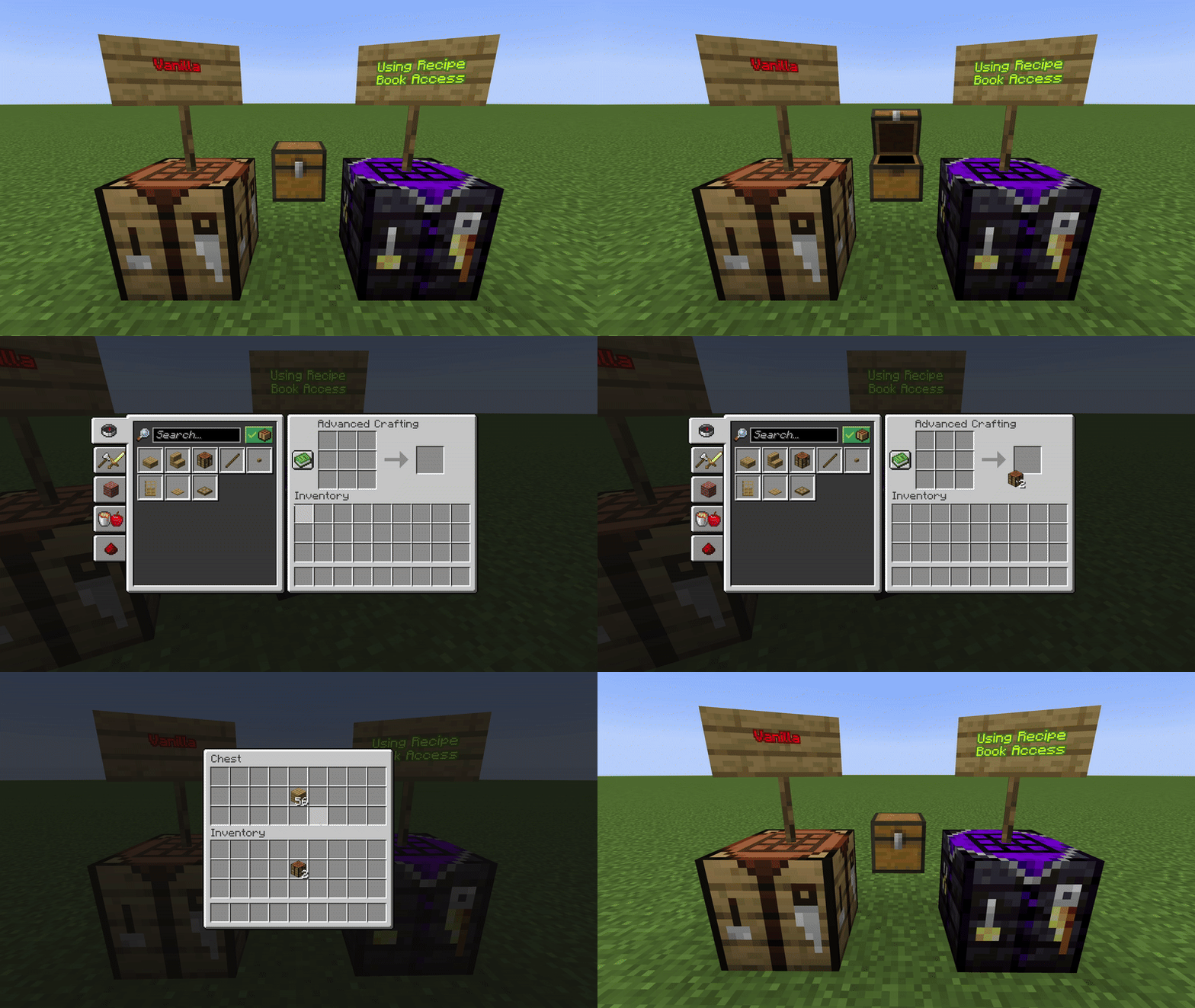
This example of a modded crafting table uses a custom list of inventories via this API, in this specific case it uses all inventories from nearby chests.
This part will demonstrate how use Recipe Book Access as a library in your project.
Skip ahead if you know how to do this.
First make the following two additions in your build.gradle file:
repositories {
    // existing repositories block

    maven { url 'https://api.modrinth.com/maven' }
}
dependencies {
// existing dependencies block
modImplementation("maven.modrinth:recipe-book-access-api:<mod_version>")
}Replace <mod_version> with the version number of Recipe Book Access you wish to use (e.g. 1.0.0).
Once done, refresh your Gradle project to download and apply the changes:
- In IntelliJ IDEA, just click on the Gradle tab and press the refresh button.
- From the command line, run:
./gradlew build
Your project should now be setup to use Recipe Book Access!
Utilizing Recipe Book Access is extremely simple, and requires you only to use one interface with one method to override.
You only need to implement the RecipeBookInventoryProvider interface in your crafting screen handler class.
In your screen handler, implement the RecipeBookInventoryProvider interface, located in com.jomlom.recipebookaccess.api.
Code Example:
// Remember to import the interface
import com.jomlom.recipebookaccess.api.RecipeBookInventoryProvider

// Implement it like this
public class YourCraftingScreenHandler extends AbstractRecipeScreenHandler implements RecipeBookInventoryProvider {
    // your existing code...

    @Override
    public List<Inventory> getInventoriesForAutofill() {

        // Return the list of inventories that you want recipe book to use
        return List.of(chestInventory, customStorageInventory);
    }
}This is the only function you must override for the full functionality of Recipe Book Access. The API handles the rest!
- This will NOT include the player's inventory by default. If you want the recipe book to use the player's inventory too, ensure to append it to the list you are returning
- This function is only called from the server's instance of the screen handler, meaning you don't need to worry about making it work on the client's side
- Since some implementations won't work from the client's instance of the screen handler (e.g. accessing nearby chests) the API will only call this function from the server and update the client on the results
- If you don't understand what this means or why, don't worry, it just makes the API easier to use and more versatile
Example Implementation:
@Override
    public List<Inventory> getInventoriesForAutofill() {

    List<Inventory> inventories = new ArrayList<>();
        BlockPos origin = this.blockEntity.getPos();

        // Iterate over all block positions within 5 blocks of our crafting table
        BlockPos.iterate(origin.add(-5, -5, -5),
                        origin.add(5, 5, 5))
                .forEach(pos -> {
                    // Make sure we ignore the block we are crafting in
                    if (!pos.equals(origin)) {
                        BlockEntity nearbyBlockEntity = this.blockEntity.getWorld().getBlockEntity(pos);
                        if (nearbyBlockEntity instanceof Inventory inv) {
                            // If we find a block entity with an inventory, such as a chest, add it to our list
                            inventories.add(inv);
                        }
                    }
                });

        // Add the player's inventory to our list
        inventories.add(player.getInventory());

        // Return our list
        return inventories;
    }
This will make the recipe book in our crafting screen able to craft not just from the player's inventory, but also from container blocks like chests or barrels within a 5 block radius.
- Your screen handler class extends
AbstractRecipeScreenHandler, or any of its subclasses, such asAbstractCraftingScreenHandler - Your corresponding screen extends
RecipeBookScreen, in order to utilize the minecraft recipe book - The player's inventory is accessible as a backup for when items are not able to be returned to their Inventory of origin (if the input slots need to be cleared to make way for another recipe)
(It may be possible to use the API in different scenarios, just know I have not tested outside these assumptions)
-
Q: I think I found an issue...
A: Feel free to create an issue on Github or reach out directly on discord @joonty -
Q: Will you release support for x ?
A: I plan to release support for older versions soon, I don't currently plan to release support outside of Fabric. If you would like to make a verion for another loader (Forge, NeoForge, etc) feel free to reach out on discord! @joonty -
Q: Does my
getInventoriesForAutofill()implementation need to work from the client?
A: Nope!getInventoriesForAutofill()is only used from the server side screen handler, and the API will keep the client up to date on the results for you automatically!