


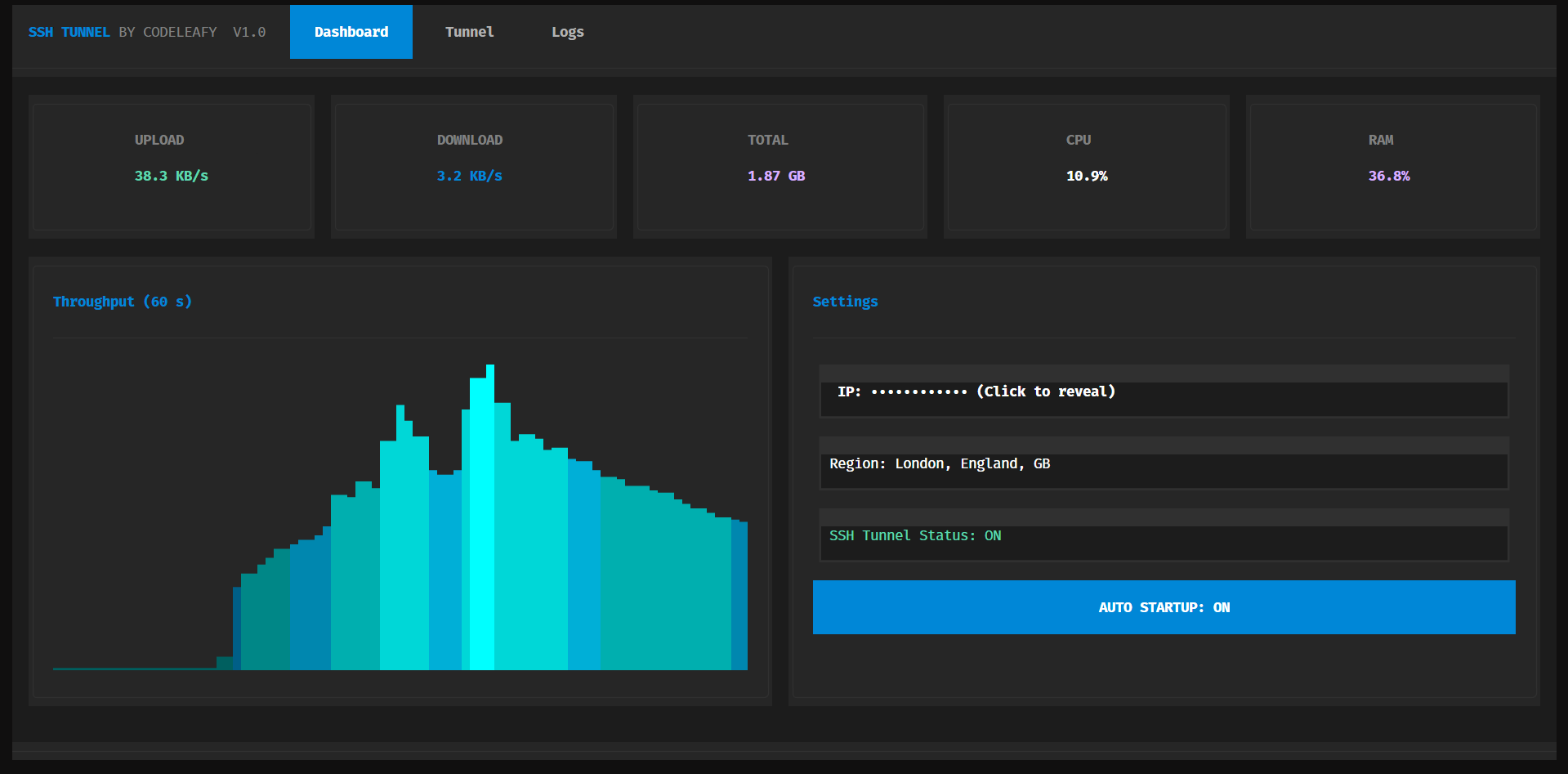
SshTunnel is a polished terminal UI that turns any fresh Ubuntu VPS into a tuned, authenticated SOCKS5 proxy in a single command. It deploys a hardened Docker container, applies aggressive Linux TCP tuning (BBR, fq, TFO, MTU probing, higher connection limits) and hands you back ready-to-share SOCKS5 URLs, Telegram proxy links and scannable QR codes.
Note: Designed to survive Codespace and VPS reboots. Docker uses
--restart unless-stoppedand a shell-profile hook is installed automatically so the tunnel comes back up on next login — no systemd required.
A single bash start.sh on a clean Ubuntu box installs Docker, Python deps in an isolated venv, downloads panel.py, and prints the launch command in green. No prompts, no questions.
Spins up serjs/go-socks5-proxy with --network host, --restart unless-stopped, nofile=1048576, and JSON log rotation. Opens the port via ufw, firewall-cmd and raw iptables — whichever is present.
Best-effort sysctl tuning on deploy: BBR congestion control, fq qdisc, TCP Fast Open, MTU probing, faster keepalives, larger socket buffers, and a wider local port range. Applied silently with safe fallbacks.
Prefers your real public IPv4 (ipify, icanhazip, ifconfig.me, AWS checkip) before falling back to NAT-aware local detection — so the share links always work from outside.
Generates a properly URL-escaped socks5:// URL, a https://t.me/socks?... Telegram proxy link, and saves both as PNG QR codes. Copy buttons try Textual clipboard → native tools (pbcopy / wl-copy / xclip / xsel / clip) → OSC52 over SSH.
Real-time CPU, RAM, upload, download, total transferred, and a 60-second throughput sparkline — rendered entirely in the terminal with Textual. Plus a live "SSH Tunnel Status" line with a Braille spinner during startup.
Prerequisites: A fresh Ubuntu (or Debian-like) VPS with root or sudo access. Everything else — Docker, Python, sshpass — is installed for you.
curl -fsSL https://raw.githubusercontent.com/Code-Leafy/SshTunnel/main/start.sh -o start.sh
bash start.sh
When it finishes you'll see a green banner with the launch command — usually:
~/.sshtunnel-venv/bin/python panel.py⚙️ Panel Configuration
All settings are persisted to ~/.sshtunnel_state.json (chmod 0600). Fields are filled from the Tunnel tab and saved automatically as you type.
VPS / Server IP(Required) — auto-detected from public IPv4 lookups. Override if needed.Port(Required) — TCP port the SOCKS5 proxy listens on. Default:443SSH Username(Required) — used only when deploying to a remote VPS. Default:rootSSH Password(Required for remote) — skipped automatically when running locally on the VPS.AUTO STARTUP(Optional) — when ON, the tunnel restarts on app launch and a hook is added to~/.bashrc/~/.profile/~/.zshrcso the container is also started on next shell login. Default:ON
The panel manages the container for you, but if you want to run it standalone:
docker run -d \
  --name socks5_443 \
  --restart unless-stopped \
  --network host \
  --ulimit nofile=1048576:1048576 \
  --log-driver json-file --log-opt max-size=10m --log-opt max-file=3 \
  -e PROXY_USER=socks \
  -e PROXY_PASSWORD=changeme \
  -e PROXY_PORT=443 \
  serjs/go-socks5-proxy
🐳 Docker Compose
version: '3.8'
services:
  socks5:
    image: serjs/go-socks5-proxy
    container_name: socks5_443
    restart: unless-stopped
    network_mode: host
    ulimits:
      nofile:
        soft: 1048576
        hard: 1048576
    logging:
      driver: json-file
      options:
        max-size: '10m'
        max-file: '3'
    environment:
      - PROXY_USER=${PROXY_USER:-socks}
      - PROXY_PASSWORD=${PROXY_PASSWORD}
- PROXY_PORT=443Launch the panel, head to the Tunnel tab, press START. The status spinner runs while Docker pulls and boots; on success the SOCKS5 URL, Telegram link, and QR code appear instantly.
~/.sshtunnel-venv/bin/python panel.py📖 Output Formats & Tab Shortcuts
The panel produces two share formats from the same credentials:
socks5://socks:<password>@<server-ip>:443#SshTunnel%20%F0%9F%9B%9C%20CodeLeafy
https://t.me/socks?server=<server-ip>&port=443&user=socks&pass=<password>
Tabs:
Dashboard— live CPU / RAM / network sparkline, status line, settingsTunnel— configuration form, START / STOP, share URLs, QR codesLogs— full deploy log with timestamps and probe results
Status states:
OFF— red, no working proxy detectedStarting ⠋— yellow, with animated Braille spinnerON— green, confirmed via live SOCKS5 handshake probe every 15s
graph LR
    A[start.sh] --> B[Docker + Python venv]
    B --> C[panel.py - Textual UI]
    C --> D[Local Docker / SSH + sshpass]
    D --> E[serjs/go-socks5-proxy container]
    E --> F[SOCKS5 URL · Telegram link · QR]
📁 Project Structure
SshTunnel/
├── panel.py                      # Textual TUI: dashboard, deploy, status, QR, copy
├── start.sh                      # Clean-Ubuntu bootstrap: Docker + venv + panel.py
├── assets/
│   └── preview.png               # Dashboard screenshot shown in this README
└── README.md                     # You are here
Runtime files created on the user's machine:
~/.sshtunnel_state.json           # Persisted settings (0600)
~/.sshtunnel-venv/                # Isolated Python venv (textual, qrcode, pillow)
~/.bashrc · ~/.profile · ~/.zshrc # Auto-start hook block (when AUTO STARTUP is ON)
./sshtunnel_socks_qr.png          # SOCKS5 QR PNG
./sshtunnel_telegram_qr.png       # Telegram QR PNG
Cold deploy on a fresh 1 vCPU / 1 GB VPS: ~12 s from
STARTto verified external handshake Tuned TCP stack: BBR + fq + TFO + MTU probing, withtcp_max_syn_backlog=16384andsomaxconn=65535Container footprint: ~8 MB image, ~3 MB resident
❓ FAQ & Troubleshooting
Start says "Proxy works LOCALLY but external ping timed out"?
Your cloud provider's web firewall is blocking the port. Open TCP <port> in the provider dashboard (AWS Security Group, Oracle Ingress, Hetzner Firewall, etc.). The on-VPS firewall is already opened for you.
docker: sysctl "net.ipv4.tcp_keepalive_intvl" not allowed in host network namespace?
Fixed in current panel.py. The keepalive tuning is applied to the host (which the container inherits via --network host) instead of being passed as per-container --sysctl flags.
Auto-start doesn't fire on Codespace restart?
Two layers protect you: Docker's --restart unless-stopped and a guarded block appended to your shell profile. Open a new terminal once after restart so the profile hook runs.
Copy button does nothing over SSH? The panel falls back through Textual clipboard → native tools → OSC52. If your terminal blocks OSC52, the output field is auto-focused with the text selected — use your terminal's copy shortcut.
Panel says sshpass not found?
Only needed when deploying to a remote VPS with a password. Either run the panel directly on the VPS, install sshpass, or use SSH keys.
MIT License · Crafted by Code-Leafy