
这是给 herdr 0.9.3 做的本地补丁,修的是一类问题,而不是某一个程序的表现:
herdr 的 pane 终端会无条件宣称“支持 Kitty 图形协议”,即使外层终端根本画不出来。于是任何在 pane 里画图的程序都会中招——图片预览、编辑器/文件管理器的图片插件、绘图与图表输出、带立绘的 TUI……它们探测到“支持”就选了 Kitty,画出一张看不见的图;而它们原本能显示的字符画/占位保底,已经被顶掉了。症状统一是“闪一下、然后一片空白”,没有任何报错。
容易踩到的外层终端:Windows Terminal(有 Sixel 但没有 Kitty,本来能显示图)、GNOME Terminal / VTE、Alacritty、macOS Terminal.app、默认 xterm、没开透传的 tmux / screen。真正实现了 Kitty 的终端(kitty、Ghostty、WezTerm)不受影响。
补丁只改 herdr,所有受影响的程序都不需要改动:它的目标是让 pane 的回答与“外层终端实际能显示什么”保持一致。
最直观的复现案例是 dsh-TUI 的鲸娘吉祥物(companion.skin: whaleGirl):闪约 0.1 秒后永久空白。任何同类的图片程序都可以用来复现同一个问题。
This is a local patch for herdr 0.9.3. It fixes a class of problem, not the behaviour of one program:
herdr's pane terminal always claims “Kitty graphics support”, even when the outer terminal cannot display images. As a result, any program that draws images inside a pane — image previews, editor/file-manager image plugins, plotting and chart output, TUIs with artwork — sees “supported”, picks Kitty, draws an invisible image, and loses the text or placeholder fallback that would have worked. The symptom is always the same: a brief flash, then a blank area, with no error anywhere.
Terminals that hit this: Windows Terminal (Sixel but no Kitty, so images were displayable before), GNOME Terminal / VTE, Alacritty, macOS Terminal.app, default xterm, tmux / screen without passthrough. Terminals that really implement Kitty (kitty, Ghostty, WezTerm) are unaffected.
Only herdr is patched. No affected program needs a change — the patch makes the pane's answer match what the outer terminal can actually display.
The easiest reproduction to see is the dsh-TUI whale-girl mascot (companion.skin: whaleGirl): it flashes for ~0.1 s and then goes permanently blank. Any comparable image-drawing program reproduces the same bug.
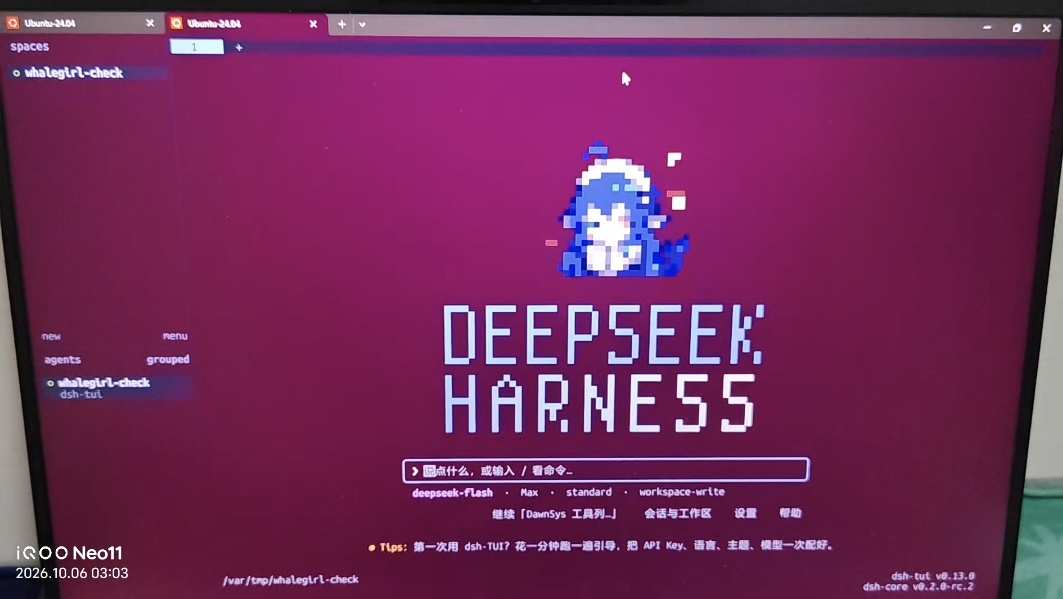
实拍(Windows Terminal + WSL,会话 whalegirl-check):作为复现案例的鲸娘吉祥物正常渲染并持续动画,不再"闪一下就没"。任何画图的程序都会得到同样的结果——要么显示图像,要么显示它自己的字符画/占位保底,而不是两者都没有。
A photo of the screen (Windows Terminal + WSL, session whalegirl-check): the whale-girl mascot used as the reproduction case renders and keeps animating instead of flashing once and going blank. Any image-drawing program gets the same outcome — either its images or its own text/placeholder fallback, never neither.
| 文件 / File | 用途 / Purpose |
|---|---|
README.md |
本文件,使用说明 / This file, usage guide |
PATCH-NOTES.md |
补丁技术说明(中文/英文对照):改了什么、冲突热点、升级注意 / Technical notes (Chinese/English) |
BUG-REPORT-DRAFT.md |
给上游的 bug 报告草稿(英文正文可直接粘贴,中文说明怎么提交)/ Upstream bug report draft (paste-ready English body) |
0001-fix-stop-advertising-kitty-graphics-herdr-cannot-del.patch |
补丁本体,可用 git am 应用 / The patch itself |
verify-probe.py |
自查探针:在任意 herdr pane 里跑,看终端有没有被“骗” / Self-check probe |
herdr-patched-linux-x86_64 |
已编译好的补丁版二进制(Linux/WSL 用) / Pre-built patched binary for Linux/WSL |
作者本机(WSL)已经装好:release 构建、独立文件名 ~/.local/bin/herdr-patched,没有覆盖日常用的 herdr。从 GitHub / Release 下载的读者请看包内的 INSTALL.md。
On the author's machine (WSL) it is installed as a release build under a separate filename, ~/.local/bin/herdr-patched, and does NOT overwrite the daily herdr. If you downloaded this from GitHub or a Release, follow INSTALL.md in the package.
herdr-patched --session patched # 建议起一个独立会话,不碰你的 default 会话-
它和官方版共用配置(
~/.config/herdr/config.toml,主题/键位都在),但会话是独立的(socket 在~/.config/herdr/sessions/patched/)。 -
千万别
herdr-patched不加--session直接跑:那会去连你正在运行的官方 server,变成“补丁客户端 + 官方服务端”的混合体,图形能力判断在服务端,等于没修。 -
想彻底替换日常版本:先把官方二进制备份(
cp ~/.local/bin/herdr ~/.local/bin/herdr-official-0.9.3),再把补丁版复制成~/.local/bin/herdr,然后重启 server(herdr server stop会结束现有 pane 里的进程,包括正在跑的 agent,务必想清楚)。回滚就是把备份复制回去。 -
补丁版对所有在 pane 里画图的程序生效,不需要为任何程序单独配置。
-
⚠️ herdr update会把~/.local/bin/herdr覆盖回官方版(这正是“独立文件名”的原因)。 -
It shares the same config as the official version (
~/.config/herdr/config.toml), but uses an independent session (socket at~/.config/herdr/sessions/patched/). -
Never run
herdr-patchedwithout--session: it would connect to your running official server, creating a "patched client + official server" hybrid — the graphics capability check lives on the server side, so the fix would be ineffective. -
To fully replace your daily version: backup the official binary (
cp ~/.local/bin/herdr ~/.local/bin/herdr-official-0.9.3), copy the patched binary to~/.local/bin/herdr, then restart the server (herdr server stopwill kill processes in existing panes, including running agents — think twice). To roll back, copy the backup back. -
The patched build applies to every program drawing images in a pane; nothing needs per-program configuration.
-
⚠️ herdr updatewill overwrite~/.local/bin/herdrwith the official version (that's why the patched binary has a separate name).
在任意 herdr pane 里跑:
Run inside any herdr pane:
python3 verify-probe.py # 在解压出来的包里直接跑;本机开发目录是 ~/dev/herdr-worktrees/kitty-graphics-patch/-
Windows Terminal / GNOME Terminal / Alacritty:
repr:里应该只有\x1b[?62;22c,没有OK→ 正常; -
kitty / Ghostty / WezTerm:应该看到
\x1b_Gi=31;OK\x1b\\→ 也正常(这种终端本来就该显示图片)。 -
Windows Terminal / GNOME Terminal / Alacritty:
repr:should contain only\x1b[?62;22c, noOK→ correct; -
kitty / Ghostty / WezTerm: you should see
\x1b_Gi=31;OK\x1b\\→ also correct (these terminals are supposed to display images).
视觉检查(任选一个会画图的程序):最方便的是 dsh-tui 把 companion.skin 设成 whaleGirl,吉祥物应当稳定显示、会动,不再闪一下就没。
Visual check (any image-drawing program works): the easiest is dsh-tui with companion.skin: whaleGirl — the mascot should display steadily and animate, no more flash-and-gone.
每次升级后跑三步自检:
herdr --version(确认在用哪个二进制)- 跑一次
verify-probe.py - 用一个会画图的程序看图像或保底是否稳定显示
任一不满足就回退旧二进制。
Run these three checks after every upgrade:
herdr --version(confirm which binary is in use)- Run
verify-probe.py - Check that an image-drawing program shows its images or its fallback steadily
If any fails, roll back to the older binary.
四种情况:
- 上游自己修好了(最可能)→ 补丁退休:升级官方版后探针若已“没有 OK”,直接删掉补丁,用官方版。
- 补丁打不上了 →
git fetch origin && git rebase origin/master,冲突热点写在PATCH-NOTES.md的 补丁打不上了怎么办 / If the patch stops applying 一节。 - 上游升级了端点代际/握手字段 → 把能力字段迁到新 codec,必须保持可选 + 默认 true,否则会误禁 kitty/Ghostty 用户的图片。
- 只是升级了官方版、补丁版没跟上 → 别混用(客户端的探测 + 服务端的判断必须同一份二进制)。
Four scenarios:
- Upstream fixes it (most likely) → Retire the patch: after upgrading the official version, if the probe shows "no OK", delete the patch and use the official version.
- Patch no longer applies →
git fetch origin && git rebase origin/master. Conflict hotspots are inPATCH-NOTES.md, section If the patch stops applying. - Upstream changes endpoint generation/handshake fields → Migrate the capability field to the new codec. It must remain optional and default true, otherwise you'll accidentally disable images for kitty/Ghostty users.
- Only the official version was upgraded, patch version lags → Do not mix them (client-side probing and server-side decision must be the same binary).
-
Windows 原生客户端(
herdr.exe+ Windows Terminal):宿主探测只做了 Unix 侧,Windows 那路保留旧行为,所以那边问题依旧——对所有画图的程序都一样。 -
已经启动着的程序不会自动改(协议是启动时一次性选定的),要重启那个程序。
-
盲目试 Kitty、不做探测的程序照旧会画看不见的图(这不是 herdr 的问题,但症状一样)。
-
Windows native client (
herdr.exe+ Windows Terminal): host probing is Unix-only; Windows keeps the old behavior, so the issue persists there — for every image-drawing program. -
Already-running programs won't change automatically (protocol is chosen once at startup). Restart the program.
-
Programs that blindly try Kitty without probing will still draw invisible images (not herdr's fault, but same symptom).
-
补丁版和官方版共用配置,但会话独立。推荐用
--session启动独立会话,避免影响正在运行的 agent。 -
替换日常
herdr二进制前,务必先备份,并清楚herdr server stop会终止 pane 里的进程。 -
herdr update会覆盖你替换的二进制。 -
The patched version shares config but uses an independent session. Use
--sessionto avoid affecting running agents. -
Before replacing your daily
herdrbinary, back it up and understand thatherdr server stopkills processes in panes. -
herdr updatewill overwrite your replaced binary.