A speculative OS and keyboard that protect flow state by adding physical resistance instead of another dashboard.
Built in 36-ish hours at Fig Build (March 2026). Not submitted: the team finished roughly five minutes past the deadline. No prizes, no Devpost.
Friction asks what a computer would do if it treated your attention as something worth protecting, not something to extract. You open a session with a focus window (capped at five hours, per attention research) and drag in your tasks from email, notes, or Slack. A short song-design step doubles as a micro-focusing exercise before you start. Then Friction disappears: no timers, no reminders, no nagging progress bar.
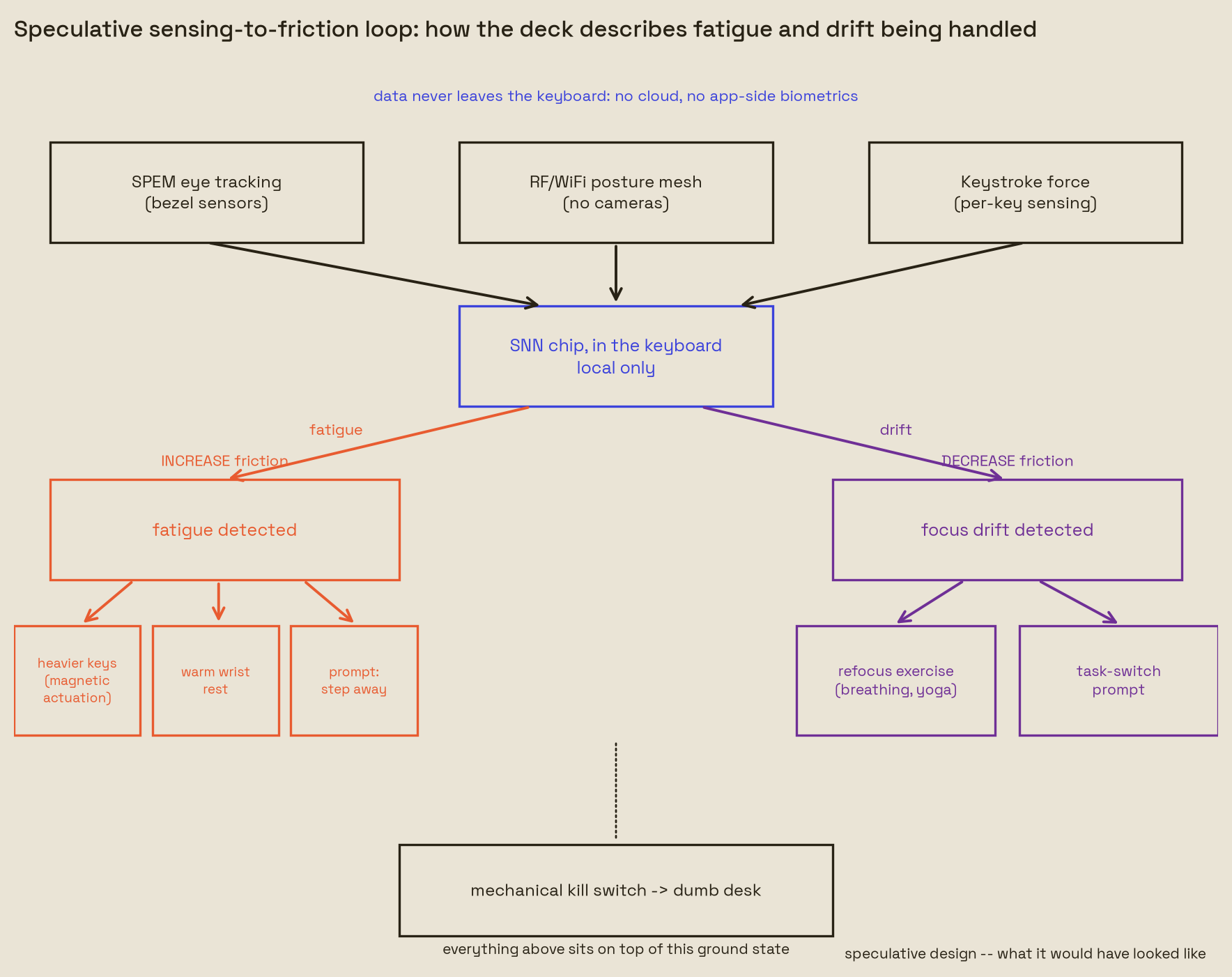
It reappears through a keyboard, not a notification. When sensors read fatigue building, the keys get physically heavier and the wrist rest warms, signaling a break before burnout instead of after. When focus drifts instead of fatigue rising, Friction backs off the resistance and offers a refocus exercise (breathing, a stretch) or a prompt to switch tasks. The end-of-session recap uses a depth-of-field metaphor instead of a score: sharp footage for time spent in flow, gaussian blur for the stretches where fatigue won.
The privacy model is part of the pitch, not a footnote. The brain sensor talks to the keyboard, never to the app, and trend data stays local on the keyboard hardware. A mechanical kill switch on the side reverts everything to a dumb desk.
The repo is a Figma Make export: a React + Vite app that simulates the whole system as a fake desktop OS, not a working OS or real hardware.
ControlPanel(src/app/components/control-panel/) stands in for the neural/biometric sensors — sliders for focus, fatigue, and engagement drive everything downstream.DesktopOS(src/app/components/desktop/) is the fake OS itself: a windowed desktop with mock Slack, Mail, Notes, VS Code, Calendar, Calculator, and Terminal apps, all built on Radix UI primitives.FrictionOverlay(src/app/components/friction-app/) sits on top of the desktop and reacts to the biometric state in real time; it's the state machine for the six session sub-states described below.- Context providers (
PersonaContext,SessionContext,BiometricContext,KeyboardContext,WindowManagerContext) wire the simulated sensor state through the whole tree.
During an active session the overlay cycles through six states tied to the focus/fatigue sliders: pure invisibility at peak focus, a one-key "tactile strike" to close out a task without breaking flow, a passive task bar as focus drifts, a low-focus pivot into breathing/posture/audio prompts, a "digital moss" overlay you swipe away to resume after a distraction, and a hard intercept (a heavy vignette and molasses-slow typing) when fatigue crosses a burnout threshold. A closing "Mirror" screen renders the session as a depth-of-field timeline instead of a score.
Run the fake OS itself with npm install && npm run dev.
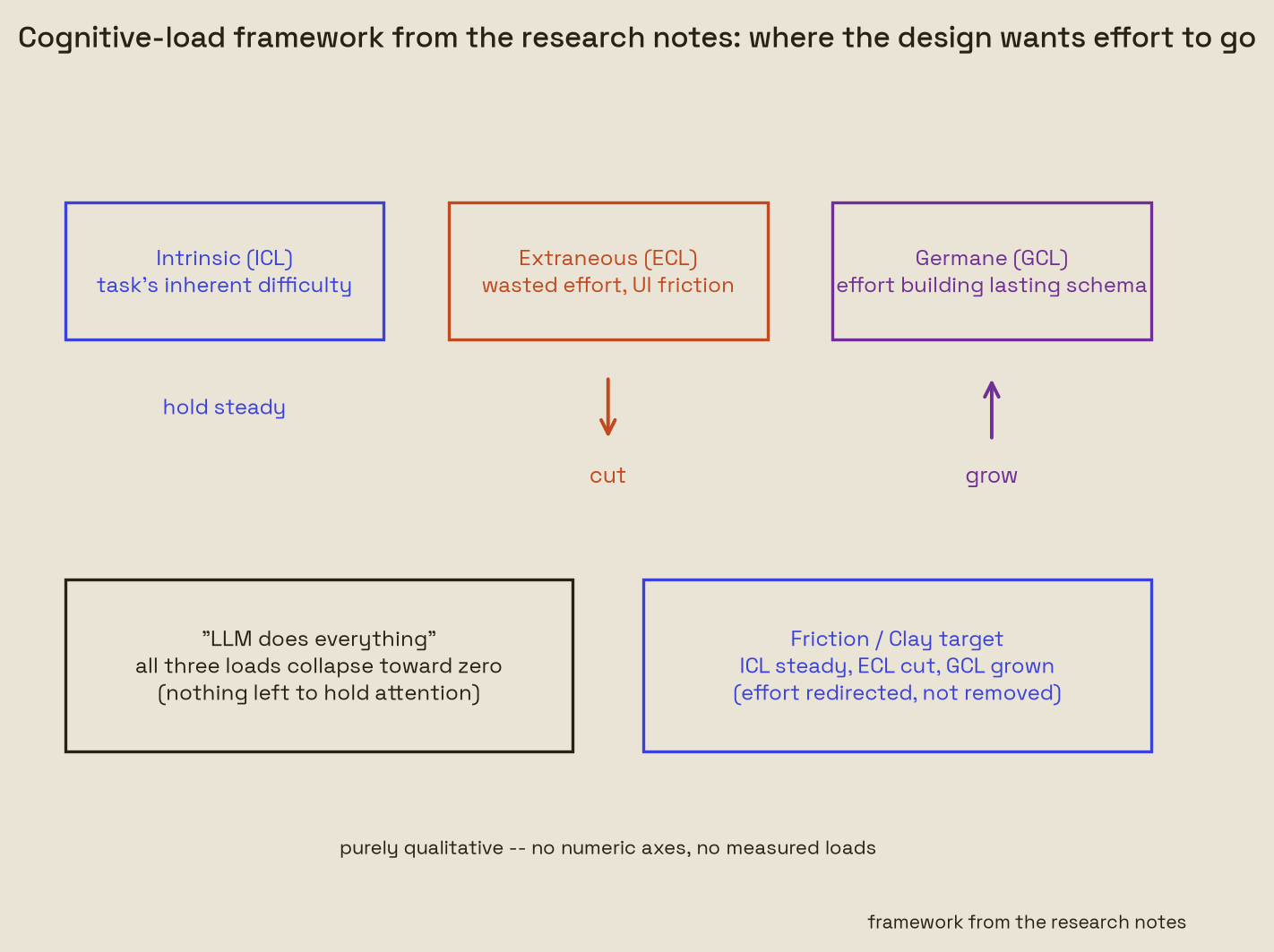
The real deliverable is the Figma Make export above — a design prototype, not working hardware or a working OS. prototype/ has no data to show, so instead of fake charts it draws two explanatory diagrams: what the sensing-to-friction loop was meant to do, and the cognitive-load argument (intrinsic/extraneous/germane load) carried over from Clay/Gyrus's research. No invented metrics, no numeric axes — boxes, arrows, and labels only.
Regenerate them locally:
MPLCONFIGDIR=/home/arya/projects/hackathons/.mplcache /home/arya/projects/hackathons/.venv/bin/python prototype/friction_prototype.py
Before a session, the deck specifies three calibration phases to establish an individual baseline — none of this is implemented in the code, it's part of the product spec:
- Visual (SPEM) — a controlled visual exercise tracks Smooth Pursuit Eye Movements from bezel sensors to learn what focused attention looks like for this user.
- Spatial (RF posture) — WiFi/RF signal reflection maps posture without cameras, learning to tell upright, engaged posture apart from slumped, fatigued posture.
- Kinetic and acoustic — magnetic key resistance and binaural audio get tuned to the user's typing force and environment.
The three baselines feed the same downstream logic: fatigue and drifting focus increase friction, recovery and re-engagement decrease it.
- Arya Garg (github.com/Aryagarg23): a different crew from the Clay/Gyrus team. Friction asks the same question Clay asked, how a tool protects thinking instead of extracting it, at the OS and hardware level instead of the browser.
- Haley Potter — linkedin.com/in/haley-potter-
- Miami Celentana — linkedin.com/in/miami-celentana
- Writeup: aryagarg23.com/writing/friction
- Site: aryagarg23.com
- Devpost profile: devpost.com/Aryagarg23 — no Devpost page for this project, it wasn't submitted
- Gyrus — agentic browser that supports curiosity instead of replacing it (WeaveHacks 2025)
- WhiteBox — traceable GraphRAG over medical literature (Future of Data 2024, 1st place)
- G-Code-Assembler — G-code assembly + STL visualization (MakeUC 2024, Kinetic Vision winner)
- Terminally-Addicted — Spotify, GitHub, GPT and YouTube without leaving the terminal (HackOHI/O 2024)
- Memento — digital memory journal for Alzheimer's patients and caregivers (RevolutionUC 2024, 3rd overall)
- Buycott — barcode scan → parent company → NLP stance on social issues (MakeUC 2023, 1st overall)
- SignLink — video calls with real-time ASL fingerspelling to text (BoilerMake X 2023)
- Kuka Arm Viz — interactive 7-DOF robot arm in WebGL with inverse kinematics (RevolutionUC 2023)
- Hi-Five — anonymous friend-matching on OCEAN personality vectors, 48-hour reveal windows (SASEhack 2024)