"Students with difficulties in studying"
In order to tackle this problem, we would implement a calendar / task manager app so that students can not just have a to-do list and a personal calendar, but also have an encouraging factor for students to complete tasks and do their schedule.
The added feature is that, the more tasks a user completes, an object gets bigger (e.g., a growing tree/fire).
Please contact student C20361521 Twila Habab for the API key
This is the homepage of the app.
Twila Habab C20361521
Working branch: Home-Page
This is the homepage of the app. It would display the following:

- Greetings to the user depending on the time of day
- Weather details depending on the current location
- Total tasks due
- Buttons leading to other pages
The app can grab the current location details when user approves permissions provided by the app at startup
The app gets current time, ergo displaying greetings to the user:

- Good Morning
- Good Afternoon
- Good Evening
- Good night
The OpenWeatherAPI is used to get weather data depending on the location (through coordinates). Weather icons are also included.

- Skies / Atmosphere
- Real temperature (in degrees celsius)
- Feels-like temperature (in degrees celsius)
- Improve layout
- Accounts
  - Good Morning, <user-here>
  - User storage (task storage would be different depending on the user)
- Display total number of tasks
Getting current time
OpenWeatherAPI
Alexander Dergach C20401562
Working branch: Progress-Page
This is the Interactive Progress Tracker. It displays the following:
- Displays a custom image that tracks the users tasks, It grows or shrinks depending on completed tasks out of the total tasks and calculates the appropriate growth rate

onTranslation - Tracks and listens to the movement of the phone
onRotation - Tracks and listens to the rotation of the phone
animateImage - Handles the animation of the parameters
calculateProgressFlame - Calculates the inputed tasks and tasks completes and increases image size accordingly
onResume - Registers the rotation and accelemoter
onPause - UnRegisters the rotation and accelemoter
- Tracks and listens to the movement of the phone
- Tracks and listens to the rotation of the phone
- Gyroscope, once mobile device is rotated on the X,Y,Z axis it changes the color of the main object in the center
- Accelerometer, tracks the mobiles movements and once it is moved on its axis's it performs certain animations, up and down the image bounces, left to right the image shakes
- Animation, library to make the image animate
- Due to out date and un supported 3D libraries for Java in Android studio, was unable to implement
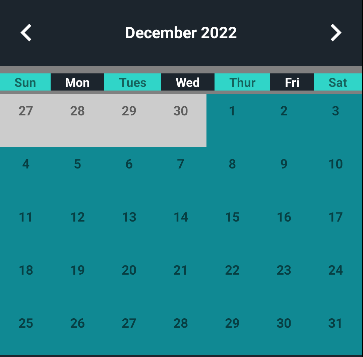
The Calendar / Existing List Task Page will display a Custom Calendar displaying the current date, month, year along with the current existing tasks.
The page will be halved with the two things - Calendar and Existing Tasks.
The Custom Calendar has a set of list dates, year and the current month will be highlighted in turquoise while days that aren't are in white. I have attempted to include returning dates, however I did not have the time to include it.
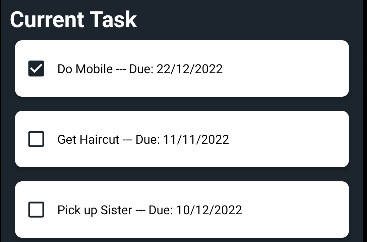
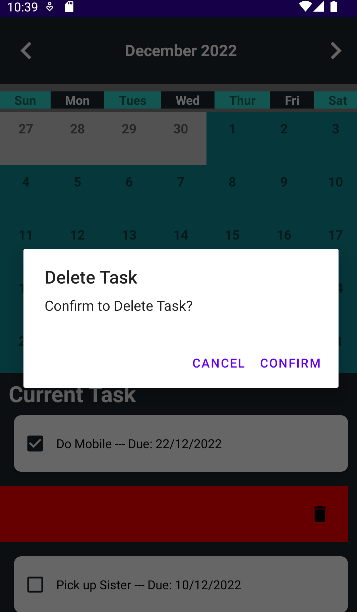
The Existing List will display the current lists available and you are able to tick it or untick if it has been done. This is displayed with the help of a Recycler View. I have also implemented a swipe functionality so when a task is swiped left, it allows the user to delete that task.
Delete Confirmation:
Jaycel Estrellado
Working branch: Calendar
Adapter -> MyGridAdapter, ToDoAdapter
Model -> CalendarModel, ToDoModel
CalendarTask
CustomCalendar
RecyclerItemTouchHelper
SplashActivity
Swipe functionality for deleting a task
If I had more time, I couldve implemented the Add Task and Returning all tasks within the calendar page. It was very disappointing to have run out of time as many projects are due within the same week.
Name and Student number Bongani Moyo C20309081
Java classes and each with a brief description AddTask Java Class / task_list xml
Task XML - I used a linear layout with nested layouts inside All for Name, Date, Time and Description. Name and Discription are both made using a textview and edit text xml so the user can insert data Date uses a Datepicker which incorparates a spinner for the user to choose date Time uses a Button which just gets the user input after they click what time they want
AddTask Java - I connected to the Database created by David in order to add tasks, At first we had the date in one string so i had originally created code to do that but we changed the design and made it all separate integer values The time i created using a timepickerdialog and the rest of values were added normally with the user typed input. category id auto adds and allows the task to add to the specified category the completed tasks checks when user says the are finished.
Extra features not included from the brief Possible features if you had time i would have added a reminder or alarm for the task due time
David Davitashvili C20406272 PageCategories.java: -This page lists all the categories where each row is clickable (see tasks of that category) and holdable (delete).
PageTasks.java: -This page lists all the tasks, their due dates and times of the category that was pressed. They are only able to delete (hold).
AddCategory.java: -This page adds a category to the categories list and inserts it into the database.
TimageDatabaseHelper.java: -Constructs the database and its tables.
TimageManager.java -Where all the CRUD functions are.
A feature not in brief: AlertDialog
Add view category/task pages, edit category/tasks pages