The application has five destinations: Home, SDKs, Plugins, Tasks and Settings. On wide windows they sit in the side rail; on narrow windows they move to the bottom bar.
- The vfox version and where its executable was found, with a refresh button.
- The plugins that have a version in use; tapping one opens it on the SDKs page.
- The health of vfox and the installed SDKs (Health), with Check health,
Adopt and Reinstall where
vfox doctorfinds drift or old installs. - How to use the versions in a terminal, with the line to add to
~/.bashrcand a copy button.
A list of your installed plugins with their current version. Pick one to see its detail: description, homepage, and two tabs (three for the plugins that the application knows, see Java, Node.js, Flutter, Gradle, Go and Python). On a wide window the detail is always open, the plugin in use until you pick another.
Installed lists the installed versions, newest first. The current version
is marked; the others offer to become the global default. Each version can
also be pinned to a project (in its own directory), have its install path
copied, be reinstalled with a fresh copy, be named an alias, or be uninstalled.
Linked versions show their directory
(17-system (linked → /opt/jdk)); uninstalling one removes the link only.
Aliases ([alias: j17], @j17 after the name) work wherever a version does;
the Options tab lists, names and removes them. Removing the plugin
itself deletes all its versions, after a confirmation.
Available searches the versions you can install: filter by text, show
only versions with a note (such as LTS) or only installed ones. Installing
shows live download progress and can be cancelled. Each listed version offers
Install, and Install and use in the menu next to it. The menu at the end of the
row above the list (More ways to add) has the other ways to add an SDK:
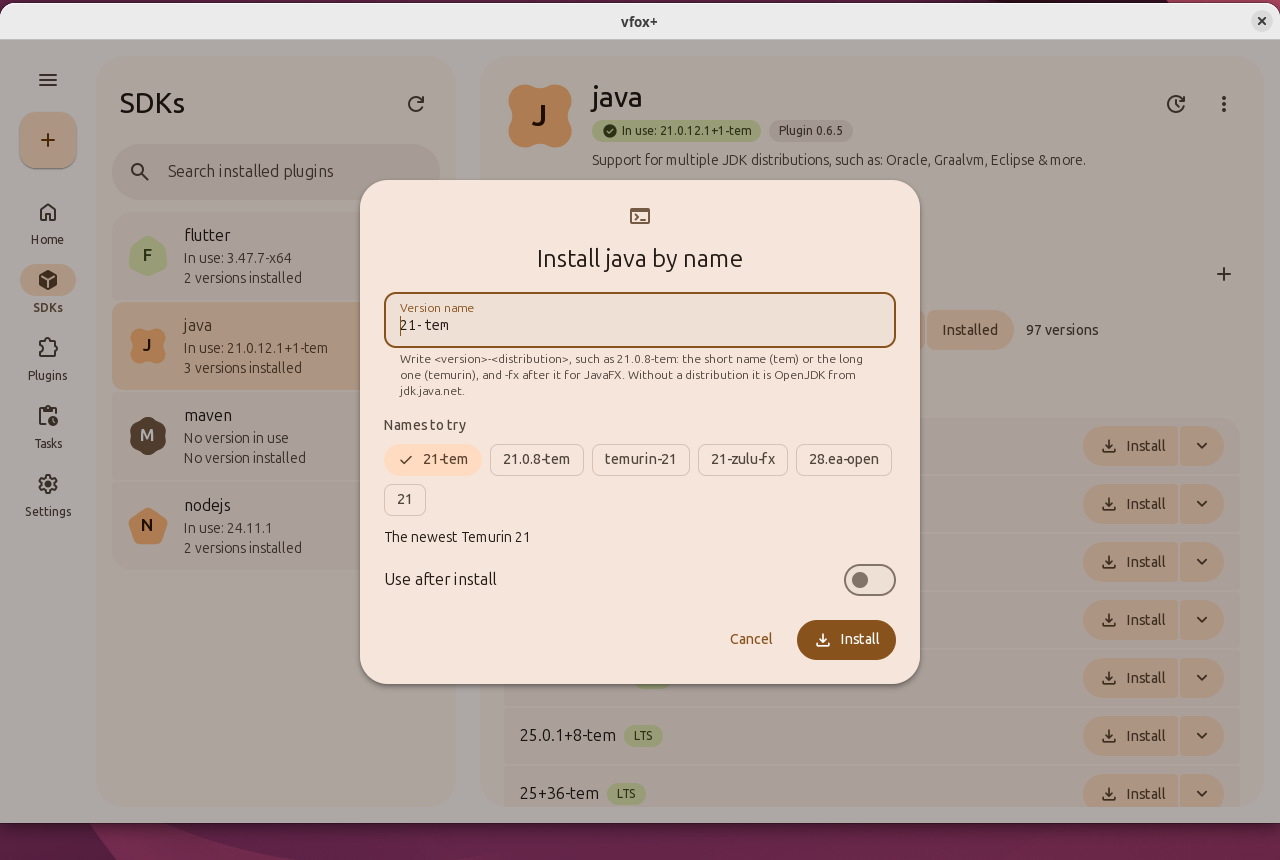
Install by name… installs a version that is not in the list by the name vfox
understands, such as 24 for the newest Node.js 24, with Use after install to
switch to it at once; Detect and link adopts what is already on the machine
(vfox link --detect); Link existing… links a directory you name as the version
you name.
The plugins vfox-java,
vfox-nodejs,
vfox-flutter,
vfox-gradle,
vfox-golang and vfox-python do more than list
versions, and vfox-plus offers all of it in the desktop application and in the web
interface of the gateway. The phone app has the same SDK pages, except for the
differences that What differs from the desktop application
lists. A plugin that you added under another
name, as vfox add --alias coffee java does, offers the same as the plugin it was
made from:
- Distributions of Java. A plain
vfox search javalists OpenJDK from jdk.java.net only. The button above the list (Distribution: OpenJDK) opens a list of the 31 distributions, such as Temurin, Zulu, Liberica, Corretto and GraalVM, which you filter by name, short name or maker; All distributions lists every one of them, about 2,700 versions, and says which each is of. The choice is remembered, for the next time you open the plugin and after a restart; it is kept in the settings of the desktop application, so the gateway and the phone app show the same one. It is the same asvfox search java tem. - Filter chips. Chips above the list narrow it by what the plugin says of its versions: LTS and JavaFX for Java, LTS for Node.js, the channels (stable, beta, dev, OpenHarmony) and the architectures (x64, arm64) for Flutter, and GraalPy and GraalPy Community for Python. Chips of one row are alternatives; rows narrow each other.
- Install by name. vfox resolves some names while it installs:
24is the newest Node.js 24 andlatestthe newest release of all,stableandbetaare the releases the Flutter channels point to,21-temis the newest Temurin 21,21-zulu-fxZulu 21 with JavaFX,28.ea-openan early-access OpenJDK,3.13the newest Python 3.13 and3.13tits newest free-threaded build, andlatestthe newest Gradle, Go or standard CPython release. The dialog suggests such names for the plugin and says what each one stands for. A channel is replaced by the release it points to, which is the name that Installed shows afterwards. - Installed names. An installed Java version names its distribution, with
JavaFX if it has it, and an installed Flutter version its architecture.
Linked versions keep the name you gave them (
17-system,brew).
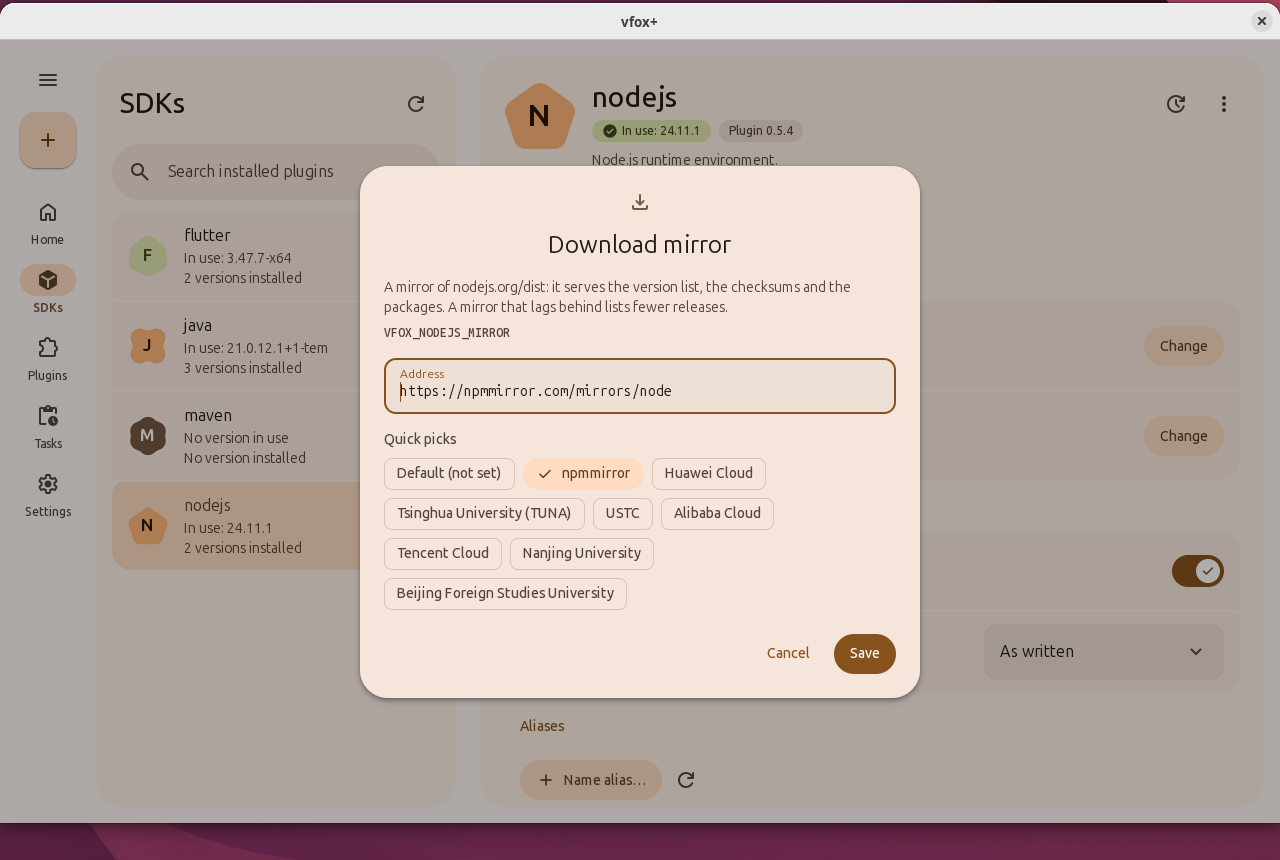
| Install by name | A download mirror |
|---|---|
 |
 |
The Options tab holds what is particular to the plugin:
- Plugin variables: the variables that the plugin reads, with the mirrors
that were checked to choose from: the GitHub mirror of Java and Flutter, the
download mirror of Node.js, the storage mirror of Flutter, the Gradle mirror
list, the Go mirror and the python.org and uv-build mirrors of Python. They are added to
every vfox command that the application runs, and the application checks that
an address starts with
http://orhttps://. - Version files: a switch with the files that the plugin reads under it,
.sdkmanrcfor Java,.node-versionand.nvmrcfor Node.js (which work both ways on vfox 1.1.0: leaving a project switches back),gradle/wrapper/gradle-wrapper.propertiesfor Gradle,.python-versionfor Python, and, for Node.js and Python, the choice of the version that a file names. - Notes: the few things that surprise people and that no button says, such as
that Java without a distribution is OpenJDK from jdk.java.net, which keeps only the
newest releases, and that a Flutter that vfox manages is not upgraded in place, and that a partial name such as
3.13never picks a free-threaded (3.13t) or pre-release build. How a name is written, and the common names, are in the Install by name dialog. - Adopt, drift and shadowing: when a JDK, Gradle, Flutter, Go or Python is already on
the machine, Detect and link adopts it instead of downloading it again;
when an SDK changes in place, the Health card on Home and
vfox usereport drift (Reinstall it, Adopt older installs); when another tool shadows the one of vfox, the health card names it and what to do (path.mode,path.preserve). - Documentation: the pages of the plugin that explain it, in your language.
The plugins vfox-maven and vfox-php do more than list versions too; the desktop application and the web interface offer it alike, and the phone app offers it too:
- Install by name.
latestinstalls the newest stable release. A pre-release installs by its name, such as4.0.0-rc-7. For PHP,latestis the newest release, which on Windows is the thread-safe build. - PHP builds. On Linux and macOS a plain version is the non-thread-safe build;
-ztsnames the thread-safe one, as in8.5.12-zts, andvfox search phpdoes not list-ztsbuilds. On Windows a plain version is the thread-safe build, and-ntsnames the non-thread-safe one. - Filter chips. On Windows, PHP has a Build filter with the chips TS and NTS. Linux and macOS have no such filter.
- Build options. On Linux and macOS, the Options tab lists PEAR, mhash and PCRE JIT,
each with Change. From PHP 7.4 PEAR is left out by default, and
PHP_WITH_PEAR=yesbuilds with itspearandpeclcommands; from PHP 8.4 the mhash functions are left out by default, andPHP_WITH_MHASH=yesbuilds with them. Both switches print a deprecation warning when set. PCRE JIT is on by default. - Free-text options.
PHP_CONFIGURE_OPTIONSandMAKEFLAGStake any text, so the Options tab does not offer them. Set them in Settings → Environment variables asKEY=VALUE: the application passes that list to every vfox command. - Adopt. Detect and link adopts the Mavens that
M2_HOMEandMAVEN_HOMEname, and those of the system package, Homebrew, SDKMAN, asdf, mise, Scoop and Chocolatey. Maven 1 is not found that way; use Link existing…. It also adopts a PHP that is already installed, which needs vfox 1.1.0 or later. - Java runtime. Maven runs on a Java runtime that the plugin does not install: put a JDK
on
PATHor setJAVA_HOME. Maven 1.1 runs on JDK 8 only. - Build time. On Linux and macOS, PHP is compiled from its source, which takes a while. The build checks its dependencies first and names any missing packages, so nothing is compiled before a missing one is reported.
- Windows runtime. On Windows the install adds the Visual C++ 2015-2022 runtime when it is missing, after Windows asks for permission.
The plugins vfox-dart, vfox-kotlin and vfox-dotnet offer these extras in all three interfaces:
- Dart channels.
stable,devandbetainstall the newest version on that channel, resolved when you install. A version published on several channels is listed once for each, sovfox search dartcan show the same number twice, with the channel in the note; the Channel filter picks one.latestis the highest number in the list, which may be a dev build; usestablefor the newest stable SDK. The plugin does not install arm64 builds, although the official Dart archive has arm64 SDKs for Linux, macOS and Windows. - Kotlin. A version is a Kotlin release in full, such as
2.1.0;latestis the newest release on the Kotlin release page. If that page cannot be read, search and install say why instead of guessing a version. Kotlin/Native is bundled on hosts that have a prebuilt archive.kotlincandkotlinc-nativeneed Java 17 or newer onPATH, which the plugin does not install. - .NET names and variants. A channel or release such as
8,8.0or8.0.34installs the SDK;-runtimeand-aspnetcoreinstall smaller distributions, and the Distribution filter narrows the list by them. A channel andlatestselect the newest stable release, and a preview only when there is none; an exact version such as11.0.0-rc.3names a preview. A version that matches no release for your platform fails the install with an error that names it, and installs nothing. The plugin setsDOTNET_ROOTand thePATH, and on Linux the SDK also needs ICU, libssl and zlib. - Adopt and no variables. Detect and link adopts SDKs already on the machine —
Dart SDKs including the one bundled with Flutter, Kotlin compilers from SDKMAN,
asdf, mise, Homebrew, IDE bundles and
KOTLIN_HOME, and .NET SDKs including those named byDOTNET_ROOTandDOTNET_HOME— and needs vfox 1.1.0 or later. These three plugins read no variables and no legacy version files, so their Options tab carries only the guide, the names and the documentation.
The plugin vfox-cmake offers these extras in all three interfaces:
- Names. Write a release in full, such as
3.31.6, or a release candidate such as4.5.0-rc1. A line such as3.31is no release, and the install fails.latestinstalls the newest release. - Release candidates. The plugin lists a candidate directly below the release it
belongs to, and a candidate whose release is not out yet goes last, so
latestis a release as long as the list has one. The Release candidate filter has a chip for each number,rc1torc6, and keeps the versions that end in it. - Adopt. Detect and link adopts a CMake that is on
PATH, inCMAKE_HOME, in the usual system places, or installed by Homebrew, Scoop or Chocolatey. SetCMAKE_HOMEin Settings → Environment variables asKEY=VALUE: the application passes that list to every vfox command. - Needs. The plugin needs vfox 1.1.0 or later, and reaches jsDelivr for the list and cmake.org for the archives; it has no mirror to set. It reads no variables and no legacy version files, so its Options tab carries only the guide, the names and the documentation.
- Search the registry and filter official or community plugins.
- Each card tells whether the plugin is already installed and opens its homepage.
- Add a plugin from the registry, from a URL, or from a local
.ziparchive or.luascript file — plus update all plugins at once. - Installed plugins offer update and remove.
Every install (including install and use, reinstall, link and link detect, alias set and unset, doctor adopt), uninstall, switch, add, remove and update becomes a task, newest first. Each task shows its state (queued, running, succeeded, failed, cancelled), live progress for running installations, and the output log with a count of dropped earlier lines; a failed task keeps its full log on disk and shows where. Failed and cancelled tasks can be retried; finished ones can be cleared. When a task finishes while you look at another page, a message reports it.
- Appearance: light, dark or follow the system; use the desktop accent colour or pick one of the swatches; the language (English or 简体中文).
- Other devices: whether phones, the gateway and other computers on the network may connect, over HTTPS, and whether vfox-plus keeps running without its window for them (lightweight mode). See Other devices and the lightweight mode.
- vfox: which executable is used (detected automatically, or pick your own) and extra environment variables such as download mirrors.
- vfox configuration: proxy, registry, storage directory, legacy version
files, caches and timeouts, diagnostics (
diagnostics.onUse) and PATH order (path.modebaseline by default,path.preserve) — switches, menus and text fields; clearing a field resets it. Aliases (vfox alias) and linked versions (vfox link) are read from vfox itself. - About: version, source code and dependency licenses.
If no vfox executable is found, or the one found does not work or is older than vfox 1.1.0, every page explains how to install vfox and offers to locate the executable or retry. Settings stay reachable so you can point the application at vfox yourself.