

This is an implementation of OpenAI gyms Frozen Lake using JAX and Jumanji. OpenAIs Frozen Lake implementation has many functions, but it uses numpy whihc is quite a bit slower than jax. This package uses jax.numpy which is 86 times faster than numpy when GPU is available. This package is built using Jumanji, meaning that users can write any functions that they need and seamelessly implement them within this or any Jumanji environment.
The Frozen Lake environment is a playground for people to learn about RL algorithms. The agent (known as the elf) must reach the goal without falling into any holes. It represents a simple gridworld problem where an agent must go from point A to point B. Unlike the OpenAI version, the ice isn't slippery so the agent won't accidentally slide from one grid block to the next. This implementation is shown on the left and OpenAIs is on the right. OpenAI supports multiple render forms but our package only supports one, which is shown below. Animation is also not supported in this package.
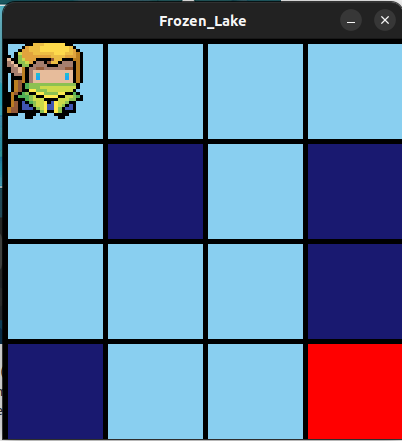
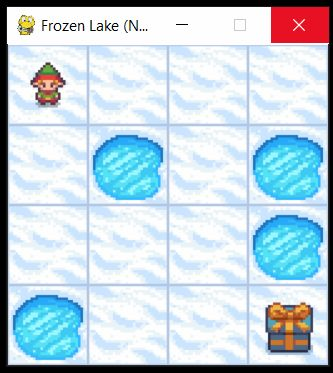
The Dark blue squares represent terminal states or equivalently holes, and the red squares represent the location of the gift (aka reward). All blocks that aren't light blue will have terminal states.
TLDR: See the testing.py file
To get started, we need to install the necessary pacakges jumanji and jaxlib since this repo is built on top of these pacakges. This can be done by following instructions on the links
https://github.com/instadeepai/jumanji (Jumanji)
https://jax.readthedocs.io/en/latest/installation.html (Jax)
Be Careful when installing JAX on Windows, if done incorrectly, it can lead to BSOD problems!!
Once Jaxlib and Jumanji are running, we can clone this repo.
gh repo clone qiulinlx/FrozenlakeNow we can begin coding up the Frozen Lake environment easily. The environment and the elf agent is initialsied and setup in the code below.
import Gridworld
from jax import random

env= Gridworld.Frozenlake()
key = random.PRNGKey(1)
env.reset(key)
Here are some simple functions that you'll need in your RL-algorithm. These functions will be able to return information about the environment and the agent such as the state of the env, the position of the agent and the reward and the action that the elf will take.
from jax import jit
state, timestep = jit(env.reset)(key)
action = env.action_spec().generate_value()
env.step(state, action)
In order to visualise the environment and the position of the agent, we need to to import Visual as a pacakage and run the function render. The render function requires the package pygame to visualise.
import visual
grid=state.grid
elfpos=state.elf_position
Visual.render(state.grid, elfpos)