Good UI to Bad UI #25

Description

🎯 Good UI from Bad UI
🌟 OPEN TO ALL 🌟
🔖 Points: 30
⏳ NO SUBMISSION WILL BE ACCEPTED AFTER 9st January, 11:59 P.M.
🧩 Task Description
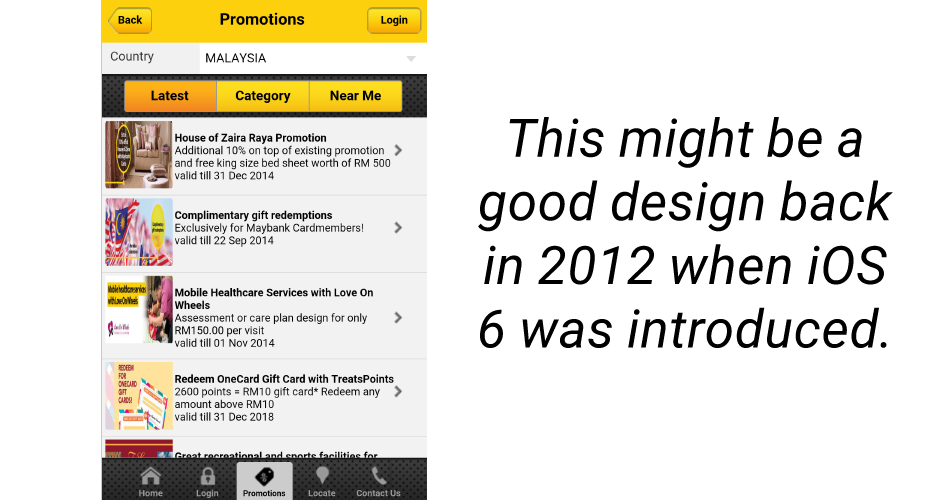
You are provided with screens of Bad UI design in the task description.
Your task is to redesign this Bad UI into a Good UI, while keeping the core purpose and content the same.
You are required to design both the screens.
The goal is to demonstrate how thoughtful UI/UX decisions—such as spacing, hierarchy, alignment, and readability—can significantly improve usability and user experience.
🚫 Do NOT redesign the flow or change the functionality.
✅ Focus only on visual clarity, structure, and usability improvements.
❌ Bad UI – Screen 1

❌ Bad UI – Screen 2
🎯 Requirements
Your redesign should improve:
- Layout structure and alignment
- Visual hierarchy (what the user sees first)
- Spacing and consistency
- Typography readability
- Color usage and contrast
- Overall usability and clarity
You must:
- Keep the same content as the Bad UI
- Preserve the same screen purpose
- Redesign only the UI, not the feature itself
🚫 Important Rule — No AI Slop Allowed
- ❌ AI-generated UI designs are NOT allowed
- ❌ Do not submit auto-generated layouts or visuals
- ❌ Copy-pasting templates without thought will be rejected
- ✅ Your redesign must show intentional design reasoning
AI tools may be used only for learning or reference, not for generating the final design.
✨ Optional Enhancements
- Brief notes explaining what you fixed and why
- Before → After comparison frame
- Subtle micro-interactions
- Improved accessibility (contrast, tap targets, readability)
📌 Submission Guidelines
- Submit your Figma file link inside a
.txtfile - Place the
.txtfile in the Good UI from Bad UI folder of this repository - Give a brief description explaining your work and design decisions
- Your redesign must be clear and easy to evaluate
- Your Figma file must be accessible to everyone
✔ Access: Anyone with the link
✔ Permission: View only
Submissions with private, restricted, or request-only links will be invalid.
✅ Minimum Design Criteria (MDC)
Your submission must:
- Clearly improve the provided Bad UI
- Maintain the original intent and content
- Demonstrate good spacing, hierarchy, and alignment
- Feel polished and professional
- Be understandable at first glance
💬 Need Help?
If you have any questions or need clarification, feel free to reach out on Discord.
We’re happy to help! 😊
✨ Good design is fixing what’s broken — thoughtfully. ✨