AI Toolkit is an extension pack that includes Microsoft Foundry. For Microsoft Foundry changes, see the Microsoft Foundry Changelog.
This release brings a unified tree view experience, Agent Builder enhancements, and streamlined GitHub Copilot integration for agent development.
-
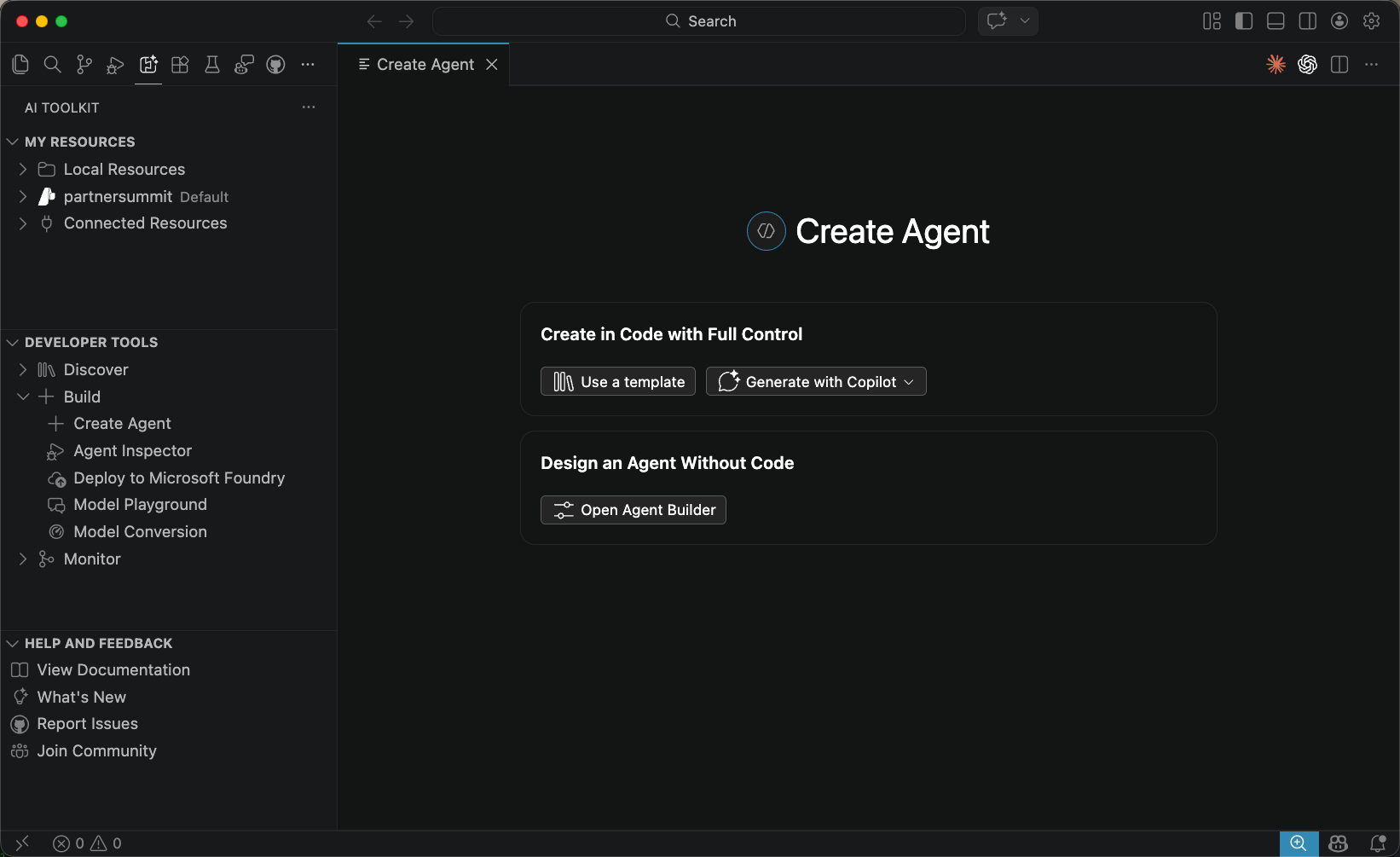
Create Agent View: A new unified entry point for creating AI agents, offering two paths side by side:
- Create in Code with Full Control: Scaffold a project from a template, or generate a single agent or multi-agent workflow using GitHub Copilot.
- Design an Agent Without Code: Launch Agent Builder directly to configure a prompt agent through the UI.
-
Conversations View for Foundry Agents: A dedicated Conversations tab is now available in Agent Builder, making it easier to review and manage conversation history when working with Foundry agents.
-
Foundry Model Licenses: License information is now displayed for Foundry models directly in the model catalog.
-
View Code for Workspace Scaffolding: Added View Code support to scaffold a workspace for Foundry agents, letting you quickly generate the project structure needed to get started.
-
GitHub Copilot Agent Development: Agent code generation, evaluation, and deployment now uses the open-source
microsoft-foundryskill from azure-skills, the same source used by GitHub Copilot for Azure. AI Toolkit automatically installs and keeps this skill up to date — no manual setup required. -
Agent Builder:
- Draft agents are now automatically saved before running in the playground, preventing accidental loss of unsaved changes.
- Open Foundry prompt agents directly in Agent Builder from the Foundry extension.
- Generate and refine agent instructions with the Foundry Prompt Optimizer.
-
MCP Tool Approval: Configure auto or manual approval for MCP tool calls in Agent Builder, giving you control over how tool invocations are handled during agent runs.
-
Tree View:
- The AI Toolkit and Foundry extension sidebar panels have been unified into a single My Resources view. Local resources (models, agents, tools) are grouped under a Local Resources node, with Foundry remote resources appearing alongside them.
- If Foundry is installed but not yet configured, a setup prompt is shown inline instead of an empty panel.
- All nodes are collapsed by default and expand/collapse state is preserved across sessions.
- Developer Tools View Mode: The Developer Tools panel now supports two switchable layouts, accessible from the panel title menu: Group by Lifecycle organizes entries into Discover, Build, and Monitor stages, while Group by Resource groups them into Agent Dev Tools and Model Tools. The active mode is indicated with a checkmark.
- Foundry agents and Foundry models now have dedicated icons to distinguish them from local resources at a glance.
-
Evaluation: Updated the VS Code Skill to use the
pytest-agent-evalsSDK for running agent evaluations, aligned with the latest evaluation framework.
This is an incremental release with bug fix.
- Changed: Consolidated Inspector templates from the Foundry extension
- Fixed: Fixed a skill issue for Python environment configuration
- Added: Support for Claude-Opus-4.6
This major milestone release introduces several new features and significant enhancements.
-
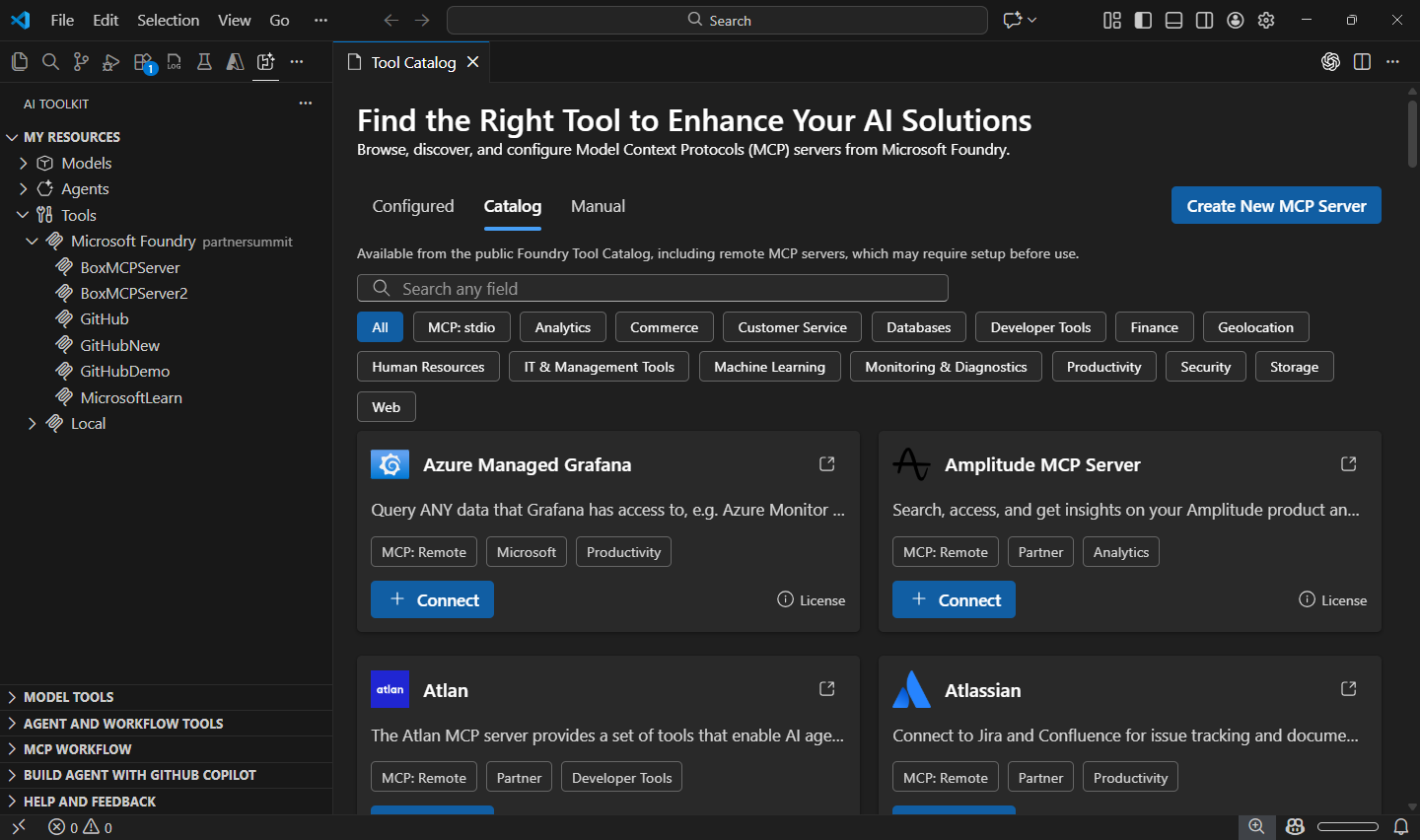
Tool Catalog: A centralized hub for discovering, managing, and integrating tools into AI agents. The Tool Catalog streamlines agent capability enhancement by providing unified access to a comprehensive range of tools.
- Browse, search, and filter available tools from the public Foundry catalog and local
stdioMCP servers. - Configure connection settings for each tool directly within the catalog.
- Seamlessly integrate selected tools into AI agents via Agent Builder.
- Manage tool lifecycles including adding, updating, and removing tools.
- Browse, search, and filter available tools from the public Foundry catalog and local
-
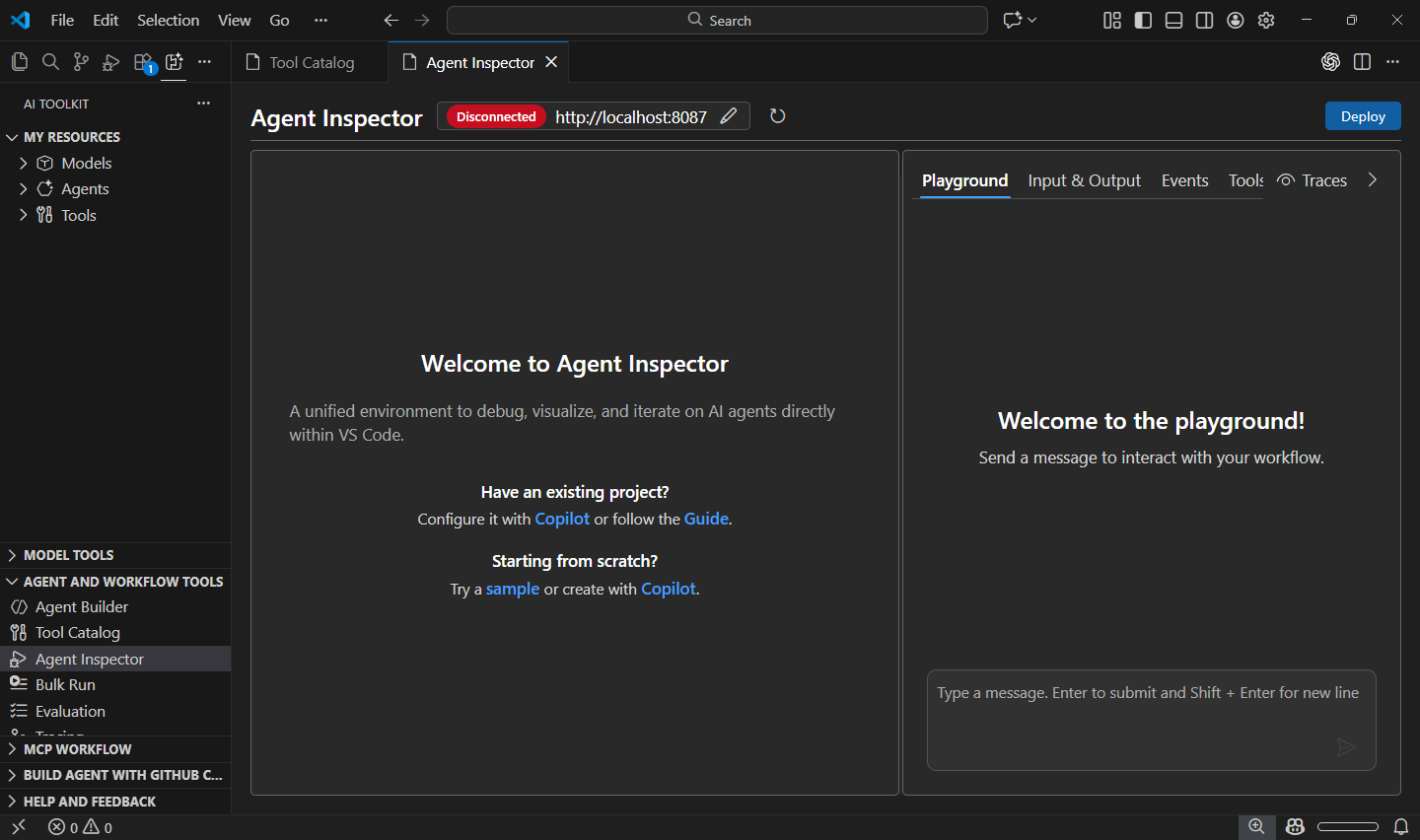
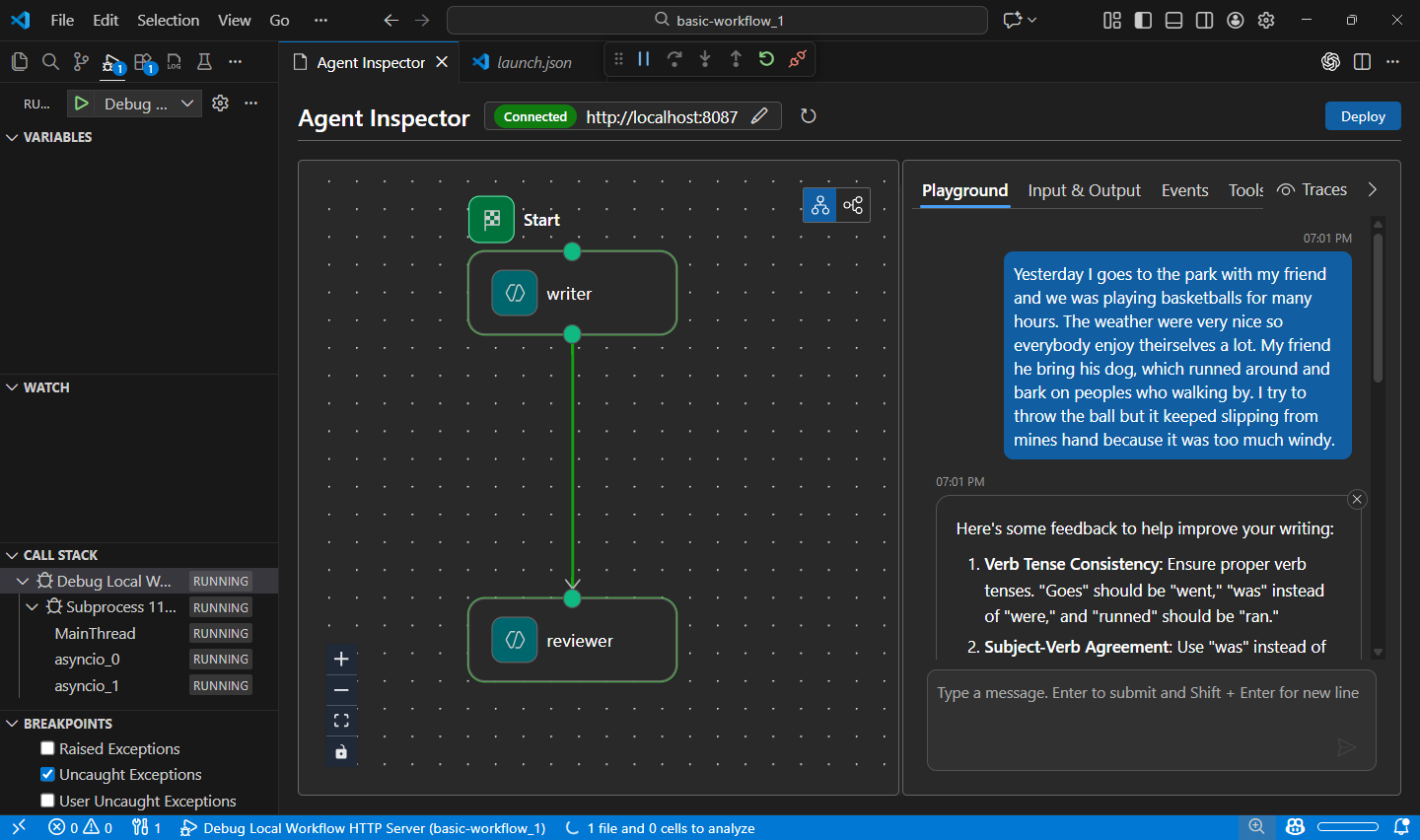
Agent Inspector: A comprehensive debugging and visualization environment for AI agents within VS Code. Press F5 to launch agents with full debugger support, view real-time streaming responses, and visualize multi-agent workflow execution.
- One-click F5 debugging: Launch agents with breakpoints, variable inspection, and step-through debugging.
- Copilot auto-configuration: GitHub Copilot generates agent code and configures debugging, endpoints, and environment.
- Production-ready code: Generated code uses Hosted Agent SDK, ready for deployment to Microsoft Foundry.
- Real-time visualization: Monitor streaming responses, tool calls, and workflow graphs between agents.
- Quick code navigation: Double-click workflow nodes to navigate directly to corresponding source code.
- Unified experience: Integrated interface combining chat and visualization for seamless agent development.
-
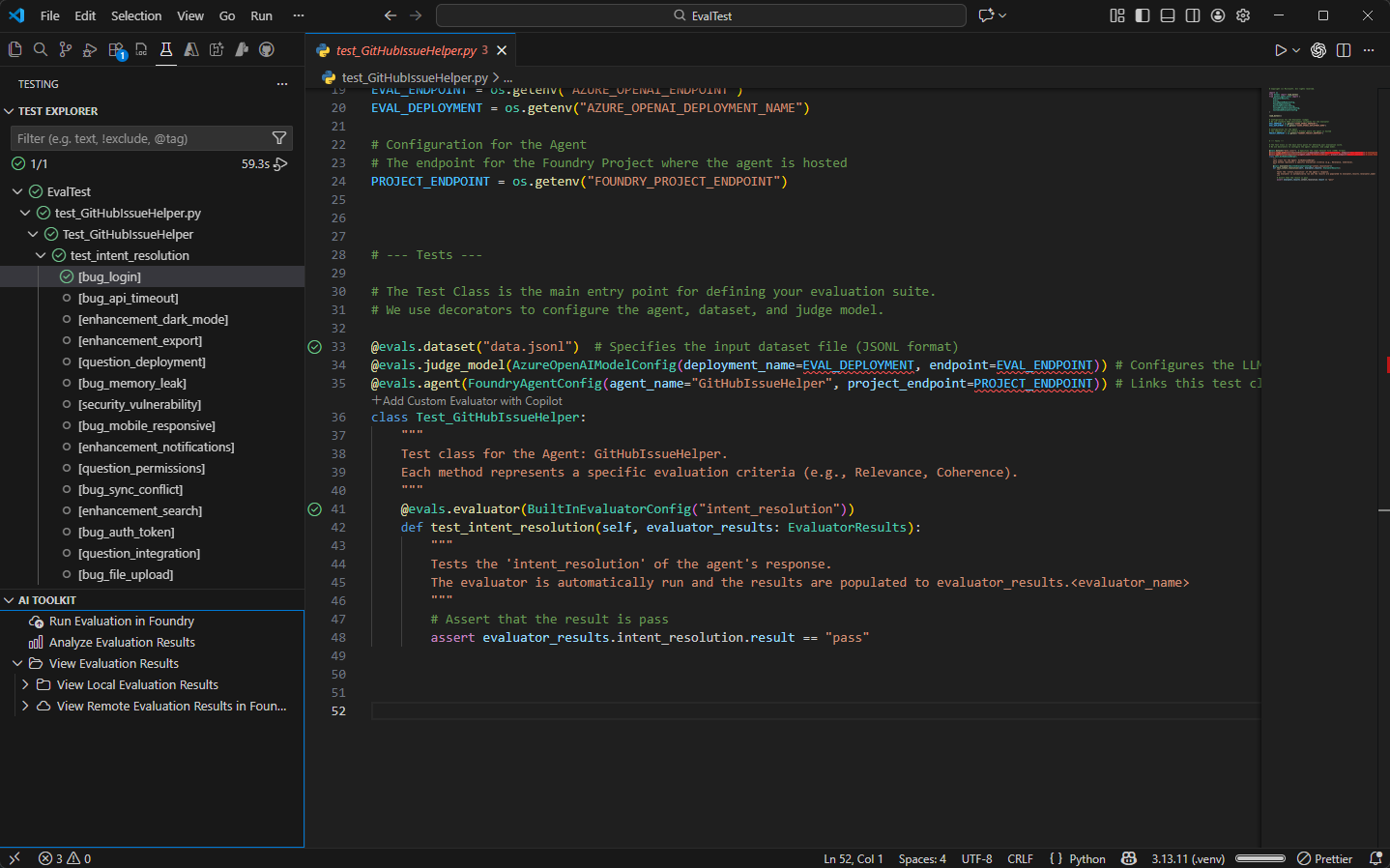
Evaluation as Tests: A structured approach to defining, running, and analyzing AI agent evaluations using familiar testing frameworks.
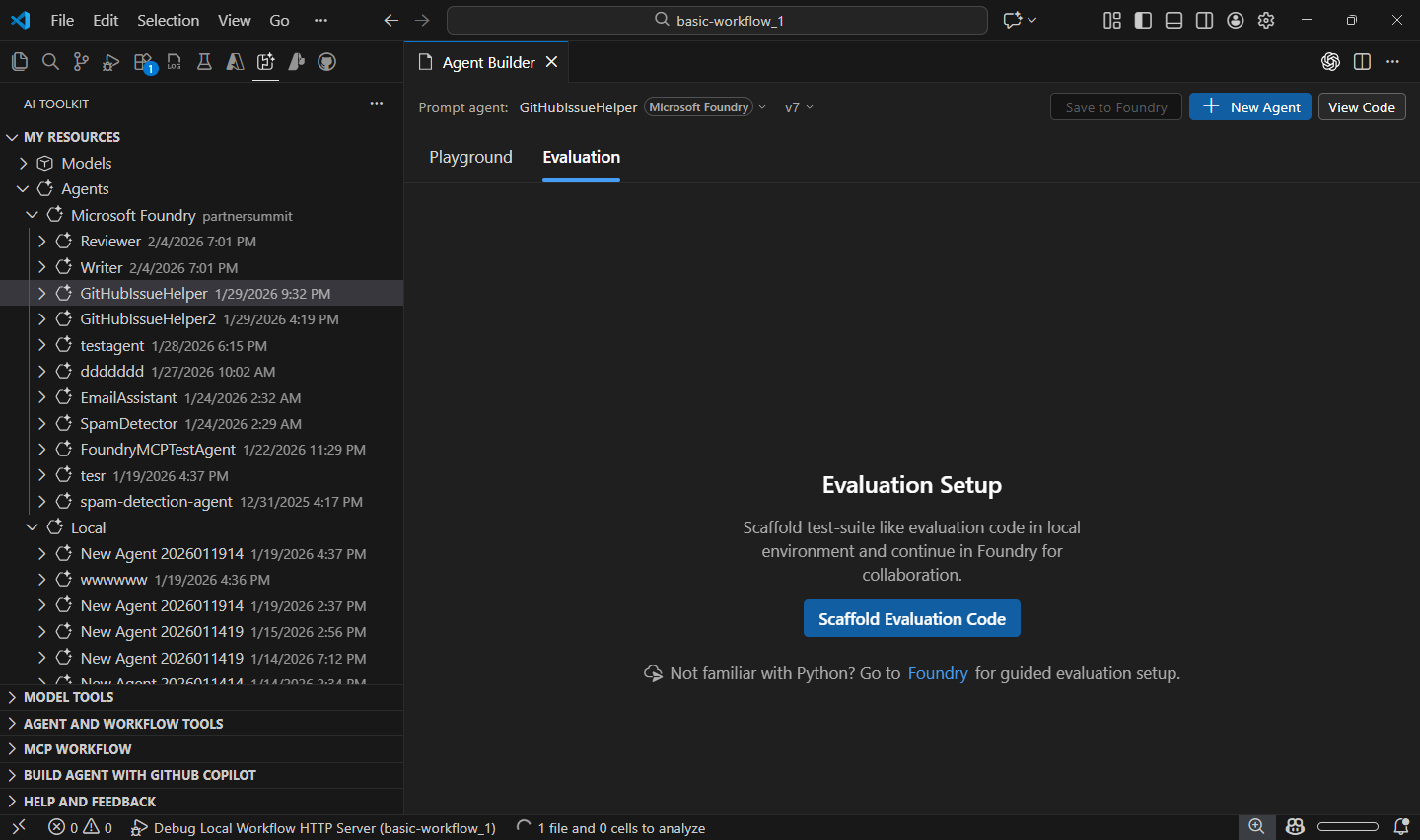
- Define evaluations as test cases: Write evaluations using pytest syntax and annotations with the Eval Runner SDK.
- Test Explorer integration: Execute tests directly in VS Code Test Explorer with flexible test case combinations.
- Result analysis: View and analyze evaluation results in a tabular view with Data Wrangler integration.
- Run evaluations in Foundry: Submit evaluation definitions to run in Microsoft Foundry.
-
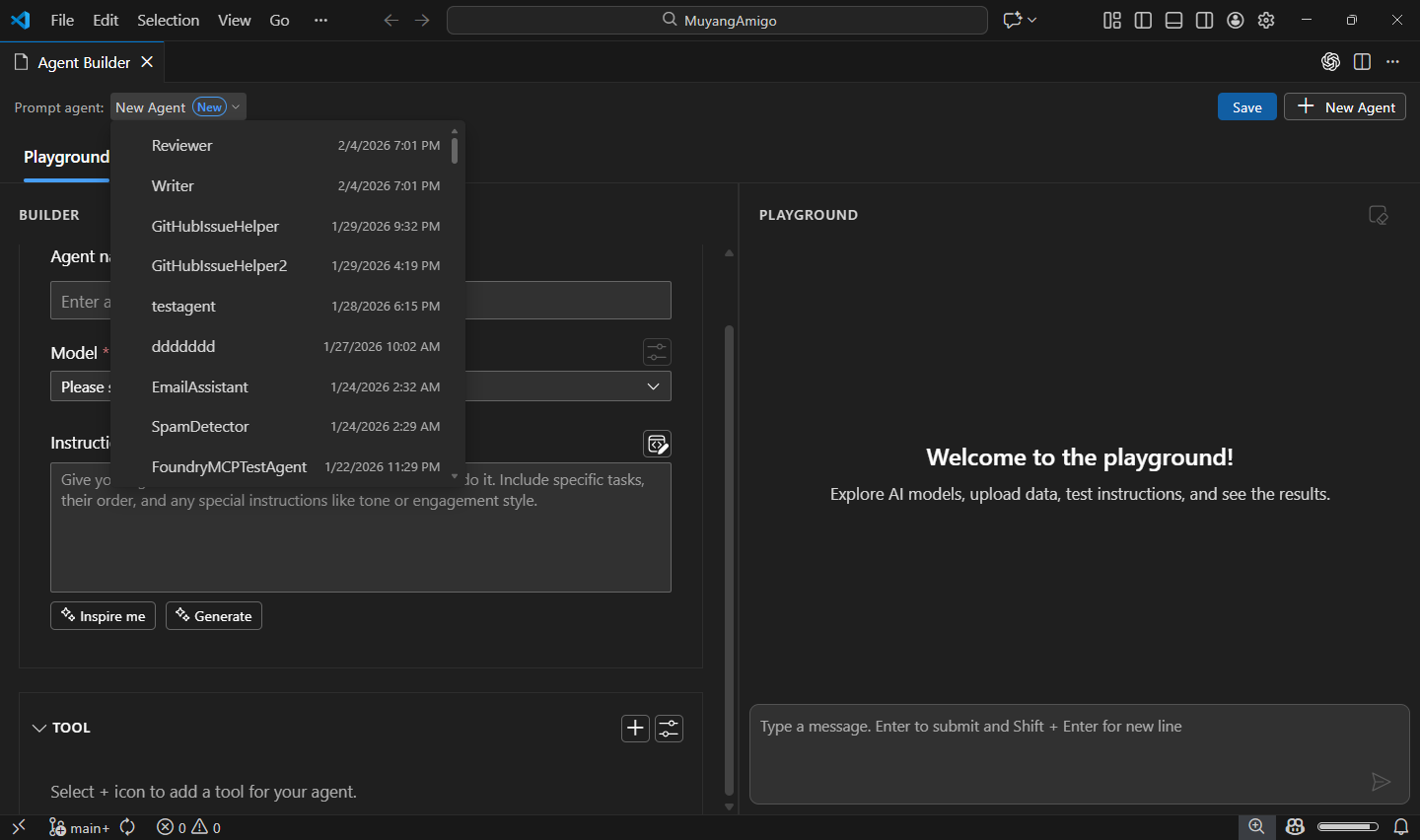
Agent Builder:
- Redesigned layout for improved usability and navigation.
- Added quick switcher for seamless transitions between agents.
- Added support for authoring, running, and saving prompt agents on Microsoft Foundry.
- Added support for adding tools to Foundry prompt agents from Tool Catalog or built-in tools.
- Added Inspire Me feature to assist users when drafting agent instructions.
- Numerous performance and stability improvements.
-
Model Catalog:
- Added support for models using the OpenAI Response API, such as
gpt-5.2-codex. - Numerous performance and stability improvements.
- Added support for models using the OpenAI Response API, such as
-
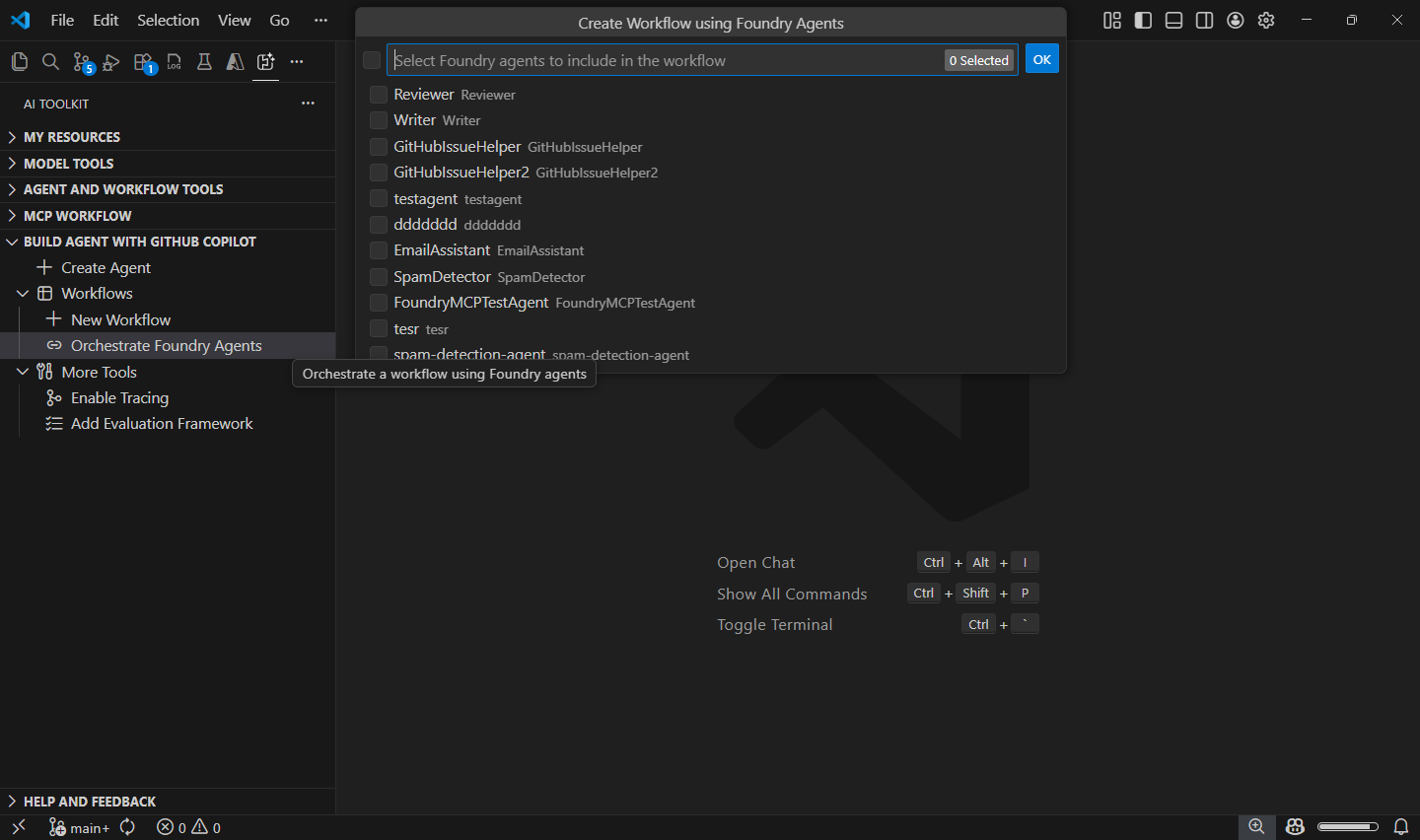
Build Agent with GitHub Copilot:
- Added New Workflow entry point to quickly generate multi-agent workflows with GitHub Copilot.
- Added capability to orchestrate multi-agent workflows by selecting prompt agents from Foundry.
-
Conversion:
- Support generate interactive playground for history model.
- Add Qualcomm GPU recipes.
-
Profiling:
- Support show resource usage for Phi Silica in Model Playground.
This is an incremental release with bug fix
- Fixed local model on the QNN device is not providing an appropriate response.
- Fixed phi silica finetuning float parameter issue.
This is an incremental release improving Copilot integration by replacing instructions with skills.
- Migrated from Copilot instructions to Copilot skills for better AI Toolkit Agent Development experience.
- Replaced
extendCopilotInstructionssetting withextendCopilotSkillsfor enhanced GitHub Copilot Chat integration. - Updated
AIAgentExpertcustom agent description to include workflow code generation and evaluation planning/execution. - Automatic cleanup of old Copilot instructions when upgrading from previous versions.
This is a major milestone release introducing significant enhancements across Model Catalog, View Code, Copilot Tools, and Local Models on Windows.
- Support for Entra Auth types and Agent Framework for Anthropic models via View Code in Playground and Agent Builder.
- Profiling features for Windows ML-based local models.
- Improved loading performance and prioritized Foundry models in Model Catalog.
- Expanded Agent Framework code sample coverage to improve code generation quality in
Agent Code Generation Tool for GitHub Copilot. - Updated recommendations to prioritize Foundry models over GitHub models for agent code generation in
Agent Code Generation Tool for GitHub Copilot. - Removed Windows AI API tab from Linux and macOS platforms in Model Catalog.
- Fixed Codespaces crash when selecting images in Playground.
- Fixed delay in displaying added models in My Resources.
- Fixed an issue where non-empty content was not allowed for Claude models used in GitHub Copilot (via AI Toolkit).
This is an incremental release adding new models from Microsoft Foundry.
- Added new Azure OpenAI models from Foundry, available in Model Catalog, Playground and Agent Builder:
- GPT-5.2: GPT‑5.2 builds on GPT‑5.1 with improvements that make interactions more reliable, flexible, and user-friendly. The focus is on delivering clearer responses, better adaptability, and enhanced control for diverse tasks.
- GPT-5.1-Codex-Max: GPT‑5.1-Codex-Max is built on an update to our foundational reasoning model, which is trained on agentic tasks across software engineering, math, research, and more.
This is an incremental release adding new models from Huggingface.
- Added Fara-7b-int4-qnn model in Model Catalog
This is an incremental release adding new models from Foundry.
- Added new Claude model from Foundry, available in Model Catalog, Playground and Agent Builder:
- Claude Opus 4.5: Anthropic's most intelligent model, and an industry leader across coding, agents, computer use, and enterprise workflows.
This is an incremental release adding new models from Foundry.
- Added Claude family of models from Foundry, available in Model Catalog, Playground and Agent Builder:
- Claude Sonnet 4.5: Anthropic's most capable model to date for building real-world agents and handling complex, long-horizon tasks, balancing the right speed and cost for high-volume use cases.
- Claude Haiku 4.5: delivers near-frontier performance for a wide range of use cases, and stands out as one of the best coding and agent models–with the right speed and cost to power free products and scaled sub-agents.
- Claude Opus 4.1: industry leader for coding, delivers sustained performance on long-running tasks that require focused effort and thousands of steps, significantly expanding what AI agents can solve.
This is an incremental release adding new models from Foundry.
- Added gpt-5.1 family of models from Foundry, available in Model Catalog, Playground and Agent Builder:
- GPT-5.1: adaptive, more efficient reasoning
- GPT-5.1-chat: chat with new chain-of-thought for end-users
- GPT-5.1-codex: optimized for long-running conversations with enhanced tools and agentic workflows
- GPT-5.1-codex-mini: a compact variant for resource-constrained environments
- Added Phi Silica in Model Catalog on win-x64 and win-arm64.
- Added CLI and version-tag support for AITK model conversion to enable CI/CD workflows
- Added ability to pack converted models into MSIX format for streamlined deployment
- Updated branding name from Azure AI Foundry to Microsoft Foundry.
- Updated conversion recipes for improved compatibility and performance.
- Shipped non-LLM recipes for AMD GPU EP support
- Config changes for OV NPU LLM: Olive updated to version 0.10.1 with a new configuration.
- Expanded support for additional LLM models for TRT RTX GPU EP.
This is a major milestone release introducing AIAgentExpert custom agent and other enhancements.
AIAgentExpertCustom Agent: A new specialized agent that provides expert-level assistance for creating, iterating, tracing, and evaluating AI agents.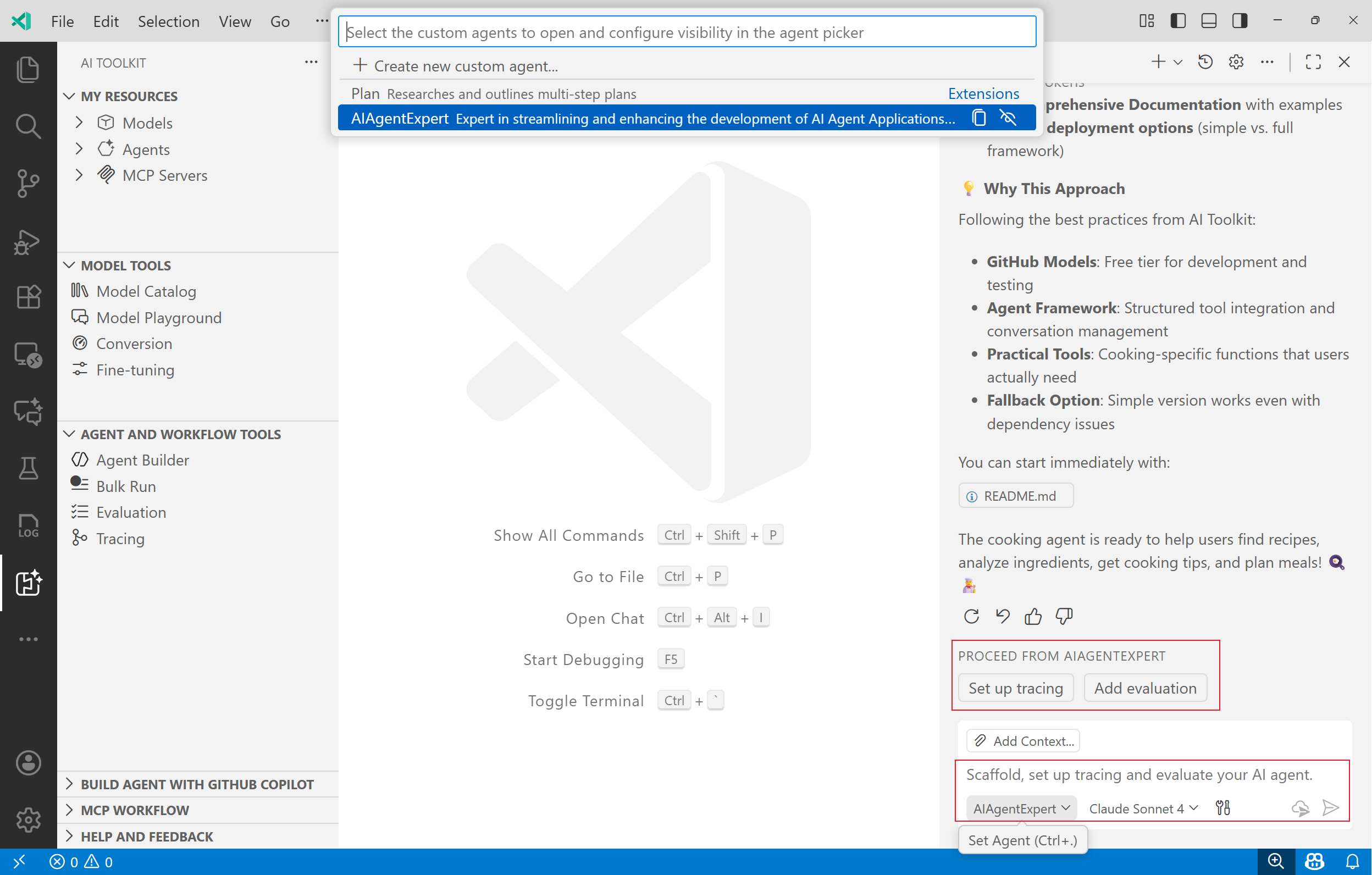
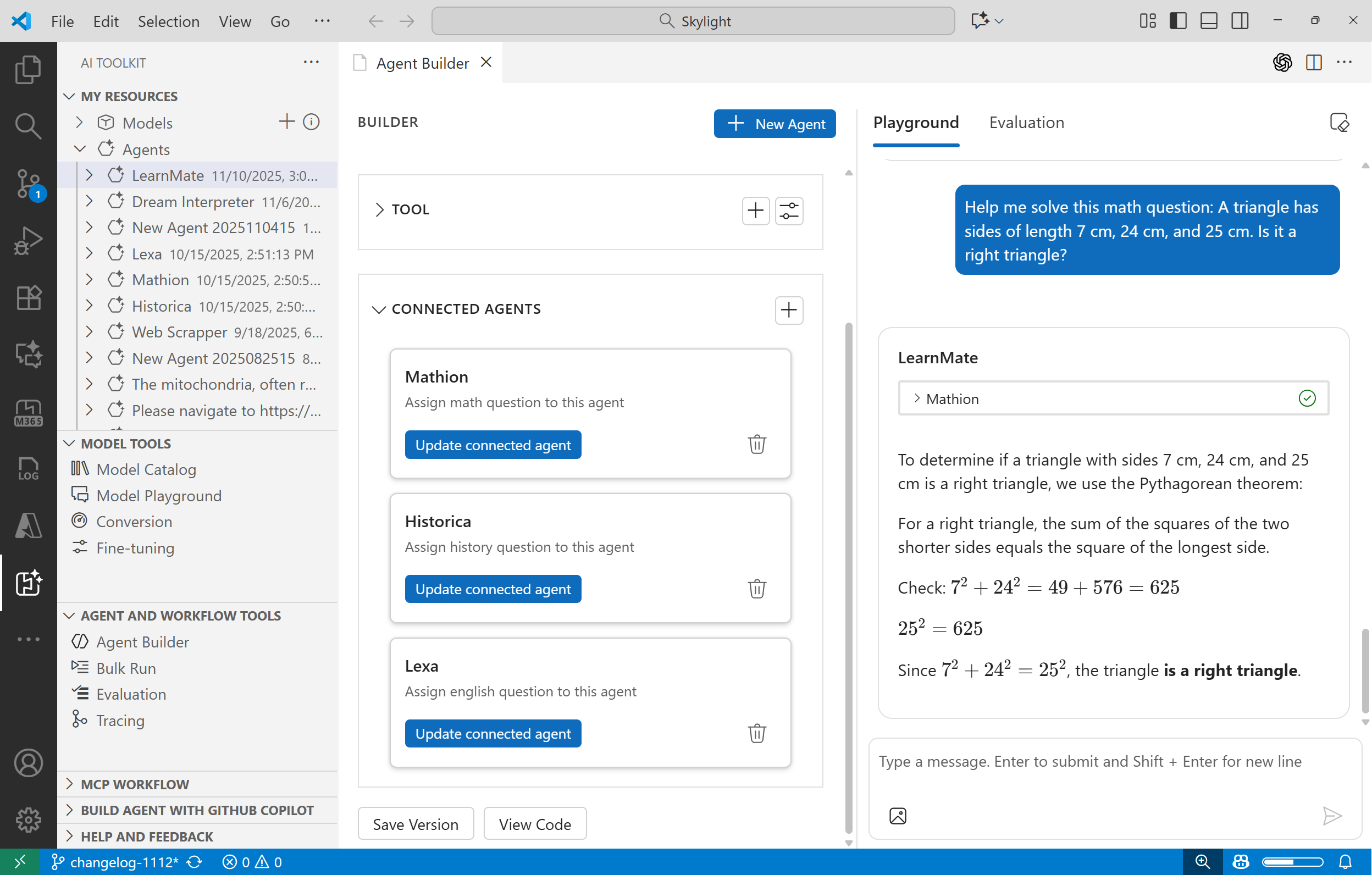
- Connected Agents in Agent Builder: Build collaborative agents that can connect and interact with each other to accomplish complex tasks.
- GPT-5 Pro Model Support: Added support for the GPT-5 Pro model, enabling developers to leverage advanced AI capabilities in their applications.
Declarative Agent To CodeTool for GitHub Copilot: Generates Python and .NET code using the Microsoft Agent Framework based on user-provided declarative agent specifications.Agent Code GenerationTool for GitHub Copilot: Extended to support C# code generation in addition to Python for building AI agents.
This is an incremental release with bug fixes and enhancements focused on agent development and evaluation workflows.
- Lifecycle Management for Local MCP Servers: Manage local MCP server execution directly within AI Toolkit with start, stop, and refresh operations for enhanced development workflows.
- Local Tracing Support for Agent Framework: Enhanced tracing visualization with support for Agent Framework: including
Invoke AgentandExecute Tooltags, comprehensive input/output handling, and backend support for receiving OTLP metrics.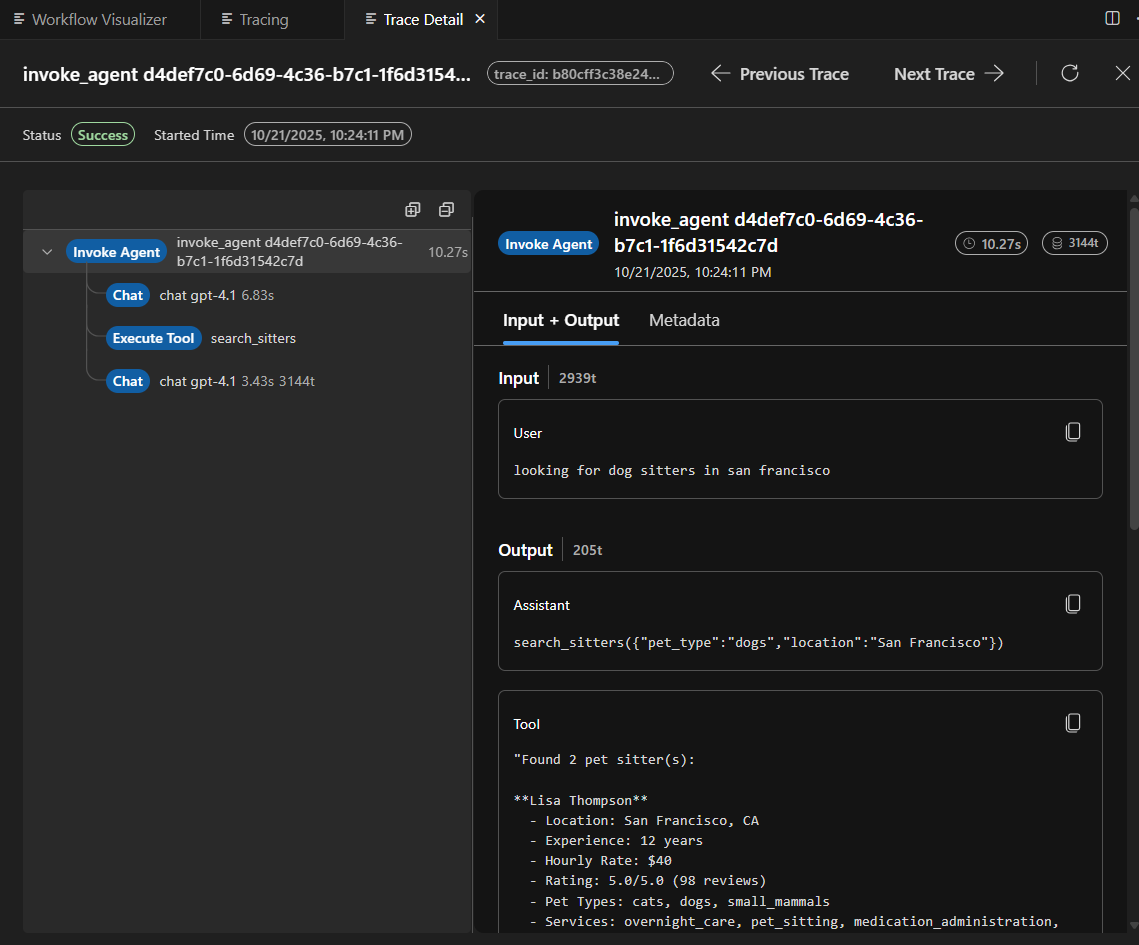
- Fixed missing
--preflag in generated code comments for proper pre-release version handling. - Fixed
connect ECONNREFUSEDerror when debugging local MCP servers. - Fixed incorrect usage of
AzureOpenAIModelConfigurationimport in generated evaluation code. - Fixed model configuration inconsistencies in generated evaluation code across the project.
- Fixed evaluation code generation incorrectly implementing custom code for built-in evaluators instead of using them directly.
This is a major milestone release introducing GitHub Copilot Tools Integration and other enhancements.
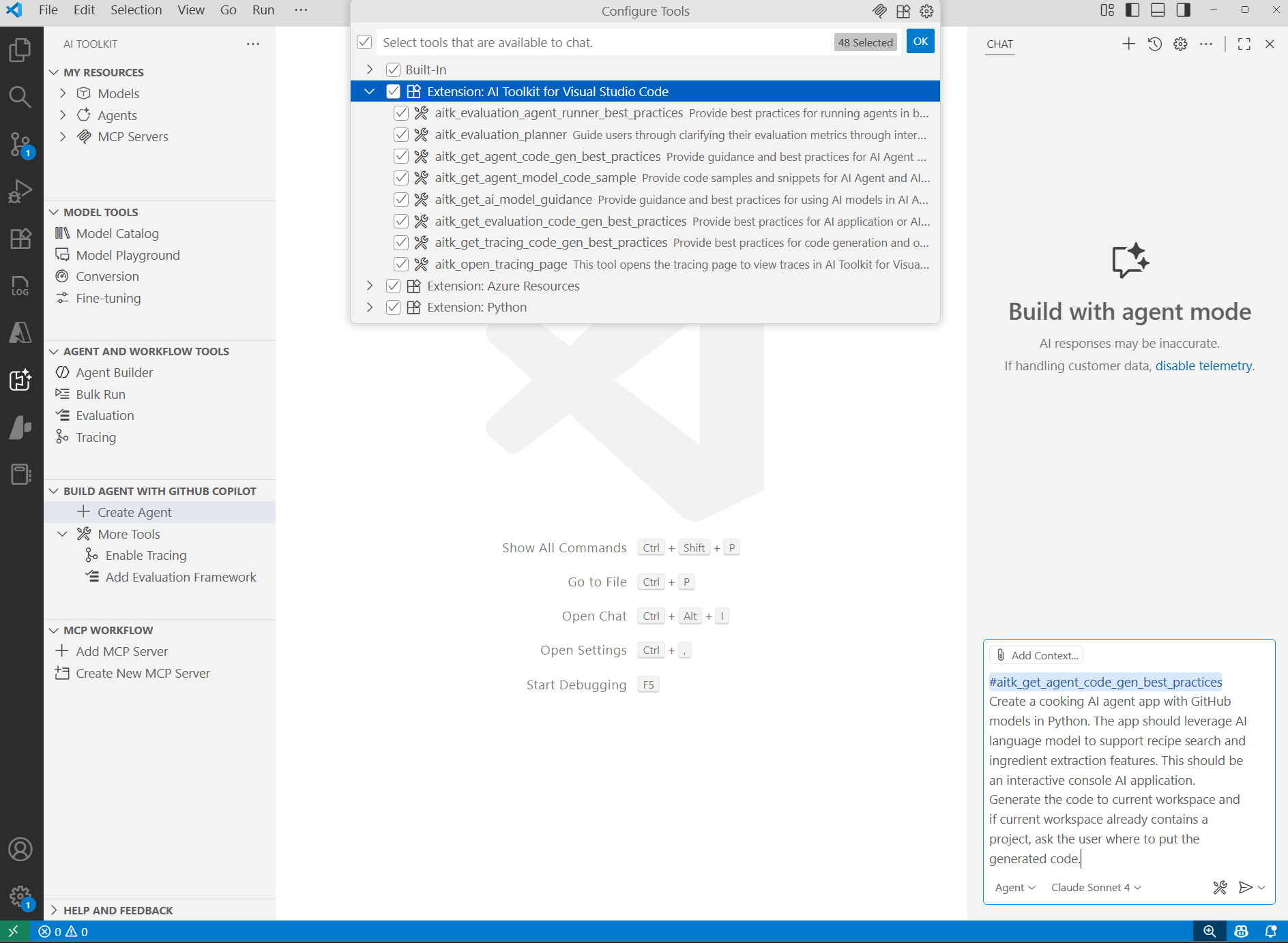 We are excited to announce the integration of GitHub Copilot Tools into AI Toolkit for VS Code. This integration empowers developers to build AI-powered applications more efficiently by leveraging Copilot's capabilities enhanced by AI Toolkit.
- AI Agent Code Generation Tool: This tool provides best practices, guidance, steps, and code samples on Microsoft Agent Framework for GitHub Copilot to better scaffold AI agent applications.
- AI Agent Evaluation Planner Tool: This tool guides users through the process of evaluating AI agents, including defining evaluation metrics, creating evaluation datasets, and analyzing results. It will invoke several other tools:
- Evaluation Agent Runner Tool: This tool runs agents on provided datasets and collects results.
- Evaluation Code Generation Tool: This tool provides best practices, guidance, steps, and code samples on Azure AI Foundry Evaluation Framework for GitHub Copilot to better scaffold code to evaluate AI agents.
You can directly access these tools in GitHub Copilot by entering your user prompt like: Create an AI agent using Microsoft Agent Framework to help users plan a trip to Paris. or Evaluate the performance of my AI agent using Azure AI Foundry Evaluation Framework.
Alternatively, AI Toolkit offers quick access to these tools via the Tree View UI under section Build Agent with GitHub Copilot.
- Model Playground Improvements: The divider between chat output and model settings is now resizable, allowing users to customize their workspace layout for better usability.
- Model Catalog Updates: The ONNX models section in the Model Catalog has been merged with Foundry Local Models on macOS and Windows platforms, providing a unified experience for discovering and selecting local models.
Incremental release with new codex model additions:
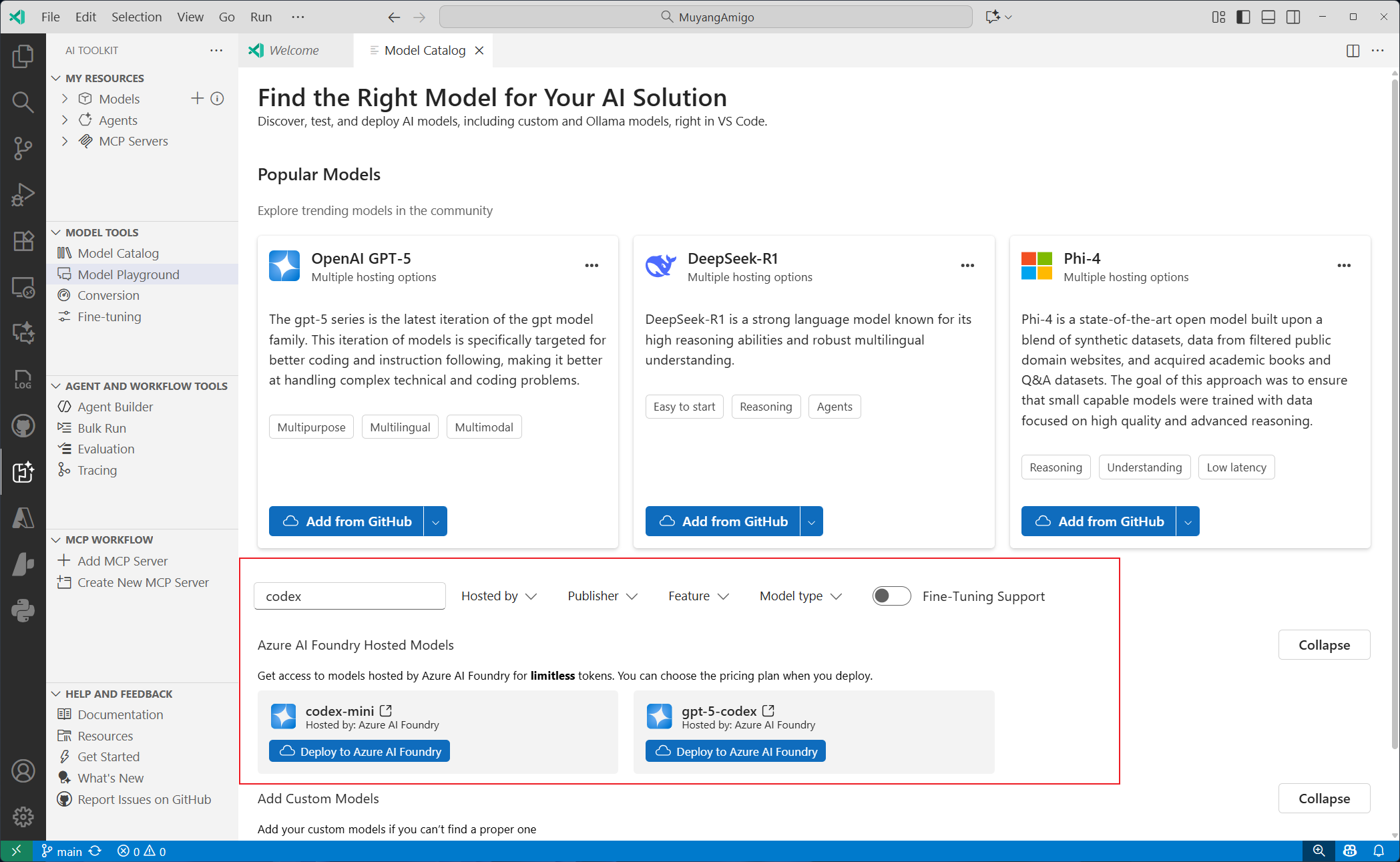
- GPT-5-CODEX: A revolutionary model that seamlessly integrates multimodal coding capabilities, enabling advanced tool utilization across diverse development environments while providing expert-level code review functionality.
- CODEX-MINI: An optimized variant of the o4-mini model, specifically engineered for lightning-fast, instruction-driven code generation tailored to command-line interface workflows.
We’re excited to announce the release of AITK v0.22.0, a major milestone that aligns closely with the Windows ML GA and brings significant enhancements across model conversion, fine-tuning, and playground experiences for local models on windows devices.
Model Conversion
Model conversion now supports a broader set of Recipes, enabling developers to convert and optimize models across a wider range of hardware targets. This includes full support for all supported execution providers (EPs) that are aligned with the Windows ML GA.
-
Conversion workflows now integrate seamlessly with WinML’s EP management, ensuring optimal performance across CPUs, GPUs, and NPUs.
-
For more details, refer to the Model Conversion Documentation.
Model Fine-Tuning
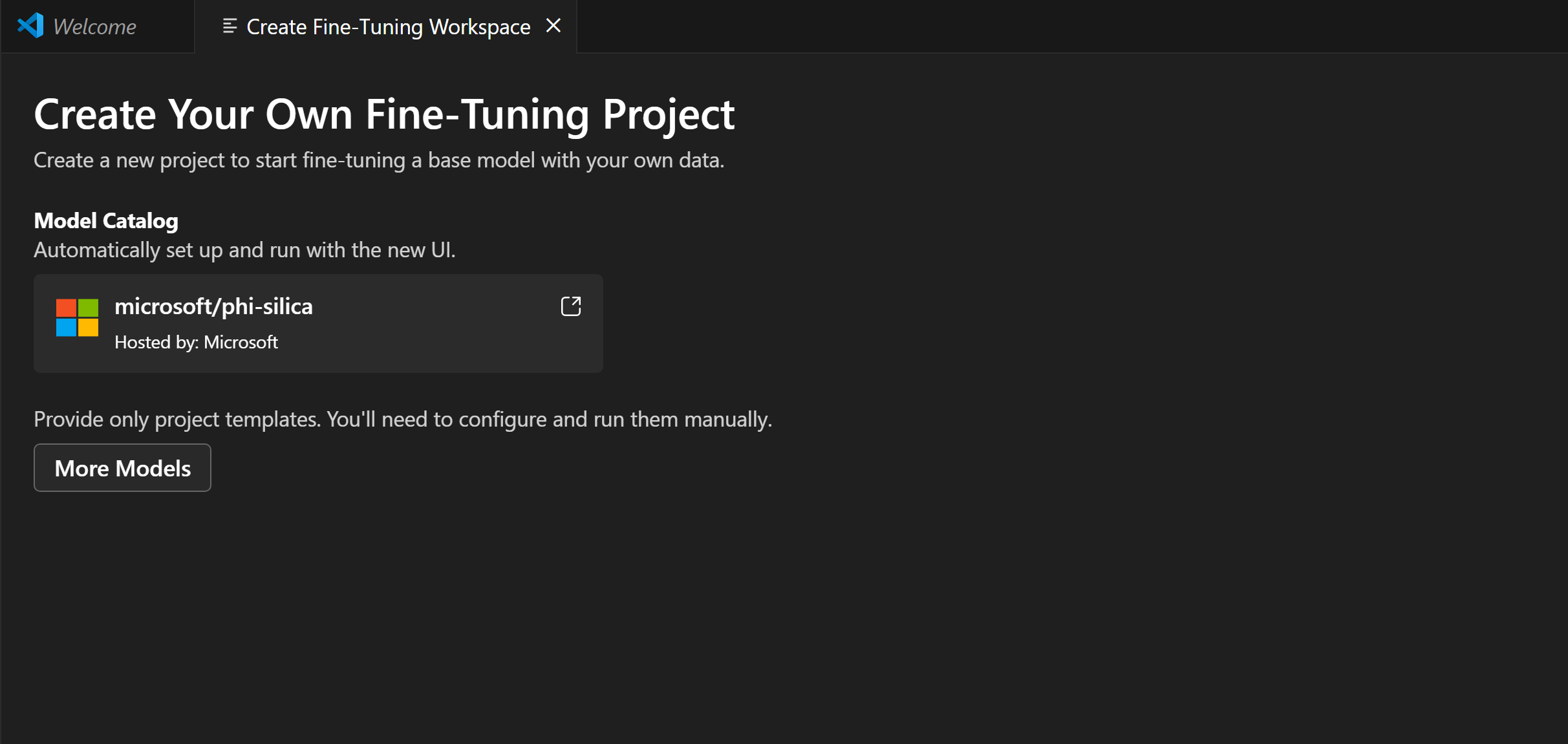
We’ve significantly improved the end-to-end fine-tuning workflow for the Phi-Silica model.
Model Playground
The Model Playground now fully aligns with the Windows ML GA capabilities.
- Enables real-time local model inferencing across diverse hardware configurations using Windows ML, which distributes, manages, and registers AI workloads for high-performance on-device execution.
This major milestone release introduces significant enhancements and powerful new capabilities:
-
Reimagined Agent Builder: Experience a completely redesigned Agent Builder with enhanced usability and functionality:
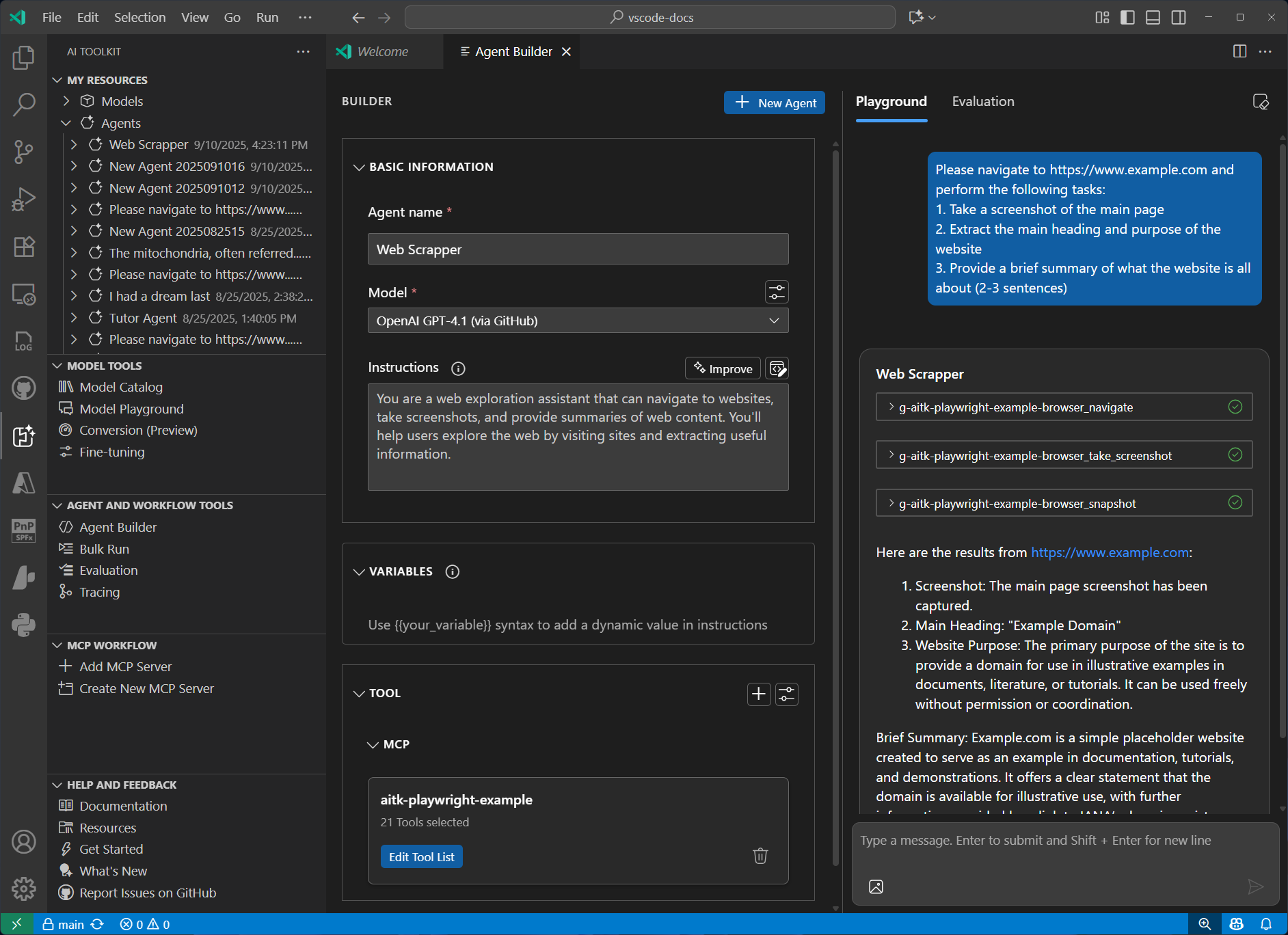
- Conversation-Centric Interface: Navigate effortlessly through a redesigned UI that puts conversations at the center, streamlining agent interactions and management.
- Flexible Modular Architecture: Create your AI agent using a modular interface for prompt editing, model selection, and tool configuration — all seamlessly integrated for maximum flexibility.
- Unified Agent Management: Access all your agents from a single, centralized location in My Resources, making it simple to create, edit, and switch between different agent configurations.
-
Local Model Support from Foundry: Run AI models directly on your machine with our new Foundry Local Models integration:
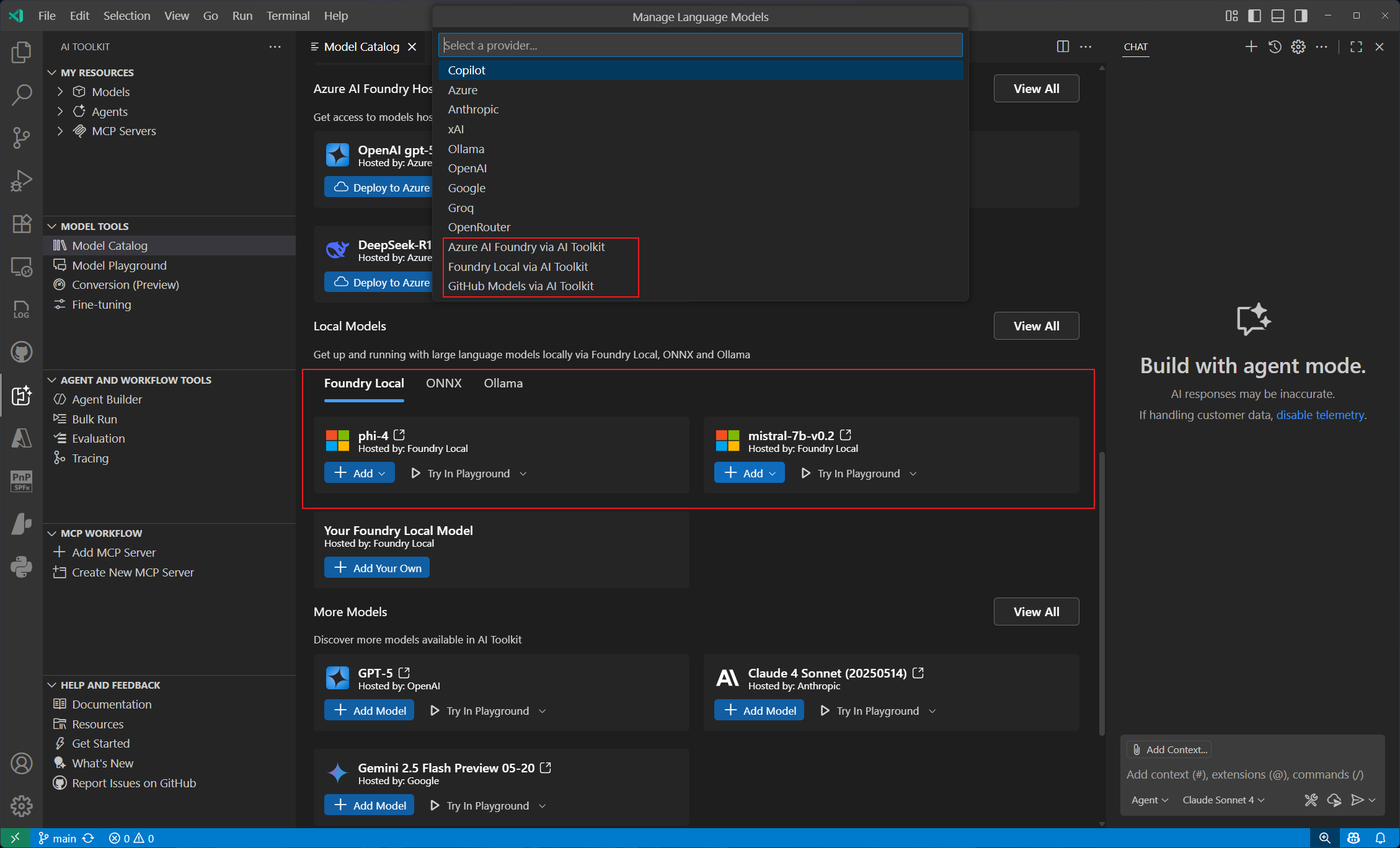
- Seamless Model Discovery: Browse and select from an extensive catalog of Foundry Local Models with just a few clicks.
- Integrated Local Execution: Run models locally through the Model Playground without external dependencies.
- GitHub Copilot Integration: Leverage Foundry Local Models directly within GitHub Copilot for enhanced development experiences.
-
Enhanced MCP Experience: Enjoy a completely overhauled Model Context Protocol (MCP) experience with improved functionality:
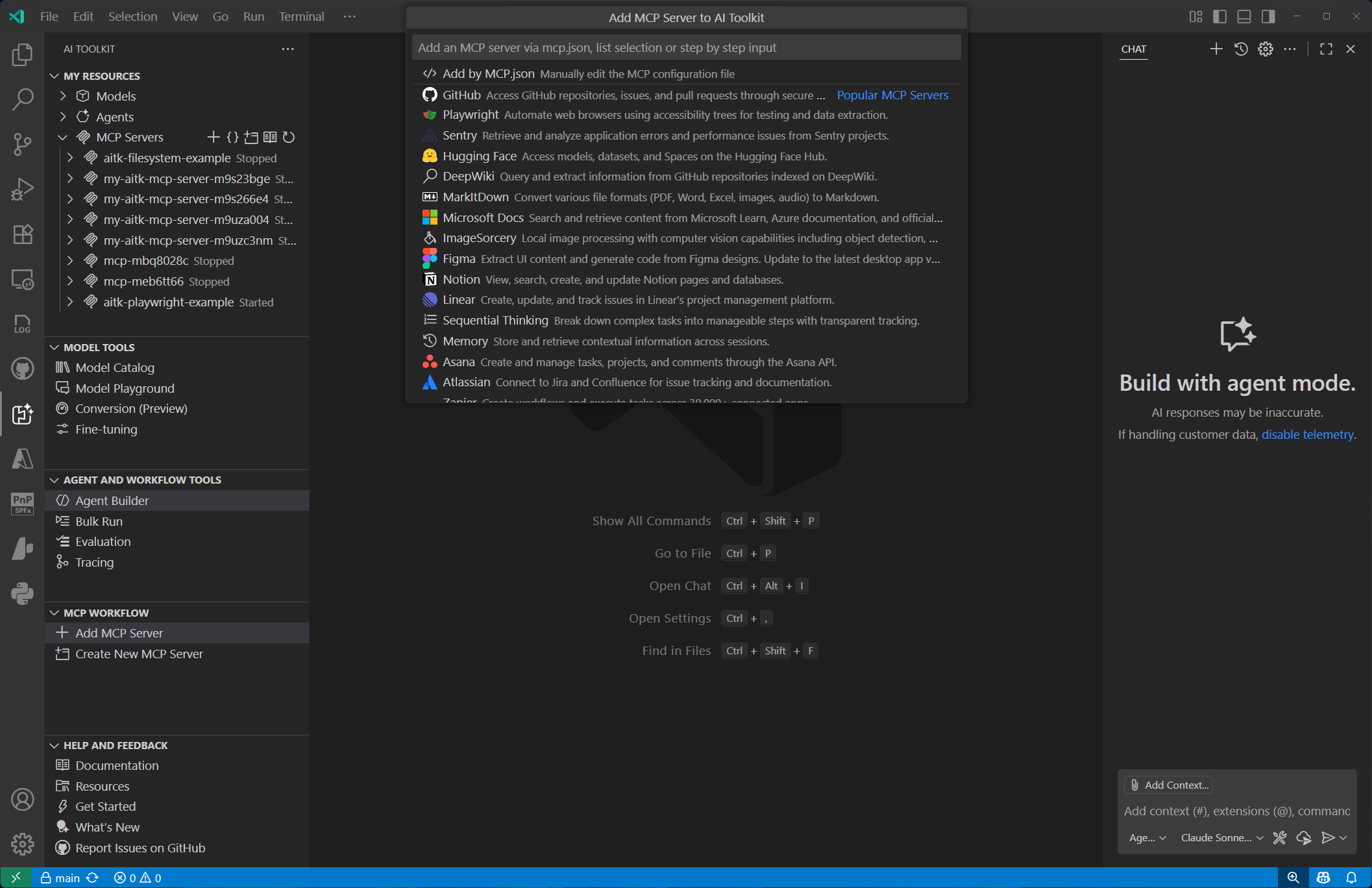
- Latest Specification Support: Full compatibility with the newest MCP specification, including streamable HTTP transport and OAuth authentication capabilities.
- Intuitive Configuration Interface: Configure MCP servers effortlessly through our redesigned quick-pick UI, featuring instant access to popular servers and direct configuration file editing.
- Streamlined Server Management: Manage all your MCP servers from a unified location in My Resources, with simplified lifecycle management and configuration options.
-
GitHub Copilot Tool Integration: Accelerate AI-powered development with new tools designed specifically for GitHub Copilot:
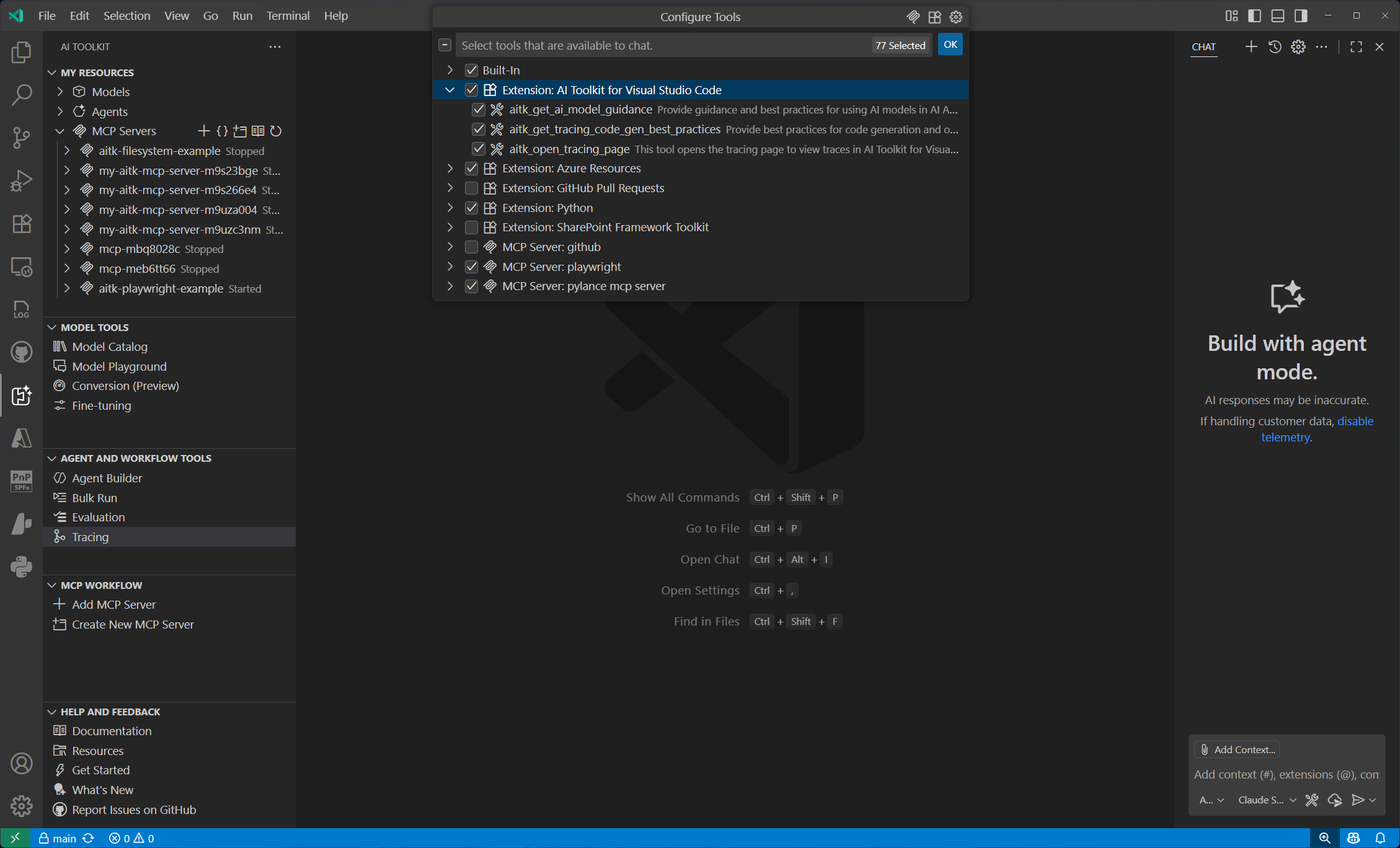
- AI Model Guidance Tool: Get intelligent recommendations for selecting and implementing AI models in your applications.
- Advanced Tracing Tool: Implement comprehensive tracing instrumentation with automatic deeplink generation for seamless visualization in AI Toolkit.
This incremental release introduces the latest GPT-5 family of models and OpenAI's open source models GPT OSS to AI Toolkit.
-
GPT-5 Family of Models: Now available in AI Toolkit through GitHub, Azure AI Foundry, or direct OpenAI access
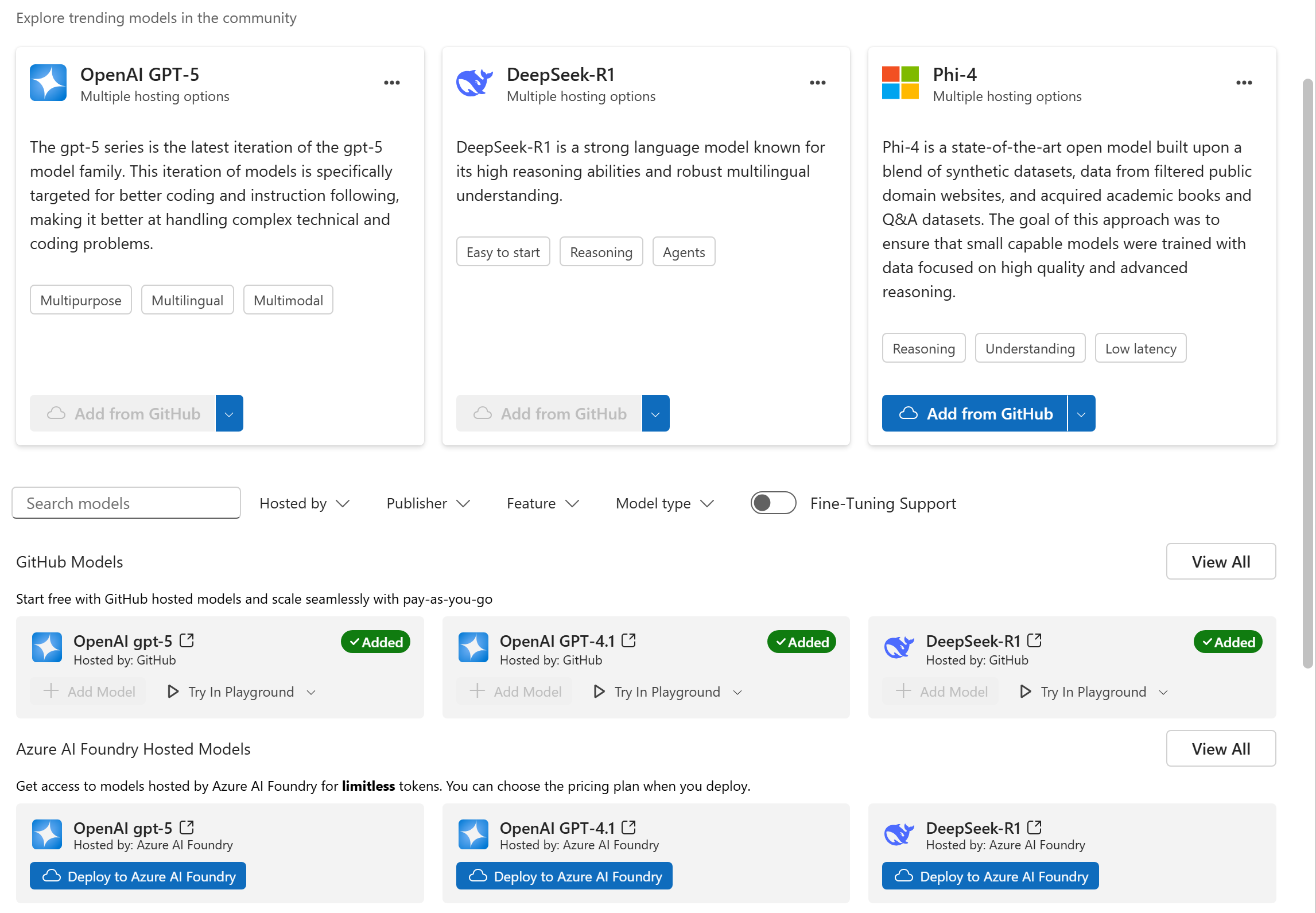
- gpt-5: Delivers advanced reasoning for analytics and code generation.
- gpt-5-mini: Optimized for low-cost, fast experiences such as real-time agents and tool orchestration for customer support.
- gpt-5-nano: Designed for speed and efficiency, offering strong reasoning for concise question answering and responses.
- gpt-5-chat (preview): Enables natural, multimodal, multi-turn conversations with persistent context for agentic workflows.
-
GPT OSS Models: Via Azure AI Foundry and Local ONNX Runtime
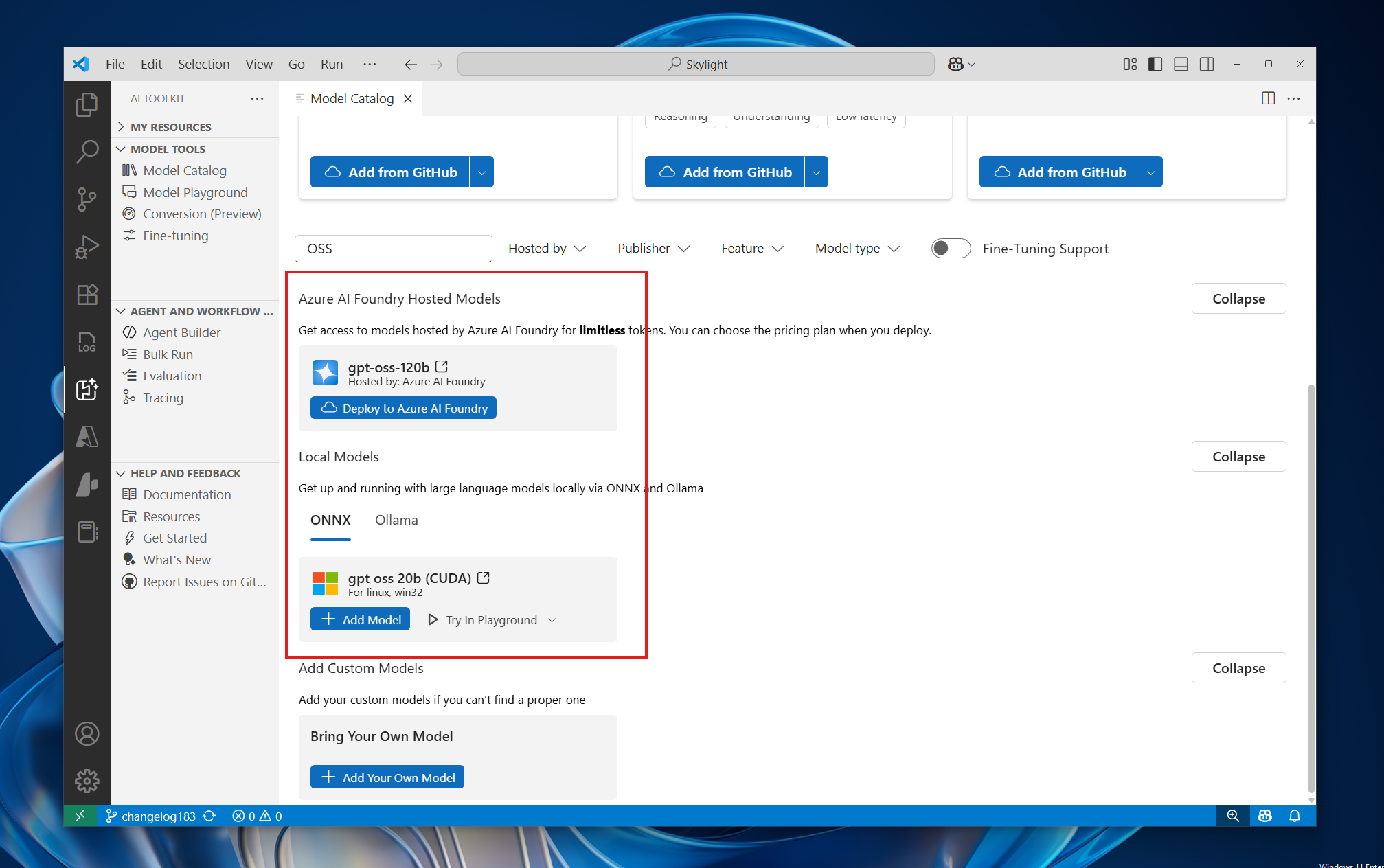
- gpt-oss-120b via Azure AI Foundry: gpt-oss-120b is an open-weight model with the following key characteristics: Text-in/text-out only Reasoning with chain-of-thought (with ability to change reasoning effort to low, medium, or high) Support for structured outputs API compatible with Responses
- gpt-oss-20b-cuda-gpu via Local ONNX Runtime: This model is an optimized version of gpt-oss-20b to enable local inference on CUDA GPUs. This model uses RTN quantization.
-
Experience GPT-5 and GPT OSS Capabilities
- Compare GPT-5 models with others in the catalog to evaluate their capabilities.
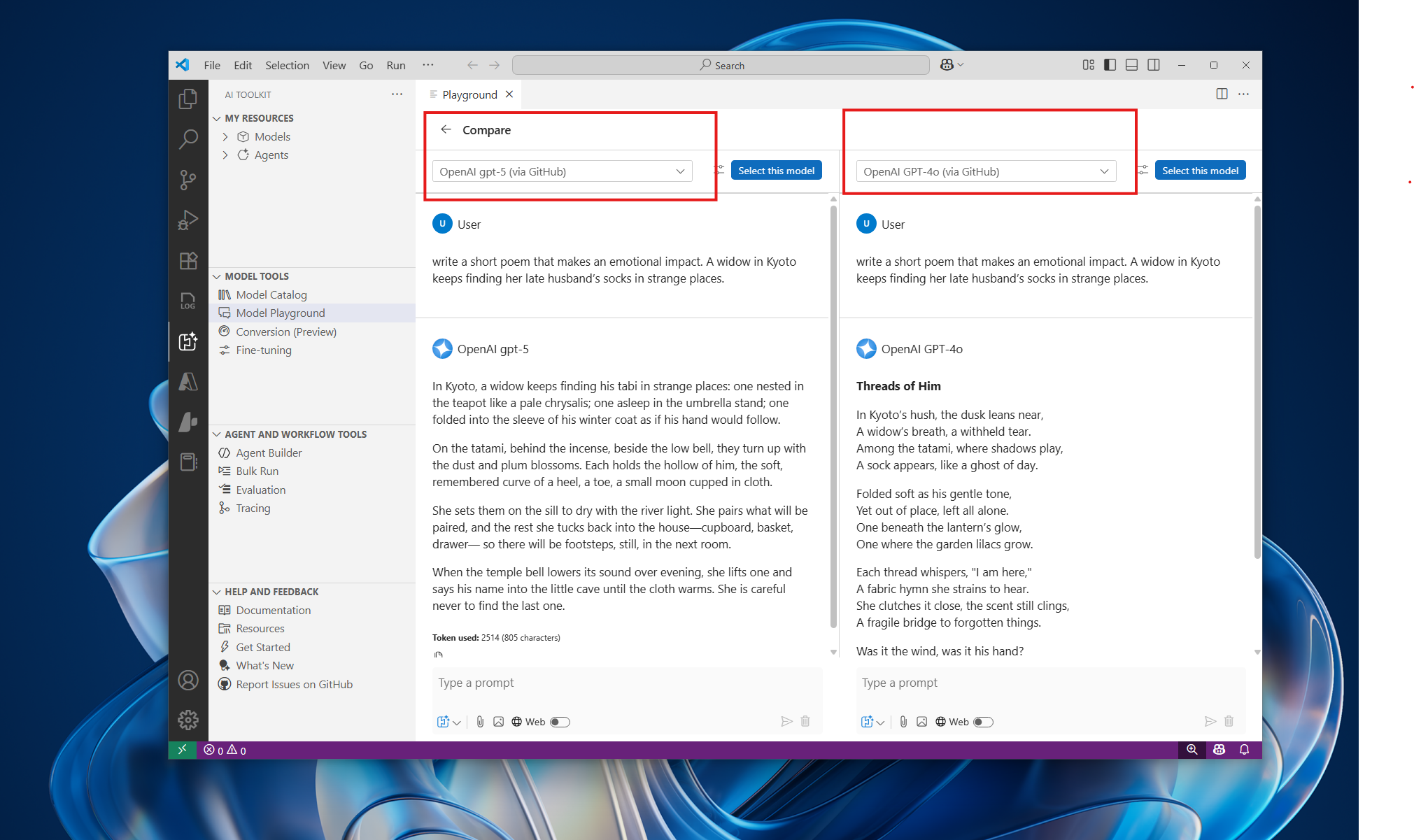
- Integrate GPT-5 models into your applications using the
View Codefeature in Model Playground, with support for Azure AI Inference SDK, OpenAI SDK, and multiple programming languages.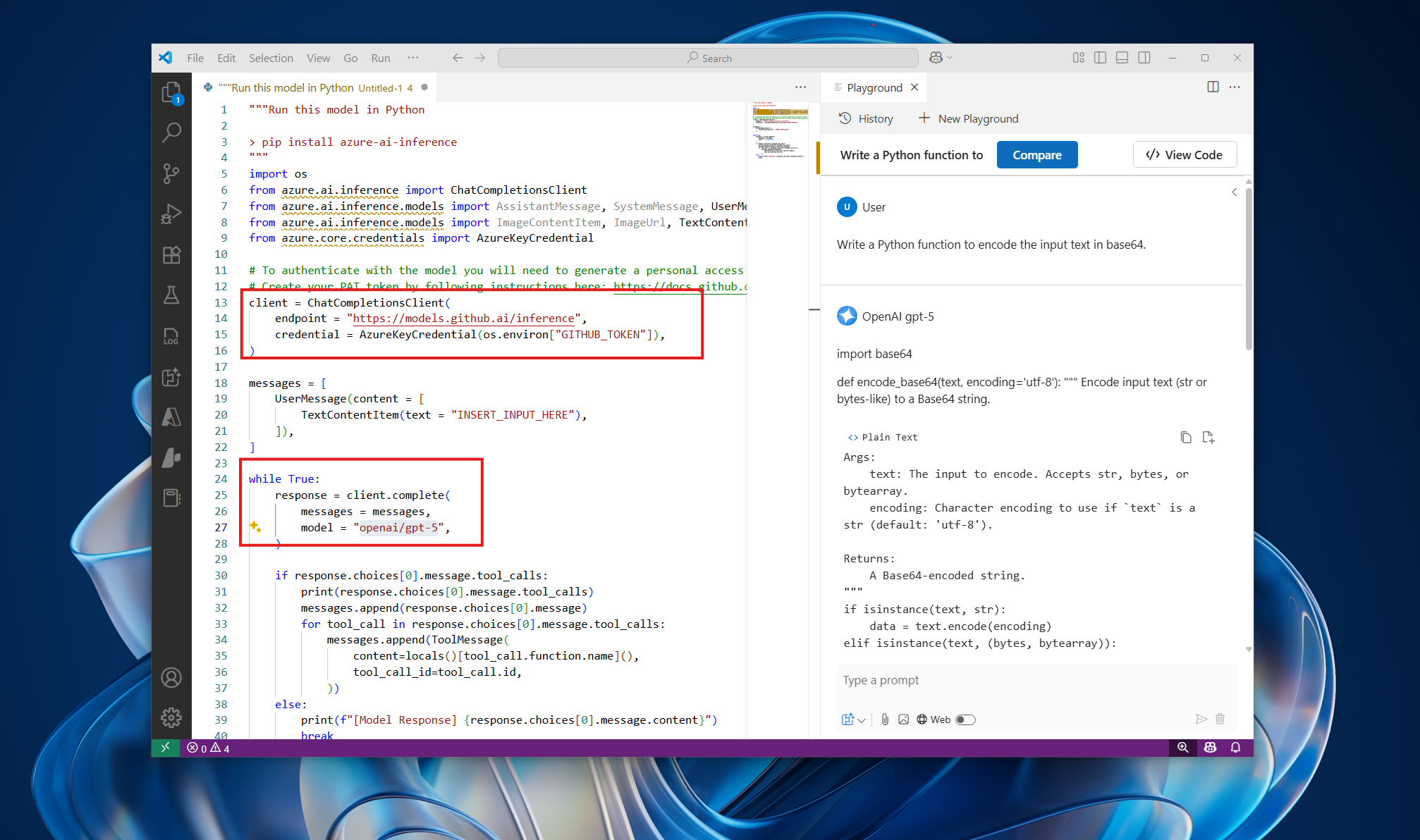
- Compare GPT-5 models with others in the catalog to evaluate their capabilities.
This is a major milestone release with significant updates and new features:
-
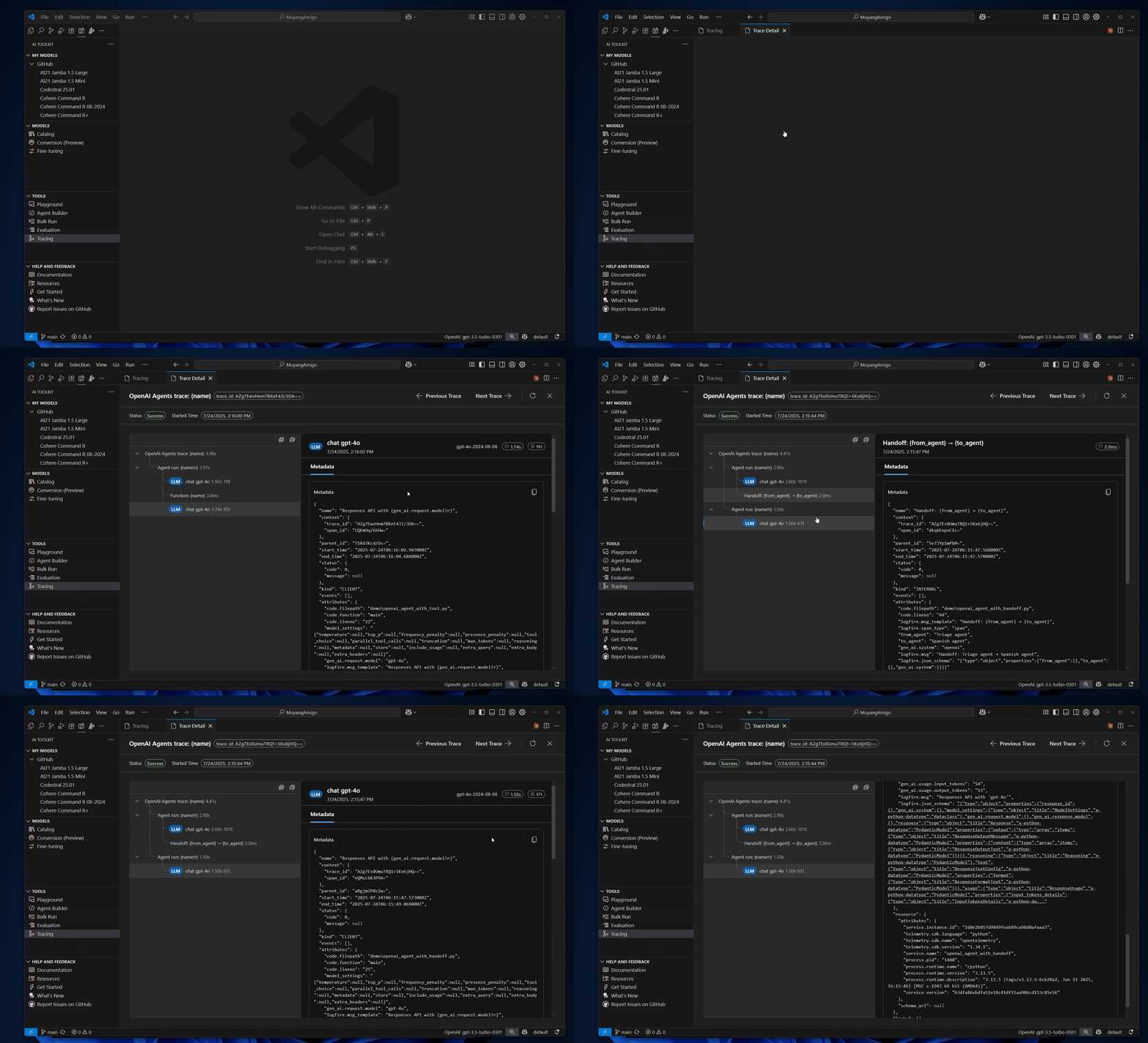
Local Observability for AI applications and Agents: You can trace the execution of your AI applications, including interactions with generative AI models and use AI Toolkit tracing visualization tool to gain insights into their behavior and performance.
-
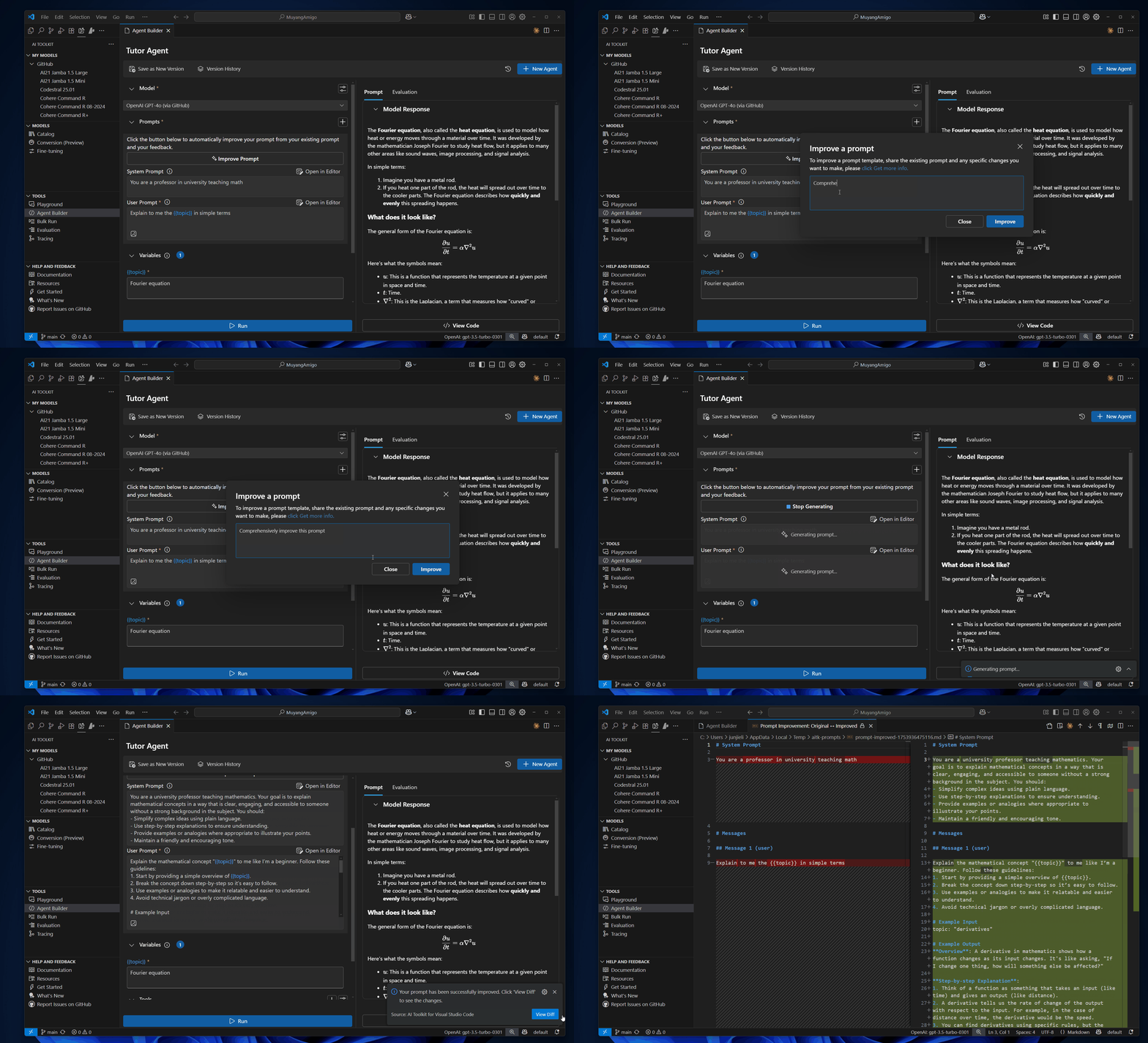
AI-Powered Prompt Improver: The new AI-powered prompt improver helps you refine your prompts for better results. It analyzes your prompts and suggests improvements to enhance their effectiveness.
-
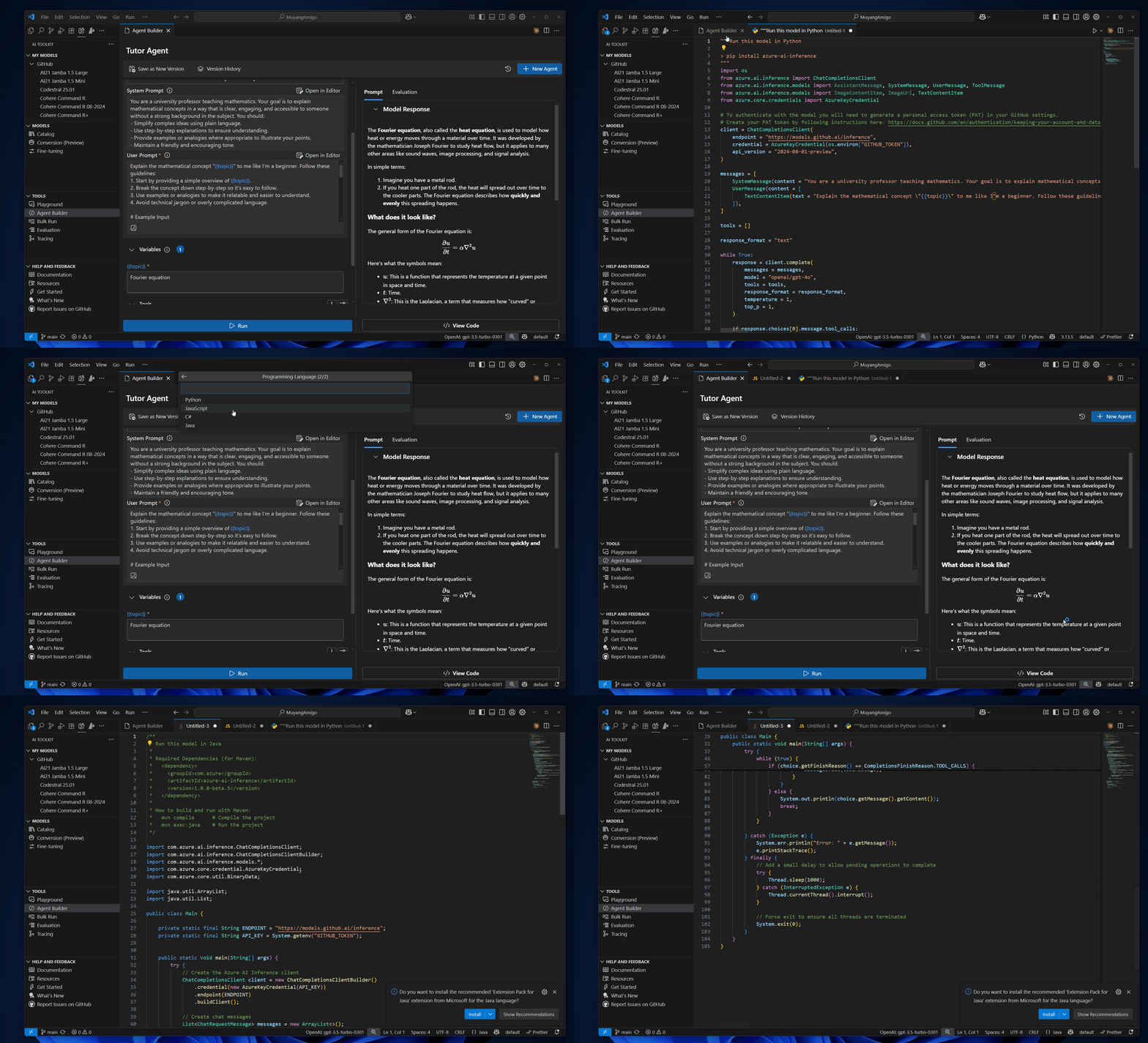
View Code Language Expansion: The "View Code" feature in the Agent Builder and Playground now supports multiple programming languages including Python, JavaScript, C# and Java. This allows you to see how your prompts can be implemented in different programming languages, making it easier to integrate AI capabilities into your applications.
-
Enhancements and Bug Fixes:
- Model sections will be automatically expanded when you apply a filter, making it easier to navigate through models.
- Added CUDA models to the model catalog, providing more options for GPU-accelerated AI applications.
- Fixed an issue where MCP initialization in generated code does not carry headers. #243
This is a major milestone release featuring significant enhancements and exciting new capabilities:
-
Agent Builder Enhancements:
- Function Calling Support: You can now define and invoke custom functions directly within agent prompts, enabling more powerful and flexible agent interactions.

- Version Management: Easily manage and compare different versions of your agents, simplifying iteration and improvement processes.

- Usability Improvements:
- The divider between input and output panels is now resizable, allowing you to customize the workspace layout to your preference.
- The evaluation results table has been optimized for a more compact and user-friendly viewing experience.
- Function Calling Support: You can now define and invoke custom functions directly within agent prompts, enabling more powerful and flexible agent interactions.
-
Model Catalog Enhancements:

- Expanded Model Selection: Over 100 new models from Azure AI Foundry have been added, significantly broadening your options for model selection.
- Direct Deployment: Deploy models directly to Azure AI Foundry from within the model catalog, streamlining your workflow.
- Improved Popular Models Section: Popular models from multiple providers are now grouped together, making it easier to discover and access models from various sources.
-
Playground Enhancements:
- Simplified Deployment Guidance: AI Toolkit now proactively assists you in deploying models to Azure AI Foundry when encountering rate limits or other errors, ensuring smoother development experiences.

- Simplified Deployment Guidance: AI Toolkit now proactively assists you in deploying models to Azure AI Foundry when encountering rate limits or other errors, ensuring smoother development experiences.
This is a major milestone release with significant updates and new features:
-
Integrated Evaluation for Agent Builders: Streamlined testing and evaluation capabilities for AI agents:

- Seamlessly switch between the
PromptandEvaluationtabs for single or batch agent evaluations. - Utilize variables within prompts and evaluations using the
{{}}syntax. - Generate synthetic data using LLMs based on provided prompts and variables.
- Customize data generation logic directly within the interface.
- Import and export evaluation datasets in CSV or JSONL formats.
- Access detailed and expanded views of evaluation results.
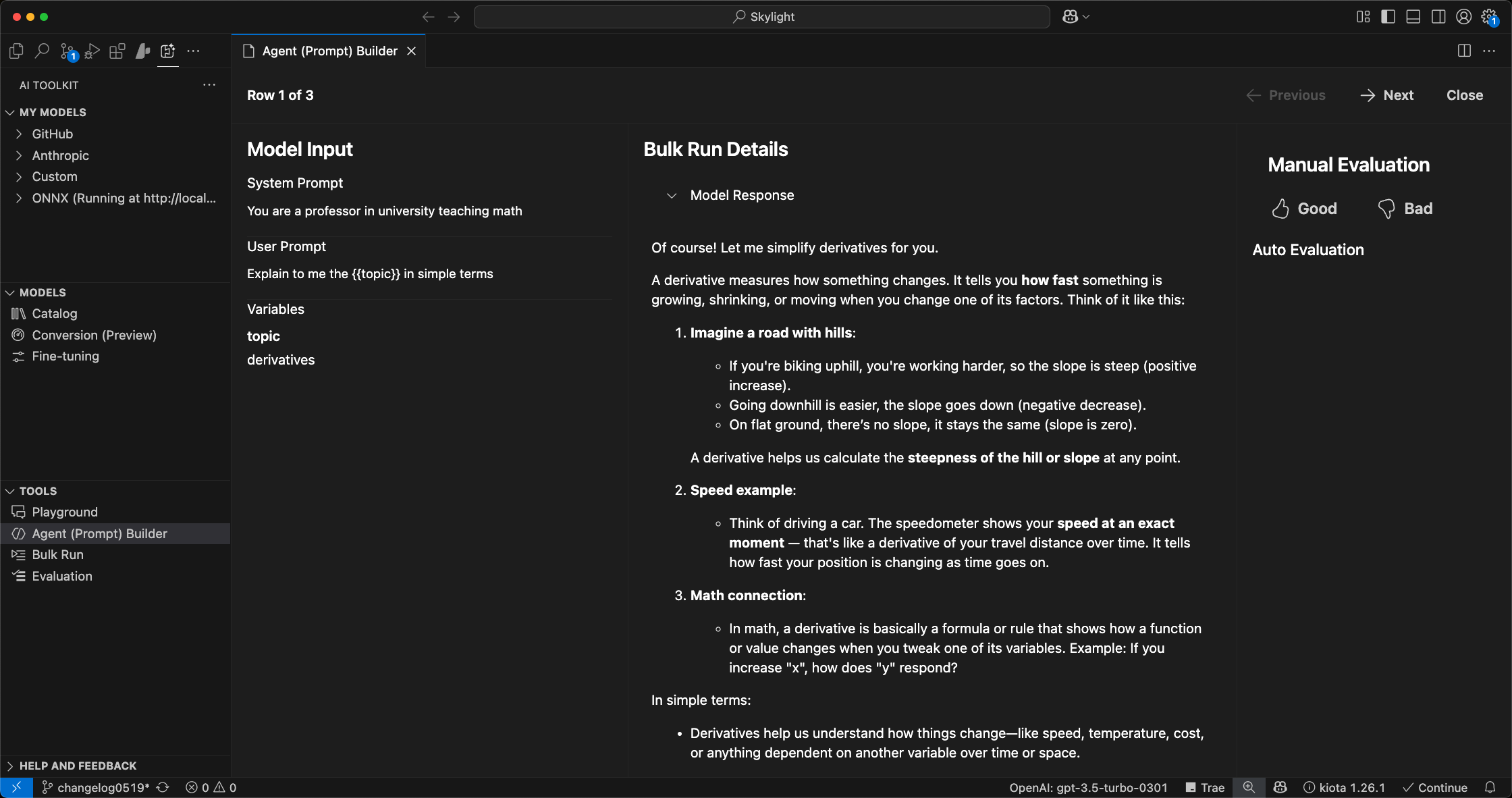
- Manually add or modify evaluation data entries.
- Provide quick feedback on evaluation outcomes with thumbs-up and thumbs-down indicators.
- Seamlessly switch between the
-
Built-in Evaluators for AI Agents: Added predefined evaluators to enhance agent assessment:

Intent Resolution: measures how well the agent identifies and clarifies user intent, including asking for clarifications and staying within scope.Tool Call Accuracy: measures the agent’s proficiency in selecting appropriate tools, and accurately extracting and processing inputs.Task Adherence: measures how well the agent’s final response meets the predefined goal or request specified in the task.
-
Model Conversion and Optimization Tools: Simplified processes for model conversion, quantization, optimization, and evaluation.
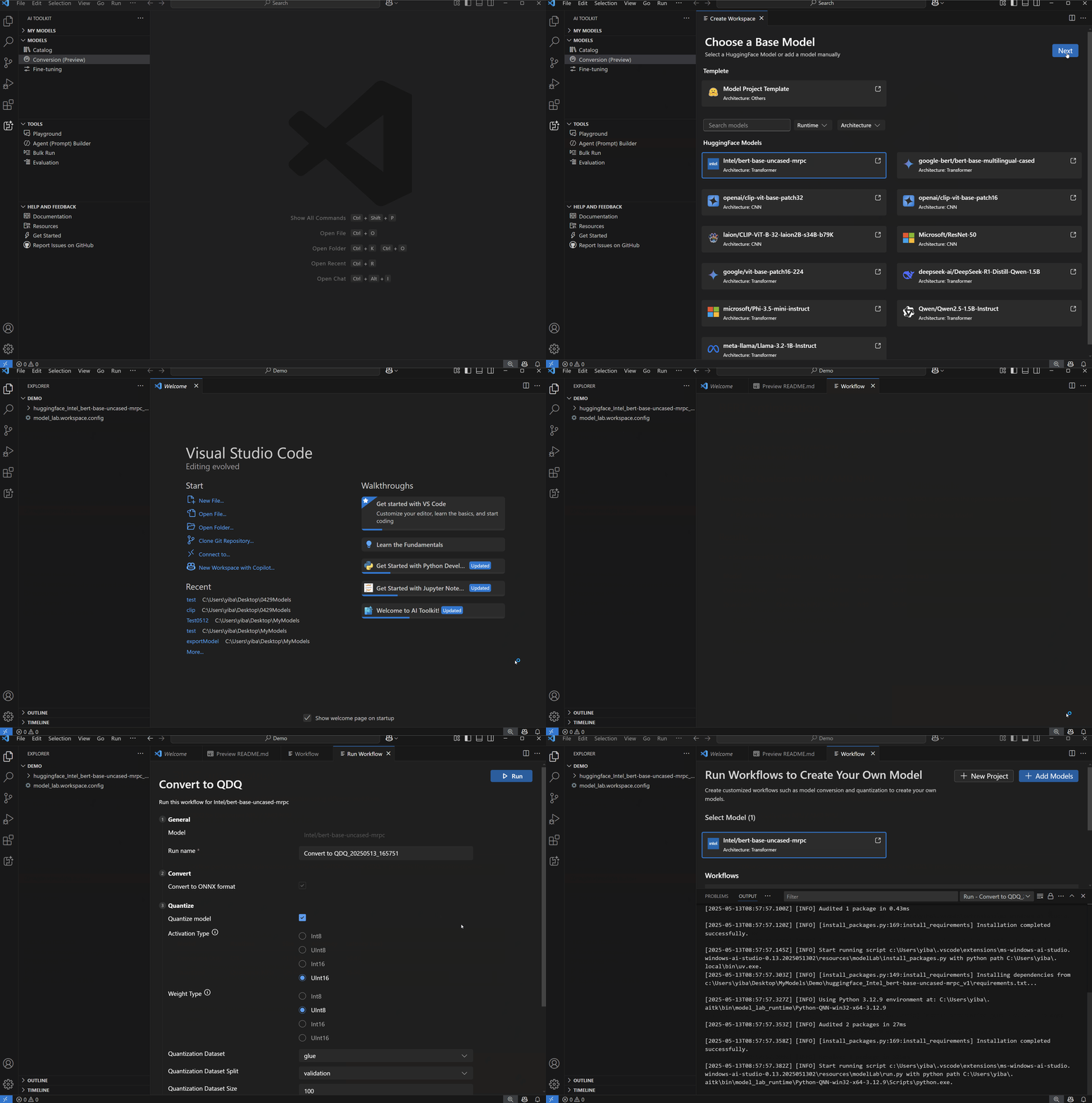
- Quantization Recipes for NPUs: Support for Intel, AMD, and Qualcomm NPU devices.
- Integrated Inference: Python notebooks provided for convenient model inference within the toolkit.
- Workspace Management: Customizable workflows and efficient management of model workspaces.
- Dedicated Python Environments: Automatically configured standalone Python environments with all necessary dependencies for each workflow execution.
-
LoRA Adapter Training for Phi Silica:
- Easily initiate fine-tuning jobs on Azure directly from AI Toolkit by providing your training dataset.
- Upon completion (typically around one hour), download your trained LoRA adapter for immediate integration into your applications via Windows AI APIs.
- LoRA inferencing support within AI Toolkit will be available soon; meanwhile, explore LoRA capabilities through the AI Dev Gallery during Build by visiting the LoRA sample page.
-
Onboarded new models from GitHub:
- DeepSeek-V3-0324: Demonstrates notable improvements over its predecessor, DeepSeek-V3, in several key aspects, including enhanced reasoning, improved function calling, and superior code generation capabilities.
- Llama-4-Maverick-17B-128E-Instruct-FP8: Great at precise image understanding and creative writing, offering high quality at a lower price compared to Llama 3.3 70B
- Llama-4-Scout-17B-16E-Instruct: Great at multi-document summarization, parsing extensive user activity for personalized tasks, and reasoning over vast codebases.
- MAI-DS-R1: A DeepSeek-R1 reasoning model that has been post-trained by the Microsoft AI team to fill in information gaps in the previous version of the model and improve its harm protections while maintaining R1 reasoning capabilities.
- Phi-4-mini-reasoning: Lightweight math reasoning model optimized for multi-step problem solving.
- Phi-4-reasoning: State-of-the-art open-weight reasoning model.
- cohere-command-a: A highly efficient generative model that excels at agentic and multilingual use cases.
- mistral-medium-2505: Mistral Medium 3 is an advanced Large Language Model (LLM) with state-of-the-art reasoning, knowledge, coding and vision capabilities.
- mistral-small-2503: Enhanced Mistral Small 3 with multimodal capabilities and a 128k context length.
- o3: o3 includes significant improvements on quality and safety while supporting the existing features of o1 and delivering comparable or better performance.
- o4-mini: o4-mini includes significant improvements on quality and safety while supporting the existing features of o3-mini and delivering comparable or better performance.
This is a major milestone release with significant updates and new features:
-
Agent Development: Introducing Agent (Prompt) Builder, evolved from the Prompt Builder. The new Agent (Prompt) Builder allows you to create and manage agents with a more intuitive interface. You can now easily create, edit, and test agents in a user-friendly environment. Key features include:

- Refreshed User Interface: The new Agent (Prompt) Builder offers a refreshed user interface, making it easier to create, edit, and test agents.
- Restructured the UI to use a input and output panel design
- Move
Structure outputfrom right output panel to left input panel - Move
Runbutton to the bottom of input panel - Move
View Codebutton to the bottom of output panel
- Quick Starter: The
Web Developeragent on quick starter can use a file system MCP tool to store assets in local disk. - MCP Tool Integration: Build an agent that can use various MCP tools. AI Toolkit enables you to:
- Connect to an existing MCP server via
stdioorsse. - Create your own MCP server from
Weather MCP Serverscaffold using your preferred programming language, either TypeScript or Python. - Test and debug your MCP server in AI Toolkit Agent Builder or using the MCP Inspector.
- Discover and configure the featured MCP server built by MCP Reference implementations, Microsoft and communities.
- Connect to an existing MCP server via
- Refreshed User Interface: The new Agent (Prompt) Builder offers a refreshed user interface, making it easier to create, edit, and test agents.
-
Models Enhancements: We are continuing to refresh the collections of models and the experience of using them:
- Onboarded GPT-4.1: A new series of GPT models featuring major improvements on coding, instruction following, and long context.
- Enhanced onboarding experience for prompting to use a default model
GPT-4owhen there is no explicit model selected. - Refreshed the Popular Models section:
- Added
Phi-4 (via ONNX) - Added
GPT-4.1 (via GitHub) - Added
GPT-o1 (via GitHub) - Removed
QwQ (via Ollama) - Removed
Claude 3.7 Sonnet (via Anthropic) - Removed
GPT-4.5 Preview (via OpenAI)
- Added
This version is an incremental release with feature improvements:
- Improved the Tutorial with richer user interface so that you can easily browse and start a tutorial.

- Added Starter Prompts in Prompt Builder for quick getting started with building prompts.

This version is an incremental release with feature improvements and bug fixes:
- Support Nvida NIM models running on Windows AI PCs.

This version is an incremental release with feature improvements and bug fixes:
-
Tutorials: Introduce first set of tutorials for common prompt engineering practices. Start one with CATALOG > Tutorials

-
Compare model responses in Playground

-
Think Mode for Claude 3.7 Sonnet model in Playground and Prompt Builder

-
Model Additions:
- QwQ via Ollama: Thinking and reasoning model of the Qwen series.
- GPT-4.5 from OpenAI: A general-purpose LLM targeted at providing more natural, fluid interactions that are humanlike.
- DeepSeek v3 via GitHub: Strong performance in coding, math and reasoning tasks.
-
Incremental feature enhancements:
- Playground improvements:
- Copy model response
- Regenerate response with the same or a different model
- Model Catalog improvements:
- Quick access to
Claude 3.7 Sonnet,GPT-4.5andQwQmodel viaPopular Models - Filter models by features such as Web Search, Attachment and Structured Outputs
- Quick access to
- Playground improvements:
This version is an incremental release with feature improvements and bug fixes:
- Support DeepSeek-R1 Model 7B and 14B
This version is an incremental release with feature improvements and bug fixes:
- More AI models are supported:
- Anthropic Claude 3.7 Sonnet model (excluding
extended thinking mode) - Phi-4-mini-instruct
- Phi-4-multimodal-instruct
- Anthropic Claude 3.7 Sonnet model (excluding
- Playground improvements:
- Add web search support for models that are capable doing it (e.g., Gemini 2.0)
- Add support to extract file content (text, PDF, JSON...) for models lacking native attachment support
- Recommend conversation starters when opening Playground
- Add default pre-selected model when opening Playground
- Prompt Builder improvement:
- Improve the UI to help new user get started
This is an incremental release with feature enhancements and bug fixes:
- Improved model catalog experiences:
- Streamline Ollama lifecycle (download, load, multi quantization in one card)
- Enable access of popular Ollama models in model catalog
- Categorize models for easy model discovery
- Search models
- Playground improvements:
- Auto naming the new playground/prompt
- New playground carries over the last model selection & preference
- UI improvements:
- Group my models by host in tree view
- Support streaming response in Prompt Builder
This is a major milestone release with new feature additions and updates:
- More AI Models:
- GitHub hosted o3-mini model
- Google Gemini 2.0 models
- Anthropic Claude 3.5 Haiku model
- Nvidia hosted NIM models
- Prompt Builder:
- Allow easy prompt creating / editing / testing
- Generate prompt using AI models
- Support structured output
- Generate ready code to interact prompts with AI model
- Playground Improvements:
- Refined Deepseek-R1 thought UI
- Refined Markdown and Latex rendering from model output
- Bulk Run Improvements:
- Generate dataset using AI models
- Support structured output
- Custom Evaluator:
- Custom evaluator from Python codes
- Custom evaluator from LLM prompt
This is a patch version to the major milestone release 0.8.0 with feature improvement:
- Support DeepSeek R1 Distilled (qwen 1.5B) NPU Model for Copilot+ PCs
- Supported SKU:
- Qualcomm Snapdragon X
- Intel Core Ultra 200V - coming soon
- Supported SKU:
This is a patch version to the major milestone release 0.8.0 with feature improvement:
- Support DeepSeek-R1 Model
This is a patch version to the major milestone release 0.8.0 with some feature improvements and bug fixes:
- Support chat history management in Playground.
- Support prompt templating with variable in Bulk Run.
This is a milestone release with core feature additions and improvements
- Support Bulk Run that user can run any prompts from imported datasets or run in full bulk
- Evaluate a dataset with a set of pre-defined popular evaluators
- Incremental UI/UX improvements and bug fixes
This is a patch version to the major milestone release v0.6.0, with some highly demanded feature improvements and bug fixes:
- Support Ollama models from more UI entries with improved doc
- Support Intel-based Mac (ONNX models support coming next)
- Support attachment for selected GitHub multi-modal models: (Llama-3.2-11B-Vision-Instruct / Llama-3.2-90B-Vision-Instruct / gpt-4o / gpt-4o-mini / Phi-3.5-vision-instruct)
- Added direct entry of developer documentation from AI Toolkit treeview
- Support responsive UI for attachments
- Count the total tokens used in each playground conversation
- Multiple bug fixes
This is a major milestone release with significant additions of features and resources.
- Most popular generative AI models on market are now supported:
- GitHub models
- ONNX optimized models that run on local CPU (including Windows optimized Small Language Models like Phi family)
- Anthropic Claude Models
- Google Gemini Models
- Meta Llama Models
- And more
- Bring your own model as remote model.
- Quickly discover a model by comprehensive filters and detailed model card in model catalog.
- Inference test and chat with a model in Playground with improved experience.
- Attachment in playground chat is now supported for multi-modal models.
- Further improved get started guide.
With these features, developers can easily get start and explore any popular genAI model from a single tool.
0.5.x are pre-released versions with major improvements on model selections and playground experience.
- GitHub AI models are now supported (Requiring proper GitHub License).
- Filters are added on model catalog.
- Models run in AI Toolkit can now be edited and deleted.
- In-code evaluation sample published.
- Get started guide with a simple Small Language Model is now available for new users.
This version adds the key support for Mac users and AI PC users:
- Mac-Silicon (M1, M2, etc.) is now supported, Mac-Intel is not yet supported.
- Mac doesn't have NVidia GPUs, so we hide local finetuning entry for Mac version AI Toolkit.
- AI PC (Copilot PC) is supported.
We are excited to announce another important feature:
- Remote inference test in playground is now supported, through connecting to remote model endpoint. Both UI and Command Palette have entry for connecting to a remote model endpoint.
We are excited to announce that Windows AI Studio has been renamed to AI Toolkit for Visual Studio Code, to expand its support of broader range of AI models, covering major scenarios for AI Engineers or App Developers to develop intelligent app with AI models. With this preview version 0.3.0, we are introducing many new features and enhancements:
Redesigned UI
We have made significant UI design updates to improve the visuals and user experiences.
Model catalog
The new Model catalog helps developer to easily discover and download a supported text generation AI model to local environment. In this version we support:
- Phi-2
- Phi-3-mini with a variety of sizes and CPU/GPU supports
- mistral-7b
Playground for inference
Downloaded models are ready to test inference with newly enhanced UI on local environment, with proper CPU or GPU support.
Fine-tune model locally
If developer's local environment has GPU support, model fine-tuning can be performed on local machine, after passing the pre-requisite test. Current supported models for fine-tuning:
- meta-llama/Llama-2-7b
- microsoft/phi-2
- mistralai/Mistral-7B
- microsoft/phi-1_5
- microsoft/Phi-3-mini-4k-instruct
- HuggingFaceH4/zephyr-7b-beta
Fine-tune model remotely
This is a preview feature that can be enabled from Visual Studio Code settings. For developers who have access to Azure cloud resources with GPU, they can perform the fine-tune jobs on Azure Container App remotely from Visual Studio Code.
Deploy models
Fine-tuned models can be deployed to a provisioned Azure Container App for testing or integrating.
Coming soon
We are actively adding support for e2e development needs around AI app and AI models.
- Add more models for inference and fine-tune support.
- Enable batch test and auto-evaluation of AI models.
- Streamlined development and test support for intelligent apps with AI models.
- Enhacing RAG and Prompt engineering support for developing and testing AI apps with AI models.
The selection of Windows optimized models is now available in Windows AI Studio. You can download those models from Hugging Face and GitHub and use in your Windows applications.
This version adds a prerequisite check, ensuring that VS Code does not have a remote connection.
This version fixes a few bugs, including -
- Conda environment fails to install in certain cases.
We are excited to introduce Windows AI Studio Preview version 0.2.0, which brings several new features and enhancements to simplify generative AI app development and local fine-tuning. Here's what's new:
-
Model Catalog
-
Windows AI Studio now offers an expanded model catalog powered by Azure ML and Hugging Face. In this release we offer 3 text generation AI models ready to be configured for fine-tuning and inferencing locally.
- Meta/Llama-2-7b
- Microsoft/phi-1.5
- Microsoft/phi-2
- mistralai/Mistral-7B
- HuggingFaceH4/zephyr-7b-beta
-
-
Prerequisites Check
-
Before installing Windows AI Studio, the new Prerequisites Check ensures that your system meets the necessary requirements, such as NVIDIA GPUs with minimun 8GB VRAM and recommended 16GB+ VRAM with a compatible WSL Ubuntu distribution installed. This ensures a smooth installation process.
-
Expected times for different GPUs on default Dataset
GPU Dataset Time RTX 3080 Ti Mobile Default 52 mins RTX 4090 Default 42 mins RTX A6000 Default 35 mins RTX ADA5000 Mobile Default 49 mins RTX A6000 ADA Default 32 min
-
-
Model Fine-tuning
- Fine-tuning AI models has never been easier. With Windows AI Studio, you can select a model from the catalog and fine-tune it locally using QLoRA. You can get started with your GitHub account.
-
Customizable Settings
- When fine-tuning a model, you have the flexibility to adjust various settings, including data types, dropout probabilities, batch sizes, and more. Customize the parameters to optimize the fine-tuning process for your specific scenario.
-
Windows Optimized Models
- Discover a collection of publicly available AI models already optimized for Windows. These models are sourced from different locations, including Hugging Face and GitHub, and are ready for download and use in your Windows applications.
-
Q&A Page
- To address common issues and provide resolutions, we have introduced a FAQ page. You can refer to this page for solutions to frequently encountered problems.
-
Please see our documentation for more in depth information and walkthrouhgs of the tool.
While the current release brings many exciting features, we are also working on the following additions:
-
RAG Project: Stay tuned for the upcoming RAG Project feature, which will further enhance your AI development capabilities.
-
Phi-2 Model Playground: Explore the Phi-2 Model Playground, a new feature that will provide an opportunity of using Phi-2 locally directly from the tool.