The Internxt CLI comes with built in WebDav support.
When you login with Internxt CLI, your auth tokens and your decrypted mnemonic are stored in your local home folder. These data will be used for both the CLI and WebDAV. Restarting the computer or uninstalling the CLI will not erase this configuration. The only way to properly clean up this configuration is by explicitly using the logout command or by removing the '.internxt-cli' folder located in your home directory.
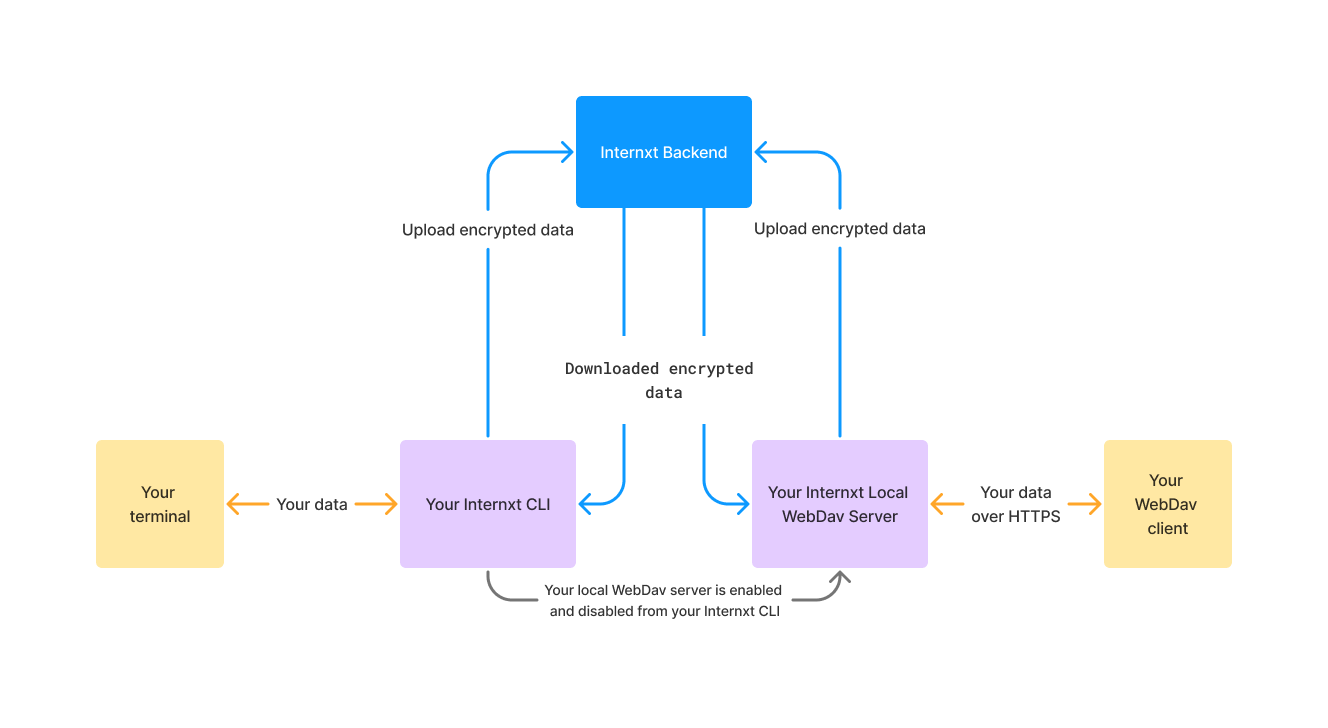
The WebDav feature works by exposing a local only server in your machine when enabled.
- When you download a file, the WebDav local server decrypts your data and sends it to the WebDav client
- When you upload a file, the WebDav local server encrypts your data and sends it to the Internxt servers
No plain data is being sent or is being pulled from the Internxt servers, you can view the whole Internxt CLI + WebDav architecture in the below diagram.
We currently have a 40GB size upload limitation per file for both, CLI and WebDAV
Below you can find a list of WebDav clients that we officially support in the Internxt CLI
| Supported | |
|---|---|
| MacOS Finder | ✅ |
| CyberDuck for Windows | ✅ |
| CyberDuck for MacOS | ✅ |
| Transmit | ✅ |
| Cadaver | ✅ |
| Nautilus (GNOME Files) | ✅ |
Find below the methods that are supported in the latest version of the Internxt CLI.
| Method | Supported |
|---|---|
| OPTIONS | ✅ |
| GET | ✅ |
| HEAD | ✅ |
| PUT | ✅ |
| DELETE | ✅ |
| PROPFIND | ✅ |
| PROPPATCH | ❌ |
| MKCOL | ✅ |
| COPY | ❌ |
| MOVE | ✅ |
- Installed Node >= v22.13.0
- Internxt CLI is installed on its latest version
- Log into your account with
internxt login - Enable WebDav with
internxt webdav enable - Access your files via WebDAV with any of our supported clients by using https://webdav.local.internxt.com:3005 or https://127.0.0.1:3005
- Disable WebDav with
internxt webdav disable
-
We use self-signed certificates when using HTTPS. This ensures that all requests to the local WebDAV server are encrypted. However, since the certificates are self-signed, many WebDAV clients may show warnings about certificate trust. You can safely ignore these warnings.
-
You may encounter issues with DNS resolution for webdav.local.internxt.com. In such cases, you can safely replace this address with 127.0.0.1 or the IP address where the WebDAV server is deployed if connecting from a different location.