Pretty, minimal and fast ZSH prompt
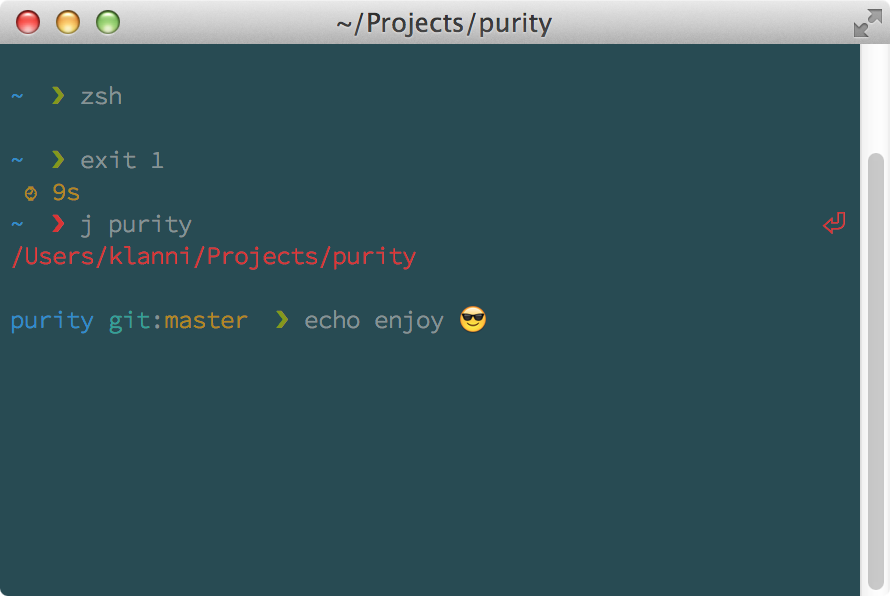
Git status indicators will appear before the prompt terminator, view the source for details
Most prompts are cluttered, ugly and slow. I wanted something visually pleasing that stayed out of my way.
- Comes with the perfect prompt character. Author went through the whole Unicode range to find it.
- Shows
gitstatus info. - Prompt character turns red if the last command didn't exit with
0. - Command execution time will be displayed if it exceeds the set threshold.
- Username and host only displayed when in an SSH session.
- Shows the current path in the title and the current directory and command when a process is running.
- Makes an excellent starting point for your own custom prompt.
Can be installed with npm or manually.
$ npm install --global purity-promptThat's it. Skip to Getting started.
- Either…
- Clone this repo
- add it as a submodule, or
- just download
purity.zsh
- Symlink
purity.zshto somewhere in$fpathwith the nameprompt_purity_setup.
$ ln -s "$PWD/purity.zsh" /usr/local/share/zsh/site-functions/prompt_purity_setupRun echo $fpath to see possible locations.
For a user-specific installation (which would not require escalated privileges), simply add a directory to $fpath for that user:
# .zshenv or .zshrc
fpath=( "$HOME/.zfunctions" $fpath )
Then install the theme there:
$ ln -s "$PWD/purity.zsh" "$HOME/.zfunctions/prompt_purity_setup"Initialize the prompt system (if not so already) and choose purity:
# .zshrc
autoload -U promptinit && promptinit
prompt purityThe max execution time of a process before its run time is shown when it exits. Defaults to 5 seconds.
Set PURITY_GIT_PULL=0 to prevent Purity from checking whether the current Git remote has been updated.
# .zshrc

autoload -U promptinit && promptinit

# optionally define some options
PURITY_CMD_MAX_EXEC_TIME=10

prompt puritySolarized theme with the Source Code Pro font (12pt) is a beautiful combination, as seen in the screenshot above. Just make sure you have anti-aliasing enabled in your Terminal.
Symlink (or copy) purity.zsh to ~/.oh-my-zsh/custom/purity.zsh-theme and add ZSH_THEME="purity" to your .zshrc file.
Symlink (or copy) purity.zsh to ~/.zprezto/modules/prompt/functions/prompt_purity_setup alongside Prezto's other prompts. Then set zstyle ':prezto:module:prompt' theme 'purity' in ~/.zpreztorc.
Add antigen bundle therealklanni/purity to your .zshrc file (do not use the antigen theme function).